


















































Certification Courses
Hands-On Labs
Threat Intelligence
Latest Cyber News
MITRE ATT&CK Breakdown
All Cyber Keywords
How a Court Order Became the Ultimate Cybersecurity Weapon Against the RedVeds Threat
In January 2026, cybersecurity defense entered a new era. Microsoft didn't just patch a vulnerability or block IP addresses, they went to court. This landmark action against the RedVeds phishing campaign represents a powerful shift in how corporations can legally dismantle cybercriminal infrastructure from the ground up.
The phishing campaign disruption targeted a network that created hundreds of deceptive lookalike domains impersonating major brands like Microsoft, Zoom, and US government agencies. The threat actors used these domains to launch credential harvesting attacks, tricking thousands of users into surrendering their login details, which could then be used for identity theft, ransomware deployment, or corporate espionage.
This post breaks down not only the technical mechanics of the attack but, more importantly, the innovative legal and technical strategy Microsoft employed to achieve a complete disruption. For cybersecurity beginners and professionals alike, it's a case study in modern, multi-pronged defense.
To understand the brilliance of the defense, we must first understand the offense. The RedVeds operation was not a simple, one-off phishing email. It was a sophisticated, persistent campaign designed for scale and evasion.
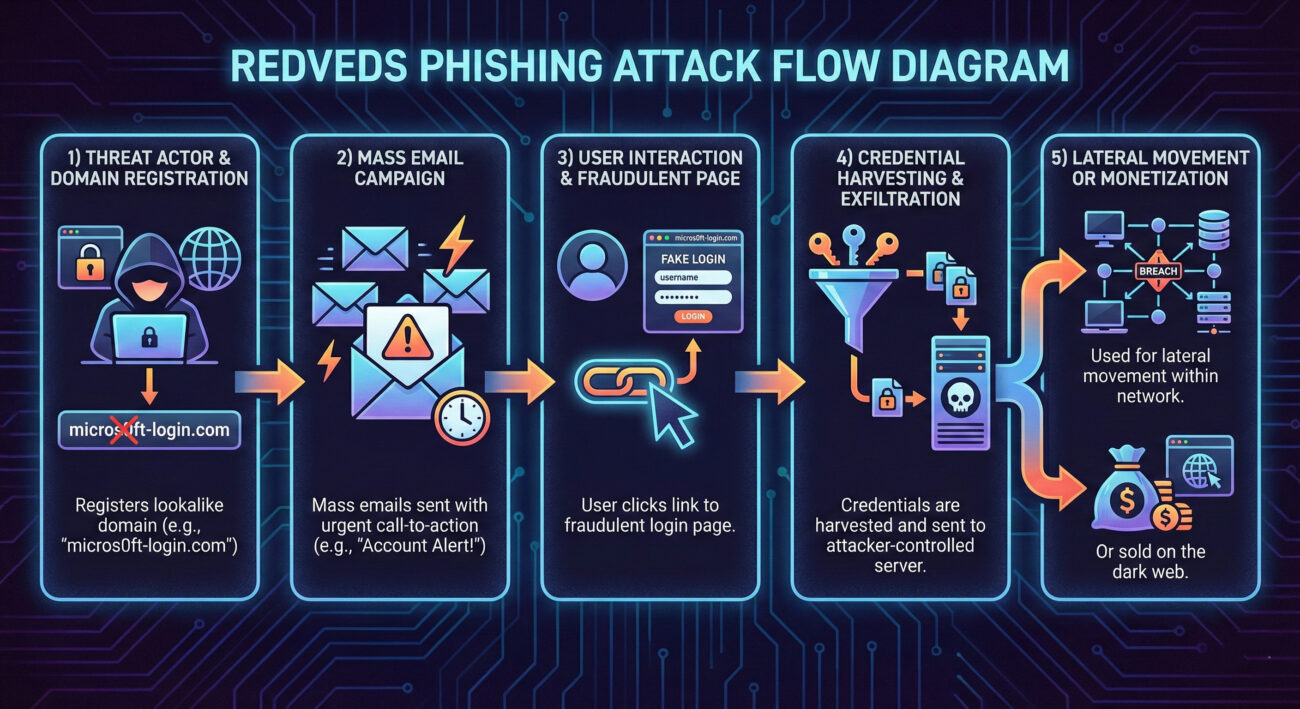
The core of the attack was domain impersonation. The attackers registered domains that closely resembled legitimate ones, using techniques like:
Victims would receive emails designed to create urgency: "Your account will be suspended," "Unusual login attempt detected," or "Action required on your invoice." The link, of course, pointed to the fraudulent lookalike domain hosting a perfect replica of a Microsoft, Zoom, or government login page. Any credentials entered were instantly sent to the threat actors.
Frameworks like MITRE ATT&CK help defenders understand adversary behavior in a structured way. The RedVeds campaign was a textbook example of several techniques.
| MITRE ATT&CK Tactic | Specific Technique (ID) | How RedVeds Used It |
|---|---|---|
| Resource Development | Acquire Infrastructure: Domains (T1583.001) | Registered hundreds of lookalike domains to host phishing pages. |
| Initial Access | Phishing: Spearphishing Link (T1566.002) | Sent targeted emails with links to fraudulent login pages to harvest credentials. |
| Credential Access | Credentials from Web Browsers (T1555.003) | Directly harvested credentials via fake web forms (phishing pages). |
| Defense Evasion | Domain Masquerading (T1036.006) | Used lookalike domains to appear legitimate and bypass user scrutiny. |
By mapping the attack, defenders can build detections. For example, detecting new domain registrations similar to your corporate domain (T1583.001) or internal alerts for emails containing links to domains with character substitutions (T1566.002, T1036.006).
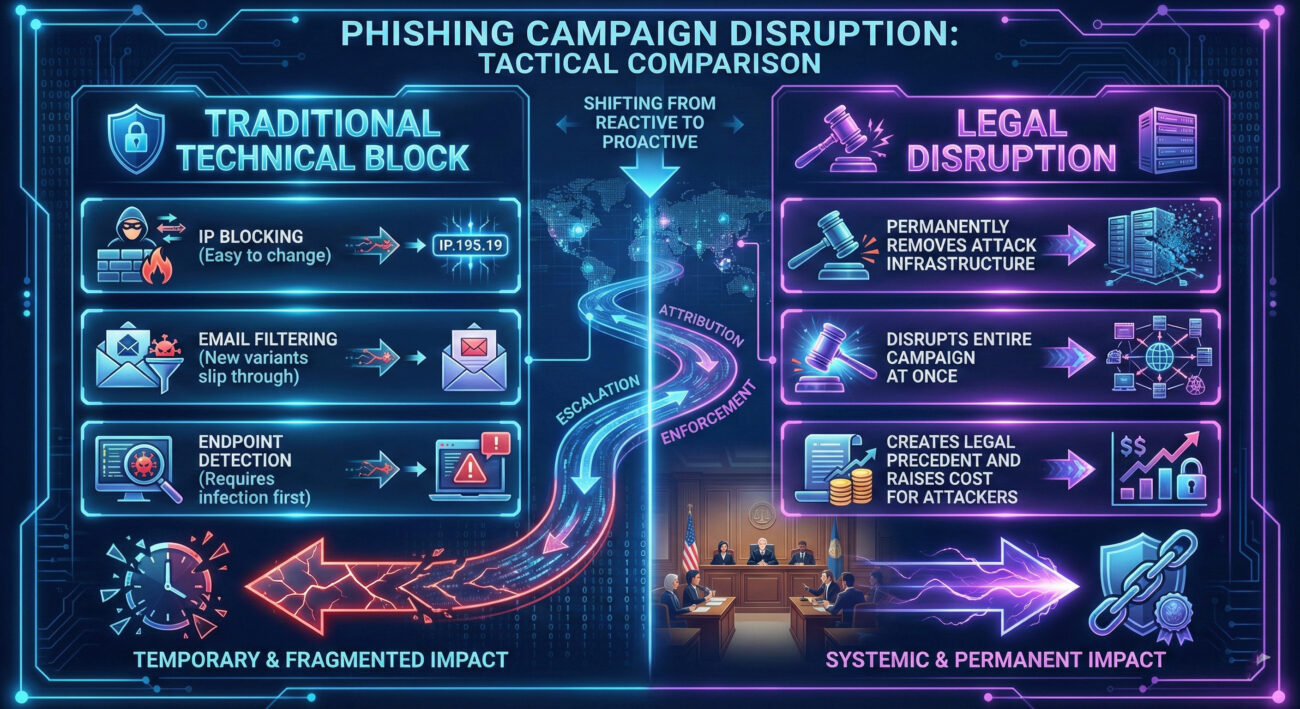
This is where the case gets groundbreaking. Microsoft moved beyond technical blocks to a legal counteroffensive. Here’s how they achieved the phishing campaign disruption.
Microsoft's Digital Crimes Unit (DCU) first investigated the campaign, tracing the infrastructure (domains, servers, hosting providers). They gathered evidence linking the domains to malicious activity, demonstrating they were created for the sole purpose of fraud and trademark infringement.
Microsoft filed a lawsuit in the U.S. District Court for the Eastern District of Virginia. They presented their evidence and requested a temporary restraining order (TRO) and transfer order. The court granted it, giving Microsoft legal authority to take control of the malicious domains.
With the court order in hand, Microsoft worked with domain registrars worldwide. The order compelled the registrars to transfer control of the identified malicious domains to Microsoft. This is the core of the legal disruption.
Once Microsoft controlled the domains, they could defang them. Instead of pointing to phishing pages, the domains now redirected to a "safe sinkhole", a server controlled by Microsoft that either displayed a warning message or simply timed out. This broke the attack chain completely.
This event is a fascinating study from both adversarial and defensive viewpoints.
Impact: A catastrophic operational failure. Their primary infrastructure, the domains, was permanently seized, not just blocked. This means:
Adaptation: Future campaigns may use more decentralized infrastructure, bulletproof hosting, or faster domain rotation to make legal action harder.
Opportunity: A powerful new tool in the arsenal. Legal action offers a more permanent and scalable solution than whack-a-mole technical blocking.
Challenge: Requires significant legal resources, evidence collection, and is typically only available to large organizations with clear trademark claims.
While not every company can replicate Microsoft's legal action, all can learn from the principles and shore up defenses.
For organizations inspired by this phishing campaign disruption, here is a practical framework to build similar resilience.
Q: Can a small or medium-sized business (SMB) use this legal takedown strategy?
A: Directly replicating it is challenging due to cost and resource requirements. However, SMBs can report malicious domains to their hosting provider, registrar, and authorities like the FBI's Internet Crime Complaint Center (IC3). The key takeaway is to secure your own environment with MFA and user training.
Q: Why don't we see legal takedowns for every phishing campaign?
A: The process requires identifiable infrastructure (often hidden by threat actors), jurisdiction over that infrastructure, and substantial evidence gathering. It's most effective against large, persistent campaigns using impersonation of clear trademarks, like Microsoft's.
Q: What's the single most effective thing I can do to prevent phishing success?
A: Without a doubt, implement phishing-resistant Multi-Factor Authentication (MFA). If a user enters their password on a fake site, the attacker still cannot access the account without the second factor. NIST guidelines provide excellent standards for authentication.
The Microsoft vs. RedVeds case is more than a news story; it's a blueprint for the future of cyber defense:
This Week: Check your organization's MFA enrollment rate. Aim for 100% on all critical systems (email, VPN, cloud apps). If you're an individual, enable MFA on your personal email and banking accounts.
This Month: Conduct a phishing simulation focused on lookalike domains. Use the results to tailor a 10-minute training session for your team or colleagues.
This Quarter: Initiate a conversation between your security and legal teams. Discuss what evidence would be needed to pursue action against a persistent threat and begin building those logging capabilities.
For continued learning, follow threat intelligence from sources like The Hacker News, Krebs on Security, and official advisories from CISA/US-CERT.
Cybersecurity is a continuous journey, not a destination. Stay vigilant, stay informed, and build defenses that are as adaptable as the threats they face.
© 2026 Cyber Pulse Academy. This content is provided for educational purposes only.
Always consult with security professionals for organization-specific guidance.
Every contribution moves us closer to our goal: making world-class cybersecurity education accessible to ALL.
Choose the amount of donation by yourself.