


















































Certification Courses
Hands-On Labs
Threat Intelligence
Latest Cyber News
MITRE ATT&CK Breakdown
All Cyber Keywords
In January 2026, the cybersecurity community was alerted to a critical vulnerability within the Node.js ecosystem. Designated as CVE-2025-24357, this flaw in the require() function's resolution mechanism opens a door for attackers to perform a path traversal, potentially leading to devastating Remote Code Execution (RCE). This breach vector allows a threat actor to load and execute arbitrary JavaScript code from outside the intended module directory, fundamentally breaking the application's security boundaries.
For cybersecurity professionals, developers, and students, understanding this vulnerability is crucial. It's not just about patching a single flaw; it's about comprehending how module systems can be weaponized and reinforcing your defensive posture against software supply chain attacks. This post provides a comprehensive, beginner-friendly breakdown of the Node.js security vulnerability, its technical underpinnings, and actionable defense strategies.
The Node.js security vulnerability (CVE-2025-24357) resides in how Node.js handles absolute paths passed to the require() function. Under normal, secure operation, require() is used to load modules from within the project's node_modules directory or core modules. However, this vulnerability allows an attacker who can control or influence the argument passed to require() to break out of these constraints.
By crafting a specific absolute path (e.g., /etc/passwd or C:\Windows\system32\drivers\etc\hosts), an attacker can trick Node.js into loading a file from anywhere on the server's filesystem. If the targeted file contains valid JavaScript code, Node.js will execute it in the application's context. This transforms a simple file read operation into a full remote code execution capability, granting the attacker the same privileges as the running Node.js process.
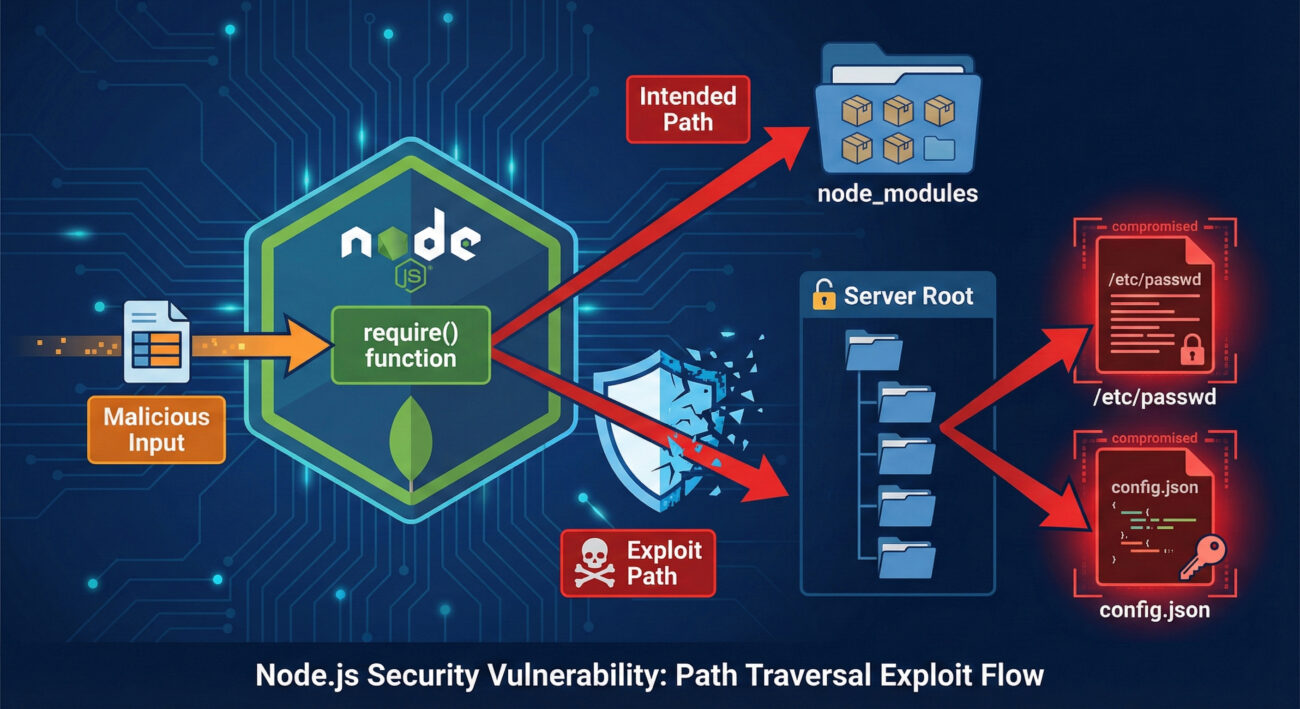
To understand this Node.js security vulnerability, we need to look at the require() function's resolution algorithm. Normally, when you call require('./myModule'), Node.js resolves it relative to the current file. When you call require('some-package'), it searches through node_modules directories.
The vulnerability is triggered when require() receives an absolute path that does not point to a core module. The system fails to properly validate that the path should be restricted, allowing traversal outside the application's root.
Imagine a web application that dynamically loads "plugins" based on user input, a common pattern in some CMS or middleware systems.
// VULNERABLE CODE - DO NOT USE
app.get('/load-plugin', (req, res) => {
    const pluginName = req.query.plugin; // User-controlled input
    try {
        // An attacker could set pluginName to an absolute path
        const pluginModule = require(pluginName);
        pluginModule.initialize();
        res.send('Plugin loaded');
    } catch (err) {
        res.status(500).send('Failed to load plugin');
    }
});
An attacker could craft a request like: GET /load-plugin?plugin=/etc/passwd. If the server's /etc/passwd file somehow contained valid JS (unlikely), it would execute. A more realistic attack targets uploaded files or other writable locations.
The internal Node.js module module.js and its Module._load method are at the heart of this. When an absolute path is provided, the logic for resolving core modules and checking for directory traversal (containsPath checks) can be bypassed under specific conditions related to absolute paths on Windows and Unix-like systems, leading to direct loading of the specified file.
This Node.js security vulnerability maps to several techniques in the MITRE ATT&CK framework, illustrating its place in a broader attack chain.
| MITRE ATT&CK Tactic | MITRE ATT&CK Technique | Description in This Context |
|---|---|---|
| Initial Access | T1190: Exploit Public-Facing Application | The attacker exploits the vulnerable endpoint (e.g., /load-plugin) to gain an initial foothold. |
| Execution | T1059.007: JavaScript/JScript (via require()) | The primary technique. The attacker achieves code execution by forcing the application to require() and execute malicious JavaScript from an arbitrary path. |
| Persistence | T1505.003: Web Shell | After initial RCE, the attacker could write a web shell file to the server and use this same vulnerability to load it on demand, establishing persistence. |
| Privilege Escalation | T1068: Exploitation for Privilege Escalation | If the Node.js process runs with elevated privileges, the executed code inherits them, allowing the attacker to escalate from application user to system user. |
Let's walk through a plausible scenario where this Node.js security vulnerability is chained with another common flaw for a full compromise.
The attacker identifies a Node.js/Express application that allows file uploads for user avatars (saved to /uploads). They also discover a feature that "loads custom themes" by name, which internally uses require() on user-provided data.
The attacker creates a malicious JavaScript file disguised as an image (shell.jpg). The file contains a simple web shell payload: module.exports = (req, res) => { require('child_process').exec(req.query.cmd, (e,o,s)=>res.send(o)); };. They upload this file via the avatar feature, knowing its exact path (e.g., /var/www/app/uploads/shell.jpg).
Using the theme loader vulnerability, the attacker sends a request: GET /load-theme?theme=/var/www/app/uploads/shell.jpg. The application require()s and executes the "image" file, loading the malicious module. The attacker now has a web shell and can run system commands via the ?cmd= parameter.
require()...), or protocol prefixes.require(userInput).vm2 module) or containerized worker processes, though these come with their own complexities.require().require().require() paths. Use WAF/IDS rules to flag HTTP requests containing patterns like require( or absolute path patterns (/etc/, C:\\) in parameters.Building a secure Node.js environment requires a layered approach. Here is a actionable framework:
npm audit and Dependabot/GitHub Security alerts to automatically receive and apply patches for dependencies and Node.js itself.require() call with a non-literal argument. Consider a custom rule for this.--disable-proto flag to mitigate prototype pollution, a related attack vector.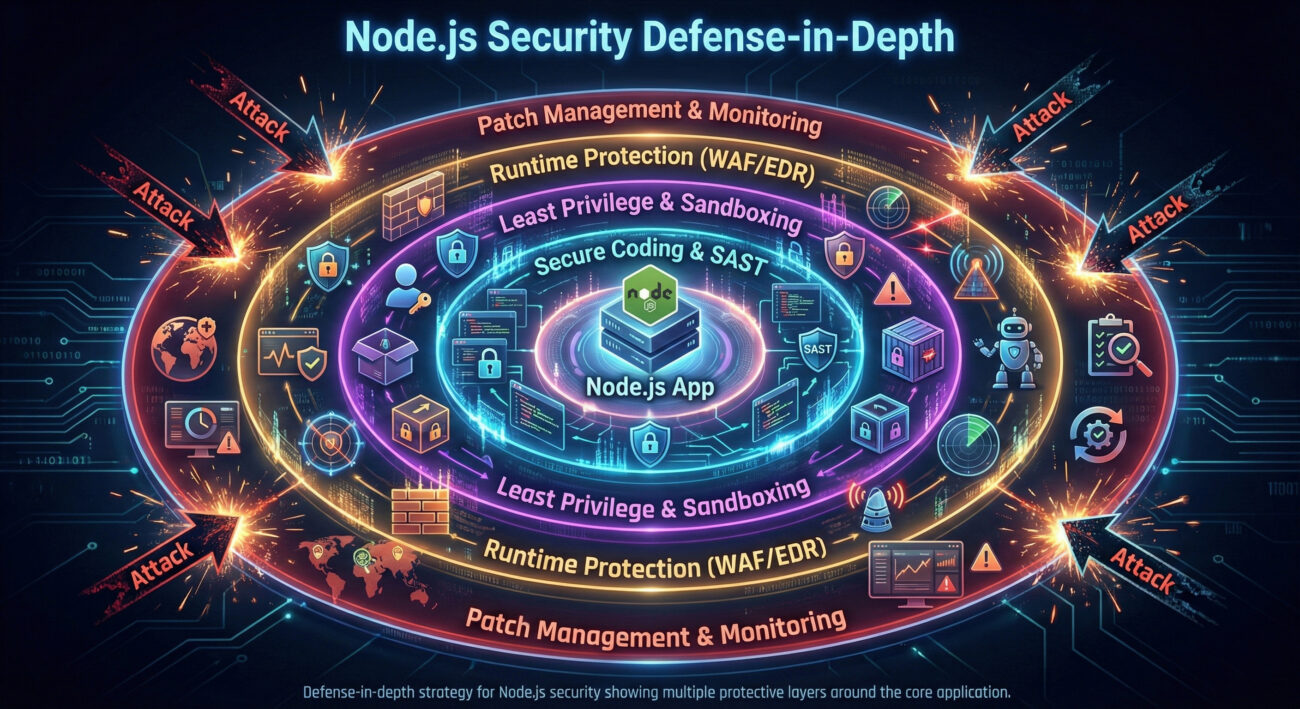
Q: Is my application vulnerable if I don't dynamically load modules?
A: The primary exploitation vector requires user input to reach a require() call. If your application only uses require() with static string literals (e.g., require('express')), you are not directly vulnerable. However, you should still patch Node.js, as indirect code paths or dependencies could be affected.
Q: What versions of Node.js are affected by this Node.js security vulnerability?
A: Based on the CVE (CVE-2025-24357), specific version ranges are impacted. You must consult the official Node.js security release notes or the NVD database for the definitive list. Generally, it affects multiple active LTS and current releases prior to the January 2026 patch.
Q: Can Web Application Firewalls (WAFs) block this attack?
A: A properly configured WAF can help by blocking requests containing suspicious path patterns (like /etc/passwd, ..\, or the word require in parameters). However, WAFs are a protection layer, not a fix. They can be bypassed with obfuscation, so patching and secure coding are mandatory.
Q: How does this differ from a regular Directory Traversal vulnerability?
A: A typical directory traversal (e.g., via file read APIs) might allow an attacker to read sensitive files. This vulnerability is more dangerous because it leads to execution. The loaded file isn't just read as data; it's interpreted as code by the Node.js engine, leading directly to RCE.
require() function.require(), import(), or eval() as extremely hazardous.Your Action Plan Starts Now
1. Audit: Run npm audit and check your Node.js version. Scan your codebase for dynamic require() calls.
2. Patch: Update Node.js and all dependencies. Refer to the official Node.js blog for security releases.
3. Harden: Implement the principle of least privilege for your application user. Review and tighten file system permissions.
4. Learn: Deepen your knowledge of Node.js security with resources like the OWASP Top Ten and the Node.js Security Cheat Sheet.
5. Share: Educate your team. Forward this analysis to your developers and DevOps engineers to raise awareness.
Proactive defense is the most effective security control. Start building yours today.
© 2026 Cyber Pulse Academy. This content is provided for educational purposes only.
Always consult with security professionals for organization-specific guidance.
Every contribution moves us closer to our goal: making world-class cybersecurity education accessible to ALL.
Choose the amount of donation by yourself.