


















































Certification Courses
Hands-On Labs
Threat Intelligence
Latest Cyber News
MITRE ATT&CK Breakdown
All Cyber Keywords
In the high-speed world of DevOps, the AWS CodeBuild service is a cornerstone for continuous integration and delivery (CI/CD). However, a pervasive and often overlooked misconfiguration can transform this powerful tool into a critical vulnerability, silently exposing sensitive credentials like AWS IAM keys, API tokens, and SSH keys to the public internet. This isn't a theoretical flaw; it's a real-world attack vector actively exploited by threat actors scanning for improperly secured build logs.
This guide deconstructs the AWS CodeBuild misconfiguration, explaining not just the "how" but also the "why" behind the risk. We'll map the exploitation to the MITRE ATT&CK framework, provide a tactical walkthrough for both attackers and defenders, and arm you with a concrete framework to audit and secure your own environments. Understanding this vulnerability is the first step in preventing a devastating cloud breach.
AWS CodeBuild is a fully managed build service that compiles source code, runs tests, and produces software packages. For each build, it generates detailed logs. By default, these logs are stored in an S3 bucket or CloudWatch Logs. The misconfiguration occurs when these logs are made publicly accessible.
If the S3 bucket storing logs has a permissive bucket policy (like Principal: "*" with Action: "s3:GetObject"), or if CloudWatch Logs are not encrypted and are exposed, the build logs become a treasure trove. What's in these logs? Often, everything the build process had access to:
DATABASE_PASSWORD).The critical oversight is assuming that build logs are private by default. In AWS, security is a shared responsibility; the platform provides the tools, but you must configure them correctly.
This AWS CodeBuild misconfiguration is not an isolated issue but part of a broader attack chain. Here’s how it maps to the MITRE ATT&CK for Cloud framework:
| MITRE ATT&CK Tactic | Technique (ID) | How It Applies to CodeBuild Misconfiguration |
|---|---|---|
| Reconnaissance | TA0043: Cloud Infrastructure Discovery | Attackers use automated tools to scan for publicly accessible S3 buckets and CloudWatch Logs associated with CodeBuild. |
| Credential Access | T1552.001: Unsecured Credentials in Cloud Storage | The exposed build logs are a form of unsecured cloud storage containing IAM credentials, API keys, and other secrets. |
| Initial Access | T1078.004: Valid Accounts - Cloud Accounts | Stolen IAM credentials from logs are used to gain initial access to the AWS cloud environment. |
| Persistence & Lateral Movement | T1136.003: Create Cloud Account & T1550.002: Pass the Hash (Cloud) | With initial access, attackers create backdoor IAM users, assume other roles, and move laterally across resources. |
This mapping highlights that the misconfiguration is a critical enabler for multiple stages of a cloud-focused attack, turning a simple logging mistake into a full-scale compromise.
Imagine a development team at "StartupXYZ" is in a rush to deploy a new feature. They configure a new CodeBuild project and let it use the default log settings, unaware that the associated S3 bucket was created with a broad, public-read policy by an old Terraform script.
The CodeBuild project pulls code from GitHub, which requires a GitHub Personal Access Token (PAT) stored as a plaintext environment variable GH_TOKEN. It also deploys to AWS, using an IAM Role attached to the build project.
The build log captures the entire process. While the token itself might not be echoed, the IAM role's temporary credentials (AWS_ACCESS_KEY_ID, AWS_SECRET_ACCESS_KEY, AWS_SESSION_TOKEN) are often logged by AWS CLI or SDK calls during the build.
An attacker, running a routine scan for misconfigured *.s3.amazonaws.com buckets, stumbles upon the log bucket. They browse to a recent log file and use simple grep commands to extract credentials.
Using the stolen IAM credentials, the attacker authenticates to the AWS account. They now have the permissions of the build role, which is often overly permissive (e.g., AdministratorAccess or broad write permissions to EC2, S3, and RDS). A data breach or crypto-mining campaign begins.
You must proactively hunt for this vulnerability. Here’s a methodical approach:
Use the AWS CLI or Console to list all projects. Note their log configuration (S3 bucket or CloudWatch Logs group).
For projects logging to S3, retrieve and analyze the bucket policy for public access.
Check if any CloudWatch Logs are publicly accessible via resource-based policies.
Use a tool like S3Scanner or a simple curl command from an external network to attempt anonymous access to a log file URL.
Apply the principle of least privilege. For S3, block public access and update the bucket policy to only allow access from specific IAM roles or VPC Endpoints.
Ensure all S3 buckets and CloudWatch Log Groups use AWS KMS keys (SSE-KMS) for encryption. This adds a layer of protection even if access controls fail.
Prevent secrets from being logged in the first place. Use AWS Secrets Manager or Parameter Store, and reference them in env as secretsManager type. Never echo secrets in build commands.
Use AWS Config with conformance packs, or tools like Prowler, to continuously check for public S3 buckets and overly permissive log configurations. Set up CloudWatch Alerts for anomalous access patterns.
AdministratorAccess policy to a build project "for convenience".Objective: Discover and exploit publicly accessible CodeBuild logs to gain initial foothold and escalate privileges.
awscli (if some read access exists), or even simple Google dorks (site:s3.amazonaws.com "CodeBuild" "log").sts:GetCallerIdentity to confirm access, then enumerate resources using tools like enumerate-iam or Pacu.Objective: Prevent credential leakage, detect unauthorized access attempts, and respond to incidents.
GetObject calls from unexpected IP addresses or anonymous principals on your log buckets. Set up Amazon GuardDuty to detect credential exfiltration.Move beyond one-time fixes. Implement this layered framework for ongoing security:
Principal: "*".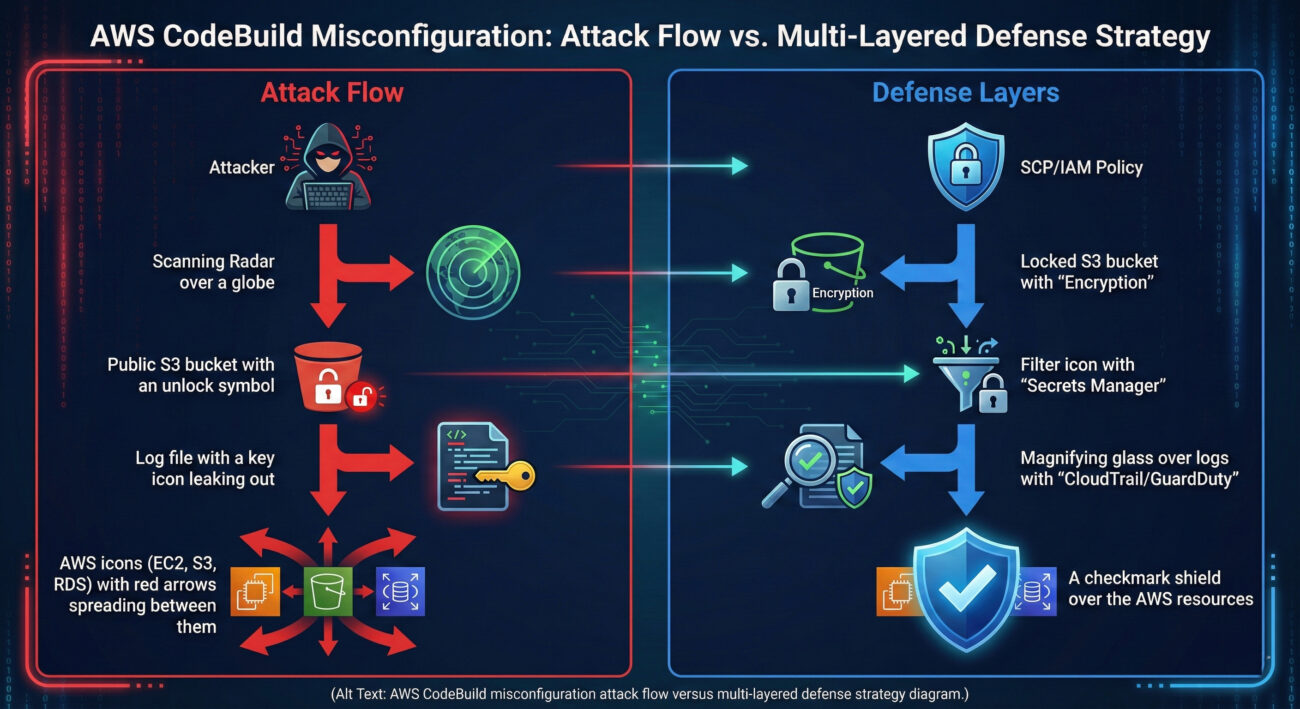
A: Absolutely yes. The attack vector is any publicly accessible log store. You must audit both S3 and CloudWatch Logs configurations.
A: Yes, if CodeBuild is a stage in your pipeline. The logging configuration is set at the CodeBuild project level, regardless of whether it's invoked manually or via CodePipeline.
A: Extremely. These credentials are short-lived but often have very high privileges during their validity period (typically one hour). An attacker can use them to cause immense damage or establish persistent access within that window.
A: Enable S3 Block Public Access at the account level and audit all existing CodeBuild project log destinations. This provides a critical safety net.
Don't let your build logs be the weakest link. Start your remediation journey now:
For further learning, explore these essential resources:
Your cloud security starts with a single, informed action. Take it now.
© 2026 Cyber Pulse Academy. This content is provided for educational purposes only.
Always consult with security professionals for organization-specific guidance.
Every contribution moves us closer to our goal: making world-class cybersecurity education accessible to ALL.
Choose the amount of donation by yourself.