


















































Certification Courses
Hands-On Labs
Threat Intelligence
Latest Cyber News
MITRE ATT&CK Breakdown
All Cyber Keywords
A critical security flaw has been discovered in the popular Modular Data Science Plugin for WordPress, putting over 10,000 websites at immediate risk of a complete takeover. Designated as CVE-2025-53079, this vulnerability carries a maximum CVSS score of 9.8, placing it firmly in the "critical" category. This blog post provides a comprehensive, beginner-friendly analysis of this WordPress plugin vulnerability, explaining exactly how the attack works, its real-world implications, and the definitive steps you must take to secure your site.
The Modular Data Science Plugin was designed to add data visualization and analysis capabilities to WordPress. However, a severe oversight in its code created a gaping security hole. The vulnerability resides in the plugin's file upload handler, specifically in the /includes/admin/upload.php file (or similar endpoint).
In essence, the plugin failed to implement proper authentication and file type validation for a function meant to upload data files. This allowed any visitor to your website, completely unauthenticated, to upload arbitrary files, including malicious PHP shells, directly to the server.
Impact: Successful exploitation leads to Remote Code Execution (RCE). An attacker can gain full control over the affected WordPress site, enabling them to:
The vulnerability is "wormable", meaning it could be used to automate attacks across thousands of sites. A Proof-of-Concept (PoC) exploit code has been publicly released, making it trivial for even low-skilled threat actors to weaponize it.
Let's break down the technical mechanics of this WordPress plugin vulnerability without the overwhelming jargon.
WordPress plugins often create custom endpoints (URLs) to handle specific tasks. This plugin created an endpoint accessible via a POST request, likely similar to:
POST /wp-content/plugins/modular-data-science/includes/admin/upload.phpThe intended purpose was for administrators to upload data files (like CSV). The critical failures were:
This trifecta of failures is a classic recipe for disaster. An attacker could simply craft an HTTP request with a malicious file and send it directly to this public URL.
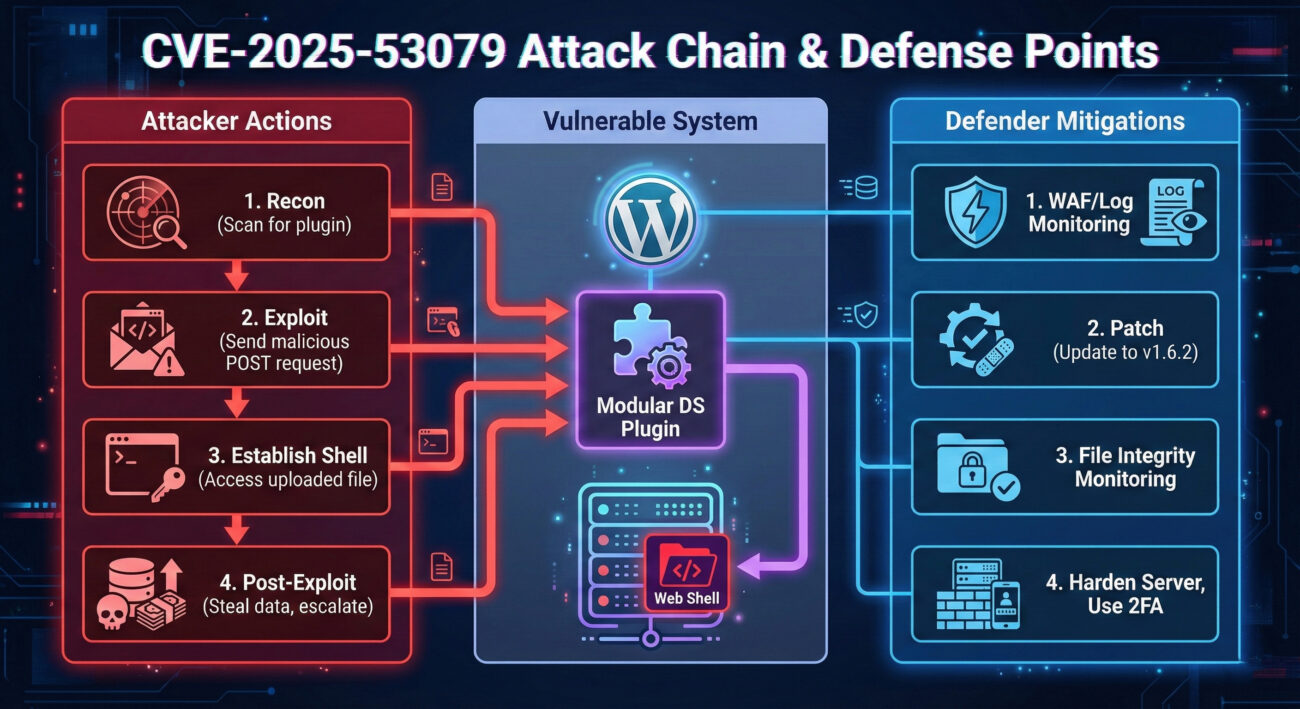
Here’s a simplified step-by-step of the exploit:
The attacker scans a target WordPress site to identify if the vulnerable Modular Data Science Plugin (versions < 1.6.2) is installed. This can be done using public tools.
The attacker creates a simple PHP web shell file. A common example is a one-liner that executes system commands passed via a GET parameter:
<?php system($_GET['cmd']); ?>This file is saved as something like shell.php.
Using a tool like curl or a simple script, the attacker sends a POST request to the vulnerable upload.php endpoint, with the malicious PHP file attached.
curl -X POST -F "[email protected]" https://target-site.com/wp-content/plugins/modular-data-science/includes/admin/upload.phpThe server, lacking any checks, accepts the file and saves it to a publicly accessible directory within the plugin (e.g., /wp-content/uploads/mds/).
The attacker now navigates to the uploaded file: https://target-site.com/wp-content/uploads/mds/shell.php?cmd=whoami. The server executes the PHP code, running the whoami command and returning the result (e.g., www-data) to the attacker's browser. Full server control is achieved.
Understanding this vulnerability within the MITRE ATT&CK framework helps defenders recognize the tactics, techniques, and procedures (TTPs) used.
| Tactic | Technique (ID) | How It Applies to This Vulnerability |
|---|---|---|
| Initial Access | T1190: Exploit Public-Facing Application | The attacker exploits the unauthenticated file upload feature in a public WordPress plugin. |
| Execution | T1059: Command and Scripting Interpreter | By uploading a PHP web shell, the attacker can execute arbitrary system commands on the web server. |
| Persistence | T1505: Server Software Component | The uploaded web shell becomes a persistent backdoor within the web server's file system. |
| Defense Evasion | T1221: Template Injection / File Upload Bypass | The technique involves bypassing weak file upload restrictions to place malicious code. |
This mapping shows that the exploit isn't an isolated incident but part of a standard attack chain. Blue teams can use these identifiers to search for related activity in logs.
A Red Team simulates real-world adversaries to test defenses. Here's how they would approach this WordPress plugin vulnerability.
wp-config.php file to steal database credentials. Exfiltrate the entire database containing user info, passwords (hashed), and sensitive post data.How a Blue Team would detect these Red Team activities:
/wp-content/plugins/modular-data-science/) from single IPs.wp-content/uploads/ and plugin directories to alert on new PHP file creation. Use server-side antivirus/clamAV to scan for known shell signatures./bin/sh -c whoami). Alert on database export commands or large outbound data transfers from the web server.For defenders, the priority is immediate action to eliminate the risk and prepare for future vulnerabilities.
wp-content/uploads/ and all plugin directories for recently added, suspicious PHP files (especially in the Modular Data Science plugin folder). Look for files with names like shell.php, cmd.php, wp-config.php.bak, etc.Follow this actionable guide to address this specific vulnerability and harden your overall WordPress security posture.
Log into your WordPress admin dashboard. Navigate to Plugins -> Installed Plugins. Look for "Modular Data Science" or "MDS". If it's not there, you are not directly vulnerable to CVE-2025-53079, but the following steps are still good practice.
If the plugin is installed:
a. Check the version number listed next to it.
b. If it's below 1.6.2, you should see an "Update Available" notice. Click "Update Now" immediately.
c. If no update is available or you cannot update, you must deactivate and delete the plugin. Click "Deactivate" and then "Delete".
Install a reputable security scanner like Wordfence or Sucuri. Run a full malware and file integrity scan. This will identify if any web shells were uploaded before you patched the hole.
Sign up for a WAF service. This acts as a protective shield. For example, Cloudflare's free plan includes basic WAF rules. Point your site's DNS to Cloudflare to activate it. Configure rules to block SQL injection and file upload exploits.
a. Change all passwords: Admin, database, and hosting account.
b. Enable Two-Factor Authentication (2FA): Use a plugin like Wordfence or Google Authenticator to add 2FA for all admin users.
c. Limit Login Attempts: Install a plugin to prevent brute-force attacks.
d. Disable File Editing: Add define('DISALLOW_FILE_EDIT', true); to your wp-config.php file to prevent code editing from the admin panel.
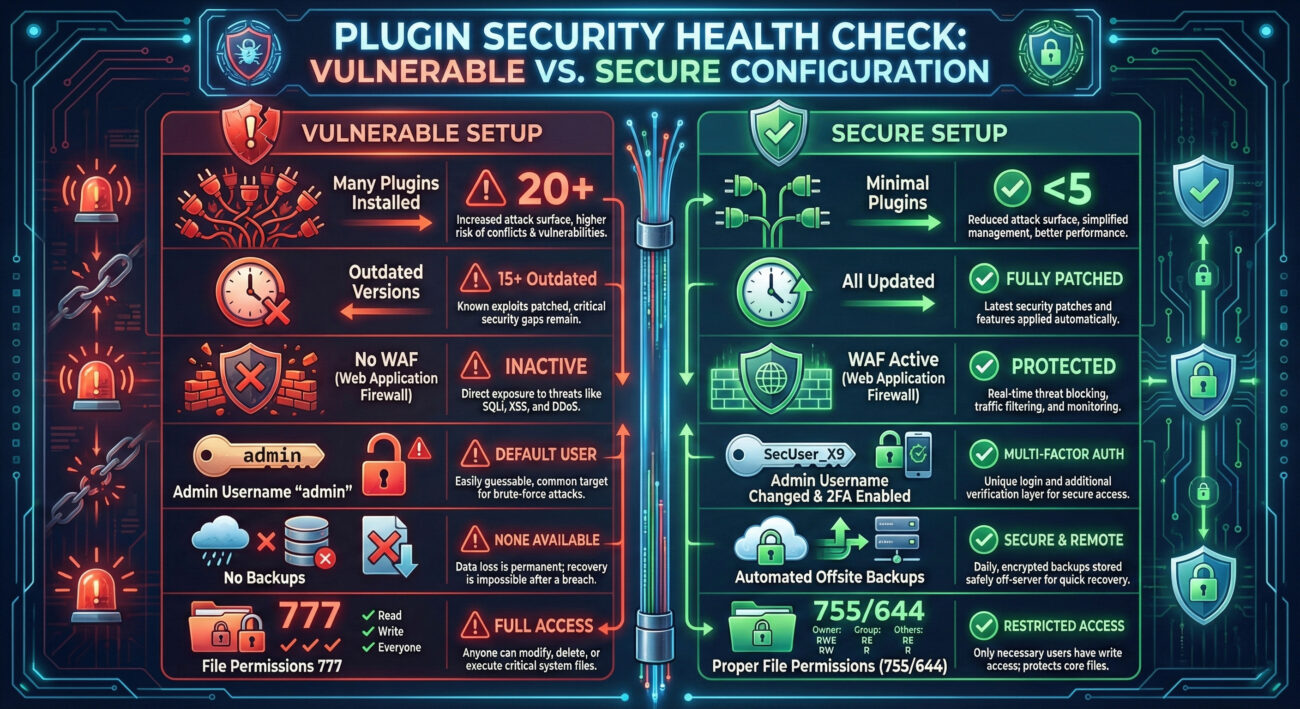
This incident highlights widespread security pitfalls. Let's contrast what went wrong with what should be done.
A: If you completely deleted the plugin files before any attack occurred, the vulnerability is gone. However, you should still scan for any backdoors that might have been uploaded before deletion. The act of deleting a compromised plugin does not remove already-dropped malicious files.
A: No. Managed WordPress hosting services like WordPress.com (not to be confused with self-hosted WordPress.org sites) manage plugin installations and security at the platform level. They typically do not allow the installation of such vulnerable third-party plugins or quickly patch them globally.
A: Running a vulnerable version is never an option. The risk of a complete site takeover far outweighs any functionality loss. You must either:
A: Developers must follow WordPress coding standards and security best practices:
current_user_can()) for all admin/ajax endpoints.wp_handle_upload()) which perform security checks..htaccess rules preventing PHP execution.A: Always refer to primary sources:
The WordPress plugin vulnerability CVE-2025-53079 is a stark reminder that third-party code is a primary attack vector. Here’s what you must remember and do right now:
Don't wait for a compromise to happen. Proactive security is the only effective defense.
© 2026 Cyber Pulse Academy. This content is provided for educational purposes only.
Always consult with security professionals for organization-specific guidance.
Every contribution moves us closer to our goal: making world-class cybersecurity education accessible to ALL.
Choose the amount of donation by yourself.