


















































Certification Courses
Hands-On Labs
Threat Intelligence
Latest Cyber News
MITRE ATT&CK Breakdown
All Cyber Keywords
Imagine building a secure fortress with a massive steel door, bulletproof windows, and armed guards, but then writing the access codes on the outside wall in paint that only some people can see. This is the paradox of modern web application security, where sensitive secrets like API keys, database credentials, and access tokens are being inadvertently baked into the public-facing JavaScript bundle secrets that power single-page applications (SPAs).
Recent research scanning 5 million applications revealed a staggering 42,000+ exposed tokens across 334 different secret types. These leaks represent a critical security gap that traditional scanners are missing, creating a low-effort, high-reward entry point for attackers. Understanding and mitigating this risk is not optional; it's a fundamental requirement for securing today's web-first digital assets.
This guide will demystify how JavaScript bundle secrets end up in production, why current tools fail to catch them, and provide a clear, actionable framework for both identifying and preventing this pervasive threat.
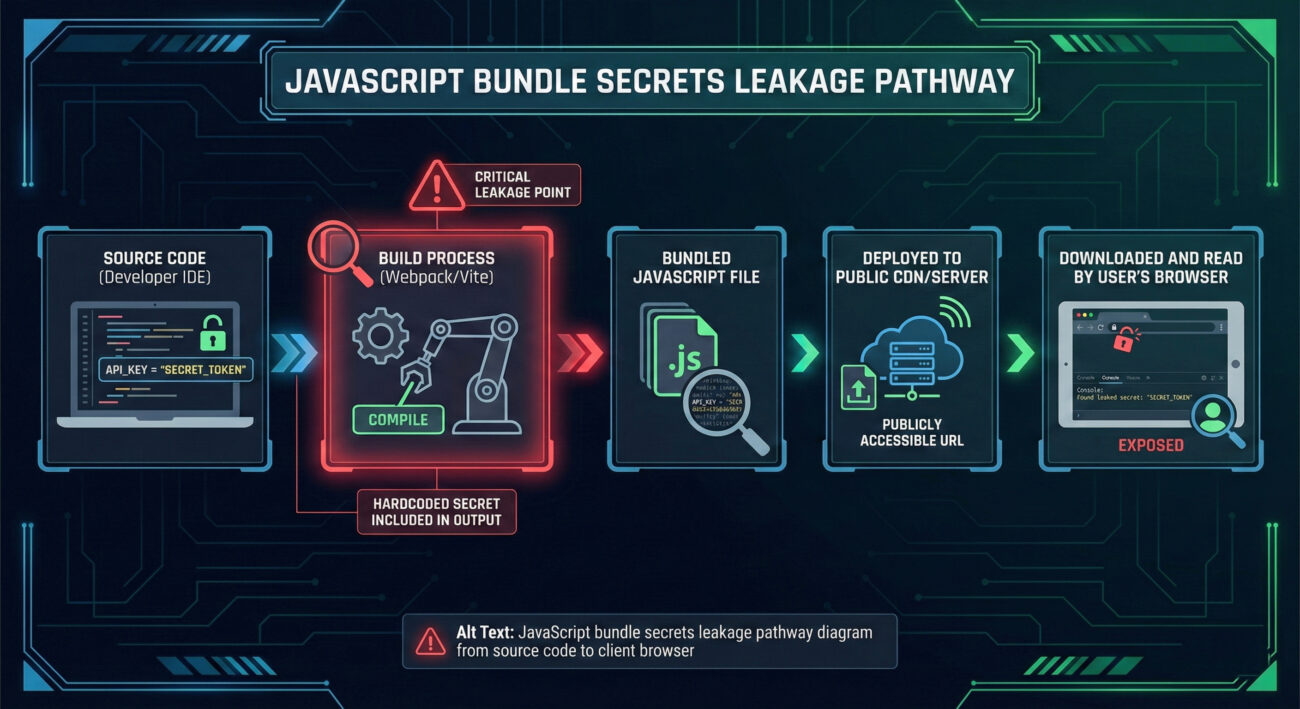
The path of a secret from a secure backend to a public-facing browser is often unintentional and stems from modern development practices. JavaScript bundle secrets don't appear by magic; they are the result of specific flaws in the development and deployment pipeline.
Modern front-end applications use bundlers like Webpack, Vite, or Parcel. These tools take your source code, dependencies, and assets and package them into optimized "bundles" (like `app.abc123.js`) for the browser. The vulnerability occurs when these bundlers are configured to inline environment variables or when secrets are hardcoded in source files intended only for the build process.
Consider this flawed code pattern that leads directly to exposure:
// config.js - A file that is processed by the bundler
// ⚠️ This value will be baked into the final bundle if the bundler is not configured to replace it!
const API_KEY = process.env.MY_API_KEY || 'glpat-myActualGitLabTokenHere12345';

// apiService.js
export function fetchData() {
    const response = await fetch('https://api.service.com/data', {
        headers: {
            'Authorization': `Bearer ${API_KEY}` // The secret is referenced here
        }
    });
    return response.json();
}
If the environment variable `MY_API_KEY` is not defined at build time, the bundler uses the fallback hardcoded string. Even worse, some bundling configurations might embed the actual value from the developer's `.env` file directly into the bundle for "convenience," catastrophically exposing it to anyone who views the page source.
So-called "shift-left" security tools like Static Application Security Testing (SAST) and pre-commit hooks scan source code before it's merged. However, secrets can be introduced after these checks run, during the build or deployment stage.
The result? A final, minified JavaScript file delivered to your users that contains live credentials, completely bypassing earlier security gates.
Theoretical risks are one thing; real-world breaches are another. The research data paints a clear picture of widespread, high-impact exposure.
| Secret Type | Number Found | Potential Impact | Example Service |
|---|---|---|---|
| Code Repository Tokens | 688 | Full access to private source code, CI/CD pipelines, and linked cloud infrastructure (AWS, SSH). | GitHub, GitLab |
| Project Management API Keys | Multiple | Access to internal tickets, projects, roadmaps, and linked documents. | Linear, Jira, Asana |
| Communication Webhooks | 314 (Slack, Teams, Discord) | Ability to post messages to internal channels, impersonate bots, or trigger automated workflows. | Slack, Microsoft Teams |
| Email/SaaS Platform Keys | Hundreds | Control over mailing lists, campaigns, customer data, and critical business workflows. | SendGrid, Mailchimp, Stripe |
One identified exposure involved a GitLab Personal Access Token with `api` and `read_repository` scopes embedded in a JavaScript file. This single token was not just active; it granted access to an organization's entire private codebase. From there, an attacker could:
This demonstrates the "keys to the kingdom" nature of these leaks. A single front-end secret can unravel multiple layers of security through interconnected services.
This threat is not an isolated issue but fits squarely into established adversary frameworks. In MITRE ATT&CK, the exploitation of JavaScript bundle secrets maps to specific techniques, primarily under the Credential Access and Initial Access tactics.
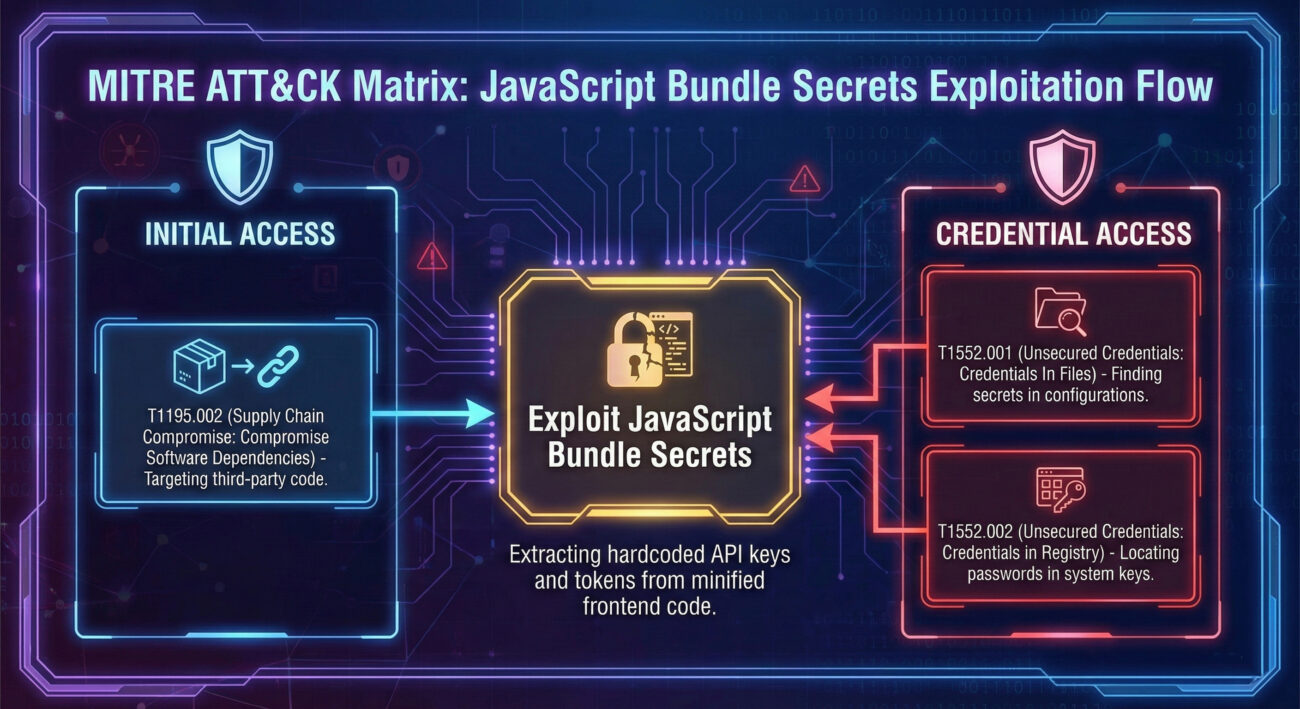
The most relevant technique is T1552.001: Unsecured Credentials - Credentials in Files. This technique involves adversaries searching for credential material stored improperly in files. Publicly accessible JavaScript bundles are a prime target.
Understanding this mapping is crucial for defenders. It allows security teams to prioritize detection rules (e.g., in SIEMs) for outbound requests using internal API keys from client IPs, and to contextualize these leaks as part of a broader attack chain, not just an isolated misconfiguration.
The scale of the problem, 42,000 leaks, exists precisely because conventional security scanners are blind to this specific vector. Here’s a breakdown of the gaps.
As a defender, you need to proactively hunt for these exposures. Here is a manual, beginner-friendly audit process you can start today.
List all your organization's customer-facing web applications, especially single-page applications (SPAs) built with React, Angular, Vue, etc. Don't forget staging and development environments that might be publicly accessible.
For each application, open it in a browser (Chrome/Firefox). Use the Developer Tools (F12):
Open the downloaded files in a powerful text editor (like VS Code) or use command-line tools. Search for common patterns:
# Using grep on the command line (adapt patterns)
grep -r -i "api[_-]*key" ./downloaded_js_files/
grep -r "sk_live_" ./downloaded_js_files/ # Stripe Live Secret Key
grep -r "eyJhbGciOi" ./downloaded_js_files/ # Base64-encoded JWT tokens
grep -r "password.*=.*['\"]" ./downloaded_js_files/ # Assignment patterns
Look for strings that resemble: API keys (32+ hex chars), OAuth tokens, Bearer tokens, database connection strings (`postgres://user:pass@host...`), and service-specific keys (e.g., `AKIA...` for AWS).
⚠️ Do NOT test live keys against real services from your IP address. It creates logs and alerts. Instead:
For any valid, active secret found:
To systematically eliminate this risk, move beyond one-off fixes and build a resilient defense-in-depth strategy.
| Pillar | Objective | Tools & Actions | Responsible Team |
|---|---|---|---|
| 1. Prevention (Shift-Left) | Stop secrets from entering the codebase and build process. | Pre-commit hooks (gitleaks), IDE plugins, developer training, secure CI/CD variable management (e.g., GitHub Secrets, GitLab CI Variables). | Development, Platform/SRE |
| 2. Detection (In-Pipeline) | Scan build artifacts for secrets before deployment. | Integrate specialized JavaScript bundle scanners into CI/CD. Use tools like Intruder's SPA scan, custom scripts with TruffleHog, or commercial secrets management solutions. | Security, DevOps |
| 3. Runtime Protection | Monitor for and respond to leaked secrets being used. | Configure alerts in SaaS platforms for token usage from unexpected locations/IPs. Use a secure secrets manager (HashiCorp Vault, AWS Secrets Manager) that provides audit logs. | Security, Cloud Ops |
| 4. Architecture & Design | Design systems where front-ends don't need secrets. | Implement the Backend-for-Frontend (BFF) pattern. Use short-lived, scope-limited tokens (JWTs) issued by your backend for user sessions, not service-level keys. | Architecture, Development |
| 5. Education & Culture | Make security a shared responsibility. | Regular training on secure coding for SPAs. Create clear, accessible documentation on "how to call APIs securely from the front-end." Foster blameless post-mortems for incidents to learn and improve. | Security, Engineering Leadership |
A: No, not in a front-end context. Build tools like Create React App, Vite, and Next.js embed the values of these environment variables (e.g., `REACT_APP_API_KEY`) directly into the final JavaScript bundle at build time. The resulting `.js` file is served publicly. The safety of your `.env` file is irrelevant once its values are baked into a public file.
A: Use a Backend Proxy. Your front-end code should only call your own backend server. Your backend, which can securely store the real API key (using a secrets manager), then makes the request to the external service and relays the response back to the front-end. This keeps the key off the client side entirely.
A: Absolutely Not. Minification and obfuscation are for protecting intellectual property and optimizing code size. They do not encrypt or hide strings. An attacker can still easily search through the minified code for patterns or simply prettify it to make strings plainly visible.
A: The key difference is the delivery vector and detection gap. A hardcoded secret in backend source code might be found by SAST. A secret baked into a JavaScript bundle is delivered to every user's browser, making it massively exposed. It also evades traditional infrastructure scanners that don't execute JS, making it a uniquely stealthy and dangerous form of leakage.
JavaScript bundle secrets represent a critical and widespread security gap. They bypass traditional "shift-left" controls and evade conventional scanning tools, creating a direct pipeline for attackers to gain initial access to your most sensitive systems.
The data is clear: with over 42,000 tokens found, this is not a hypothetical threat. It's an active, ongoing breach happening to thousands of organizations. By understanding the mechanics, the build-time inclusion, the MITRE ATT&CK mapping (T1552.001), and the scanner blind spots, you can move from being a potential victim to a proactive defender.
Start your hunt today. Your secrets are waiting to be found, make sure you find them before the adversary does.
Expand your knowledge with these carefully selected resources:
© 2026 Cyber Pulse Academy. This content is provided for educational purposes only.
Always consult with security professionals for organization-specific guidance.
Every contribution moves us closer to our goal: making world-class cybersecurity education accessible to ALL.
Choose the amount of donation by yourself.