


















































Certification Courses
Hands-On Labs
Threat Intelligence
Latest Cyber News
MITRE ATT&CK Breakdown
All Cyber Keywords
A new, highly targeted wave of phishing attacks has security teams on high alert. In January 2026, LastPass issued a critical warning to its user base about a sophisticated campaign specifically designed to steal the one credential that protects all others: the master password. This isn't just another spam email; it's a calculated attack that preys on trust and urgency to compromise the very core of your digital security. Understanding this threat is essential for anyone, from cybersecurity beginners to seasoned professionals.
This series of phishing attacks represents a significant escalation in credential harvesting. Attackers sent convincing emails impersonating LastPass, claiming that urgent "infrastructure updates" or "maintenance" required users to create a local backup of their vaults within 24 hours. The goal was singular: to lure victims to a fake login page and harvest their master passwords. Giving up this password is the digital equivalent of handing a thief the master key to your entire house, not just the front door.
LastPass confirmed it would never ask for a user's master password. The campaign, starting around January 19, 2026, used subject lines like "LastPass Infrastructure Update: Secure Your Vault Now" to create a powerful sense of urgency. The emails directed users through a series of redirects, ultimately landing on a deceptive domain ("mail-lastpass[.]com") designed to look legitimate.
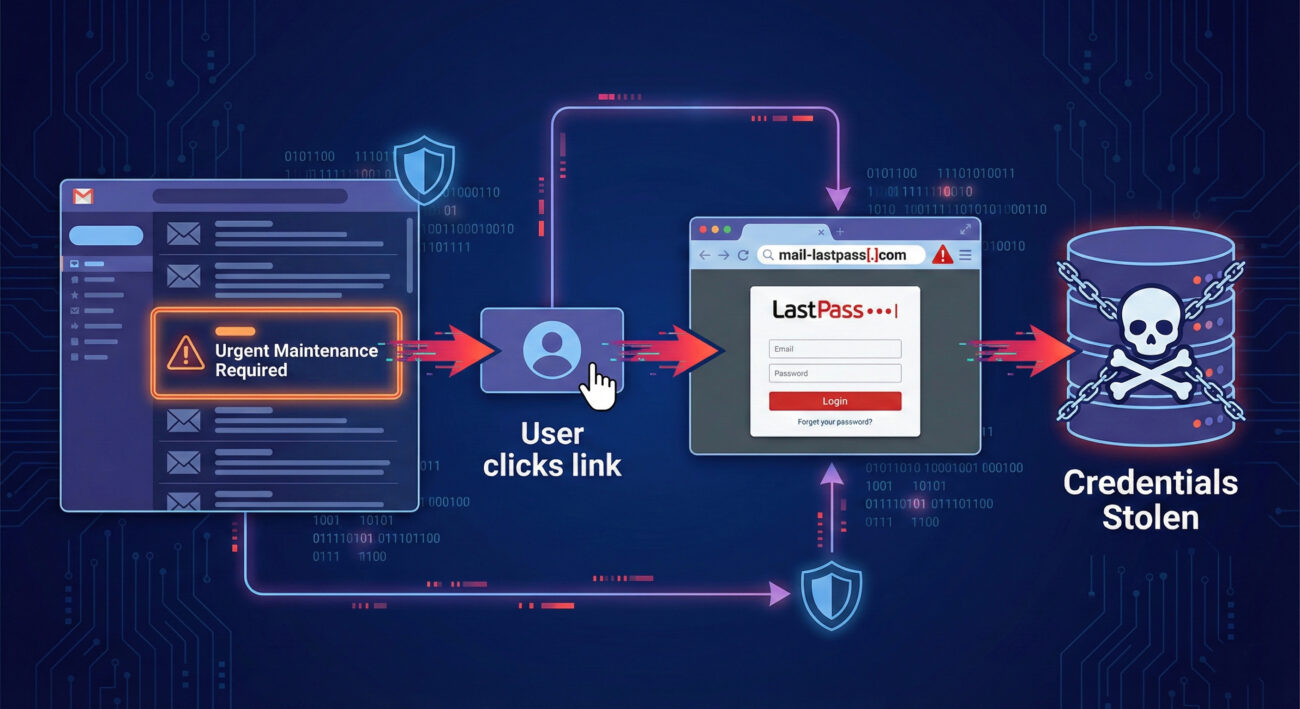
Understanding the mechanics of these phishing attacks is the first step in building immunity against them. The attackers followed a refined, multi-stage process designed to bypass both technical filters and human skepticism.
The attack began with emails sent from seemingly official but fake addresses like [email protected]. The content leveraged powerful psychological triggers: authority (impersonating LastPass), urgency ("action required in 24 hours"), and fear (potential loss of data). By framing the request as a "backup" for the user's own protection, they masked their malicious intent.
To evade simple link scanners, the emails contained links to intermediary domains, such as a benign-looking Amazon S3 bucket URL. This URL would then automatically redirect the victim to the final phishing domain. This layer of obfuscation makes the initial email appear less suspicious to automated security tools.
Users landed on "mail-lastpass[.]com" – a domain chosen for its visual similarity to the real LastPass login pages. The site was likely a near-perfect clone, complete with logos, branding, and familiar layout, prompting the user to enter their email and, crucially, their master password.
Once submitted, the credentials were sent directly to the attackers. With the master password in hand, they could potentially access the victim's entire vault if other security layers like two-factor authentication (2FA) were not enabled. This single credential becomes a gateway for further attacks, including identity theft and corporate network infiltration.
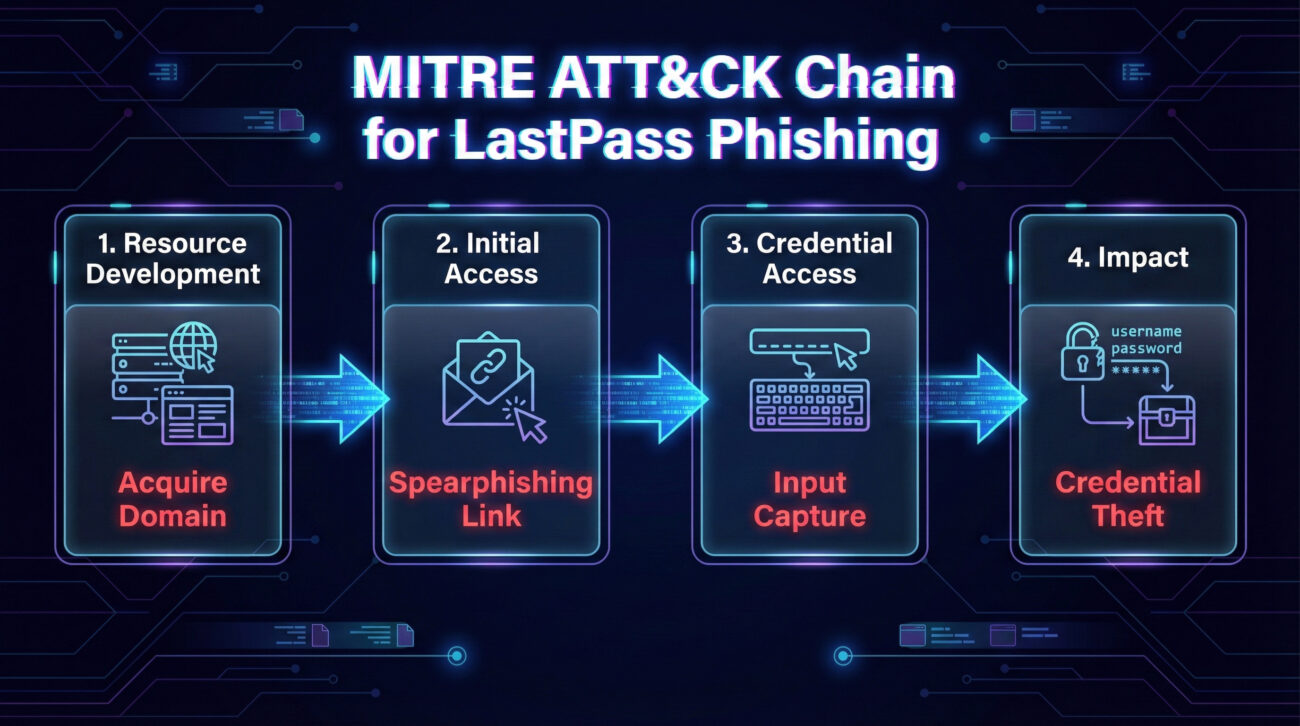
This campaign can be mapped precisely to the MITRE ATT&CK® framework, a globally recognized knowledge base of adversary tactics. Mapping the phishing attacks this way helps defenders speak a common language and prepare systematic defenses.
| MITRE ATT&CK Tactic | Technique (ID & Name) | How It Was Used in This Attack |
|---|---|---|
| Initial Access | T1566: Phishing | The primary method to gain initial foothold. Spearphishing emails with malicious links were sent to a broad set of LastPass users. |
| Credential Access | T1589.001: Credentials from Password Stores | The ultimate objective. By stealing the master password, attackers aimed to harvest all credentials stored within the password manager vault. |
| Resource Development | T1583.001: Domains | Attackers registered deceptive domains (mail-lastpass[.]com) to host their phishing infrastructure and lend an air of legitimacy. |
| Defense Evasion | T1204.002: User Execution - Malicious Link | Relied on the user clicking the link in the email, requiring human interaction to bypass technical controls. |
Viewing an incident through both the attacker's (Red Team) and defender's (Blue Team) lenses provides complete strategic understanding. Here’s how each side would approach these phishing attacks.
Even security-conscious individuals can fall victim to sophisticated phishing attacks. Here’s what to avoid and what to embrace.
For IT administrators and security leaders, here is a practical framework to protect your organization from similar phishing attacks targeting password managers.
Establish a Clear Policy: Formally state that the company will never ask for credentials via email. Mandate the use of the corporate-approved password manager and enforce MFA on it.
Launch Targeted Training: Conduct a 15-minute training session using this LastPass case study as the primary example. Simulate a similar phishing email to test user awareness.
Secure Email Gateways: Configure filters to flag or quarantine emails with suspicious characteristics: sender domain mismatches, urgent financial/password-related language, and links to newly registered domains.
Web Filtering: Deploy DNS or proxy-based web security that blocks access to known phishing domains and categories. Integrate threat intelligence feeds for real-time blocking.
Enable Advanced Monitoring: Use tools like a SIEM (Security Information and Event Management) to correlate login failures, MFA bypass attempts, and traffic to suspicious domains.
Create an Incident Response Playbook: Have a dedicated procedure for "Suspected Credential Phishing." This should include steps for credential reset, user re-education, and infrastructure takedown requests.
A: Most likely, yes. The primary risk comes from entering and submitting your credentials. However, sophisticated attacks can sometimes exploit browser vulnerabilities just by visiting a page (a "drive-by download"). It's best to run a full antivirus scan, clear your browser cache, and remain vigilant for any unusual activity on your accounts.
A: Check the URL in the address bar meticulously. The real LastPass login page is on a domain ending in "lastpass.com" (like "https://lastpass.com"). The phishing page used "mail-lastpass[.]com" – a subtle but critical difference. Also, a password manager browser extension that fails to auto-fill on a page where it normally does is a major warning sign.
A: Act immediately. Log in to your password manager from a trusted device using any saved session or by following the official "Forgot Password" process (which will require your account recovery options). Change your master password and your primary email account password. Review your vault for any unauthorized activity and enable or update your MFA settings.
A: Absolutely. Any service that stores high-value credentials is a prime target for phishing attacks. The principles in this article apply universally: be suspicious of unsolicited, urgent requests; never share your master password; and always use MFA. You can read about general password security best practices from the U.S. Cybersecurity & Infrastructure Security Agency (CISA).
Call to Action: Your cybersecurity posture is only as strong as your habits.
© 2026 Cyber Pulse Academy. This content is provided for educational purposes only.
Always consult with security professionals for organization-specific guidance.
Every contribution moves us closer to our goal: making world-class cybersecurity education accessible to ALL.
Choose the amount of donation by yourself.