


















































Certification Courses
Hands-On Labs
Threat Intelligence
Latest Cyber News
MITRE ATT&CK Breakdown
All Cyber Keywords
In the rapidly evolving landscape of AI-integrated development, a critical security flaw recently came to light. Researchers discovered not one, but three severe vulnerabilities in Anthropic's official Git Model Context Protocol (MCP) server. These MCP server vulnerabilities (CVE-2025-68143, CVE-2025-68144, CVE-2025-68145) created a perfect storm, allowing attackers to read sensitive files, delete data, and ultimately execute malicious code on vulnerable systems. This incident serves as a stark warning about the security risks in the AI toolchain and underscores why every developer and security professional must understand the mechanics of such attacks.
MCP (Model Context Protocol) servers act as bridges, allowing Large Language Models (LLMs) to interact with external tools and data sources, like Git repositories. The vulnerabilities in Anthropic's mcp-server-git package stemmed from a fundamental failure to properly validate and sanitize user input before passing it to system-level commands. This is a classic security failure with modern AI-era consequences.
The impact was severe: a remote attacker could leverage prompt injection, such as through a malicious README file or issue comment that an AI assistant processes, to trigger these flaws. This means no direct network access to the victim's machine was needed. By chaining the three vulnerabilities, an attacker could achieve Remote Code Execution (RCE), gaining full control over the server environment. The affected package, being the "canonical" reference implementation, meant these MCP server vulnerabilities posed a systemic risk to the entire emerging MCP ecosystem.
Let's break down each of the three CVEs to understand the exact technical missteps. This clarity is crucial for both identifying similar flaws in other code and for effective defense.
This was the initial foothold. The git_init tool accepted a user-supplied path to initialize a new Git repository but performed no validation on that path.
Technical Behavior: An attacker could provide a path like ../../../etc/passwd. The server would then attempt to create a .git folder and structure within a sensitive system directory, potentially corrupting critical files or preparing the ground for further exploitation. The core issue was the lack of path normalization and restriction to intended working directories.
This flaw turned a capability into a weapon. The git_diff and git_checkout functions took user-controlled arguments and appended them directly to git CLI commands without sanitization.
Technical Behavior: Imagine an AI assistant is asked to "checkout the branch described in this issue." If the issue contains the text main -- --output=/tmp/payload.sh, the server might execute git checkout main -- --output=/tmp/payload.sh. The -- argument, interpreted by Git, could be misused to write or manipulate files in unintended ways, leading to data loss or manipulation.
This vulnerability bypassed intended restrictions. The server had a --repository flag to limit operations to a specific repo path, but the validation was insufficient.
Technical Behavior: An attacker could specify a repository path like /intended/repo/../../../etc. The validation might only check that the path started with /intended/repo/, but the subsequent traversal sequences (../) would allow operations to "escape" and target any other repository or directory on the filesystem, violating the security boundary.
| CVE Identifier | CVSS v3 Score | Type | Affected Component | Root Cause |
|---|---|---|---|---|
| CVE-2025-68143 | 8.8 (High) | Path Traversal | git_init tool |
Missing path validation during repo creation |
| CVE-2025-68144 | 8.1 (High) | Argument Injection | git_diff, git_checkout |
Unsantized user input passed to Git CLI |
| CVE-2025-68145 | 7.1 (High) | Path Traversal | --repository flag logic |
Insufficient path sanitization for flag |
How would these theoretical flaws be used in a real attack? The research by Cyata outlined a chained exploit leveraging the Filesystem MCP server alongside the Git server.
The Attack Vector: The entry point is prompt injection. An attacker plants malicious instructions in a location an AI assistant will read, a poisoned commit message, a malicious issue, or even a webpage the LLM is prompted to summarize. These instructions are crafted to trigger the vulnerable MCP tools.
The Goal - RCE: The endgame is to abuse Git's "clean filter" mechanism. Filters are scripts Git can run automatically when adding files to the repository. By writing a malicious filter script and a .gitattributes file to trigger it, the attacker can execute arbitrary code the moment the victim (or the AI agent acting on their behalf) runs a simple git add command.
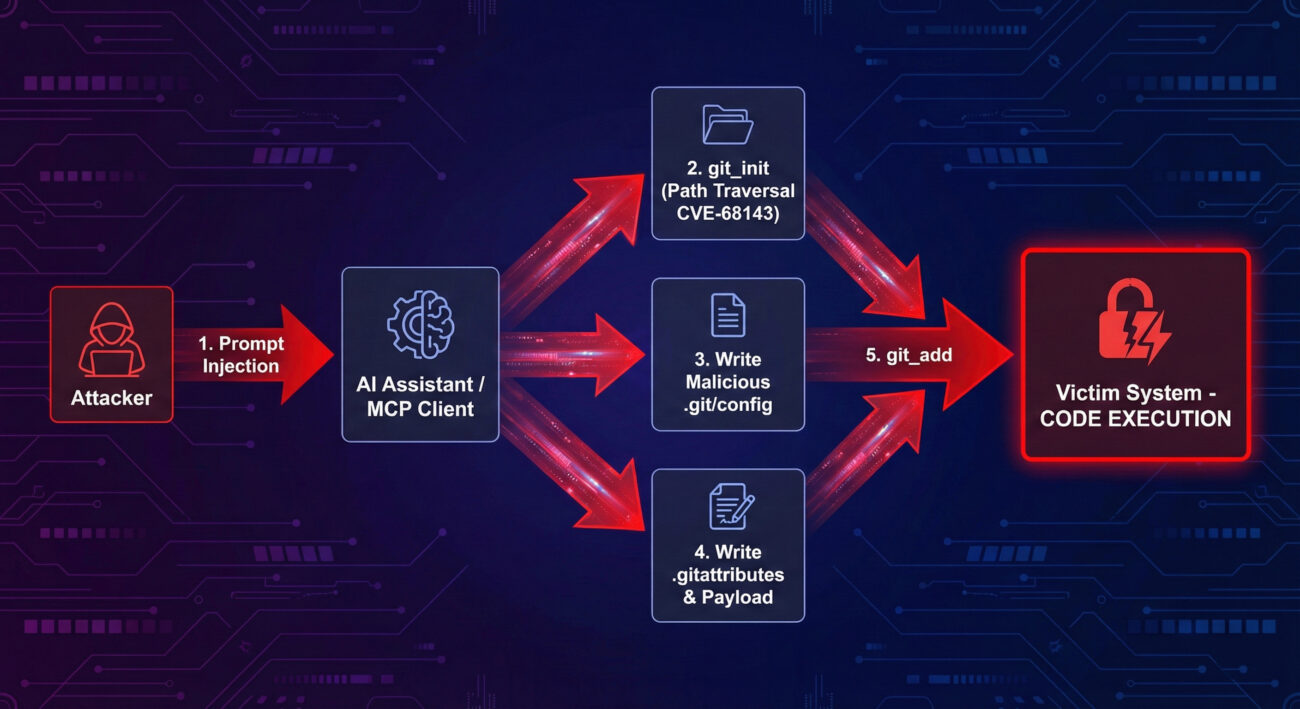
Here is the detailed kill chain, showing how an attacker could sequentially exploit these MCP server vulnerabilities.
Using prompt injection, the attacker tricks the AI into calling git_init with a path to a writable directory on the victim's system (e.g., /tmp/attack). Due to CVE-2025-68143, this works even if the path is outside intended bounds, creating a Git repository the attacker can target.
The attacker then uses the Filesystem MCP server (or other means) to write a malicious .git/config file into the newly created repository. This configuration defines a "clean" filter that points to a shell script they will deploy in the next step.
Next, the attacker writes the actual payload, a shell script (e.g., payload.sh) that will be executed. They also write a .gitattributes file that associates a specific file extension (like .trigger) with the malicious clean filter defined in Step 2.
The attacker creates a file with the triggering extension (e.g., exploit.trigger) in the repository. The mere existence of this file is not enough; it needs to be staged.
Finally, the attacker prompts the AI to add the file to the repository (e.g., "please add the exploit.trigger file"). When the victim's system runs git add exploit.trigger, Git sees the clean filter in .git/config, executes the specified malicious shell script, and grants the attacker Remote Code Execution.
Framing these MCP server vulnerabilities within the MITRE ATT&CK® framework helps defenders map the techniques to their own detection and mitigation strategies. This attack employs several key techniques:
.git/config files or other configuration files containing secrets from other repositories.git add) to execute malicious code.Understanding this mapping allows Blue Teams to hunt for related activity, such as unusual child processes spawned from Git operations or anomalous file writes to .git/config.
Opportunity: These vulnerabilities are a gold mine. They are exploitable via indirect input (prompt injection), making attribution and initial detection difficult. Chaining them leads directly to high-value RCE.
mcp-server-git. Look for AI/LLM interfaces that handle Git operations.Challenge & Strategy: Defending requires a multi-layered approach, as the attack vector (AI prompt) is non-traditional.
mcp-server-git. This is the most critical step..git/config files outside of normal development activity. Implement strict allow-listing for MCP server capabilities where possible.Addressing MCP server vulnerabilities requires more than just a patch. Here is a framework for building a resilient AI-integrated development environment.
mcp-server-git is updated to version 2025.12.18 or later. The patch removed the vulnerable git_init tool and added robust input validation.git CLI, use secure native Git libraries (e.g., pygit2 for Python) that provide structured APIs, eliminating argument injection risks.CAP_DAC_OVERRIDE, CAP_SYS_ADMIN).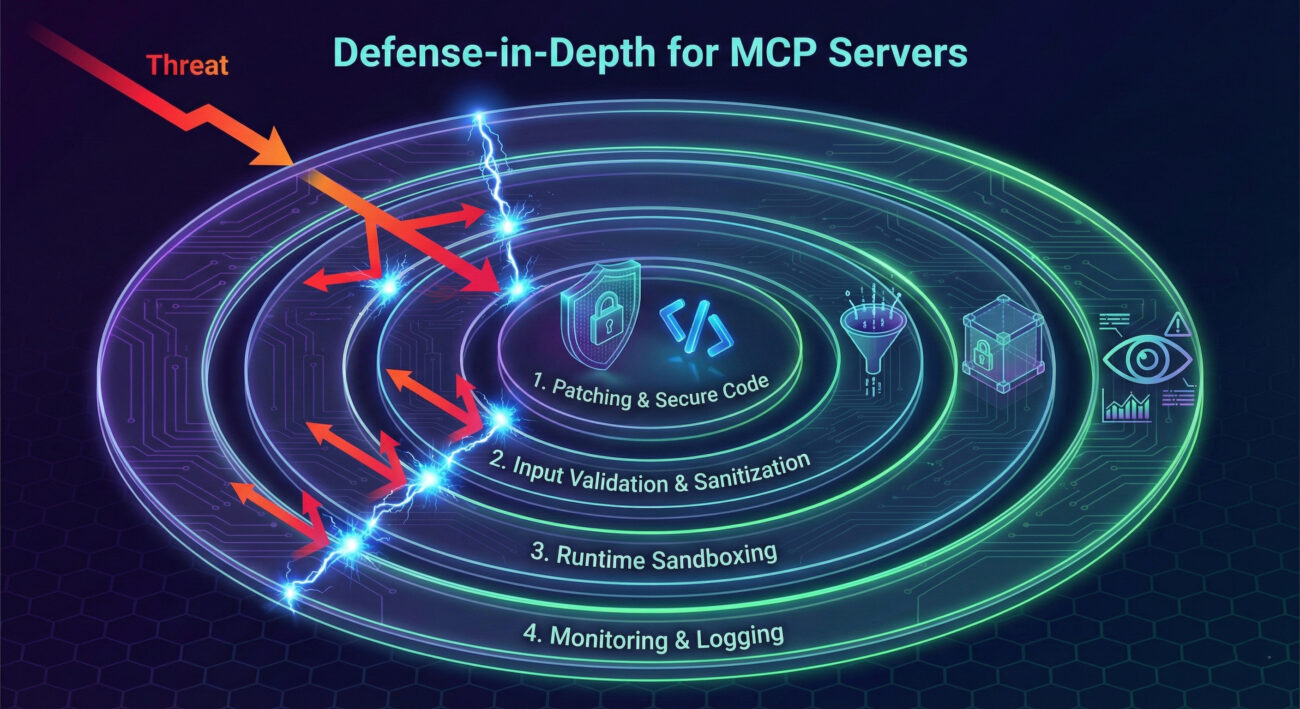
../) and check the final canonical path.shlex.quote() and os.path.normpath() followed by prefix checking.Q1: I don't use Anthropic's Claude. Am I still affected by these MCP server vulnerabilities?
A: Potentially, yes. While the vulnerability was found in Anthropic's server, MCP is an open protocol. Any AI application (using ChatGPT, custom LLMs, etc.) that integrates the vulnerable mcp-server-git package is at risk. The key is the dependency, not the specific AI front-end.
Q2: The attack requires prompt injection. Isn't that the AI's problem, not the server's?
A: This is a critical misunderstanding. Defense-in-depth is paramount. While preventing prompt injection is important, backend systems must be resilient even if input is malicious. A backend tool should never allow arbitrary code execution because it received a bad instruction, this is the core lesson of these MCP server vulnerabilities.
Q3: What's the simplest first step I should take right now?
A: Update your dependencies. Run pip install --upgrade mcp-server-git (or equivalent) and verify you are on version 2025.12.18 or later. Then, audit your projects for direct or transitive dependencies on this package.
Q4: Where can I learn more about secure coding for MCP servers?
A: Start with the general OWASP Top Ten, focusing on Injection and Broken Access Control. For MCP-specific guidance, monitor Anthropic's official MCP documentation and the MITRE CWE listings for Path Traversal (CWE-22) and Command Injection (CWE-78).
The disclosure of these MCP server vulnerabilities is a watershed moment for AI security. It highlights that the integration of powerful LLMs with backend tooling creates a new and complex attack surface where traditional vulnerabilities can have exponentially greater impact.
mcp-server-git closes these specific holes, but the architectural lessons must be applied to all MCP servers and AI-backend integrations to prevent similar breaches.By understanding the technical details of these exploits, mapping them to adversarial frameworks like MITRE ATT&CK, and implementing a layered defense strategy, security teams and developers can help secure the promising future of AI-augmented development.
Don't let your project be the next case study. Start by auditing your dependencies today.
Next Steps:
1. Scan your projects for mcp-server-git.
2. Enforce patching policies for all AI tooling dependencies.
3. Begin threat modeling sessions focused on AI-agent access to critical tools.
For continuous learning on cutting-edge cybersecurity threats and defenses, consider following resources like The Hacker News, the SANS Institute Blog, and the MITRE ATT&CK® knowledge base.
© 2026 Cyber Pulse Academy. This content is provided for educational purposes only.
Always consult with security professionals for organization-specific guidance.
Every contribution moves us closer to our goal: making world-class cybersecurity education accessible to ALL.
Choose the amount of donation by yourself.