


















































Certification Courses
Hands-On Labs
Threat Intelligence
Latest Cyber News
MITRE ATT&CK Breakdown
All Cyber Keywords
In the sprawling digital landscape of a modern organization, user accounts are created for employees, contractors, and service bots. But what happens when the person leaves, the project ends, or the contractor's role is complete? Too often, the associated accounts are forgotten, left active, unmonitored, and unmanaged. These are orphan accounts, and they represent one of the most pervasive and underestimated security risks in cybersecurity today.
Imagine leaving a spare key to your office under the doormat after an employee quits. A threat actor finds that key. That's the essence of an orphan account. This guide will demystify this hidden danger, explain exactly how attackers exploit them using recognized MITRE ATT&CK techniques, and provide you with a clear, actionable framework to find and neutralize these threats.
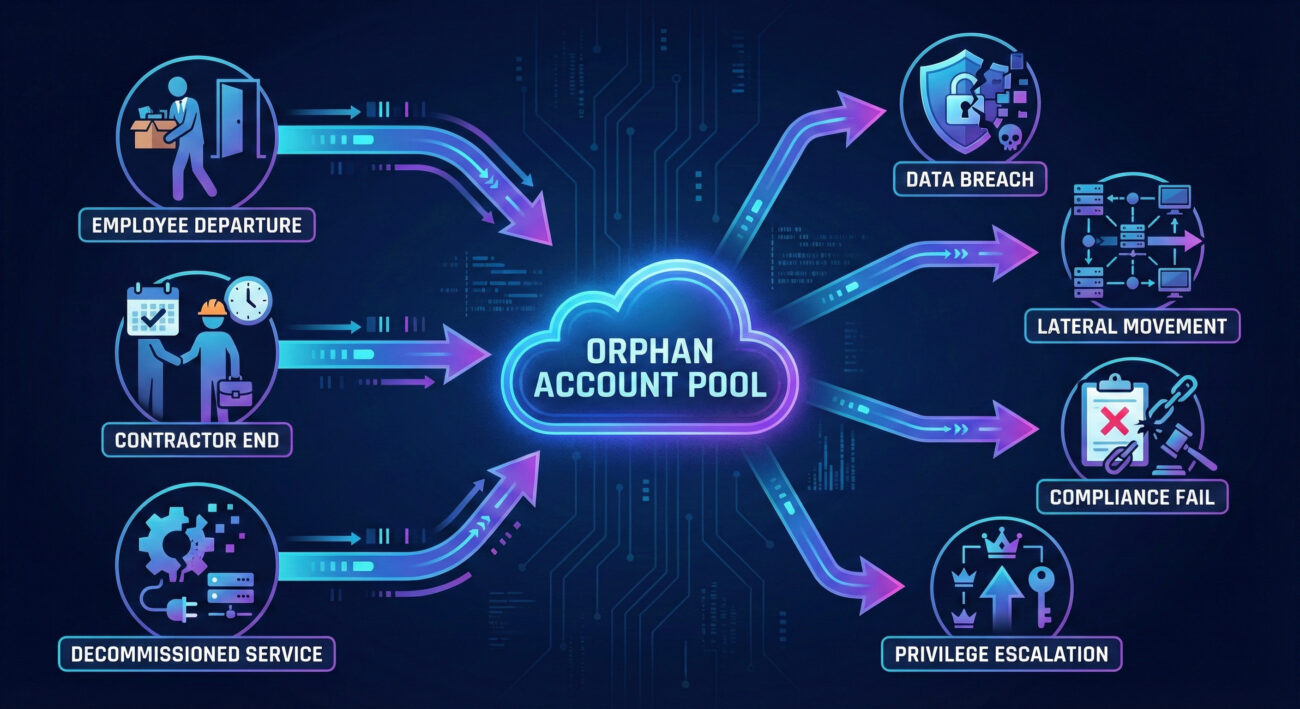
An orphan account (sometimes called a "ghost" or "dangling" account) is any user credential that remains active within a system after its legitimate owner no longer requires access. The "owner" could be a departed employee, a contractor whose project concluded, a temporary staff member, or even a service account for decommissioned software.
These accounts are "orphaned" because they lack an active, responsible user to monitor their activity or update their security settings. They are often created with standard, sometimes privileged, access and then fall off the IT department's radar during offboarding processes.
Common Causes of Orphan Accounts:
Orphan accounts are not just clutter; they are active, credentialed backdoors. Their danger is multifaceted:
The exploitation of orphan accounts maps directly to several key tactics and techniques in the MITRE ATT&CK framework, a globally recognized knowledge base of adversary tactics. Understanding this mapping helps defenders speak a common language and prioritize defenses.
| MITRE ATT&CK Tactic | Relevant Technique | How Orphan Accounts Are Used |
|---|---|---|
| Initial Access (TA0001) | T1078 - Valid Accounts | Orphan accounts are the quintessential valid account. Attackers use credential stuffing, password spraying, or leaked passwords to gain initial access, bypassing perimeter defenses because the credentials are legitimate. |
| Persistence (TA0003) | T1098 - Account Manipulation T1136 - Create Account |
Once in, attackers use the orphan account to create new backdoor accounts or modify existing ones (like resetting passwords or adding SSH keys) to maintain access even if the orphan account is eventually discovered. |
| Privilege Escalation (TA0004) | T1078.002 - Domain Accounts | If the orphan account already has elevated privileges (e.g., a forgotten admin account), it provides immediate escalation. If not, attackers use it to perform lateral movement to find more powerful accounts. |
| Lateral Movement (TA0008) | T1021 - Remote Services T1550 - Use Alternate Authentication Material |
Using the orphan account's credentials, attackers move laterally across the network, accessing file shares, internal wikis, or other systems to expand their foothold. |
By framing the orphan account risk within MITRE ATT&CK, security teams can proactively hunt for indicators of these techniques in their logs and align their defenses with industry best practices.
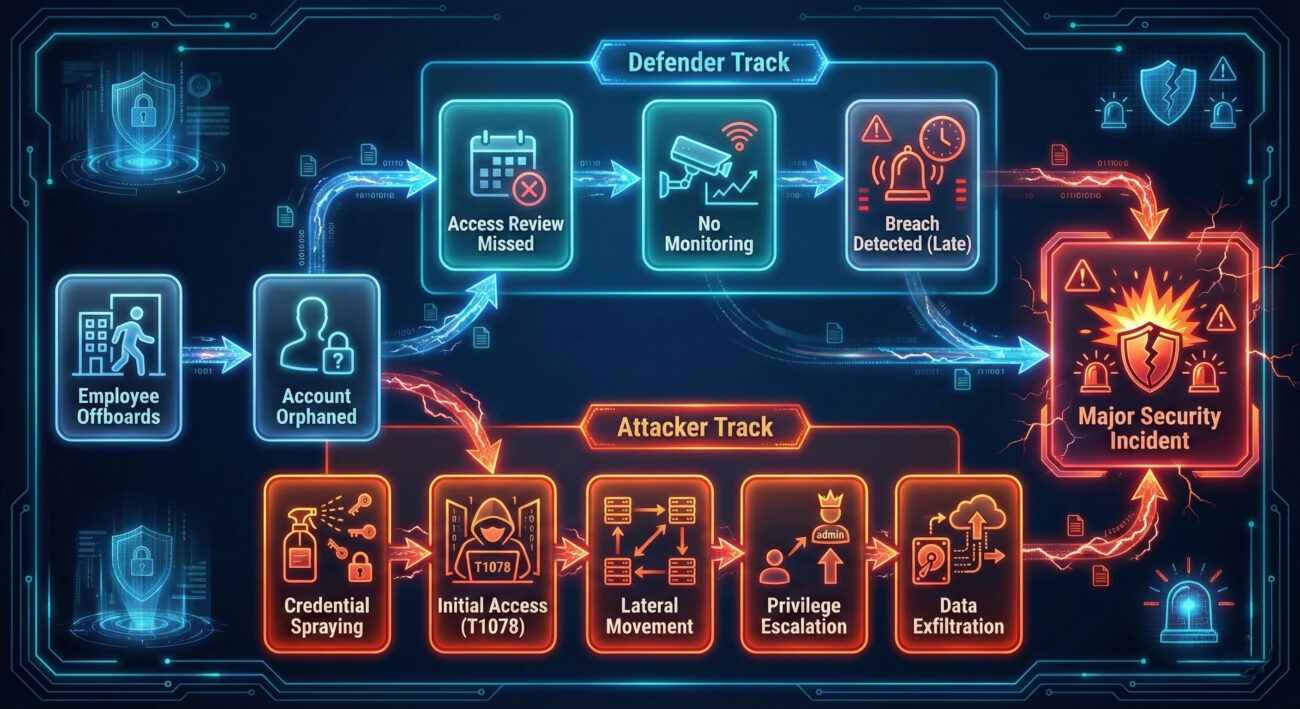
Let's follow a hypothetical but all-too-plausible scenario, "Project Ghost Access," to see how a threat actor leverages an orphan account.
A hacker acquires a list of employee emails from a past data breach of a major corporation, "TechGlobal." They perform password spraying (T1110) against TechGlobal's VPN login portal. One set of credentials ([email protected] / Winter2023!) works. John Smith was a contractor who left 8 months ago, but his VPN account was never disabled.
From the VPN, the attacker accesses the internal network. They find the orphan account has basic network share access. Using it, they locate internal IT documentation and discover a privileged service account named svc_backup_legacy used for an old backup system. The password is stored in plaintext in a shared file. This is another orphan account for a decommissioned service.
The attacker uses the svc_backup_legacy credentials (T1078) to log into a domain server. This account has local admin rights on several key servers. Using Mimikatz or similar tools (T1003), they dump credentials from server memory, capturing the hash of a Domain Administrator account.
With Domain Admin privileges, the attacker can now access any system, encrypt files for ransomware, or quietly exfiltrate sensitive intellectual property and customer data over several weeks, all originating from forgotten, unmonitored accounts.
Here is a technical breakdown of the common attack flow, useful for understanding the adversary's perspective.
Attackers scour LinkedIn, past breach databases (like HaveIBeenPwned), or even corporate websites to find names of former employees/contractors. They then compile username lists (e.g., firstname.lastname, flastname).
Using tools like Hydra or SprayingToolkit, they attempt a few common passwords (CompanyName123, SeasonYear!) across many usernames to avoid lockouts. They also try credentials leaked from other breaches, banking on password reuse.
Simplified Example of a Password Spraying Command:
Explanation: This command tries the password 'Spring2024!' for every user in 'userlist.txt' against a VPN login form, waiting 30 seconds between attempts on each host (-W) to avoid triggering alarms.
Upon successful login, the attacker uses basic commands to map the network from within:
Threat actors see orphan accounts as low-hanging fruit and a primary entry vector.
Defenders must treat orphan account management as a fundamental hygiene task.
Ready to act? Follow this structured framework to eliminate orphan accounts from your environment.
You can't secure what you don't know exists. Use native tools and scripts to compile a list of all accounts.
Get-ADUser -Filter * -Properties LastLogonDate | Where-Object {$_.LastLogonDate -lt (Get-Date).AddDays(-90)} to find stale accounts.aws iam generate-credential-report and analyze for unused access keys or old passwords.Cross-reference your account list with authoritative sources.
Take action based on the account type and risk.
| Account Type | Recommended Action |
|---|---|
| Confirmed former employee/contractor | Disable immediately, then schedule for deletion after a retention period (e.g., 30-90 days). |
| Unknown/Unvalidated user account | Disable and investigate. If no owner claims it, delete. |
| Legacy service account | Assess if the service is still running. If not, disable. If yes, document ownership and rotate credentials. |
| Privileged orphan account | HIGH PRIORITY. Disable immediately. Conduct a forensic review of its recent activity logs. |
Establish automated guardrails to prevent future orphan accounts.
Continuously monitor for signs of orphan account misuse.
Q: What's the difference between an orphan account and a dormant account?
A: A dormant account belongs to a current user who hasn't logged in for a long time (e.g., someone on extended leave). An orphan account has no active owner (the user is gone). Dormant accounts can become orphaned if not managed properly.
Q: How often should we audit for orphan accounts?
A: At a minimum, quarterly. However, the best practice is to have continuous monitoring via automated tools that flag accounts inactive for 45-90 days and immediately disable accounts upon HR termination feed updates.
Q: Are service accounts considered orphan accounts?
A: They can be. If a service account is tied to a decommissioned application and has no documented owner, it is an orphan. Service accounts require even stricter management due to their often-high privileges.
Q: What's the first tool a small team should use to find orphan accounts?
A: Start with native, free tools. Use PowerShell for AD and the built-in access review features in your cloud provider (Azure AD Access Reviews, AWS IAM Access Analyzer). For a more unified view, consider open-source IAM tools or affordable SaaS solutions like Okta or Auth0 for smaller organizations.
Don't let forgotten accounts be your downfall.
This week, take these three immediate actions:
For further learning, explore these essential resources:
MITRE ATT&CK: Valid Accounts (T1078) | CISA Identity and Access Management Guidance | NIST Cybersecurity Framework
Share this guide with your team to build collective awareness against the hidden risk of orphan accounts.
© 2026 Cyber Pulse Academy. This content is provided for educational purposes only.
Always consult with security professionals for organization-specific guidance.
Every contribution moves us closer to our goal: making world-class cybersecurity education accessible to ALL.
Choose the amount of donation by yourself.