


















































Certification Courses
Hands-On Labs
Threat Intelligence
Latest Cyber News
MITRE ATT&CK Breakdown
All Cyber Keywords
On December 21, 2025, threat actors began actively exploiting a critical vulnerability in the Metro development server, part of the popular @react-native-community/cli npm package. Tracked as CVE-2025-11953 and dubbed “Metro4Shell”, this flaw allows remote unauthenticated attackers to execute arbitrary commands on any machine running the development server. With a CVSS score of 9.8 (Critical), the Metro4Shell RCE exploitation has been observed delivering Rust-based backdoors, disabling Microsoft Defender, and establishing persistent command & control. The U.S. CISA has already added this vulnerability to its Known Exploited Vulnerabilities (KEV) catalog, mandating fixes by February 26, 2026.
This post provides a complete, beginner-friendly breakdown of the Metro4Shell attack, maps it to MITRE ATT&CK techniques, and offers a clear defender’s roadmap. Whether you're a developer using React Native or a security professional, understanding this supply-chain style attack on development infrastructure is crucial.
React Native developers use the Metro bundler (part of @react-native-community/cli) as a local development server. It bundles JavaScript and assets, and typically runs on localhost:8081. However, misconfigurations or exposing this server to a network can turn it into a critical attack vector.
CVE-2025-11953 (Metro4Shell) is an unauthenticated remote code execution flaw in versions of the Metro server prior to the patch. Discovered by JFrog in November 2025, the vulnerability allows an attacker to send a crafted HTTP request that executes arbitrary OS commands on the host. It abuses the server’s lack of input validation in certain endpoints designed for development-time features.
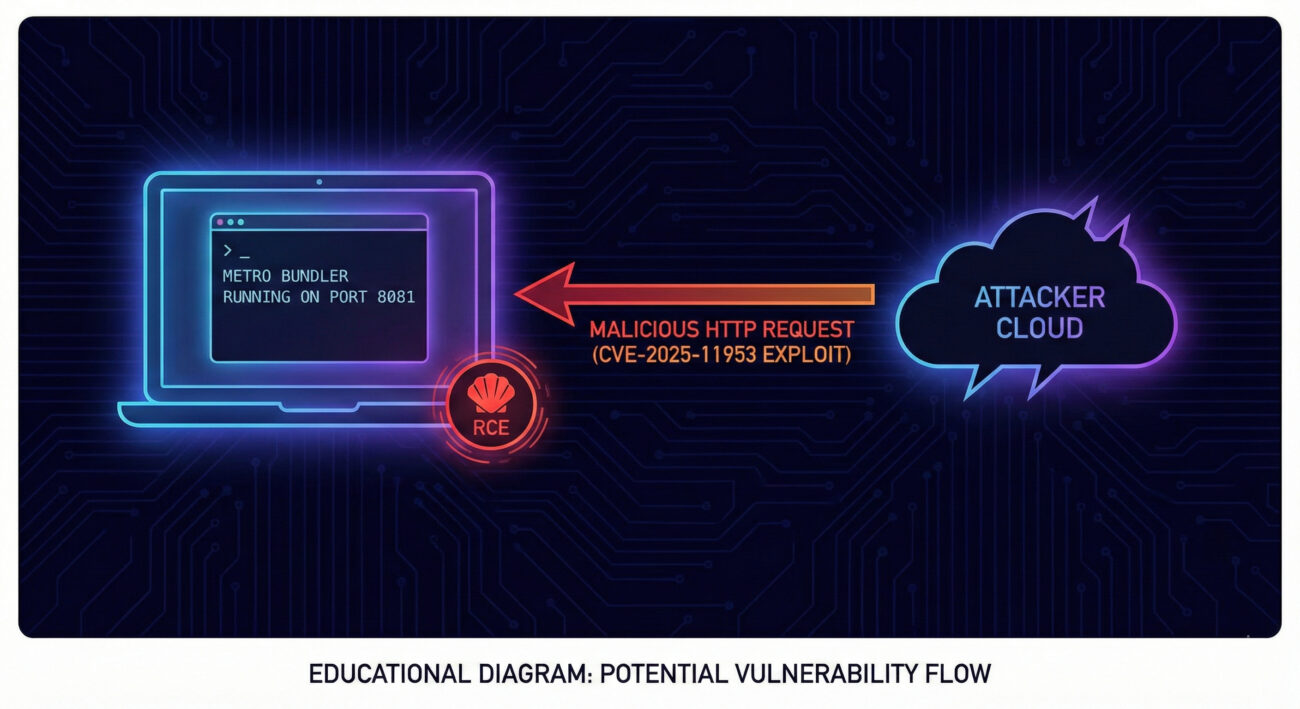
While the full exploit details are withheld to prevent script-kiddie use, the core issue lies in the Metro server’s handling of multi-part requests or specific URL parameters that are passed to a shell without sanitization. In vulnerable configurations, an HTTP GET or POST can trigger command injection with the privileges of the Node.js process.
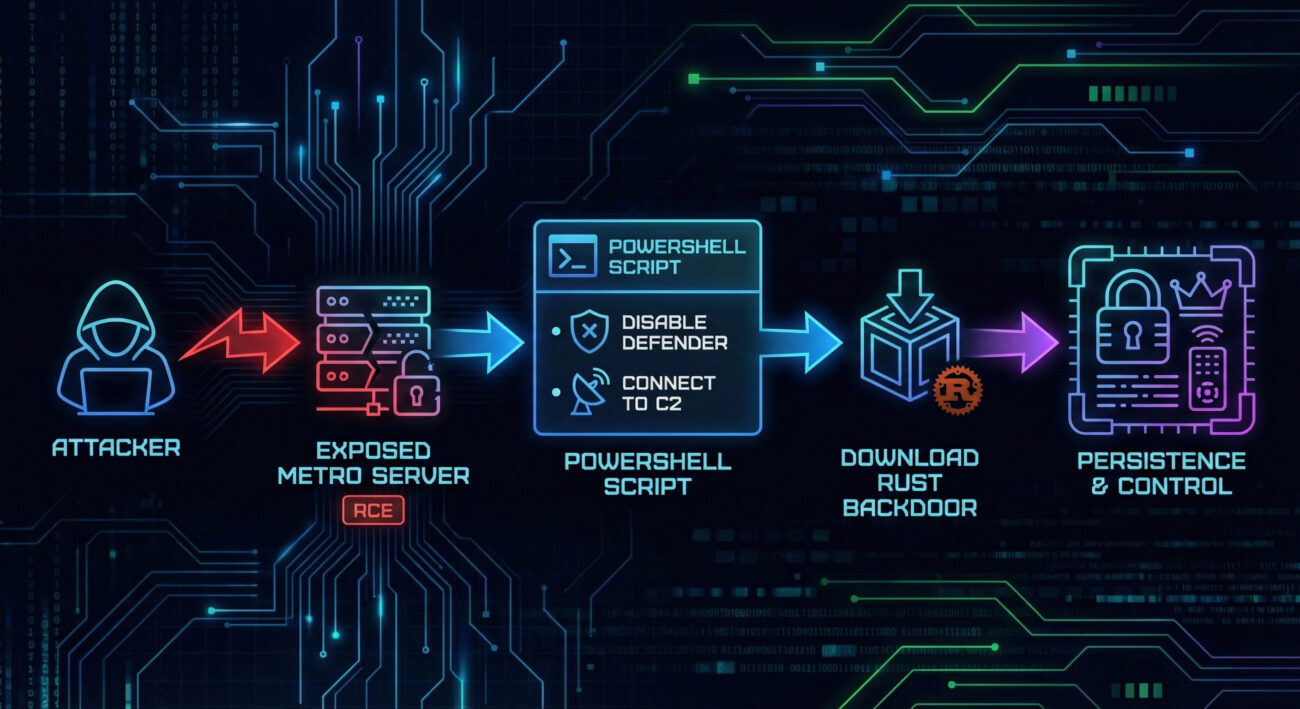
According to VulnCheck’s honeypot telemetry, the Metro4Shell RCE exploitation observed in the wild follows a multi-stage pattern. Below is a step-by-step reconstruction based on the IP addresses and payloads captured.
Attackers scan for exposed Metro servers on ports 8081, 8082, etc. Using a crafted request (often containing encoded PowerShell), they gain unauthenticated RCE. The observed attacking IPs included: 5.109.182.231, 223.6.249.141, and 134.209.69.155.
The exploit injects a Base64-encoded PowerShell script. Once decoded, the script performs two key actions:
C:\Users\<Username>\AppData\Local\Temp to Microsoft Defender Antivirus exclusions (defense evasion).8.218.43.248:60124.Through the TCP tunnel, the victim downloads a binary payload written in Rust. This binary includes anti-analysis checks (e.g., debugger detection, sandbox evasion) and ultimately provides persistent backdoor access. The consistency of payloads over weeks confirms this is operational use, not mere probing.
Understanding the adversary behavior through the MITRE framework helps defenders build better detections. Here’s how the Metro4Shell attack maps to tactics and techniques:
| Tactic | Technique ID | Technique Name | Observed Use |
|---|---|---|---|
| Initial Access | T1190 | Exploit Public-Facing Application | Exploiting CVE-2025-11953 in exposed Metro dev server. |
| Execution | T1059.001 | Command and Scripting Interpreter: PowerShell | Base64-encoded PowerShell script executed post-exploit. |
| Defense Evasion | T1562.001 | Disable or Modify Tools: Antivirus | Adding Defender exclusions for working dir and Temp. |
| Command and Control | T1573.001 | Encrypted Channel: Symmetric Cryptography | Raw TCP connection (though not encrypted, the Rust binary may use custom encryption; raw socket for C2). |
| Ingress Tool Transfer | T1105 | Ingress Tool Transfer | Downloading Rust-based binary from attacker IP. |
Run a network scan to check if any developer machines have port 8081 (or custom Metro port) listening on 0.0.0.0. Use: netstat -an | findstr :8081 (Windows) or ss -tuln | grep 8081 (Linux).
Update @react-native-community/cli to the latest version (>= 15.1.0, which includes the fix). Run: npm update @react-native-community/cli. Check your lockfile.
Ensure Metro only binds to localhost. In your metro.config.js, set server: { port: 8081, enableDevServer: true, bindAddress: '127.0.0.1' }. Also, never expose the dev server via ngrok or cloud without authentication.
Check logs for requests to /__open-stack-frame or similar endpoints with encoded payloads. Also monitor outbound connections to the known malicious IPs: 8.218.43.248, 5.109.182.231, 223.6.249.141, 134.209.69.155.
Federal agencies must patch by February 26, 2026. All organizations should treat this as an active threat. Reference: CISA KEV Catalog.
bindAddress in Metro config.@react-native-community/cli.To systematically protect against attacks like Metro4Shell, integrate these controls into your development lifecycle:
| Phase | Action | Tooling / Check |
|---|---|---|
| Code | Dependency scanning | npm audit, Snyk, or GitHub Dependabot to flag vulnerable @react-native-community/cli. |
| Build | Static analysis of configs | Check that metro.config.js binds to localhost; use linters. |
| Deploy | Network policies | Developers should be on isolated VLANs; egress filtering. |
| Runtime | EDR / logging | Monitor for suspicious process trees: node.exe spawning powershell.exe. |
| Response | Incident playbook | Include steps for dev server compromise: isolate machine, rotate secrets, check for backdoors. |
A: Metro is integral to the development server; if you ever run npm start or react-native start, you're running Metro. Check if it's bound to localhost only.
A: According to JFrog's disclosure, versions of @react-native-community/cli prior to 15.1.0 (or specific backported patches) are vulnerable. Always update to the latest.
A: No, the attacker needs network access to the Metro port. However, if an attacker already has code execution on your machine, they could pivot to localhost. But the primary vector is remote exploitation of exposed servers.
A: Yes, for FCEB agencies, it's binding. For private sector, it's a strong signal that this is a top priority threat.
Call to Action: 🛡️ Review your React Native projects today. Run npm ls @react-native-community/cli to check versions. If you need help crafting detection rules or securing your CI/CD pipeline, contact our team or explore our developer security workshop.
© Cyber Pulse Academy. This content is provided for educational purposes only.
Always consult with security professionals for organization-specific guidance.
CISA KEV Catalog • @react-native-community/cli on npm • VulnCheck Analysis • JFrog Security • React Native Security
Every contribution moves us closer to our goal: making world-class cybersecurity education accessible to ALL.
Choose the amount of donation by yourself.