


















































Certification Courses
Hands-On Labs
Threat Intelligence
Latest Cyber News
MITRE ATT&CK Breakdown
All Cyber Keywords
Have you ever wondered what happens behind the scenes when you type your username and password into a website's login form? That simple text box and password field represent one of cybersecurity's most critical, and vulnerable, gateways: form-based authentication. This method protects everything from your email and social media to your online banking, yet most users have no idea how it works or how to keep it secure.
Form-based authentication is simply a security process where users prove their identity by submitting credentials through web forms. Think of it like a digital bouncer checking your ID at a club, except this bouncer works 24/7 and guards access to your most valuable digital assets.
In this guide, you'll learn: exactly how login forms work, why they're both essential and risky, common attacks that target them, and practical steps to make your protected accounts virtually unbreakable.
Every day, billions of people use form-based authentication to access online services. According to recent data from CISA, compromised credentials are involved in over 80% of web hacking-related breaches. This isn't just about stolen Netflix accounts, weak authentication has enabled massive data breaches affecting millions, from social media platforms to government systems.
What makes form-based authentication particularly important is its universal presence. Whether you're logging into your healthcare portal, online shopping account, or work email, you're interacting with authentication forms. The problem? Many websites still implement them poorly, creating vulnerabilities that attackers exploit daily.
Consider this: the Verizon 2023 Data Breach Investigations Report found that stolen credentials were used in 50% of all incidents. This isn't sophisticated hacking, it's often exploiting weak authentication forms through techniques like phishing and credential stuffing. Understanding how these forms work isn't just technical knowledge; it's essential digital self-defense.
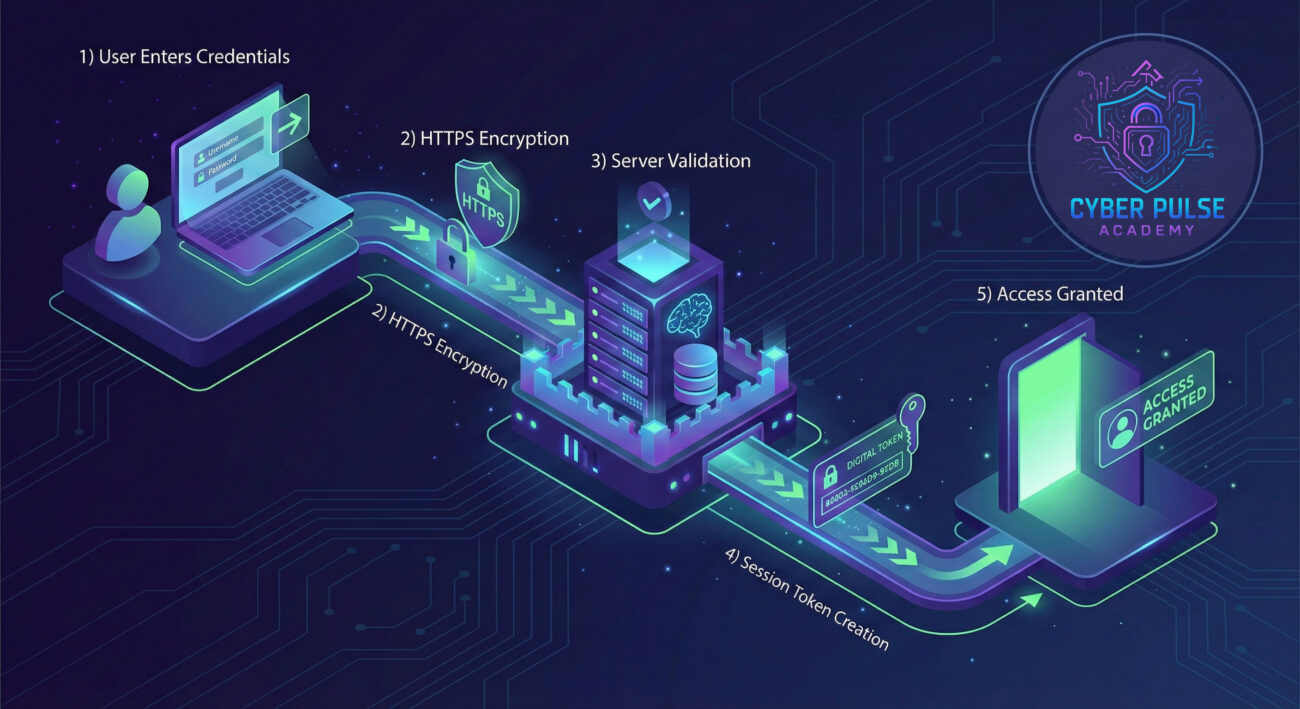
| Term | Simple Definition | Everyday Analogy |
|---|---|---|
| Credentials | The username/password combination you use to prove your identity | Your house key and which door it opens |
| Session Token | A temporary digital "wristband" that proves you're logged in | Concert wristband that lets you re-enter without your ticket |
| HTTPS/SSL Encryption | Scrambling data between your browser and the website | Sending a letter in a locked, tamper-proof envelope |
| Brute Force Attack | Trying every possible password combination until one works | A thief trying every key on your keychain |
| Multi-Factor Authentication (MFA) | Requiring two or more proofs of identity to log in | Needing both a key AND fingerprint to enter a building |
Sarah runs a small coffee shop with a website for online orders. She set up a simple login form for her 5 employees to manage orders. The form asked for username and password, stored in a basic database. No encryption, no login limits, no special security.
One Tuesday morning, Sarah noticed strange things: orders being canceled, inventory numbers changing, and customer emails going missing. An attacker had exploited her weak authentication form through a common vulnerability called SQL injection, entering special characters that tricked her system into revealing all employee credentials.
| Time/Stage | What Happened | Impact |
|---|---|---|
| Week 1 | Sarah implements basic login form with no security measures | System vulnerable from day one |
| Month 3 | Attacker discovers site through search, tests login form | First breach attempt occurs |
| Month 4 | SQL injection attack succeeds; all credentials stolen | Complete system compromise |
| Month 4.5 | Unauthorized changes to orders, customer data accessed | Business operations disrupted |
| Month 5 | Sarah implements HTTPS, input validation, and MFA | System secured, attacks prevented |
The aftermath? Sarah lost customers' trust, spent $5,000 on security fixes, and nearly closed her business. All because of one poorly implemented login form. This happens daily to businesses worldwide, but it's completely preventable with proper form-based authentication knowledge.
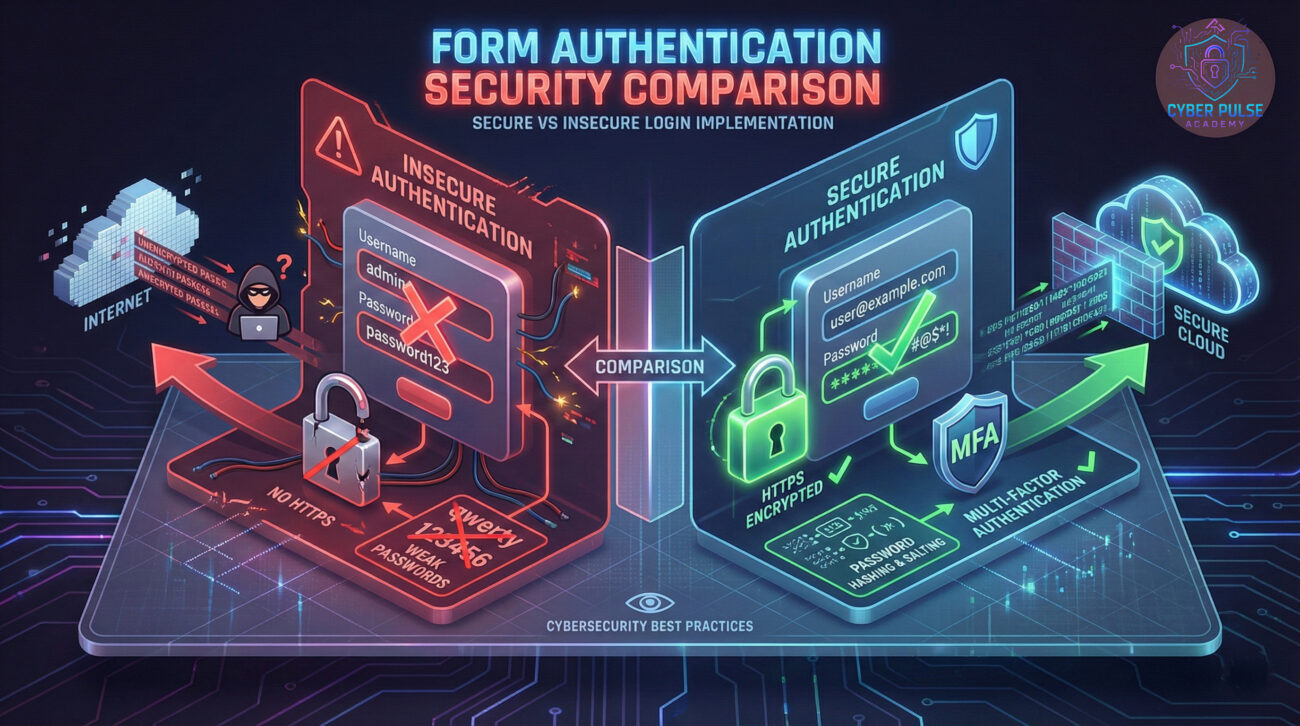
Before entering credentials, check these security indicators:
Your password is your first defense line:
Add that critical second layer:
Stay vigilant against unauthorized access:
Develop routines that protect you:
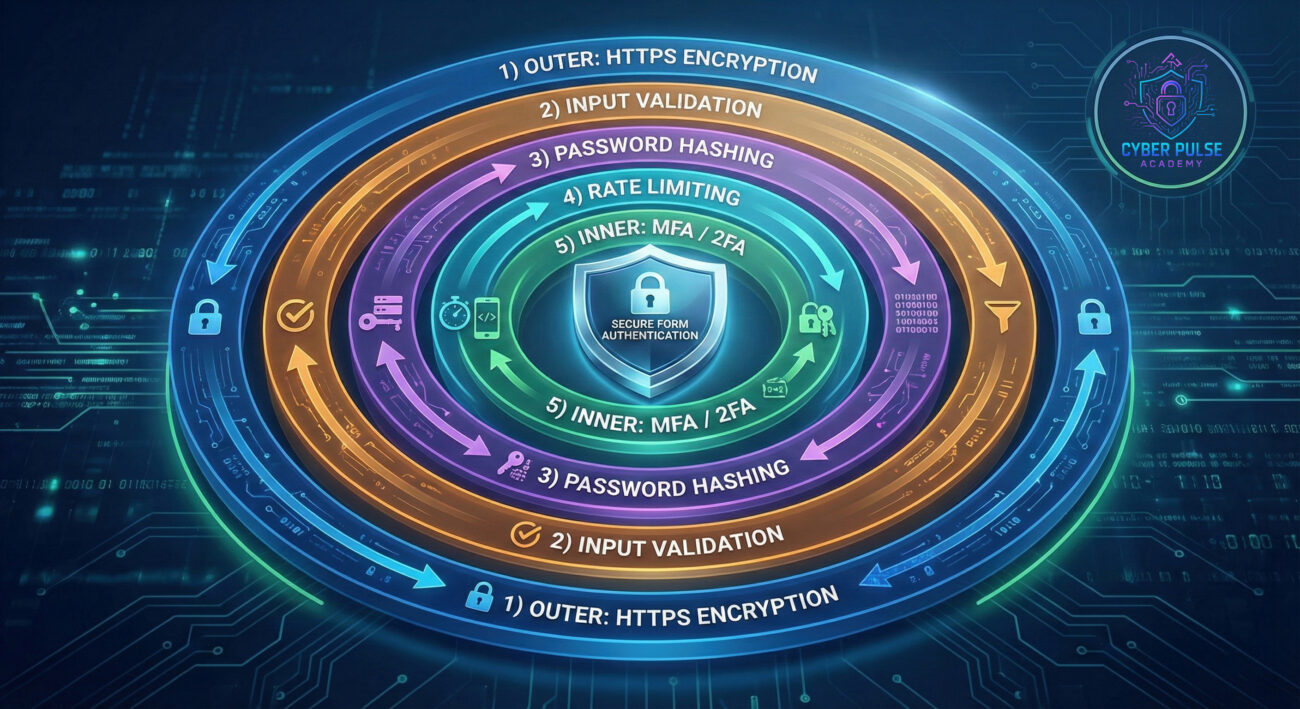
Let's think like both an attacker and defender to understand form-based authentication weaknesses:
Simple Attack Path: An attacker finds a website with poor login security. They notice no rate limiting on the form, meaning they can try unlimited passwords. Using a list of common passwords from previous breaches (called credential stuffing), they automate thousands of login attempts. Within hours, they've guessed several weak passwords and gained unauthorized access.
Defender's Counter-Move: The website implements three simple defenses: 1) Rate limiting that locks accounts after 5 failed attempts, 2) Password strength requirements that prevent common passwords, and 3) Alert systems that notify administrators of suspicious activity. Suddenly, the attacker's automated tools fail, and legitimate users remain protected.
Every login form represents a potential entry point. Attackers look for the weakest implementation: forms without HTTPS (credentials sent in plain text), no account lockout policies (allowing unlimited guesses), and poor input validation (enabling SQL injection). They automate attacks at scale, knowing that even a 0.1% success rate across millions of attempts yields thousands of compromised accounts. Their goal isn't breaking advanced cryptography, it's finding the one website that forgot basic security measures.
Every authentication form is a fortress gate that needs multiple layers of defense. Defenders implement HTTPS as the foundational moat, input validation as the gate's strength check, password hashing as the inner vault protection, and MFA as the final guard tower. They monitor for unusual patterns, rapid login attempts, geographic anomalies, unfamiliar devices. Their mindset: assume breaches will be attempted, so make each layer independently strong while monitoring for when (not if) they're tested.
Form-based authentication is the digital front door to your online life, and now you have the keys to keep it secure. Remember these essential takeaways:
Your action items today: 1) Check your most important accounts for MFA and enable it, 2) Audit your passwords using a manager, 3) Bookmark reputable security resources like CISA's Secure Our World and the MFA guide on this blog. Form-based authentication doesn't have to be a weakness, with knowledge and good habits, it becomes one of your strongest digital defenses.
Have you encountered suspicious login forms or implemented strong authentication measures? Share your experiences or questions in the comments below! For deeper dives into related topics, check our guides on password security, two-factor authentication, and phishing protection.
Every contribution moves us closer to our goal: making world-class cybersecurity education accessible to ALL.
Choose the amount of donation by yourself.