


















































Certification Courses
Hands-On Labs
Threat Intelligence
Latest Cyber News
MITRE ATT&CK Breakdown
All Cyber Keywords
Ever wonder how your home Wi-Fi knows it's really you connecting and not an imposter? Or how your company's VPN keeps out unwanted guests? The unsung hero in these scenarios is often a powerful authentication method called the CHAP (Challenge-Handshake Auth) protocol. In this guide, you'll learn what CHAP (Challenge-Handshake Auth) is, why it's a cornerstone of network security, and how it acts as a vigilant bouncer for your digital doors.
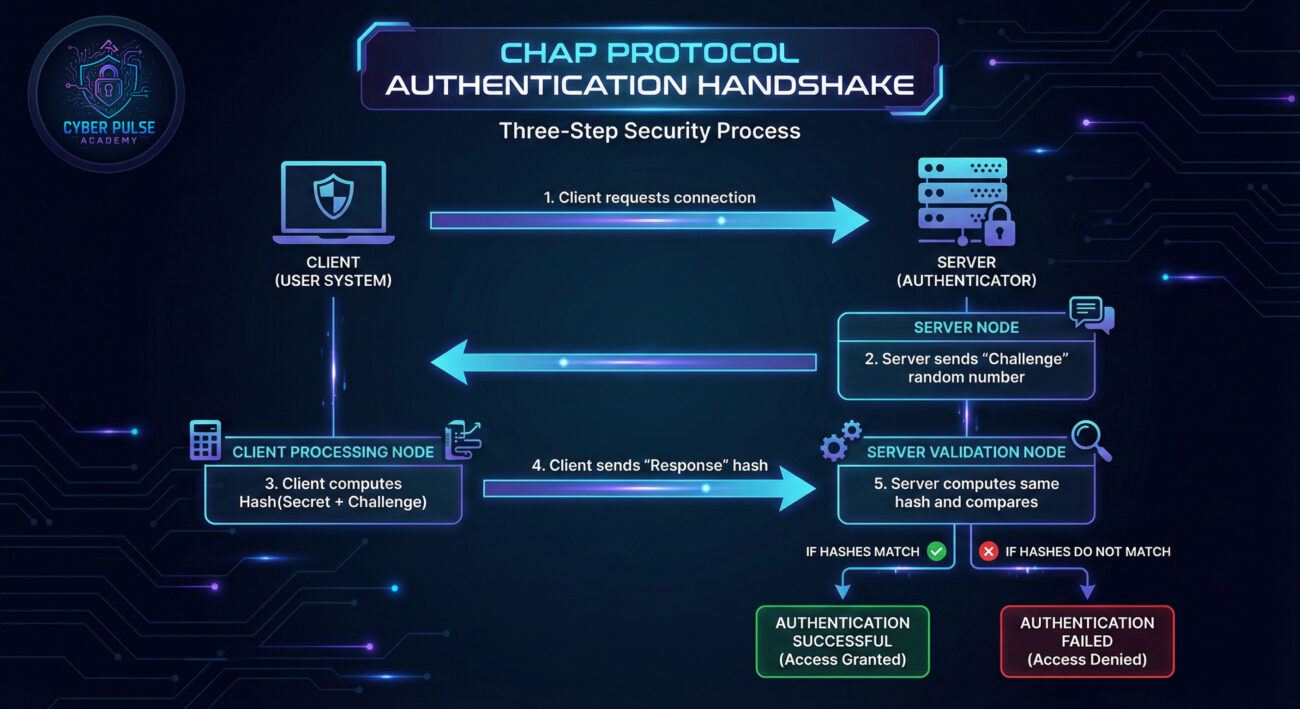
Imagine you're entering a high-security club. You give your name (your username), but instead of just showing a static ID card (a password), the bouncer challenges you with a random question. Only you, with the secret knowledge, can provide the correct response. This dynamic, three-step "challenge-and-response" is the core of the CHAP (Challenge-Handshake Auth) protocol.
CHAP, or Challenge-Handshake Authentication Protocol, is a method used to verify the identity of a user or device trying to connect to a network. Unlike simpler methods that send passwords in plain text, CHAP never transmits the actual secret over the connection. This makes it a far more secure way to perform authentication, especially for remote connections like dial-up, VPNs, and PPP links.
In this guide, you'll learn the elegant dance of the CHAP handshake, understand why it's resistant to common eavesdropping attacks, and discover how you can ensure it's protecting your own network connections.
In an era of rampant credential theft and network breaches, static passwords are a major liability. The CHAP (Challenge-Handshake Auth) protocol addresses this critical vulnerability. According to the Cybersecurity and Infrastructure Security Agency (CISA), robust authentication for network access is a fundamental control. CHAP provides this by ensuring that even if a hacker intercepts the authentication session, they cannot reuse the data to gain access later.
Think about your daily life: connecting to your office network from home, or your smart home devices communicating with the router. Each of these connections is a potential entry point. Protocols like PAP (Password Authentication Protocol) send credentials in clear text, making them easy prey. CHAP elevates security by using a hashed value that changes with every single login attempt. This means that stolen authentication data is useless for future sessions, effectively thwarting replay attacks.
The importance of the CHAP (Challenge-Handshake Auth) protocol is further underscored by its inclusion in foundational frameworks like the NIST Cybersecurity Framework under the "Identify" and "Protect" functions. It's a proven, standardized method for ensuring that the entity on the other end of a connection is verified and trusted.
| Term | Simple Definition | Everyday Analogy |
|---|---|---|
| Challenge | A random string of data sent by the server to the client. | The bouncer asking you a random, unique question like "What's the third word of our secret phrase?" |
| Response | The hashed result computed by the client using its secret and the challenge. | You whispering the correct answer back, but in a scrambled form only the bouncer can verify. |
| Hash Function (e.g., MD5, SHA) | A one-way mathematical process that turns data into a fixed-size, unique string (a hash). | A special blender that turns your secret and the question into a unique smoothie. You can't turn the smoothie back into the original ingredients. |
| Replay Attack | A network attack where a valid data transmission is maliciously repeated. | A spy recording you saying the password and playing it back later to gain entry. |
| Mutual Authentication | When both sides of a connection verify each other's identity. (Part of CHAP variant MS-CHAPv2) | The bouncer also proves he's a real employee by showing a badge, not just you proving who you are. |
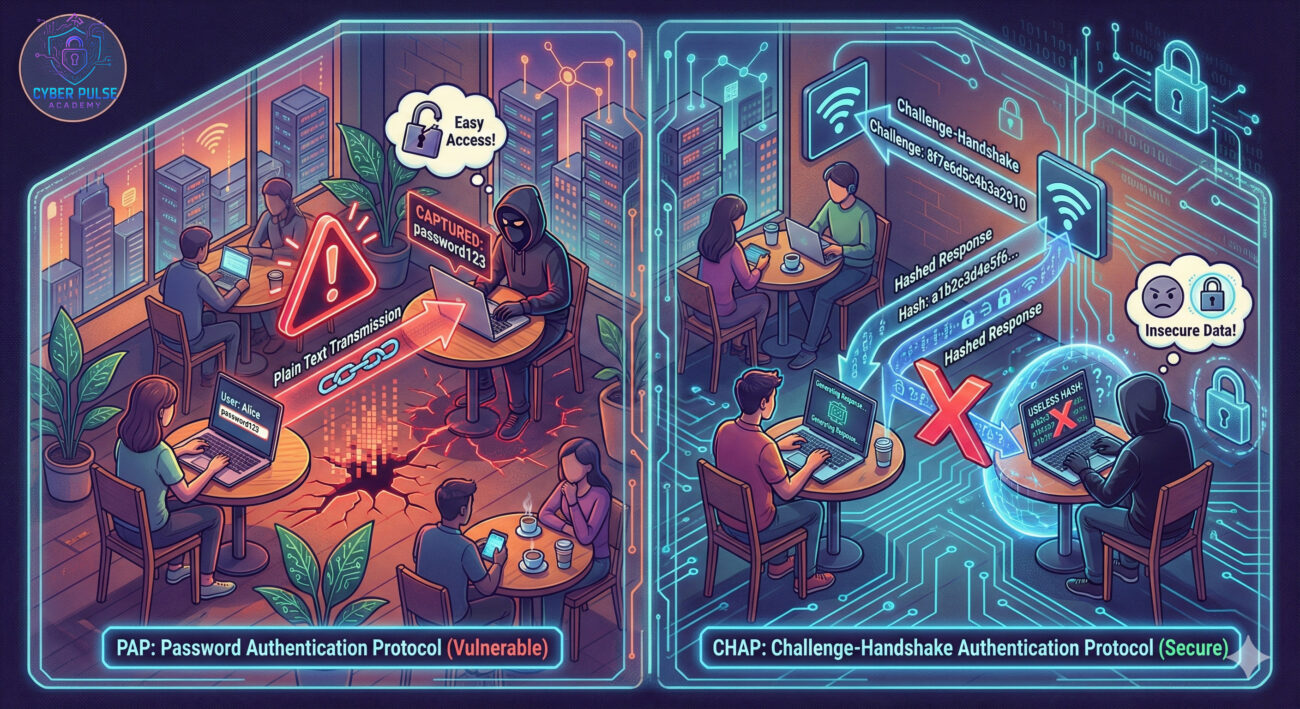
Maria, a freelance accountant, often works from a local coffee shop. She uses a company VPN to access sensitive financial files. Her IT administrator has configured the VPN to use the CHAP protocol for authentication.
The Situation: An attacker named Leo is in the same coffee shop, running packet-sniffing software on the public Wi-Fi. He's looking for credentials to steal.
Before CHAP (Challenge-Handshake Auth) (Using PAP): If Maria's VPN used PAP, her username and password would be sent in clear text. Leo would intercept them instantly and have full access to the corporate network.
With CHAP (Challenge-Handshake Auth) in Place: When Maria connects, the VPN server sends a random "challenge" number. Maria's computer uses a hash function to combine this challenge with her stored secret (a derivative of her password). It sends only this hash (the "response") back. Leo intercepts this hash, but it's useless to him. It only works for that specific, random challenge. If he tries to "replay" that same hash later, the server will send a new challenge, and the old hash won't match. Maria's session remains secure.
| Time / Stage | What Happened | Impact |
|---|---|---|
| Connection Initiation | Maria's laptop requests a VPN connection to her company server. | The authentication process begins. |
| Challenge Sent | The server generates and sends a unique, random challenge value. | Creates a one-time-use authentication scenario. |
| Attack Interception | Leo's sniffer captures the challenge and the subsequent response hash traveling over the Wi-Fi. | Leo obtains encrypted data, not the plaintext password. |
| Failed Replay Attack | Later, Leo tries to send the captured response hash to the server to impersonate Maria. | Attack fails because the server issues a new challenge, making the old response invalid. |
| Outcome | Maria's connection is established and remains private. The server can optionally re-challenge periodically. | Protected session and secured company data. |
While end-users typically don't configure CHAP directly, understanding how it's set up helps you appreciate the security protecting you. Here’s a guide from a network administrator’s perspective.
Access your network access server (NAS), VPN concentrator, or router configuration. Navigate to the PPP (Point-to-Point Protocol) or dial-in/VPN authentication settings.
User secrets (passwords) must be stored in a way that allows the server to compute the expected hash. They are typically stored using the same hash function (like MD5 or SHA) or in a reversible format if the server needs the original secret.
On the client device (user's computer, router, or IoT device), enter the same username and secret configured on the server.
Initiate a connection from the client. Use logging on both the server and client to verify the steps.
One of CHAP's strengths is the ability to re-verify the client during a session. Configure the server to issue a new challenge periodically (e.g., every 10 minutes).
How might an attacker view a system using CHAP? A threat hunter thinks like the adversary to find weaknesses.
Simple Attack Path: An attacker discovers a network still supporting the older MS-CHAPv1 (which has known flaws). They use a tool to intercept a handshake. Because MS-CHAPv1 breaks the challenge-response into two independent pieces, the attacker can offline brute-force the user's password hash. If the password is weak, it will be cracked quickly, compromising the secret.
Defender’s Counter-Move: The defender's mindset is proactive elimination of weak links. They audit all network devices and VPN configurations to ensure MS-CHAPv1 is completely disabled, leaving only the more secure MS-CHAPv2 or other EAP methods. They also implement account lockouts after a few failed CHAP attempts to prevent offline brute-force attacks from being feasible. The key is not just having CHAP, but ensuring it's configured in its strongest, most modern form.
"CHAP (Challenge-Handshake Auth) is an obstacle, but not an impassable wall. We look for misconfigurations: Is it using old, crackable MD5? Is weak PAP still enabled as a fallback? Can we force a downgrade attack? Our goal is to find the implementation flaw, not break the core cryptography. We also target the shared secret itself, is it reused, weak, or stored somewhere we can steal it? A successful CHAP attack often comes from exploiting human error around the protocol, not the protocol itself."
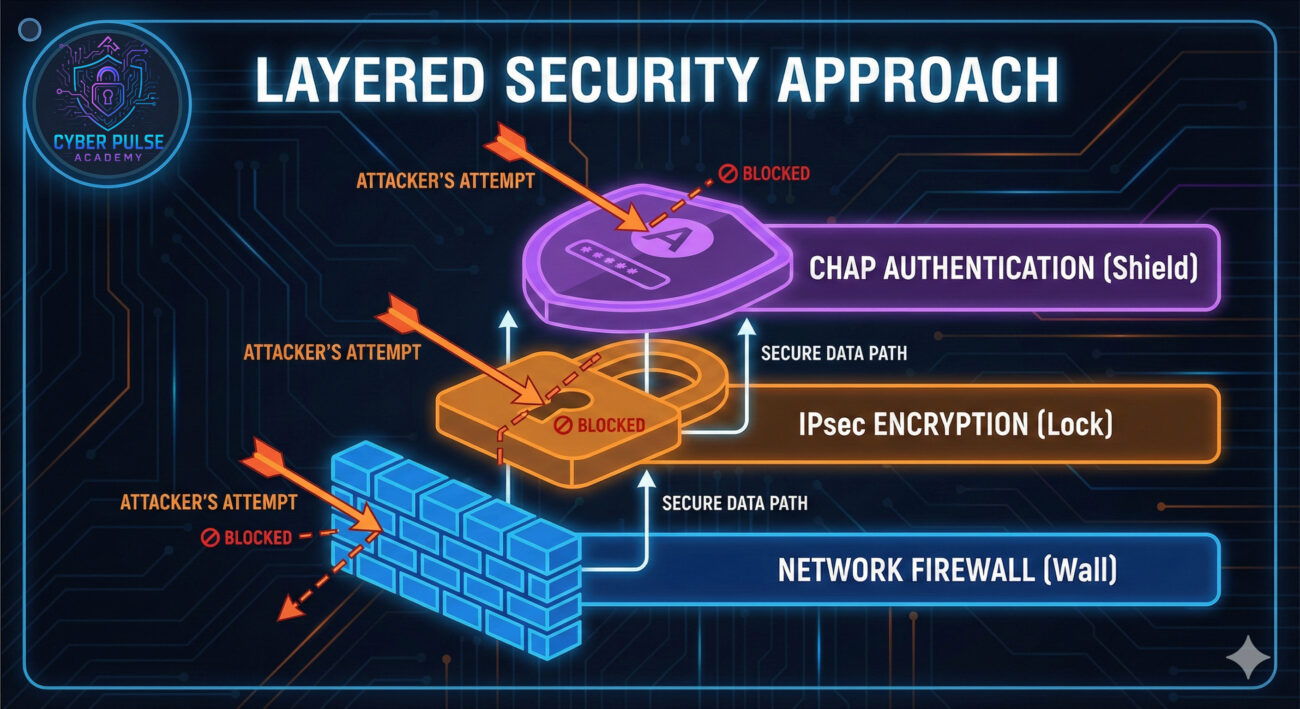
"CHAP (Challenge-Handshake Auth) is a reliable, standardized component in our secure access toolkit. Our focus is on rigorous configuration management: enforcing strong secrets, disabling legacy versions, and eliminating fallbacks. We monitor CHAP logs for anomalies, a spike in failures from a single IP could signal a brute-force attempt. We view CHAP not as a standalone solution, but as a critical authentication layer within our broader encrypted VPN and zero-trust framework. Our job is to close the gaps the Red Team looks for."
The CHAP protocol remains a fundamental and intelligent method for verifying identity across a network. Its genius lies in its simplicity and resistance to common attacks.
Understanding protocols like CHAP demystifies how your everyday connections stay secure and empowers you to advocate for stronger security practices, whether at home or in your organization.
Did this guide help you understand the CHAP protocol? Are you implementing it in your network? Share your thoughts, questions, or experiences in the comments below! Let's build a more secure digital world together.
Every contribution moves us closer to our goal: making world-class cybersecurity education accessible to ALL.
Choose the amount of donation by yourself.