


















































Certification Courses
Hands-On Labs
Threat Intelligence
Latest Cyber News
MITRE ATT&CK Breakdown
All Cyber Keywords
Imagine you're in a massive office building with thousands of employees, but there's no reception desk, no directory board, and everyone's contact information is scattered across different departments. Chaos, right? That's exactly what managing digital identities in organizations would be like without LDAP (Lightweight Directory Access Protocol).
LDAP is the universal directory service that keeps track of users, devices, and resources across networks – acting as the organized receptionist that knows exactly who everyone is and what they can access. But here's the crucial part: when this directory service isn't properly secured, it becomes one of the most attractive targets for cyber attackers.
In this comprehensive guide, you'll learn: what Lightweight Directory Access Protocol actually does in simple terms, why it's fundamental to cybersecurity, how attacks against Lightweight Directory Access Protocol happen, and most importantly, how to secure it properly – even if you're just starting your cybersecurity journey.
Have you ever wondered how large organizations manage thousands of user accounts, passwords, and access permissions without complete chaos? The secret ingredient is often Lightweight Directory Access Protocol. Created in the early 1990s, LDAP was designed to be a lighter, faster version of the more complex X.500 directory services – hence the "Lightweight" in its name.
Think of LDAP as the digital equivalent of a corporate phonebook combined with an ID card system. When you log into your work computer, email, or any company application, there's a good chance LDAP is working behind the scenes to verify who you are and what you're allowed to access. It's the backbone technology for services like Microsoft Active Directory, OpenLDAP, and countless authentication systems.
But here's what every beginner needs to understand: LDAP itself isn't the directory – it's the protocol (the rules) for accessing and managing that directory. Just like HTTP is the protocol for accessing websites, LDAP is the protocol for accessing directory information. This distinction is crucial because when we talk about Lightweight Directory Access Protocol security vulnerabilities, we're often talking about how attackers exploit the way this protocol is implemented or configured.

According to recent reports from CISA (Cybersecurity and Infrastructure Security Agency), directory services like those using Lightweight Directory Access Protocol are among the most targeted components in enterprise networks. Why? Because compromising an LDAP server often means gaining access to the keys to the kingdom – user credentials, access controls, and organizational structure information.
Consider these real-world impacts: When attackers breach an Lightweight Directory Access Protocol directory, they can potentially:
The importance of securing LDAP implementations has skyrocketed with the rise of remote work and cloud services. Modern hybrid environments often use LDAP to synchronize identities between on-premises systems and cloud applications, creating additional attack surfaces that need protection. As noted in NIST Special Publication 800-53, proper identity and access management – which relies heavily on directory services – is foundational to any security program.
For beginners, understanding Lightweight Directory Access Protocol security isn't just about learning a protocol – it's about understanding how digital identities are managed at scale and where the critical security controls must be placed. Every password reset, every new employee account creation, and every access request approval likely touches an LDAP directory somewhere in the process.
Before we dive deeper, let's demystify the essential terminology. Here are the most important LDAP concepts every cybersecurity beginner should understand:
| Term | Simple Definition | Everyday Analogy |
|---|---|---|
| Directory Information Tree (DIT) | The hierarchical structure that organizes all entries in the directory | Like a company's organizational chart showing departments and reporting lines |
| Distinguished Name (DN) | The unique identifier for each entry in the directory | Like a complete mailing address that uniquely identifies your home |
| Bind Operation | The process of authenticating to the LDAP directory | Like showing your ID card to enter a secure building |
| LDAP Injection | A type of attack where malicious input is sent to exploit LDAP queries | Like tricking a receptionist into giving you access to restricted areas |
| LDAPS (LDAP over SSL) | The secure version of LDAP that encrypts communications | Like having a private, encrypted phone line instead of shouting in public |
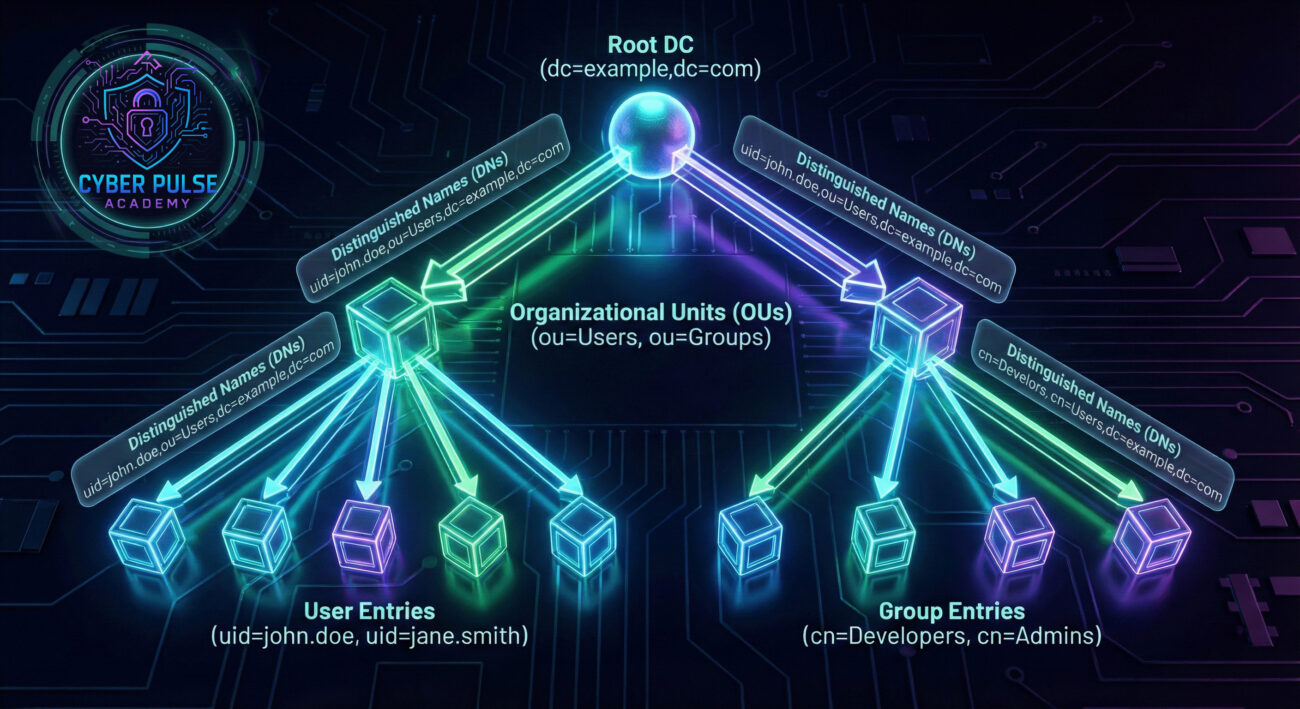
Let's follow Sarah, a systems administrator at TechGlobal Inc., through a hypothetical but all-too-real LDAP security incident. This story illustrates why proper Lightweight Directory Access Protocol security isn't optional – it's critical.
The Setup: TechGlobal uses an on-premises LDAP directory to manage 2,500 employee accounts. The directory handles authentication for email, file shares, and internal applications. For "convenience," some legacy systems still use unencrypted LDAP (port 389) instead of LDAPS (port 636).
The Timeline of Compromise:
| Time/Stage | What Happened | Impact |
|---|---|---|
| Day 1 | Attackers scan TechGlobal's network and discover unprotected LDAP port 389 | Initial foothold established |
| Day 3 | Using a known vulnerability in the LDAP software, attackers gain read access to directory | All usernames and group memberships exposed |
| Day 5 | Attackers find service accounts with weak passwords in the directory | Privilege escalation achieved |
| Day 7 | Using stolen credentials, attackers modify user permissions to access finance systems | Sensitive financial data compromised |
| Day 30+ | Attackers maintain persistent access through created backdoor accounts | Continuous data exfiltration undetected |
The Aftermath: When the breach was finally discovered during a routine security audit, TechGlobal faced massive remediation costs, regulatory fines, and damaged customer trust. The root cause? Insecure LDAP implementation combined with weak authentication controls.
The Lesson: This scenario shows how a single LDAP vulnerability can cascade into a full-scale breach. The directory service, meant to be a security control, became the attack vector. Proper configuration, monitoring, and hardening of LDAP services are not "nice-to-have" – they're essential defenses.
Whether you're evaluating an existing Lightweight Directory Access Protocol deployment or planning a new one, these steps provide a practical framework for security hardening. Follow this guide to transform your directory service from a potential vulnerability into a security asset.
Never allow plain LDAP (port 389) for authentication or data transfer. Mandate LDAPS (LDAP over SSL/TLS) on port 636 for all connections.
Related reading: Understanding TLS Encryption for Beginners
Move beyond simple username/password authentication for LDAP bind operations.
Related reading: Complete Guide to Multi-Factor Authentication
Limit what users and applications can do within the LDAP directory based on their actual needs.
Default Lightweight Directory Access Protocol installations often come with insecure settings that need adjustment.
You can't protect what you can't see. Implement logging and monitoring for all LDAP activities.
LDAP security isn't a one-time setup – it requires ongoing maintenance.
Related reading: Effective Patch Management Strategies
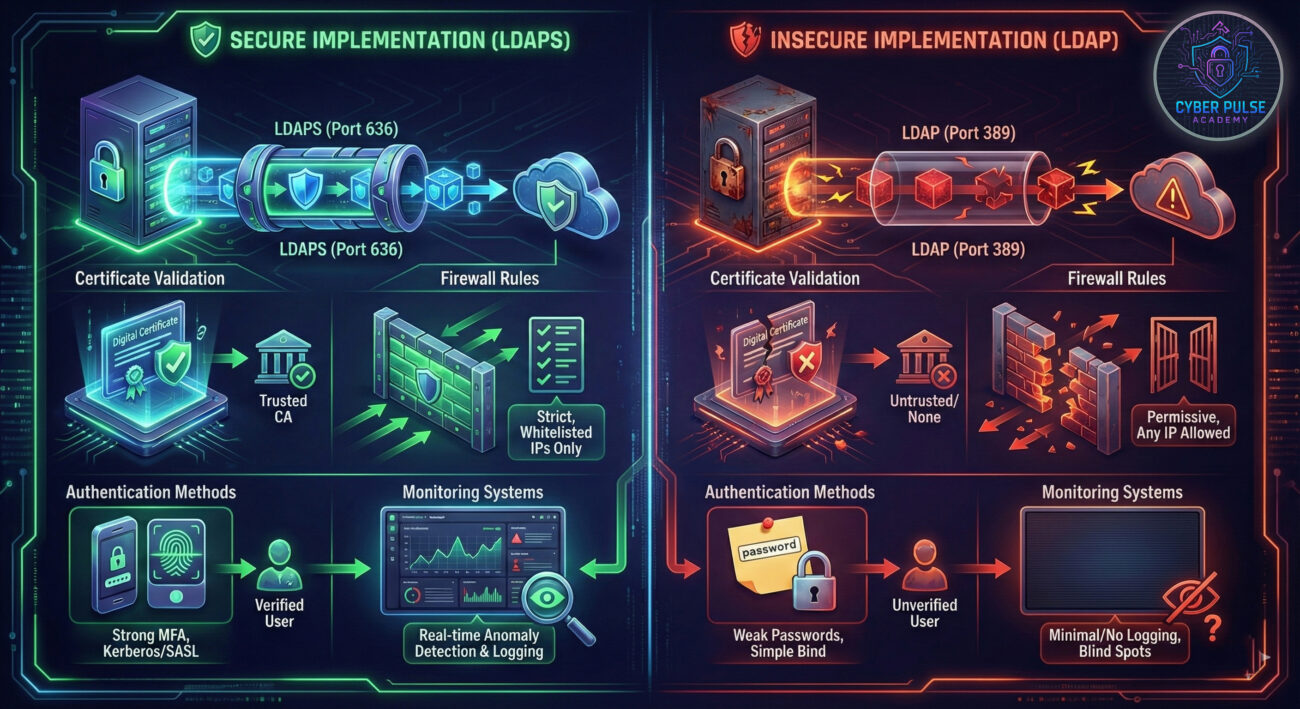
Let's examine a simple attack path an adversary might take against an LDAP directory, and how defenders can counter it – all without getting into technical tool specifics.
The Attack Path (Adversary's View): First, I'd scan the target network for open port 389 (LDAP) or 636 (LDAPS). If I find unencrypted LDAP, that's ideal – I can eavesdrop on authentication traffic. Even with LDAPS, I might find misconfigured certificate validation. My goal is to query the directory anonymously or with stolen credentials to map the organization's structure. Once I understand the directory tree, I look for service accounts with weak passwords or excessive privileges. Compromising one of these accounts gives me a foothold to create backdoor users or modify existing permissions.
The Defense Move (Protector's View): As a defender, I assume LDAP is a high-value target. I start by ensuring all LDAP communications are encrypted with valid certificates. I disable anonymous binds and implement account lockouts after failed attempts. Most importantly, I monitor for unusual query patterns – like requests for all user entries or attempts to enumerate the directory structure. I also regularly review service account permissions and ensure they follow least privilege principles. By treating the LDAP directory as a crown jewel and applying defense-in-depth, I make the attacker's job exponentially harder.
Lightweight Directory Access Protocol directories are treasure maps. They reveal the organizational structure, user relationships, and potential privilege escalation paths. I'm looking for misconfigurations – anonymous access, weak authentication, or unencrypted communications. Every piece of information I gather helps me craft more targeted attacks. Service accounts are particularly valuable targets because they often have elevated privileges and weaker security controls. A successful LDAP compromise can give me persistent access and the ability to move laterally across the network.
The Lightweight Directory Access Protocol directory is a critical asset that requires layered protection. I focus on securing the authentication process, encrypting all communications, and implementing strict access controls. Monitoring is essential – I need to detect reconnaissance activities early, before they escalate to full compromise. Regular audits help me ensure permissions haven't drifted from secure configurations. I treat LDAP security as an ongoing process, not a one-time configuration, because attackers continuously evolve their techniques.
Congratulations! You've now built a solid foundation in understanding Lightweight Directory Access Protocol from a cybersecurity perspective. Let's recap the essential points:
Remember that Lightweight Directory Access Protocol security isn't just about technology – it's about processes and people too. Ensure your team understands the importance of directory security, and establish clear procedures for managing LDAP configurations and responding to potential incidents.
Your next step? If you're responsible for systems using LDAP, conduct a security review using the framework in this guide. Check if you're using encrypted connections, review authentication methods, and verify your monitoring capabilities. For those studying cybersecurity, consider exploring related topics like Active Directory security or Identity and Access Management (IAM) principles.
Have questions about LDAP security or want to share your experiences? Join the conversation in the comments below! What aspect of directory services security would you like us to cover next?
Share this guide with colleagues who manage or depend on LDAP directories – security is a team effort!
Every contribution moves us closer to our goal: making world-class cybersecurity education accessible to ALL.
Choose the amount of donation by yourself.