


















































Certification Courses
Hands-On Labs
Threat Intelligence
Latest Cyber News
MITRE ATT&CK Breakdown
All Cyber Keywords
Have you ever wondered how governments and mega-corporations protect their most sensitive secrets from insider threats and hackers? The answer often lies in a powerful security model called Mandatory Access Control (MAC). In simple terms, MAC is like having an unforgiving, rule-obsessed security guard who decides exactly what everyone can see and touch based on strict labels, not personal judgment.
In this guide, you'll learn: what MAC really is (using everyday analogies), why it's the gold standard for high-security environments, the step-by-step logic behind it, and how understanding it makes you more security-aware, even if you never configure it yourself.
Imagine a military base. A private soldier can't just walk into the general's office and read top-secret battle plans. Why? Not because the door is locked (that's part of it), but because a central authority has defined clear rules: "Only personnel with 'Top Secret' clearance can enter this room." The soldier's rank or personal request doesn't matter. This is the essence of Mandatory Access Control.
In cybersecurity, Mandatory Access Control (MAC) is a security model where a central policy (set by administrators) forcibly controls access to resources (files, networks, programs) based on labels assigned to both users and data. The user has no say in changing these rules. It’s the opposite of the permission model on your home PC, where you, as the owner, can grant access to any file.
This guide will take you from "MAC sounds technical" to "I get why this is crucial for national security." We'll break down the jargon, walk through a relatable story, and show you the logical steps that keep the world's most sensitive data secure.
Mandatory Access Control isn't for your personal photo album; it's for environments where a single data leak can cause catastrophic damage. Think nuclear launch codes, medical research data, or financial market algorithms. According to the National Institute of Standards and Technology (NIST), MAC is foundational for systems evaluated at high assurance levels (like Common Criteria EAL4+).
The real-world importance skyrockets with the rise of insider threats. A Verizon Data Breach Investigations Report consistently shows a significant portion of breaches involve internal actors. Discretionary Access Control (DAC), the model where users own and can pass on their files, fails here. If a compromised or malicious employee has access, they can share sensitive data freely. MAC slams the door shut on this vulnerability.
For you, this matters because it shapes the security of services you trust. When your tax data is with the government or your health records are in a hospital system, robust models like MAC are part of what keeps them protected. Understanding it helps you appreciate the layers of defense in critical infrastructure.
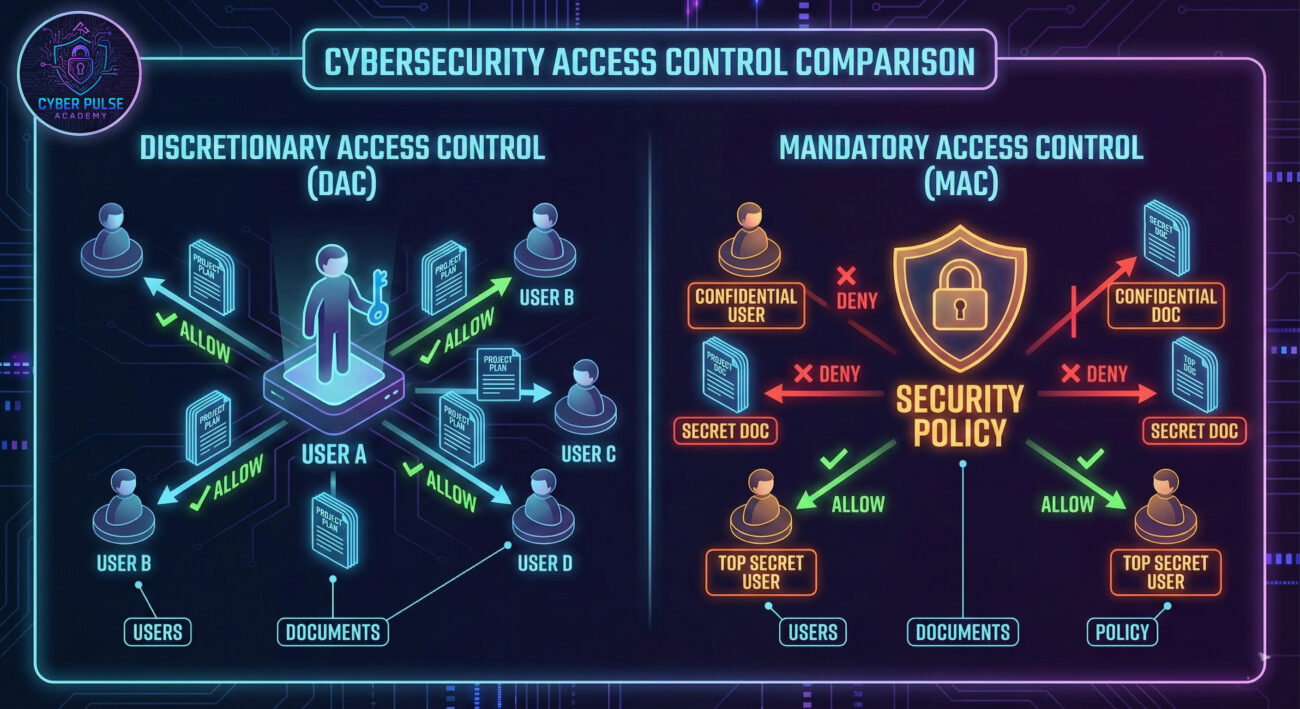
Don't let the jargon scare you. Here are the core concepts of Mandatory Access Control translated into simple language and everyday analogies.
| Term | Simple Definition | Everyday Analogy |
|---|---|---|
| Subject | The entity requesting access (e.g., a user, a program). | You, the employee, trying to enter a building. |
| Object | The resource being accessed (e.g., a file, database, printer). | The confidential file cabinet or the secure server room. |
| Security Label | A tag defining the sensitivity level (e.g., Top Secret, Public). | The color-coded badge you wear or the stamp on a document. |
| Access Policy | The central, unchangeable set of rules that decides if access is granted. | The corporate security manual that even the CEO must follow. |
| Reference Monitor | The system component (like a kernel) that enforces the policy on every access attempt. | The automated turnstile that scans your badge and only opens if the rules allow it. |
Let's follow Maria, a brilliant software engineer at SecureTech, a defense contractor. She has a "Secret" security clearance. Her project involves a new encrypted communication module. The design specs are stored in a file labeled "Top Secret".
Before MAC: In a typical company using discretionary controls, if Maria's manager (who has access) accidentally or maliciously shared the "Top Secret" file with her, she could read it, copy it, or email it out. The security depends entirely on individual users' decisions.
With MAC Enforced: SecureTech uses a Mandatory Access Control system (like SELinux on their servers). The central policy has one ironclad rule: "A subject can read an object only if the subject's clearance label is equal to or higher than the object's classification label." Maria ("Secret") tries to open the "Top Secret" design file. The Reference Monitor intercepts this request, compares labels, and immediately denies it. An alert is logged. Maria cannot override this, nor can her manager change the file's label to grant access. The system's policy is king.
| Time / Stage | What Happened | Impact |
|---|---|---|
| 9:00 AM | Maria logs in. Her session is assigned the "Secret" label. | She can only access objects labeled "Secret" or lower (e.g., "Confidential"). |
| 10:30 AM | She receives a task and needs the "Top Secret" design specs. She double-clicks the file. | The Reference Monitor blocks access instantly. A security log is generated. |
| 10:31 AM | Maria contacts the Security Officer. The officer reviews the policy and the legitimate "need-to-know." | Access is denied. Maria must work with a "Top Secret"-cleared colleague or get a sanitized version. |
| 11:00 AM | An auditor reviews the morning's access logs and sees the denied attempt. | The secure boundary held. The insider threat risk is contained by the system, not human trust. |
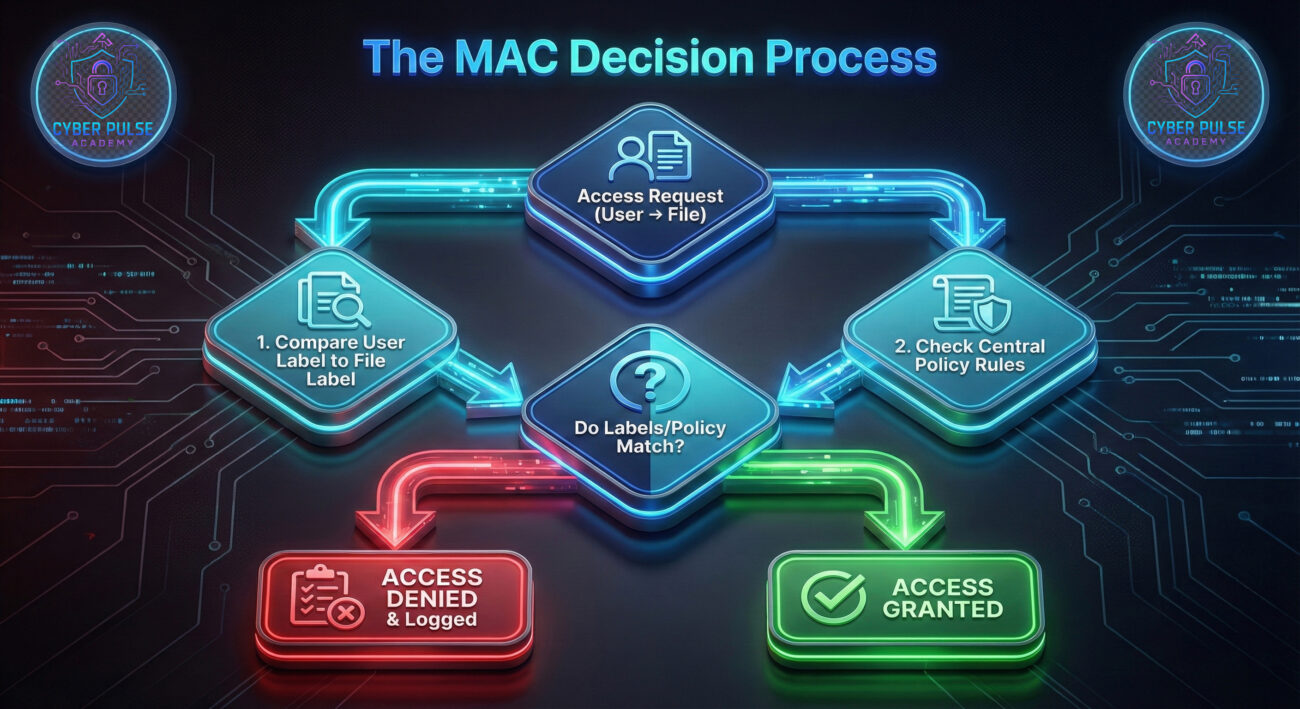
Let's break down the logical process of how Mandatory Access Control works from system setup to daily operation. This isn't a configuration manual, but a conceptual walkthrough.
The organization chooses a formal policy model that dictates the rules. The two most famous are:
These models are the mathematical blueprints for the rules.
Every single subject (user, process) and object (file, port, device) in the system is tagged with a security label. This is a massive, administrative task.
Labels are stored in a secure, tamper-proof database.
This is the heart of the system. Every time a program tries to open a file, send network data, or even just read memory, the Reference Monitor (built into the operating system kernel) intercepts the request.
Think of it as a microscopic security checkpoint for every single action.
The Reference Monitor consults the central policy and the labels involved. Using the rules from Step 1 (e.g., Bell-LaPadula), it makes a binary decision: ALLOW or DENY.
The decision is mandatory; no user privilege can override it.
Every decision, especially denials, is sent to a secure audit log. This creates an invaluable trail for security analysts.
This turns the MAC system from a static wall into an intelligent detection system. Learn more about security monitoring in our guide on Security Logging for Beginners.
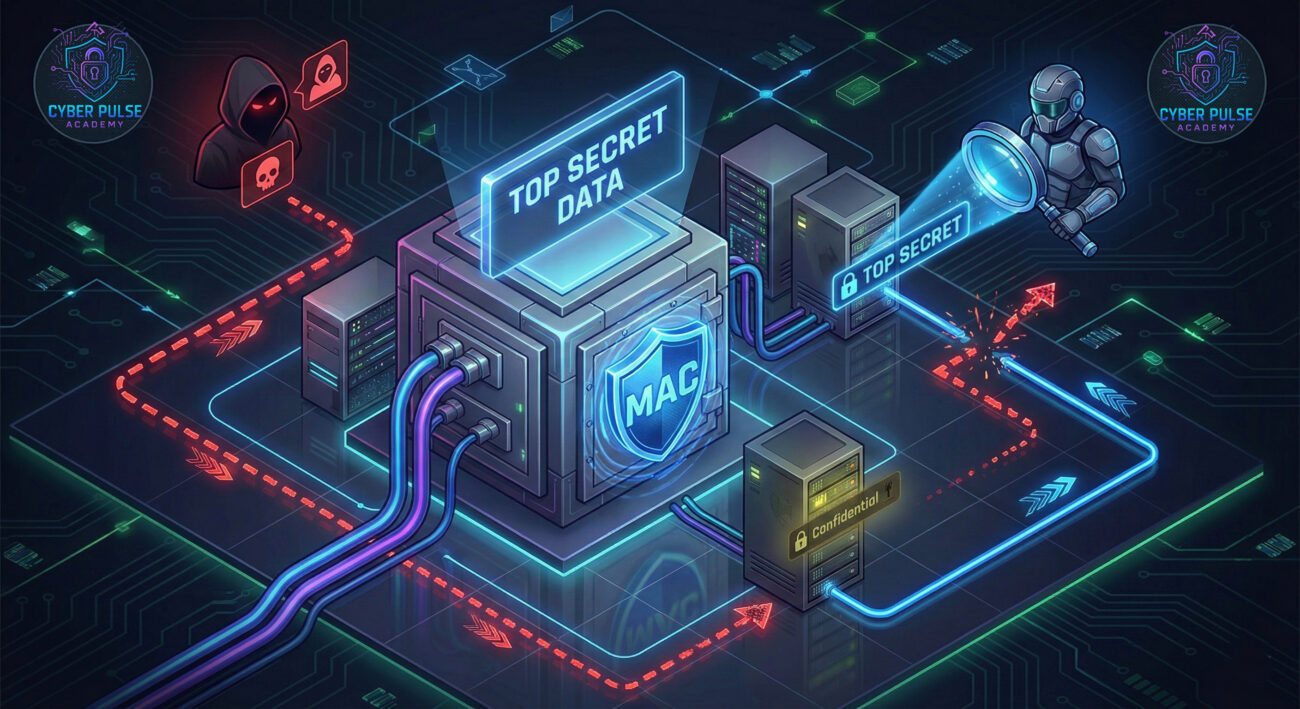
From an attacker's perspective, a well-configured Mandatory Access Control system is a formidable fortress wall. Their goal is to find a way around it, not through it.
Simple Attack Path: An attacker who has phished an engineer's credentials finds they can't directly access the "Crown Jewels" data due to MAC labels. Instead, they look for mislabeled objects. Perhaps a log file containing error messages from the high-security application was accidentally created with a "Confidential" label instead of "Top Secret". If the attacker's compromised account has "Confidential" clearance, they can now read this log, which might leak sensitive configuration details or system paths, a foothold for further exploitation. They hunt for the weakest link in the labeling scheme.
Defender's Counter-Move: The defender uses automated integrity checking and labeling verification tools. They run regular scans to ensure all files in sensitive directories carry the correct, high-level security label. Any file found with a lower label in a high-security area triggers an immediate investigation. Furthermore, they implement strict information flow control to prevent high-level processes from writing data to lower-level locations, closing the "write-down" loophole that could be used to exfiltrate data piece by piece.
"MAC is the primary obstacle. We can't just escalate privileges and own the system. Our playbook shifts to label manipulation and discovery. We need to find processes or services that have high labels but are vulnerable to code injection, if we can exploit one, we inherit its powerful label. Alternatively, we search for policy flaws: can a high-clearance user's action be influenced to create a new object with a mishandled label? Our goal is to find the crack in the policy's logic or its implementation."
"MAC is our strongest containment layer. It provides assured isolation. Our focus is on policy correctness and log analysis. We rigorously verify that every new system component is labeled appropriately at installation. We monitor for anomalies: why is a process with a 'Web Server' label suddenly trying to read a 'Financial Database' label? That's an immediate alert. We treat the MAC policy as a living document, refining it to eliminate any unnecessary permissions, making the attacker's job of lateral movement incredibly noisy and difficult."
Congratulations! You've navigated through one of cybersecurity's core advanced concepts. Let's solidify what you've learned:
While you may not set up a Mandatory Access Control system tomorrow, you now possess the foundational knowledge to understand security discussions at a higher level and appreciate the sophisticated mechanisms guarding our digital world.
Did this guide demystify Mandatory Access Control for you? What other cybersecurity concepts would you like explained in simple terms? Share your thoughts, questions, or experiences in the comments below! Let's build a more security-aware community together.
Every contribution moves us closer to our goal: making world-class cybersecurity education accessible to ALL.
Choose the amount of donation by yourself.