


















































Certification Courses
Hands-On Labs
Threat Intelligence
Latest Cyber News
MITRE ATT&CK Breakdown
All Cyber Keywords
Why Physical Access Control Matters in Cybersecurity Today
Imagine someone walking into your office and stealing sensitive data right from your desk, sounds like a nightmare, doesn’t it? This is where physical access control comes in. In simple terms, physical access control is the practice of restricting entry to physical spaces, like buildings or rooms, to only authorized people. Think of it as a bouncer at a club checking IDs; without it, anyone could waltz in and cause trouble.
In this guide, you’ll learn: what physical access control is, why it’s crucial for cybersecurity, key terms you need to know, a real-world scenario to see it in action, step-by-step steps to implement it, common mistakes to avoid, and best practices to keep your spaces secure.
Have you ever forgotten to lock your front door and felt a pang of worry? In cybersecurity, neglecting physical access control can lead to far worse consequences. Physical access control is your first line of defense against unauthorized entry to spaces where sensitive data or assets are stored. It’s like putting a lock on your diary; without it, anyone can peek inside. In this post, we’ll break down this concept into bite-sized pieces, so even if you’re a complete beginner, you’ll walk away with actionable knowledge to protect your physical environments.
Why should you care about physical access control? In today’s digital age, we often focus on firewalls and passwords, but if an attacker can physically touch your devices, all that digital security might crumble.
According to a report from CISA, physical breaches account for over 30% of security incidents in organizations. That means nearly one in three attacks starts with someone gaining unauthorized physical access. Whether it’s your home office, a corporate building, or a data center, implementing physical access control safeguards your assets from theft, vandalism, or espionage. It connects directly to your daily life, for instance, using a keycard to enter your workplace or a fingerprint scan on your smartphone. By mastering this, you’re not just securing spaces; you’re building a holistic cybersecurity mindset.
Before diving deeper, let’s clarify some essential terms. This table will help you understand the jargon without getting overwhelmed.
| Term | Simple Definition | Everyday Analogy |
|---|---|---|
| Access Point | A physical location where entry is controlled, like a door or gate. | Like a ticket gate at a movie theater, you need a ticket to pass through. |
| Credential | Something used to prove identity, such as a key, card, or biometric data. | Your driver’s license when asked for ID; it verifies who you are. |
| Multi-Factor Authentication (MFA) | Using two or more methods to verify identity for access. | Like needing both a key and a code to open a safe, double protection. |
| Tailgating | When an unauthorized person follows an authorized person through an access point. | Like someone sneaking into a concert behind you without a ticket, a common vulnerability. |
| Access Control List (ACL) | A list that defines who is allowed or denied access to specific areas. | Like a guest list at a party; only names on the list get in. |
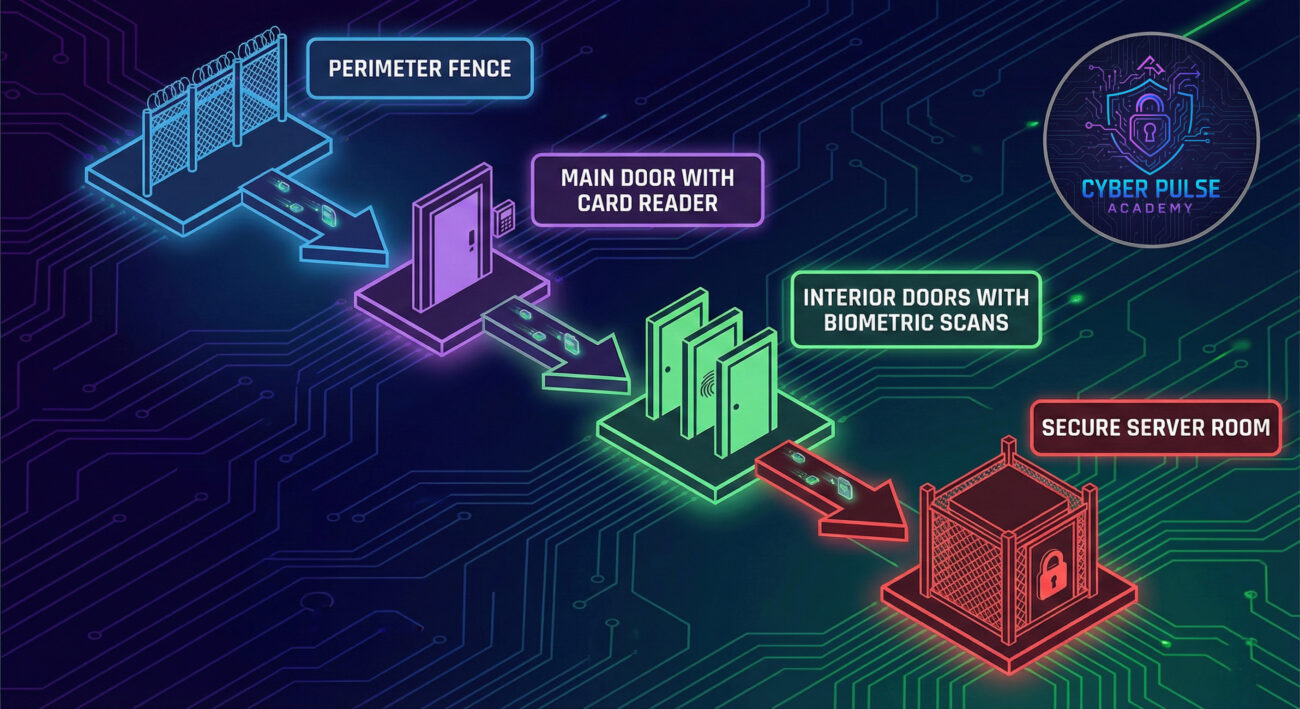
Let’s meet Alex, an IT manager at a mid-sized company. The company relied on digital security but neglected physical access control, doors were often left unlocked, and employees shared keycards casually. One evening, an attacker named Mara posed as a delivery person and slipped into the building during shift change. Since there were no secure checks, she accessed the server room and planted a malware-loaded USB drive, leading to a data breach that cost the company $500,000 in damages and reputational harm.
Here’s a timeline of what happened:
| Time/Stage | What Happened | Impact |
|---|---|---|
| Day 1: Evening | Mara tailgated an employee into the building due to weak door policies. | Unauthorized physical access gained. |
| Day 1: Night | She accessed the server room using a shared keycard left on a desk. | Critical infrastructure compromised. |
| Day 2: Morning | Malware activated, stealing sensitive data and disrupting operations. | Data breach detected; financial losses began. |
| Week 1: Aftermath | Company implemented strong password policies and MFA for physical access. | Improved security, but reputational damage lingered. |
This story highlights how skipping physical access control can domino into digital disasters. By learning from Alex’s mistakes, you can prevent similar attacks.
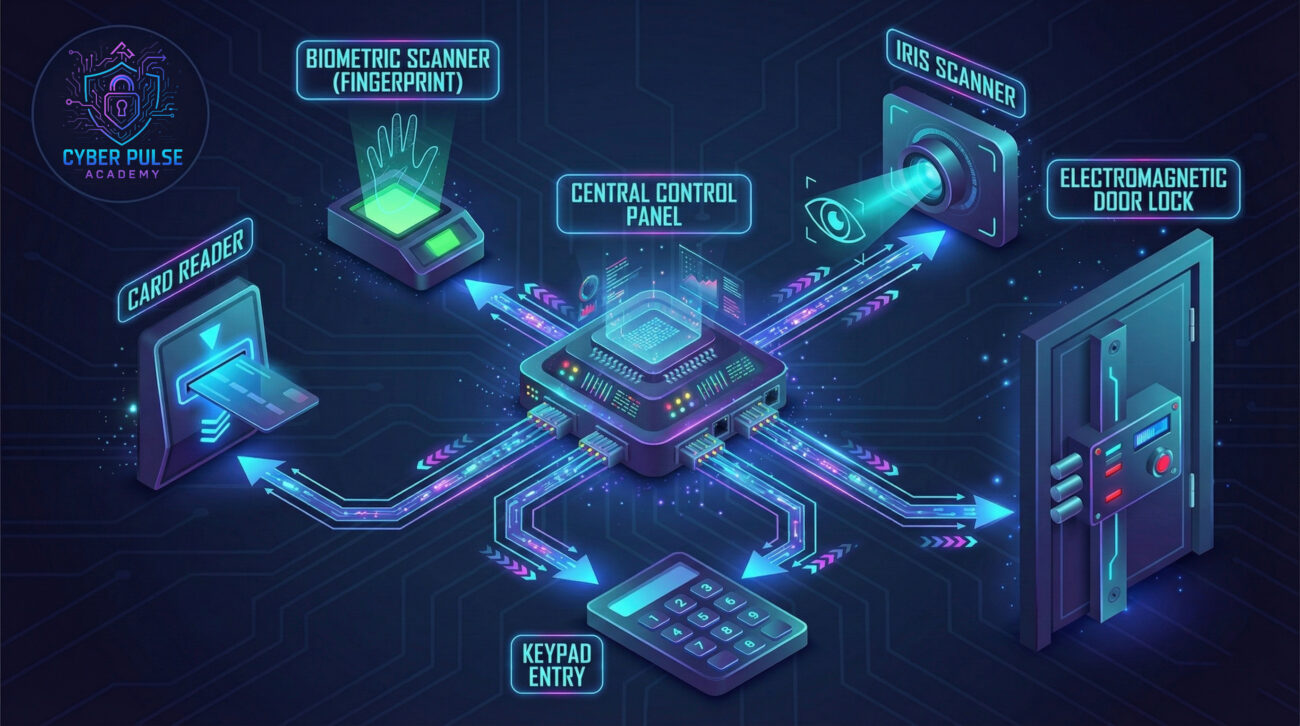
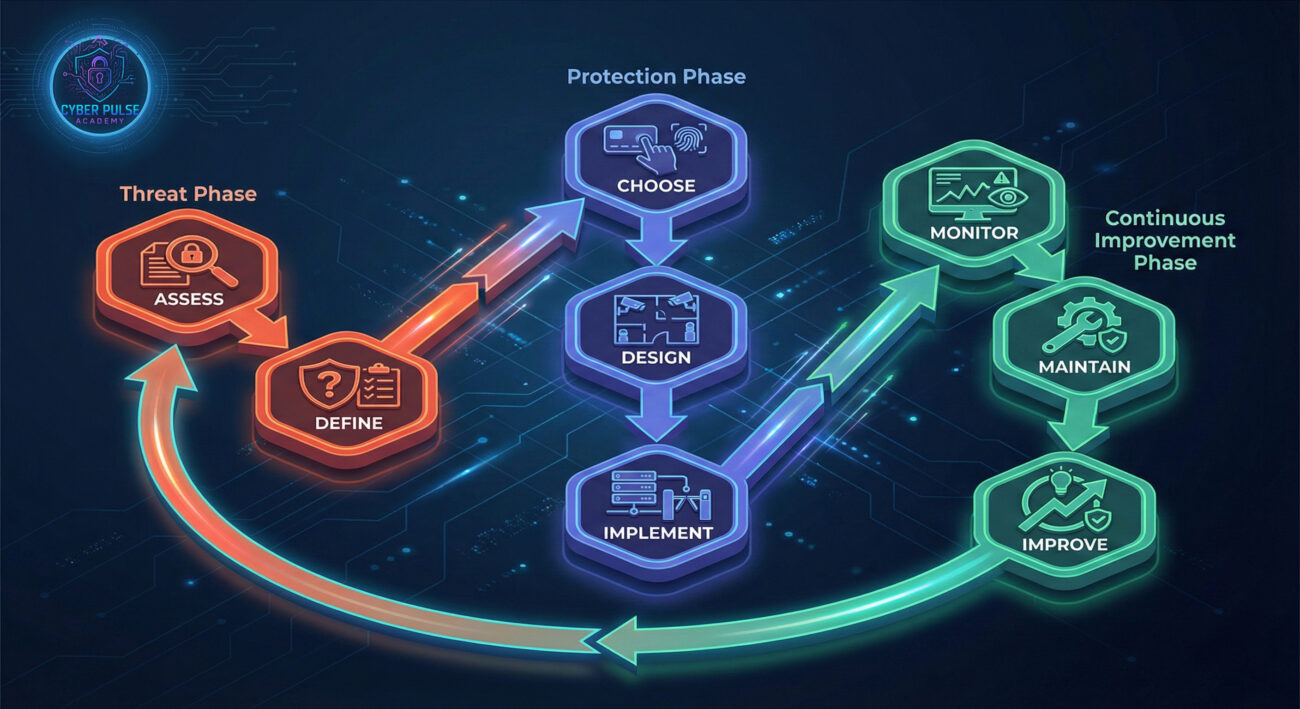
Follow these steps to secure your physical spaces effectively. Each step builds on the previous to create a robust defense.
Start by evaluating what you already have. Walk through your spaces and identify all access points.
Create clear rules for who can enter where and when. This is your Access Control List (ACL).
Select methods to verify identity. Avoid relying solely on traditional keys.
Deploy hardware and software to enforce your policies.
Educate everyone on proper procedures. Human error is a common risk.
Keep an eye on who enters and exits. Regular audits help catch issues early.
Security isn’t a one-time task. Evolve with new threats and technologies.
To master physical access control, know what to avoid and what to embrace. Here’s a quick breakdown.
Let’s peek into an attacker’s mindset. A hacker targeting physical access might start with social engineering, posing as a maintenance worker to slip past reception. Once inside, they look for propped-open doors or unsecured server rooms, exploiting weak policies. For example, they might use a stolen keycard during lunch hour when vigilance is low.
From a defender’s perspective, the counter-move is proactive monitoring. By implementing surprise security checks and using encrypted audit trails, you can detect unusual patterns, like repeated access attempts, and respond before damage occurs. It’s about thinking like an attacker to stay one step ahead, without needing technical tools, just sharp observation and strict protocols.
Understanding both sides helps balance your security strategy. Here’s a quick comparison.
A red teamer sees physical access control as a puzzle to solve. They care about finding the easiest entry point, maybe a distracted employee or an outdated lock. Their goal is to bypass barriers quickly and quietly, often using deception or exploiting human trust. For them, a successful attack means gaining unnoticed access to steal data or plant devices.
A blue teamer views physical access control as a shield to maintain. They focus on layering defenses, verifying every entry, and monitoring for anomalies. Their priority is ensuring only authorized personnel get in, using tools like MFA and cameras. For them, success means preventing breaches through constant vigilance and secure updates.
Physical access control isn’t just about locks and keys; it’s a critical part of cybersecurity that protects your physical spaces from real-world threats. By now, you should feel confident in your understanding. Let’s recap the key takeaways:
Remember, in cybersecurity, every layer counts, and physical access control is the foundation that keeps your digital assets safe. Start applying these lessons today to secure your spaces effectively.
Have questions or tips about physical access control? Share your thoughts in the comments below! If you found this guide helpful, explore more on our blog, like our post on password security or two-factor authentication. Stay secure!
Every contribution moves us closer to our goal: making world-class cybersecurity education accessible to ALL.
Choose the amount of donation by yourself.