


















































Certification Courses
Hands-On Labs
Threat Intelligence
Latest Cyber News
MITRE ATT&CK Breakdown
All Cyber Keywords
Ever wondered how websites remember you're logged in without asking for your password every single time? That's the magic – and the potential vulnerability – of session tokens. These invisible digital keys are the guardians of your online identity, and understanding them is your first step toward true digital security.
A session token is simply a unique string of characters that websites use to recognize you after you log in. Think of it like a concert wristband – once you've shown your ticket (password), you get a wristband (token) that lets you move around freely without constantly proving who you are.
In this guide, you'll learn: what session tokens actually are, why they're a prime target for hackers, how to spot when they're being attacked, and most importantly, how to protect yourself with simple, actionable steps.
Imagine you're at an exclusive party. You show your invitation (your password) at the door, and the bouncer gives you a special wristband (your session token). As long as you wear that wristband, you can come and go freely, get drinks, and access VIP areas without showing your invitation again. That's exactly how session tokens work online.
A session token is a temporary, unique identifier created by a website or app after you successfully log in. It's stored either in your browser's cookies or in local storage, and it's sent back to the server with every request to prove "Hey, it's still me!" This prevents you from having to enter your credentials repeatedly.
But here's the critical part: if someone steals your wristband at the party, they instantly become you. Similarly, if a hacker steals your session token, they gain full access to your account without ever knowing your password. This is why understanding and protecting these tokens is so essential for your online security.
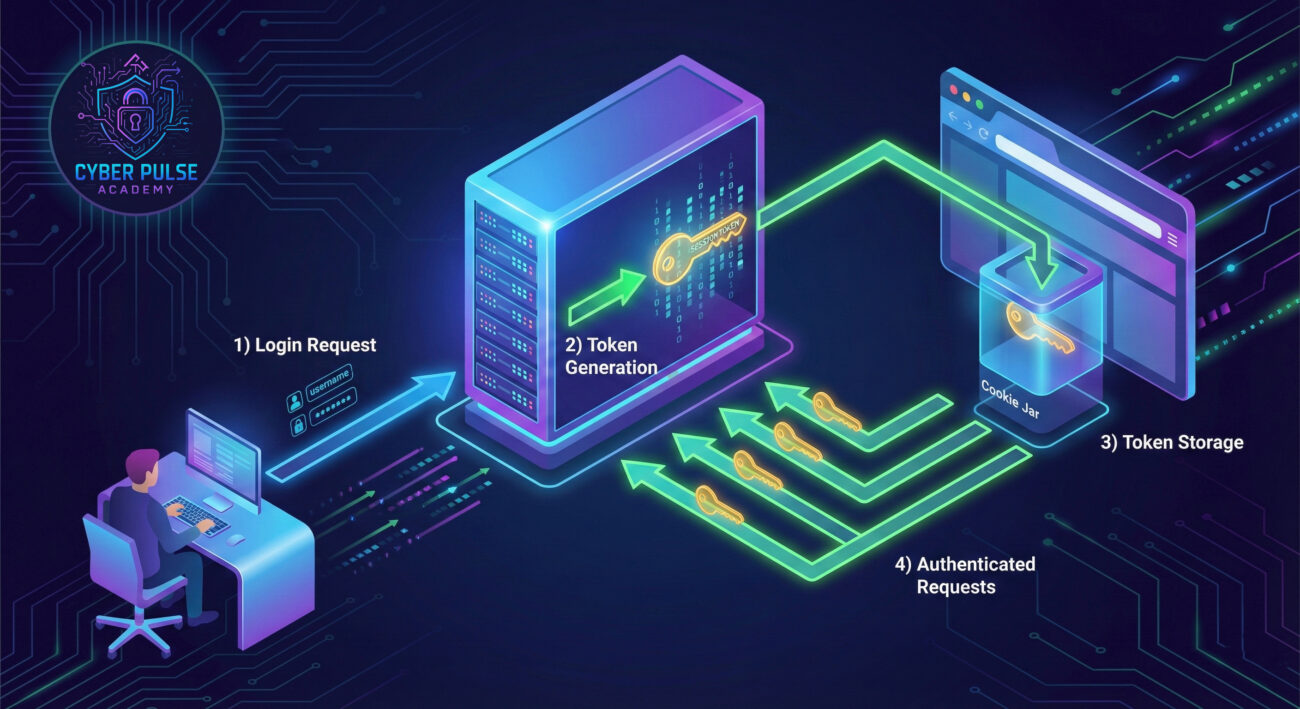
Session tokens aren't just a convenience feature – they're at the heart of modern web security. According to the OWASP Top Ten, broken authentication (which includes session token vulnerabilities) remains one of the most critical web application security risks. When attackers compromise session tokens, they bypass all other security measures.
Consider this: a CISA advisory highlighted that session hijacking attacks have increased by 200% in the last three years. Why? Because with the rise of multi-factor authentication (MFA) making password theft less effective, hackers have shifted focus to stealing active sessions instead.
Every time you use online banking, shop on e-commerce sites, access your email, or use social media, you're relying on session tokens. A compromised session token means someone could drain your bank account, make purchases with your saved credit cards, read your private messages, or even impersonate you to scam your contacts. This isn't theoretical – major platforms like Facebook and Twitter have faced session hijacking attacks affecting millions.
| Term | Simple Definition | Everyday Analogy |
|---|---|---|
| Session Token | A temporary digital key that proves you're logged in | A concert wristband that gets you back in without your ticket |
| Session Hijacking | When an attacker steals your session token to impersonate you | Someone stealing your wristband to enter the concert as you |
| Token Expiration | A security feature that makes tokens invalid after a set time | Your wristband expiring at the end of the concert |
| Man-in-the-Middle (MitM) | When a hacker intercepts communication between you and a website | Someone secretly listening to your phone conversation |
| HTTPS/SSL | Encrypted communication that protects data in transit | Sending a letter in a locked, tamper-proof box instead of a postcard |
Sarah, a freelance graphic designer, often works from her local coffee shop. One Tuesday morning, she connects to the café's free WiFi (which has no password), logs into her online banking to check a payment, then switches to her email and project management tools. Unbeknownst to her, someone in the corner is running freely available network sniffing tools.
The coffee shop's WiFi wasn't using proper encryption, allowing the attacker to perform a Man-in-the-Middle attack. When Sarah accessed a website that was still using HTTP instead of HTTPS (a common mistake on some older sites), her session token was sent in plain text. The hacker captured it instantly.
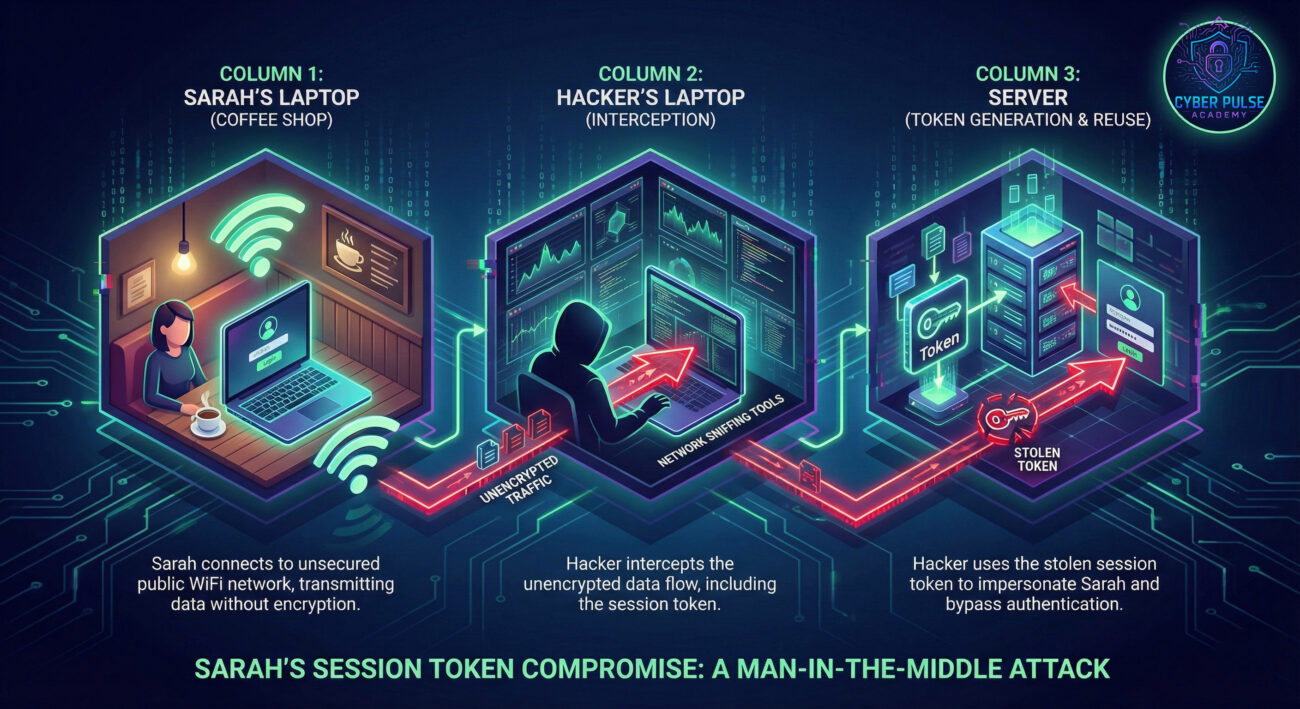
| Time/Stage | What Happened | Impact |
|---|---|---|
| 9:00 AM | Sarah connects to open coffee shop WiFi | Vulnerability: Unencrypted network access |
| 9:15 AM | She logs into her project management tool (HTTP site) | Session token transmitted in plain text |
| 9:16 AM | Hacker's sniffing tool captures the token | Breach: Token now compromised |
| 9:30 AM | Sarah continues working, unaware | False sense of security |
| 10:00 AM | Attacker uses stolen token from different location | Full account access without password |
| Outcome | Client project files stolen, account misused | Financial loss and reputational damage |
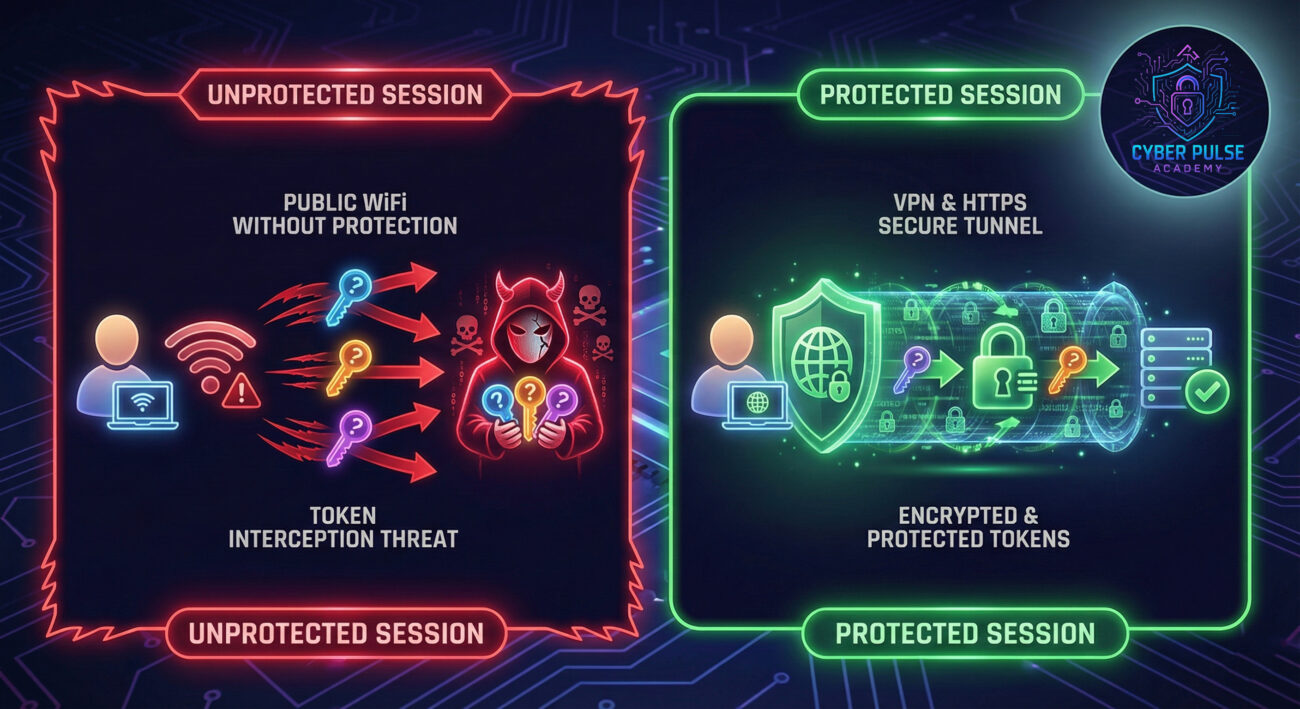
This scenario highlights why using secure connections (HTTPS everywhere) and avoiding public WiFi for sensitive tasks are crucial. Sarah's mistake wasn't using public WiFi – it was using it without additional protection like a VPN and not verifying all sites used HTTPS.
Before logging into any website, check for HTTPS in the address bar and the padlock icon. This ensures your connection is encrypted, making it much harder for anyone to intercept your session token.
When using coffee shop, airport, or hotel WiFi, always activate a reputable VPN. This creates an encrypted tunnel for all your traffic, protecting it from local network snoopers.
It seems simple, but actively logging out of websites (especially on shared devices) immediately invalidates your session token on the server side.
Regular updates to your browser, operating system, and security software patch vulnerabilities that could be exploited to steal session tokens.
While MFA primarily protects login, some advanced implementations also help protect sessions by requiring re-authentication for sensitive actions.
Many services (Google, Facebook, banking apps) let you review and manage active sessions – devices currently logged into your account.
A good password manager doesn't just store passwords – it can also help you avoid phishing sites that might steal your tokens by only auto-filling on verified domains.
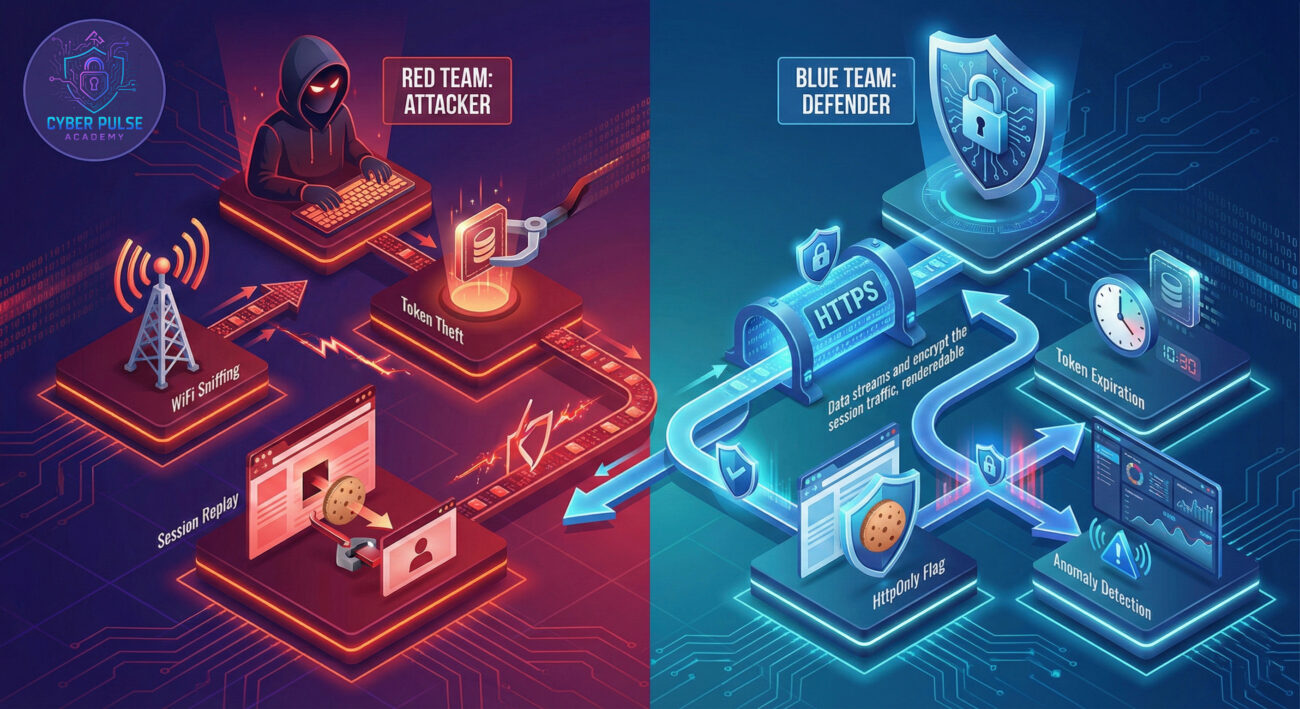
Understanding how attackers think helps you defend better. Let's examine a simple attack path and the corresponding defensive move.
Attacker's Approach: A threat actor sets up in a coffee shop with free tools that capture unencrypted network traffic. They're not targeting anyone specific – they're casting a wide net, looking for anyone accessing HTTP (not HTTPS) websites. When they capture a session token from an HTTP connection, they immediately try using it on the corresponding website. If the token is still valid (the user hasn't logged out), they now have full access.
Defensive Strategy: Websites implement secure flags on their session cookies (like HttpOnly and Secure flags) and enforce HTTPS-only connections. They also implement short session timeouts for sensitive actions. As a user, you complement this by always using HTTPS, employing a VPN on public networks, and logging out of sessions when finished. This layered approach – proper website configuration plus informed user behavior – creates multiple barriers the attacker must overcome.
"Session tokens are the golden ticket. Why bother cracking passwords when I can just steal the token that proves you're already logged in? I look for weak implementations: tokens that don't expire, aren't properly invalidated on logout, or are transmitted without encryption. Public WiFi is my hunting ground – I look for people accessing HTTP sites or using apps without proper certificate pinning. Once I have a valid token, I have all the access of the legitimate user without triggering any login alerts."
What they care about: Token longevity, lack of encryption, poor logout implementation, and users on unsecured networks.
"Our goal is to make tokens worthless if stolen. We implement short expiration times, bind tokens to specific devices or IP addresses (with care for mobile users), and ensure immediate invalidation on logout. We use the HttpOnly flag to prevent JavaScript theft via XSS attacks and the Secure flag to ensure tokens only travel over HTTPS. We monitor for abnormal token usage patterns – if a token normally used in New York suddenly appears in Moscow minutes later, that's an instant red flag."
What they care about: Proper token attributes, encryption in transit and at rest, monitoring for anomalous use, and user education about session security.
Session tokens are the invisible workhorses of your online experience, making browsing convenient but creating significant security implications when mishandled. By now, you understand that protecting your session tokens is just as important as protecting your passwords.
Key Takeaways:
Remember that session token security is a shared responsibility. Websites need to implement tokens properly with security flags and expiration, but you as the user must also do your part by using secure connections and practicing good session hygiene. Your session token is your digital identity card – guard it as carefully as you would your physical ID.
Cybersecurity is a constantly evolving field, and we learn best from each other. Have you ever received a "new device login" notification that wasn't you? What steps do you take to protect your sessions on public networks?
Share your thoughts, questions, or experiences in the comments below – let's build a more security-aware community together!
Further Reading: Check out our guides on Password Security Fundamentals and Mastering Multi-Factor Authentication to build a complete personal security framework.
Every contribution moves us closer to our goal: making world-class cybersecurity education accessible to ALL.
Choose the amount of donation by yourself.