


















































Certification Courses
Hands-On Labs
Threat Intelligence
Latest Cyber News
MITRE ATT&CK Breakdown
All Cyber Keywords
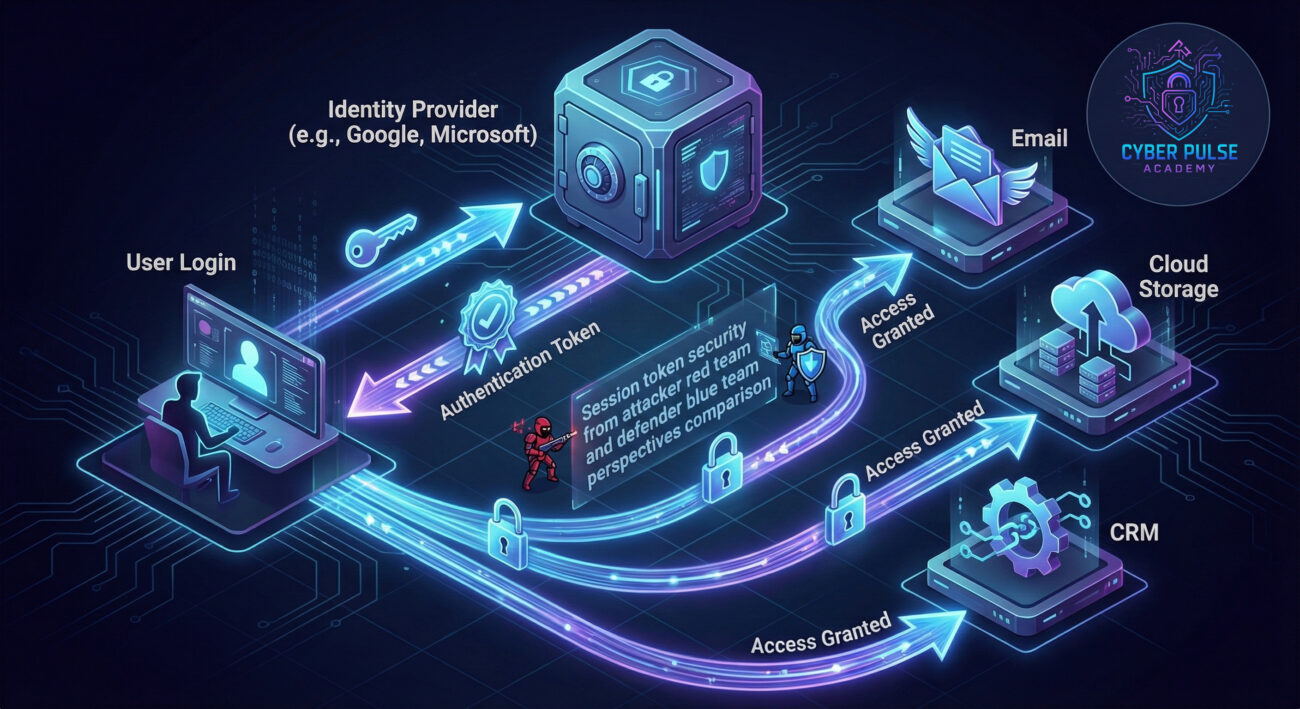
Ever feel overwhelmed by the sheer number of passwords you need to remember? Single Sign-On (SSO) is your cybersecurity superhero, solving the password fatigue problem while actually making you more secure. Imagine having one master key that safely opens every door in your digital building, that's SSO in action.
In this guide, you'll learn: exactly how SSO works without technical jargon, why it prevents common security breaches, how to implement it step-by-step, and the crucial mistakes to avoid when using this powerful tool.
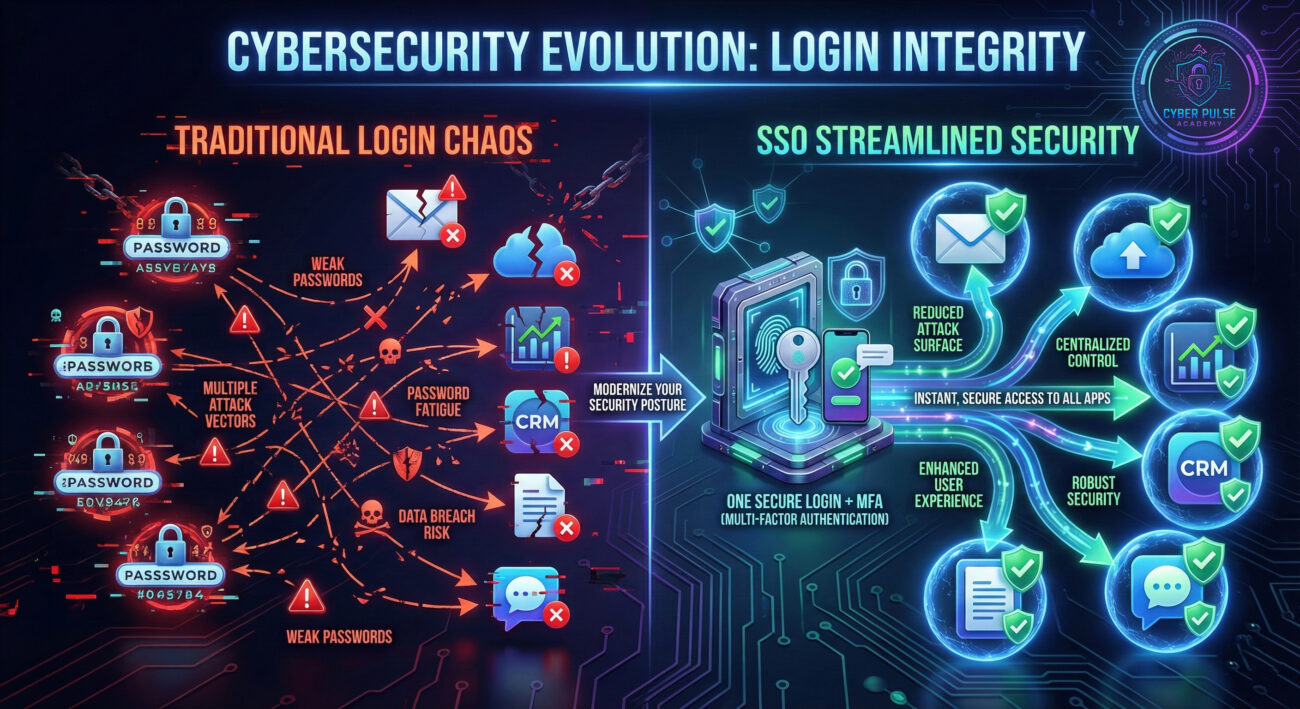
Remember the last time you clicked "Forgot Password" for the third time in a week? You're not alone, the average person manages 100 passwords across their digital life. This password overload leads to dangerous shortcuts: reusing passwords, writing them down, or choosing weak variations. Single Sign-On (SSO) solves this by letting you use one set of strong credentials to access multiple applications securely.
Think of SSO like your passport at an airport security checkpoint. Once you're verified at the main gate (with your passport/photo ID), you can access all the gates, lounges, and facilities without showing ID repeatedly. The security checkpoint is thorough once, then trusts that verification throughout your journey.
This beginner's guide will demystify SSO completely. You'll learn how it actually enhances security while simplifying your life, see real-world examples of SSO in action, and discover how to implement it safely, whether for personal use or in a business setting.
Single Sign-On isn't just a convenience feature, it's becoming a security essential. According to the Verizon Data Breach Investigations Report, over 80% of breaches involve compromised credentials. When you use SSO with proper multi-factor authentication (MFA), you're dramatically reducing your attack surface.
Consider this: every additional password creates another potential entry point for hackers. SSO consolidates these entry points into one heavily fortified gateway. Major breaches like the Colonial Pipeline attack often start with a single compromised password. SSO, when properly configured with MFA, could have prevented the initial access.
For businesses, implementing Single Sign-On means better security monitoring. IT teams can track login attempts centrally, detect suspicious activity more easily, and instantly revoke access across all applications when an employee leaves. This centralized control transforms security from a patchwork of solutions into a unified defense system.
| Term | Simple Definition | Everyday Analogy |
|---|---|---|
| Identity Provider (IdP) | The service that stores and verifies your identity, like Google, Microsoft, or Okta | Like a government passport office, they verify who you are and issue credentials others trust |
| Service Provider (SP) | The application or website you want to access (like Salesforce, Slack, or Dropbox) | Like different countries you visit, they trust your passport (from the IdP) to let you in |
| Authentication Token | A digital "key" issued after successful login that proves your identity to other services | Like a wristband at a festival, once you're verified at entrance, you can access all areas |
| SSO Attack Surface | The potential vulnerabilities in an SSO system that attackers might exploit | Like having one master lock, if it's picked, all doors open; but it's easier to make one lock super strong |
| MFA (Multi-Factor Authentication) | Adding extra verification steps beyond just a password (like phone codes or biometrics) | Like needing both a key AND a fingerprint scan to enter a high-security facility |
Sarah, a marketing manager at a mid-sized company, used to juggle 15 different passwords for various tools: email, project management, CRM, design software, analytics platforms, and more. Like many people, she reused variations of her dog's name with different numbers, a major security risk.
When her company implemented Single Sign-On with Microsoft Azure AD as their identity provider, everything changed. Now Sarah logs in once each morning with her corporate account plus a phone verification code. She automatically accesses all her tools without additional passwords. When she needs a new application, IT simply adds it to their SSO configuration, no new credentials for Sarah to remember or manage.
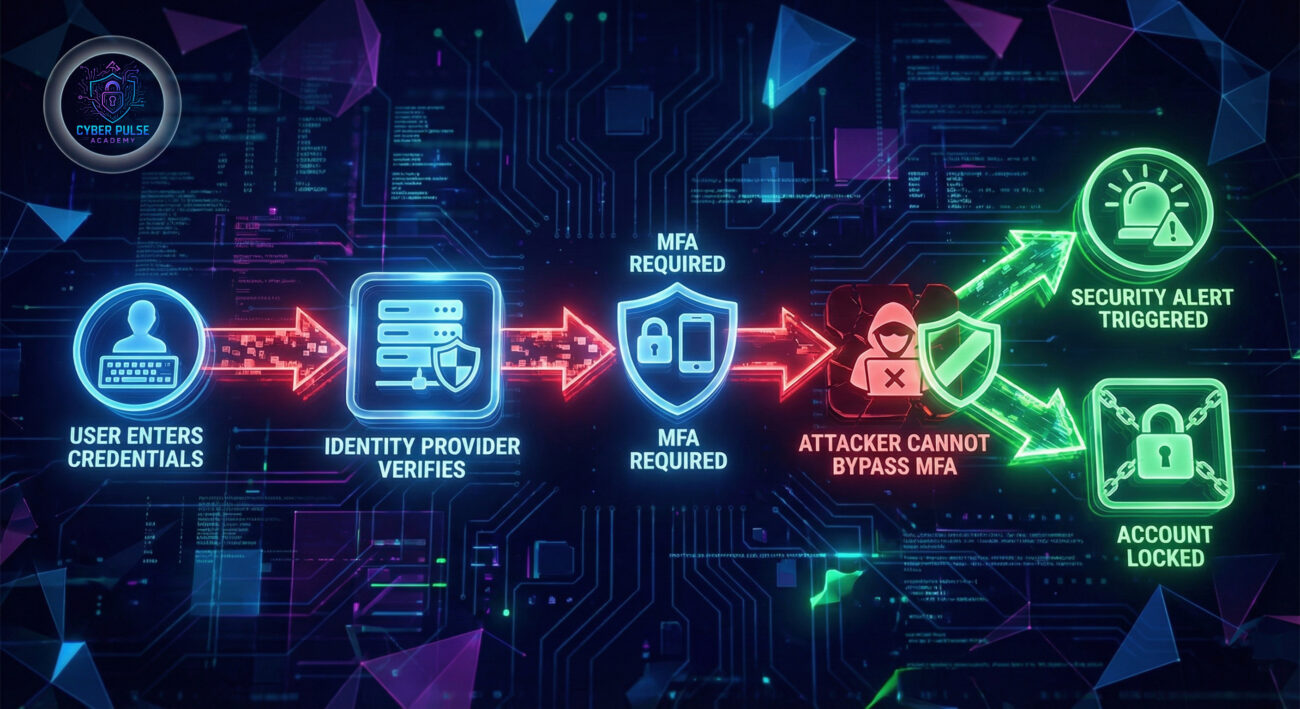
The real test came when Sarah accidentally clicked a phishing link in a fake "urgent" email. Previously, this could have compromised her email password. But with SSO and MFA, the attacker couldn't proceed past the phone verification step. IT security immediately detected the suspicious login attempt from an unfamiliar location and locked the account, preventing any breach.
| Time/Stage | What Happened | Impact |
|---|---|---|
| Before SSO | 15+ different passwords, password reuse, written notes | High risk of credential theft, frequent password resets, poor user experience |
| SSO Implementation | Microsoft Azure AD configured as Identity Provider for all business apps | One secure login with MFA, centralized access control, improved security |
| Phishing Attempt | Sarah clicks malicious link, enters (now single) credentials | Attacker gets username/password but blocked by MFA requirement |
| Security Response | IT detects unusual login location, automatically locks account | Breach prevented, Sarah re-authenticates securely, all applications protected |
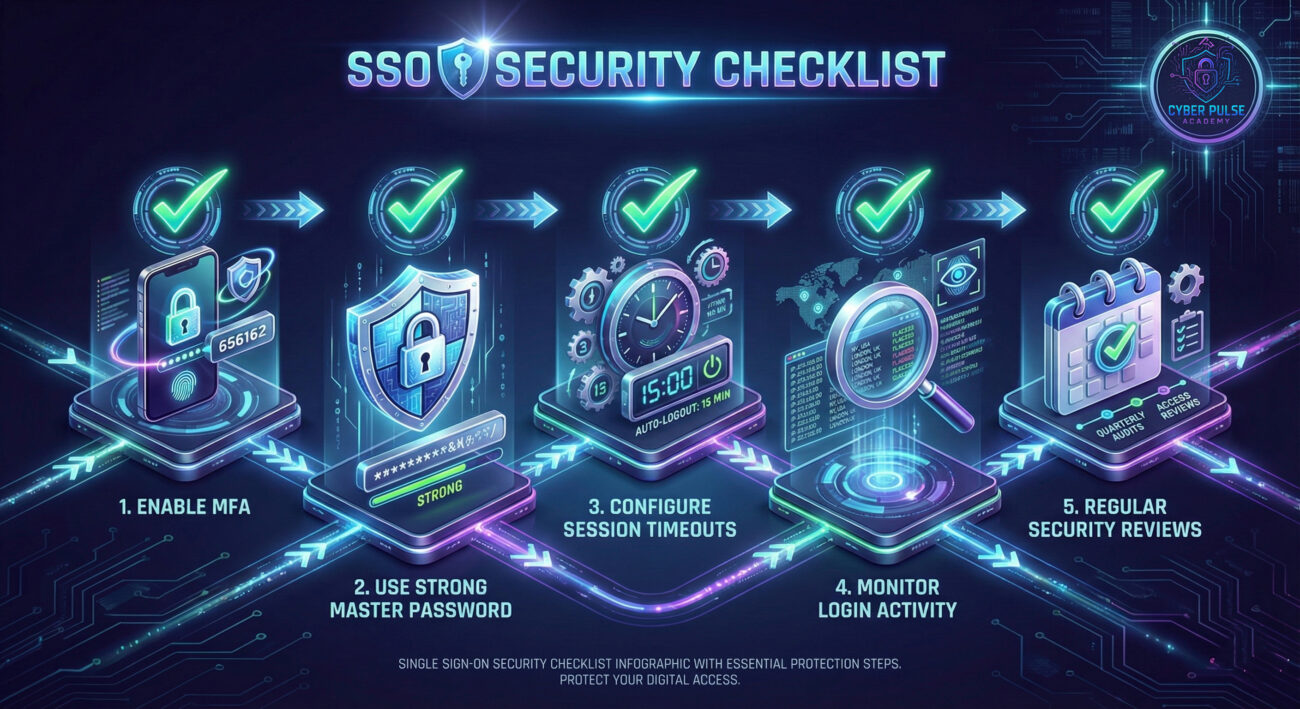
Select a reputable IdP based on your needs. For personal use, Google or Microsoft accounts work well. For businesses, consider dedicated solutions like Okta, Azure AD, or Ping Identity.
List all applications that will use SSO. Categorize them by importance and sensitivity. Start with less critical apps to test the process before moving to vital systems.
Set up your chosen IdP with security best practices. This is your central security checkpoint, so configure it carefully.
Start with a non-critical application to test the SSO flow. Follow the IdP's documentation for adding a new "service provider" or "application."
Set rules that automatically protect your accounts based on risk factors. Modern IdPs allow policies based on location, device, time, and behavior.
SSO changes how people log in. Provide clear instructions and explain the security benefits to ensure adoption and proper use.
Regularly review SSO logs and update configurations. Security is ongoing, not a one-time setup.
From a defender's perspective, understanding how attackers view Single Sign-On systems is crucial for protection. Here's one simplified attack path and counter-move:
Attack Path - Credential Phishing to IdP: Instead of targeting individual applications, hackers create convincing fake login pages for the identity provider itself. If an employee enters their master credentials here, the attacker gains access to EVERY connected application instantly. They might use urgency ("Your account will be locked!") or mimic IT department communications to increase success rates.
Defender's Counter-Move - User Training + Technical Controls: First, regularly train users to recognize phishing attempts targeting the SSO portal. Teach them to check URLs carefully and never click login links in emails. Technically, implement FIDO2 security keys or certificate-based authentication that can't be phished. Configure your IdP to display organization-specific branding that's hard for attackers to replicate perfectly. Finally, set up impossible travel alerts that trigger when a login occurs from two geographically distant locations in an unrealistic timeframe.
"SSO represents both challenge and opportunity. The challenge: breaching one well-protected credential with MFA is harder than finding that one weak password among dozens. The opportunity: if we DO compromise those master credentials, we get the keys to the entire kingdom instantly. We look for SSO implementations without proper MFA, misconfigured session timeouts, or inadequate monitoring. We particularly target the human element, phishing the SSO portal itself or exploiting password reset processes."
"SSO transforms our security monitoring from scattered to centralized. We can now see authentication patterns across ALL applications in one dashboard. This lets us detect anomalies faster, like a user logging into HR systems at 3 AM from another country. Our focus shifts to fortifying the identity provider with the strongest available MFA, configuring intelligent conditional access policies, and ensuring proper logging/alerting. We treat the IdP as our most critical security asset and protect it accordingly with regular audits, updates, and testing."
Single Sign-On represents a fundamental shift in digital security, from managing dozens of vulnerable entry points to fortifying one main gateway. When implemented correctly with multi-factor authentication and proper monitoring, SSO actually enhances security while dramatically improving user experience.
Key takeaways for beginners:
Whether you're implementing Single Sign-On for personal use or across an organization, remember that it's not a "set and forget" solution. Regular reviews, user education, and staying current with security best practices will ensure your SSO implementation remains a security asset rather than a liability.
Have questions about implementing Single Sign-On in your specific situation? Confused about any terms or concepts? Share your thoughts and questions in the comments below! Your real-world experiences help other beginners navigate their cybersecurity journey more confidently.
Further Reading: Explore our related guides on Multi-Factor Authentication Deep Dive, Password Manager Security, and Advanced Phishing Protection Strategies to build comprehensive digital security knowledge.
Every contribution moves us closer to our goal: making world-class cybersecurity education accessible to ALL.
Choose the amount of donation by yourself.