


















































Certification Courses
Hands-On Labs
Threat Intelligence
Latest Cyber News
MITRE ATT&CK Breakdown
All Cyber Keywords
Quick Summary: Web authentication is your digital ID card that proves you are who you say you are online. From passwords to facial recognition, it's the gatekeeper standing between your accounts and hackers trying to steal your information.
Have you ever wondered how websites know it's really you logging into your email or bank account? That's web authentication at work, and understanding it could save you from becoming the next cybersecurity breach statistic.
Web authentication is simply the process that verifies you are who you claim to be when accessing online services. Think of it like showing your ID to a bouncer at an exclusive club, except this club contains your personal photos, financial information, and private conversations.
In this beginner-friendly guide, you'll learn:
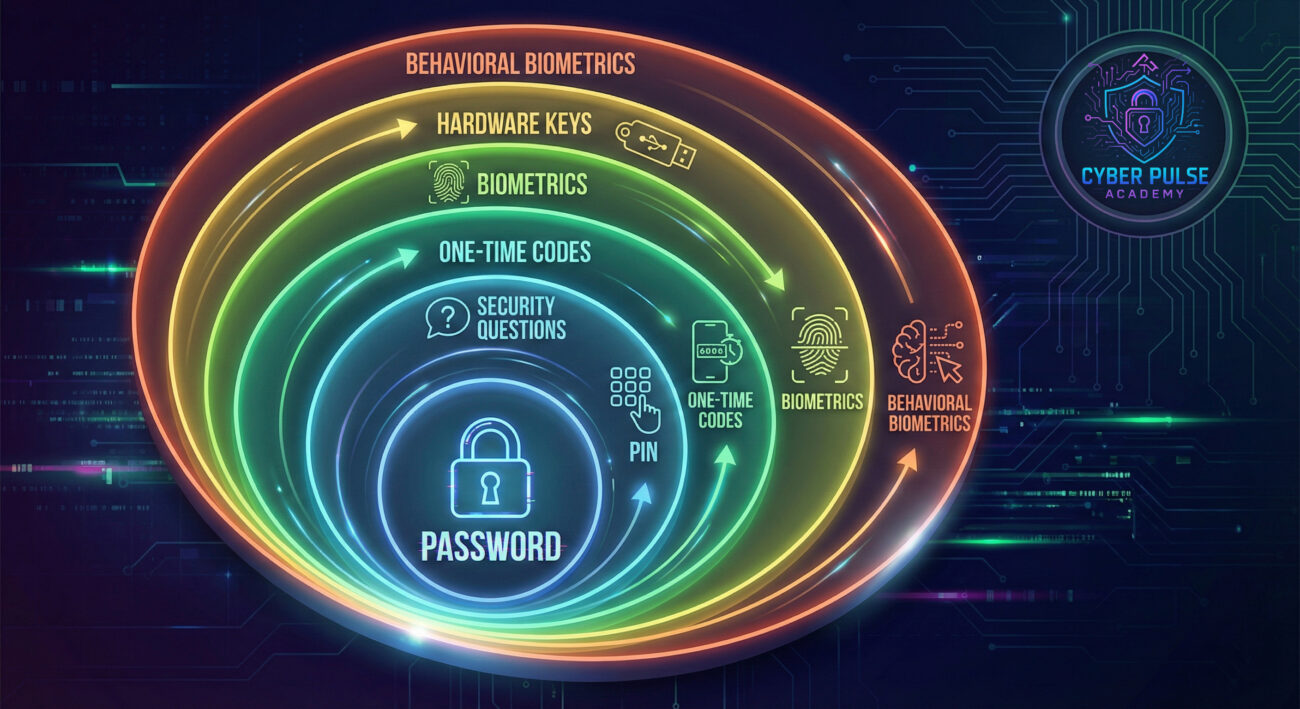
Imagine your online accounts as houses in a digital neighborhood. Without proper web authentication, you're leaving your front door unlocked with a welcome mat saying "Everything valuable is inside!"
Every time you log into social media, email, or banking websites, you're using some form of authentication. The simplest version is the password you've memorized (or maybe written on a sticky note). But just like physical keys can be copied or stolen, digital credentials can be compromised too.
This guide will walk you through everything from basic passwords to advanced biometric systems. You'll learn not just what these methods are, but why some are like flimsy screen doors while others are like bank vaults. Let's start by understanding why this matters more today than ever before.
According to the Verizon 2023 Data Breach Investigations Report, 80% of breaches involve stolen or weak credentials. That means the majority of cyber attacks succeed because web authentication systems failed or were bypassed.
Consider these alarming statistics:
Web authentication isn't just about convenience, it's about survival in today's digital landscape. Every online service you use, from streaming platforms to healthcare portals, relies on authentication to protect your data. When these systems fail, the consequences range from embarrassing social media hijackings to devastating financial losses.
The shift to remote work and increased online shopping has made authentication even more critical. Your Netflix password might seem unimportant until you realize many people reuse it for their email, which is the key to resetting ALL their other passwords.

Let's break down the technical jargon into simple concepts anyone can understand:
| Term | Simple Definition | Everyday Analogy |
|---|---|---|
| Authentication | Proving you are who you say you are | Showing your driver's license at airport security |
| Multi-Factor Authentication (MFA) | Using two or more different proofs of identity | Needing both a key AND a fingerprint to enter a high-security building |
| Phishing | Tricking someone into giving away credentials | A fake police officer asking for your house keys |
| Biometrics | Using unique physical traits for identification | Your face being your ticket to enter an exclusive event |
| Brute Force Attack | Guessing passwords through trial and error | Trying every key on a keychain until one opens the door |
| Encryption | Scrambling data so only authorized parties can read it | Sending a letter in a locked box that only the recipient can open |
Sarah, a freelance graphic designer, used the same password for everything: "Sunshine123!". She thought the exclamation mark made it secure. One day, she received an email that looked exactly like it was from Netflix, saying her payment failed. Without thinking, she clicked the link and entered her credentials.
What Sarah didn't realize was this was a sophisticated phishing attack. The attackers now had the password she used for everything. Within hours, they accessed her email, social media, and even her PayPal account. The timeline below shows how quickly things escalated:
| Time/Stage | What Happened | Impact |
|---|---|---|
| 2:15 PM | Sarah clicks the phishing link and enters credentials | Attackers capture her main password |
| 2:30 PM | Attackers access her email using the stolen password | They now control password reset for all other accounts |
| 3:45 PM | Social media accounts are compromised | Friends receive suspicious messages asking for money |
| 4:20 PM | PayPal unauthorized transaction of $850 | Immediate financial loss |
| 5:00 PM | Sarah notices strange emails and enables MFA | Attackers blocked from further access |
Sarah was lucky, she caught it early and only lost $850. Many aren't so fortunate. The Federal Trade Commission reported that Americans lost $8.8 billion to fraud in 2022, much of it starting with compromised authentication.

Before improving, understand your starting point. Make a list of your most important accounts (email, banking, social media, work). For each, note:
Be honest, this audit is for your eyes only. Check out our guide on password audit tools for help.
A password manager is your single most important authentication security upgrade. It generates, stores, and auto-fills strong, unique passwords for every site.
MFA adds that crucial second layer. Even if someone gets your password, they can't access your account without the second factor.
Hackers often try to bypass authentication rather than break it. Recognize these red flags:
When in doubt, navigate directly to the website yourself rather than clicking links.
For your most valuable accounts (email, banking, cryptocurrency), consider upgrading to hardware security keys like YubiKey.
Proactive monitoring catches breaches early. Schedule monthly checks:
What happens if you lose access to your MFA method or forget your master password?
Understanding web authentication requires seeing it from both the attacker's and defender's perspectives.
The Simple Attack Path: An attacker starts with credential harvesting, either buying lists from dark web markets after major breaches or sending phishing emails disguised as legitimate services. They use automated tools to test these credentials across hundreds of popular sites (called "credential stuffing"). When they hit a match, they immediately check if the account has any payment methods saved, access valuable data, or use it to launch further attacks against the victim's contacts.
The Defender's Counter-Move: Defenders focus on breaking the attack chain early. They implement rate limiting (blocking too many login attempts), require MFA for all sensitive actions, monitor for suspicious login patterns (like logins from foreign countries minutes apart), and educate users to recognize phishing attempts. The most effective defenders assume some credentials will be compromised and focus on making those credentials useless to attackers through layered authentication.
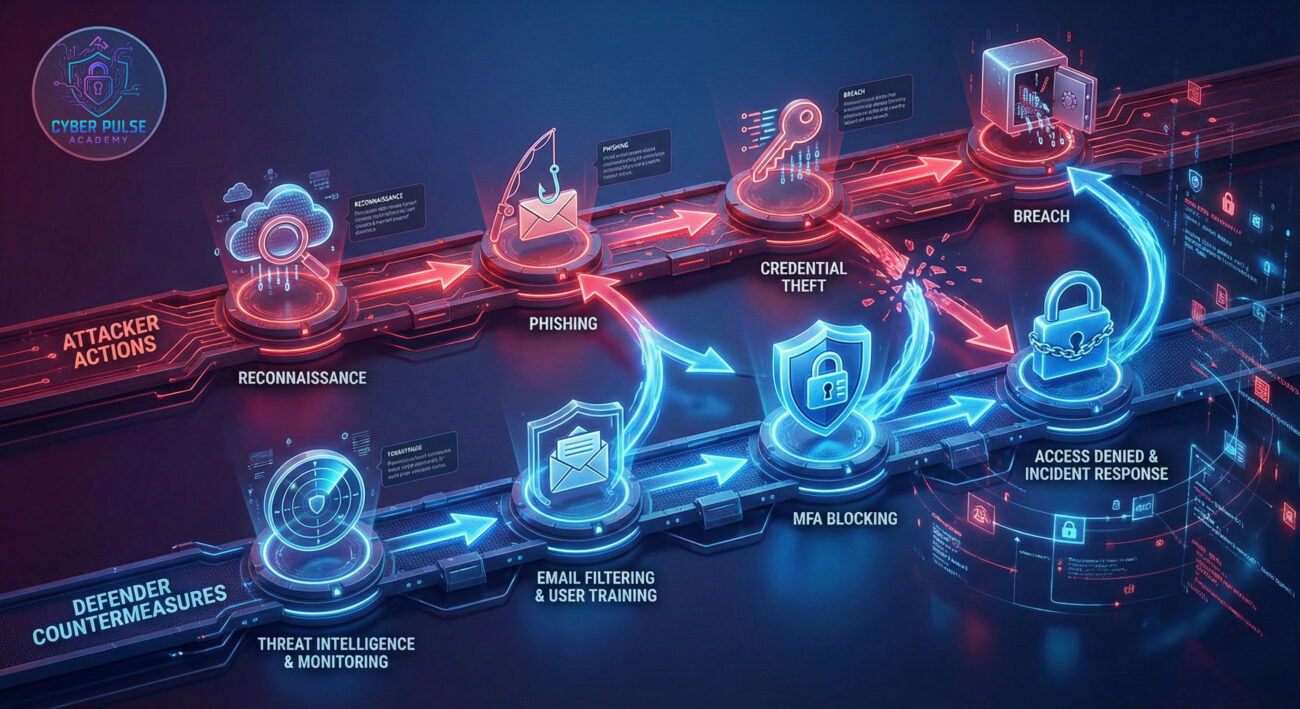
Attackers see authentication as obstacles to bypass, not systems to respect. They look for the weakest link: maybe it's the user who reuses passwords, the company that hasn't implemented MFA, or the system that allows unlimited password guesses. Their goal is efficiency, finding the path of least resistance to gain access. They don't care about breaking the strongest authentication if they can trick a user into approving an MFA prompt or resetting a password to one they control. They're constantly probing for human error and configuration mistakes.
Defenders view authentication as a layered system where no single point should become a failure point. They assume credentials will be compromised and focus on making those stolen credentials useless through additional factors. Their priority is balancing security with usability, if authentication is too cumbersome, users will find workarounds that create vulnerabilities. They monitor for abnormal patterns, educate users, and constantly update systems as new threats emerge. For them, authentication isn't just a technical system but a human behavioral challenge.
Web authentication may seem technical, but at its core, it's about one simple principle: proving you are who you say you are before being granted access. In today's digital world, mastering this isn't optional, it's essential for protecting your digital life.
Your main takeaways should be:
Remember that authentication is your digital front door. You wouldn't leave your house unlocked, don't leave your digital life unprotected either. Start today by implementing just one improvement: enable MFA on your email account or install a password manager. Small steps create significant security improvements over time.
What's your biggest authentication challenge? Do you struggle with remembering passwords, find MFA cumbersome, or have questions about specific methods? Share your thoughts and questions in the comments below, let's build a more secure digital community together!
Further Reading: Check out our related guides on advanced password security, biometrics and privacy, and phishing defense strategies.
Pro Tip: Bookmark this page and schedule a recurring calendar reminder every 3 months to review your authentication setup. Cybersecurity isn't a one-time task, it's an ongoing practice.
Every contribution moves us closer to our goal: making world-class cybersecurity education accessible to ALL.
Choose the amount of donation by yourself.