


















































Certification Courses
Hands-On Labs
Threat Intelligence
Latest Cyber News
MITRE ATT&CK Breakdown
All Cyber Keywords
Have you ever used the same password for multiple websites? If so, you're not alone, but you might be the next victim of a credential stuffing attack. This cyber threat is like a thief finding your house key and trying it on every door in your neighborhood.
Credential stuffing is a cyber attack where hackers use stolen username and password combinations from one website to break into accounts on other websites. Think of it as digital lock-picking using keys that people have already lost.
Here's a simple analogy: Imagine your email password gets stolen from a shopping site breach. Hackers then try that same email-password combination on your bank, social media, and work accounts. If you've reused passwords (and millions do), they've just hit the jackpot.
In this guide, you'll learn exactly how credential stuffing works, see real examples of its damage, and discover 7 practical steps to protect yourself, even if you're a complete beginner to cybersecurity.
Credential stuffing isn't just another tech term, it's a multi-billion dollar problem affecting real people every day. When major companies like CISA report credential stuffing campaigns targeting streaming services, or when NIST emphasizes authentication importance, they're talking about this exact threat.
Consider these eye-opening facts: According to recent cybersecurity reports, credential stuffing accounts for over 90% of login attempts on retail websites during major sales events. Hackers automate these attacks using tools that can test thousands of credentials per minute across hundreds of websites simultaneously.
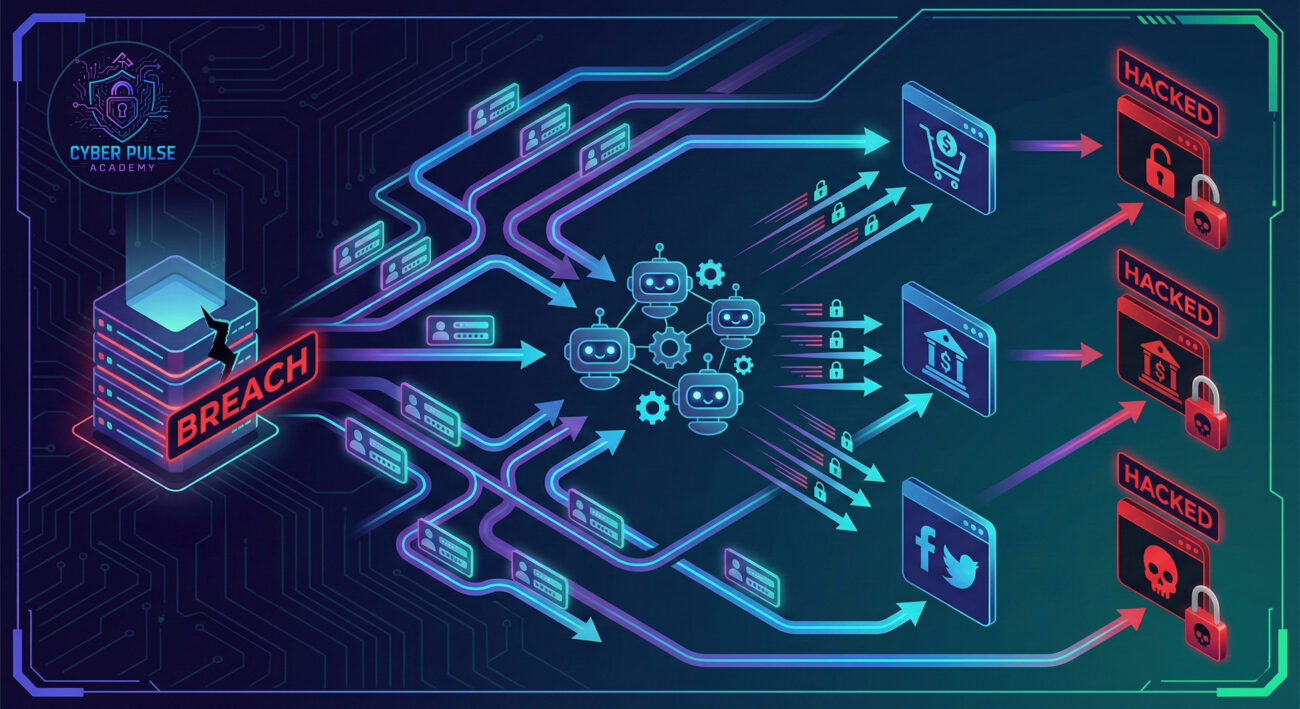
The reason credential stuffing is so dangerous is simple human nature: password reuse. Studies show that 65% of people reuse passwords across multiple sites. When one company suffers a data breach (and they all eventually do), those stolen credentials become master keys for countless other accounts.
This affects you directly. Whether it's your online shopping accounts getting drained, your social media being hijacked for scams, or your work email being compromised, credential stuffing is the gateway to these nightmares. The good news? Understanding this threat is your first step toward powerful protection.
Let's break down the essential cybersecurity terms you need to understand credential stuffing. Don't worry, we'll use simple analogies instead of technical jargon.
| Term | Simple Definition | Everyday Analogy |
|---|---|---|
| Credential Stuffing | Using stolen username/password combos from one site to break into accounts on other sites | A thief finds your house key and tries it on every door in town |
| Data Breach | When a company's user data gets stolen or leaked to hackers | A bank vault being cracked open, with everyone's safety deposit boxes taken |
| Botnet | A network of hijacked computers used to launch automated attacks | A zombie army following a hacker's commands without the owners' knowledge |
| Multi-Factor Authentication (MFA) | Requiring two or more proofs of identity to log in | Needing both your key AND a fingerprint scan to enter a building |
| Password Manager | A secure app that creates and stores unique passwords for all your accounts | A high-security vault that holds different keys for every lock you own |
Meet Sarah, a 32-year-old graphic designer who loves online shopping. She uses the same password, "Sunshine123!", for everything: her Amazon account, Netflix, Facebook, and even her online banking. "It's just easier to remember one password," she thought.
Last month, a small online art supply store Sarah used got hacked. The hackers stole the email addresses and passwords of all 50,000 customers. Sarah's "Sunshine123!" was now in the hands of cybercriminals.
Within hours, automated bots began testing Sarah's email and password combination on hundreds of websites. The timeline below shows how quickly disaster unfolded:
| Time/Stage | What Happened | Impact |
|---|---|---|
| Hour 1 | Hackers upload stolen credentials to botnet systems | Sarah's credentials are now part of an automated attack |
| Hour 3 | Bots successfully log into Sarah's Netflix account | Hackers change password and sell account access online |
| Hour 5 | Sarah's Facebook account gets compromised | Scam messages sent to all her friends requesting money |
| Day 2 | Bank login attempt fails (different password requirement) | Bank's security system blocks the attempt, Sarah gets a warning email |
| Day 3 | Sarah discovers multiple unauthorized purchases on Amazon | $847 in fraudulent charges, hours on phone with customer service |
Sarah's story isn't unique. According to the FTC's 2023 report, account takeover fraud (often via credential stuffing) resulted in over $8.8 billion in losses. The emotional toll, stress, violated privacy, hours of recovery work, is equally devastating.
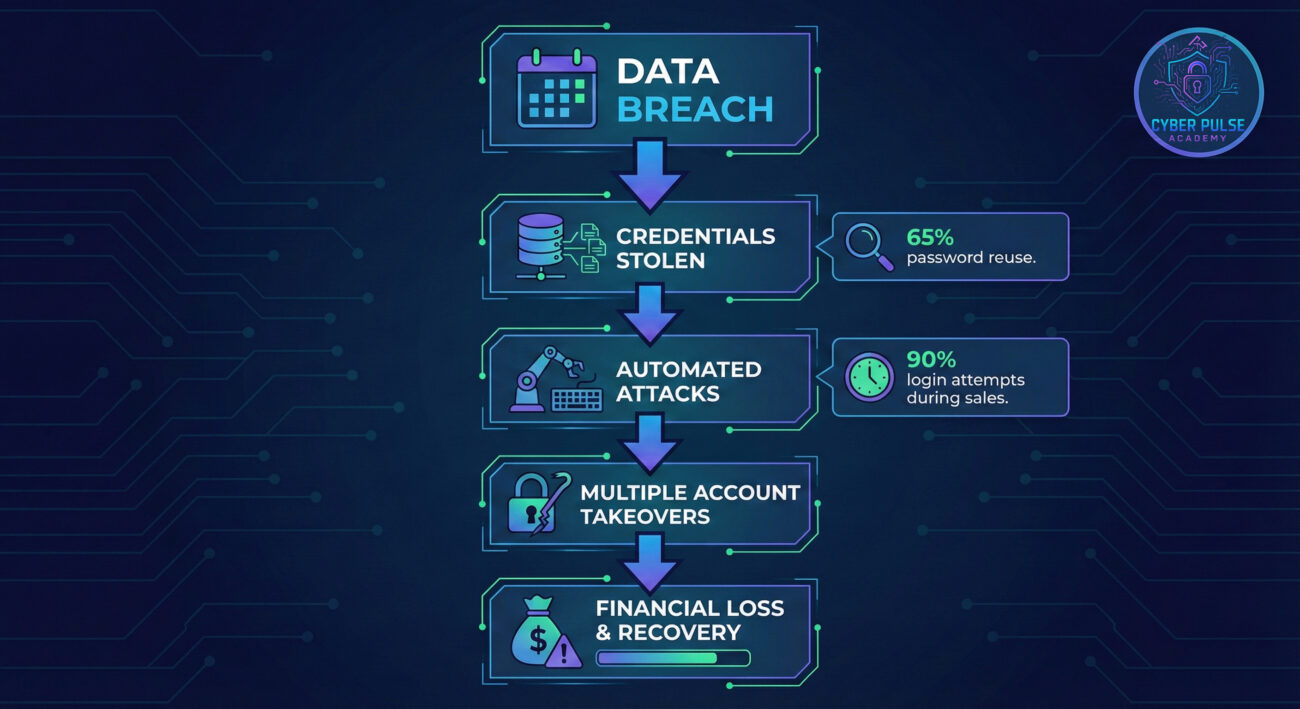
The turning point came when Sarah's bank's security system blocked the login attempt. Their advanced threat detection recognized the suspicious pattern, a login from a foreign country using credentials from a known breach. This prompt action prevented what could have been catastrophic financial loss.
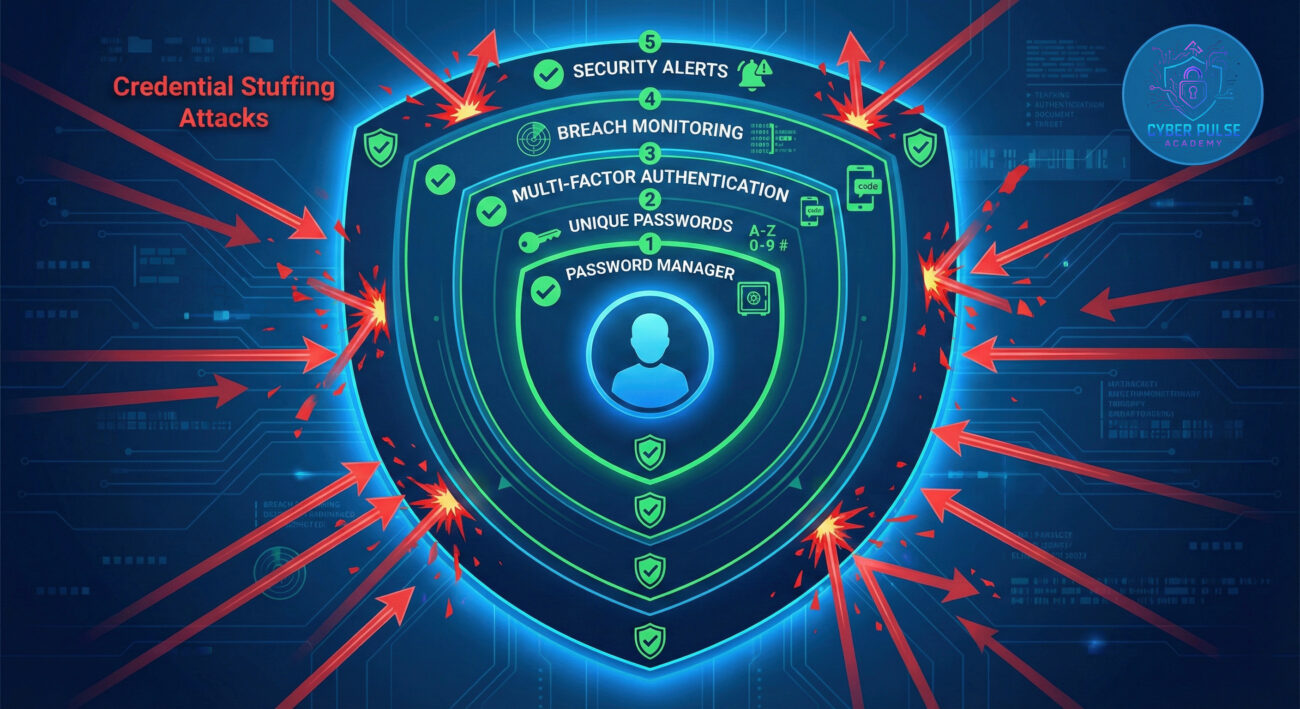
Ready to build your defenses? Follow these 7 essential steps to protect yourself from credential stuffing attacks. Each step builds on the last, creating layers of security that make you a difficult target.
First, find out if your credentials have already been leaked in data breaches.
A password manager is your single most important defense against credential stuffing.
Add that second layer of security that stops credential stuffing cold.
If Step 1 revealed breaches, change those passwords NOW.
Set up alerts to catch suspicious activity early.
Build habits that keep you secure long-term.
Knowledge is power in cybersecurity.
Let's peek into the mindset of both attacker and defender to understand credential stuffing at a deeper level.
"Credential stuffing works because it exploits the gap between human convenience and digital security. The attacker doesn't need to be clever, they just need to be automated."
Attack Path (Simplified): An attacker purchases 10 million username/password pairs from the dark web for $100. They load these into automated tools that test each combination against 50 popular websites. Even with a 0.1% success rate (due to password reuse), that's 10,000 compromised accounts. They then sell access to these accounts or use them for fraud, turning $100 into thousands.
Defender's Counter-Move: A vigilant company implements rate-limiting (blocking too many login attempts from one source) and uses breach databases to flag passwords known to be compromised. When someone tries to use a password from a known breach, the system requires additional verification. This simple step defeats the automated attack while maintaining user convenience for legitimate logins.
For the red team (attackers), credential stuffing is a numbers game with fantastic ROI. They care about:
Their tools are automated, scalable, and surprisingly inexpensive. They're not targeting you personally, they're targeting everyone who reuses passwords.
For the blue team (defenders), credential stuffing is about risk reduction and user education. They focus on:
Their goal is to make credential stuffing economically unviable by reducing success rates and increasing attacker effort.
Credential stuffing represents one of the most pervasive threats in today's digital landscape precisely because it exploits our very human tendency toward convenience. But as we've seen, you have the power to build formidable defenses.
Let's recap your key takeaways:
Remember Sarah's story? After her experience, she adopted all seven protection steps. She now uses a password manager with unique 20-character passwords for every account, has MFA enabled everywhere possible, and receives breach alerts. Her digital life is now secure and she enjoys peace of mind knowing her accounts are protected.
You don't need to be a cybersecurity expert to protect yourself from credential stuffing. You just need to take consistent, smart actions starting today. Begin with Step 1, check your exposure, and build from there. Your future self will thank you.
Have questions about credential stuffing or password security? Share your thoughts in the comments below! Have you experienced credential stuffing attempts on your accounts? What security measures have worked best for you? Let's continue the conversation and help build a more secure online community together.
Every contribution moves us closer to our goal: making world-class cybersecurity education accessible to ALL.
Choose the amount of donation by yourself.