


















































Imagine logging into your bank account one morning to find it completely empty. Not because you spent the money, but because a sophisticated hacker halfway across the world transferred it out in the middle of the night. This isn't just a scary story, it's the real-world impact of threat actors like the Lazarus Group. If you're new to cybersecurity, understanding who these actors are is your first step toward building a more secure digital life.
The Lazarus Group is a notorious, state-sponsored hacking team believed to be based in North Korea. Think of them not as a lone teenager in a basement, but as a well-funded, highly organized cyber army with the resources of a nation behind them. Their goal isn't just to cause mischief; it's to steal billions of dollars, spy on governments, and disrupt critical infrastructure on a global scale.
In this guide, you'll learn exactly who the Lazarus Group is in plain language, discover their most famous attacks, and, most importantly, understand the practical steps you can take to protect yourself from similar threats. You don't need a technical background, just the curiosity to learn.
Table of Contents
- Why the Lazarus Group Matters in Cybersecurity Today
- Key Terms & Concepts Demystified
- A Real-World Scenario: The 2014 Sony Pictures Hack
- How to Protect Yourself From Advanced Persistent Threats
- Common Mistakes & Best Practices
- Threat Hunter's Eye: Thinking Like an Attacker & Defender
- Red Team vs Blue Team View
- Conclusion & Key Takeaways
Why the Lazarus Group Matters in Cybersecurity Today
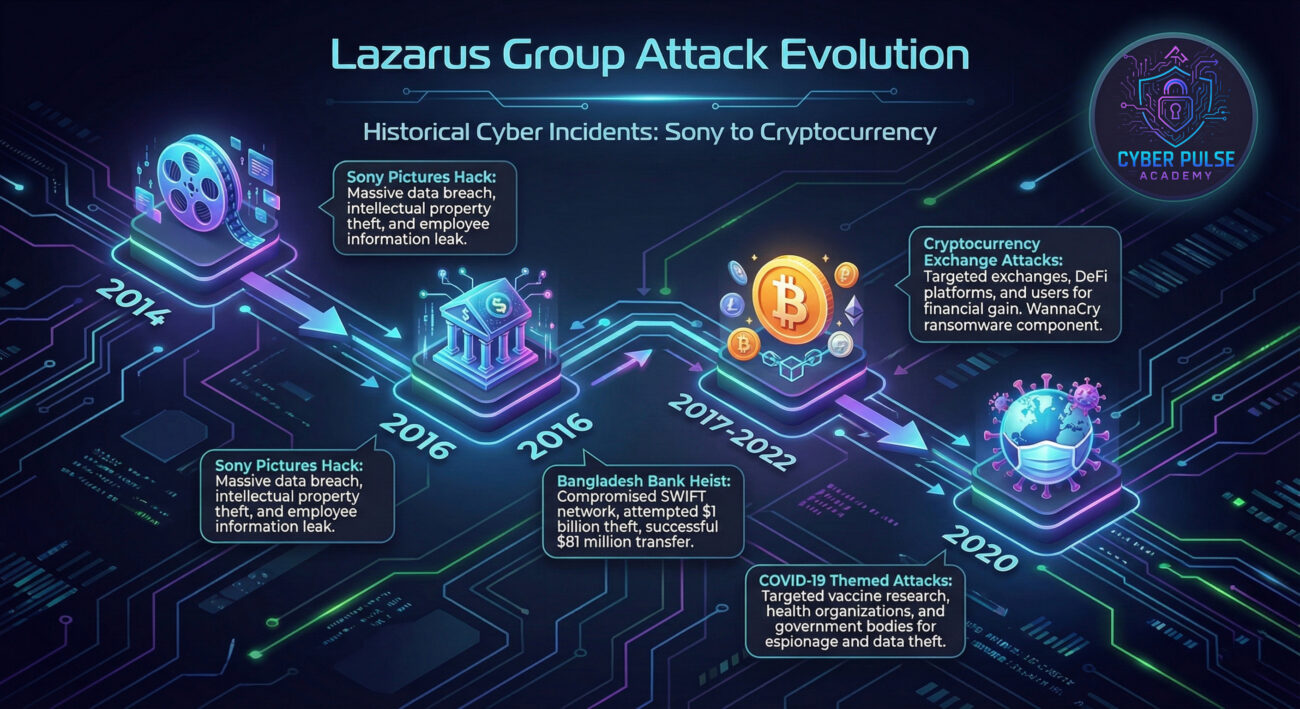
You might wonder why a beginner should care about a specific hacking group. The answer is simple: the Lazarus Group represents the pinnacle of modern cyber threats. Their tactics, which trickle down to less skilled hackers, have stolen over $2 billion in cryptocurrency alone, according to the U.S. Treasury. When they target a company, it's not just that company that suffers, customer data gets leaked, people lose money, and trust in our digital systems erodes.
This group doesn't discriminate. They've hit Hollywood studios like Sony, tried to steal from banks in over 30 countries via the "SWIFT" network attacks, and even targeted cryptocurrency exchanges and regular employees with phishing emails. Their actions show that in today's world, cyber risk is everyone's risk. Whether you're an individual with an online banking account or an employee at a small company, understanding the patterns of such groups helps you recognize and avoid the traps they set.
By learning about the Lazarus Group, you're not just learning history; you're learning to identify the hallmarks of a sophisticated attack. This knowledge transforms you from a passive target into an active participant in your own digital security.
Key Terms & Concepts Demystified
Cybersecurity has its own language. Before we dive deeper, let's break down the essential terms related to the Lazarus Group with simple analogies.
| Term | Simple Definition | Everyday Analogy |
|---|---|---|
| Advanced Persistent Threat (APT) | A stealthy, continuous hacking process where an intruder remains in a network for a long time to steal data. | Like a burglar who sneaks into your house, hides in the attic for months, and quietly takes photos of your valuables without you noticing. |
| State-Sponsored Hacker | A hacker or group that is funded, directed, or sheltered by a national government. | Not a freelance thief, but a member of a government's spy agency, like a digital James Bond with a license to hack. |
| Social Engineering | Manipulating people into giving up confidential information or performing actions that compromise security. | Like a con artist who calls you pretending to be your bank's fraud department to trick you into revealing your password. |
| Malware | Malicious software designed to damage, disrupt, or gain unauthorized access to a computer system. | A digital parasite or Trojan horse that looks harmless (like an email attachment) but contains harmful code. |
| Multi-Factor Authentication (MFA) | A security method that requires two or more proofs of identity to grant access to an account. | Like needing both a key (password) and a fingerprint scan (phone notification) to open a safe, not just the key alone. |
A Real-World Scenario: The 2014 Sony Pictures Hack
To understand the real impact of the Lazarus Group, let's walk through one of their most infamous operations. In November 2014, employees at Sony Pictures Entertainment in California started seeing a strange image on their computer screens: a red skeleton with the message "Hacked By #GOP" (Guardians of Peace).
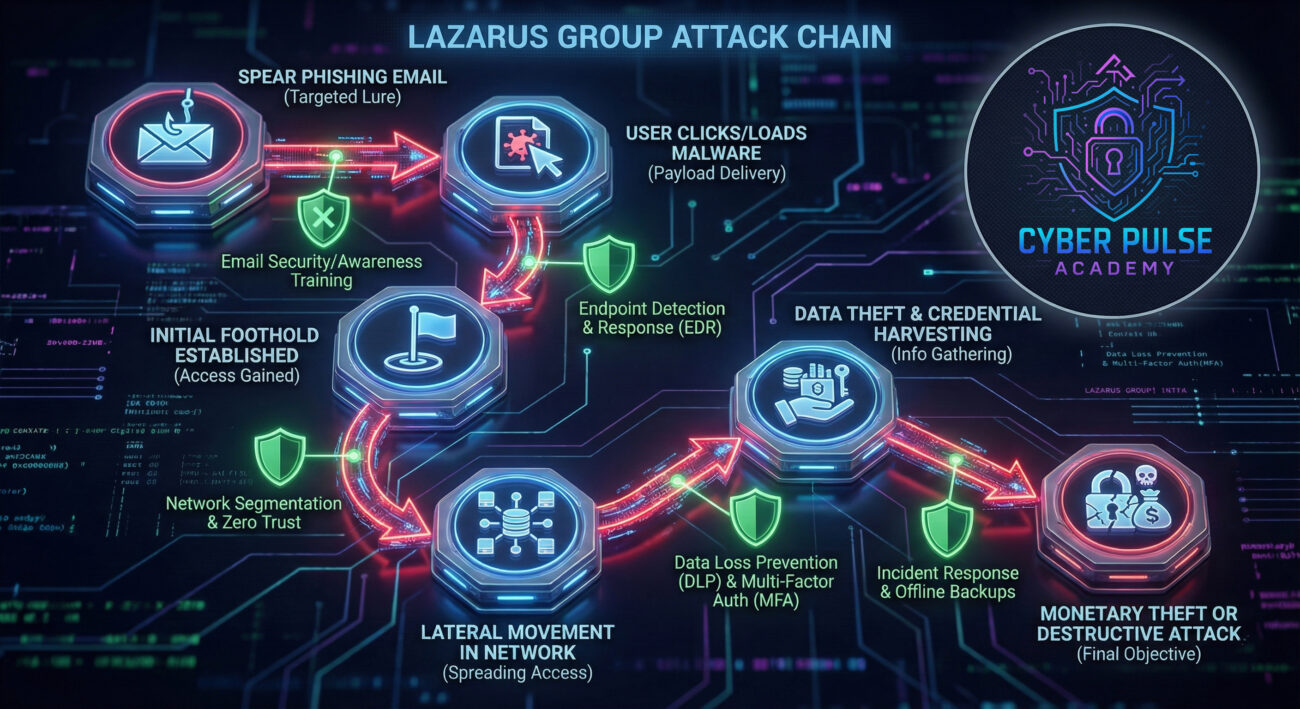
Meet Alex, a fictional mid-level manager in the marketing department. One Tuesday morning, Alex clicked on what looked like a legitimate email from a colleague. This was a phishing email crafted by the Lazarus Group. The email contained a malicious link that, when clicked, secretly installed malware on Alex's computer. This gave the hackers a foothold inside Sony's network.
From there, the Lazarus Group moved laterally for weeks, like invisible ghosts exploring a building. They accessed everything: unreleased movies, confidential employee emails and salaries, executive conversations, and even personal data of thousands of employees. Then, they pulled the trigger. They deleted data from thousands of computers, leaked embarrassing emails to the public, and threatened moviegoers with physical violence if Sony released "The Interview," a comedy about North Korea.
The timeline below shows how a single click led to a catastrophic breach:
| Time/Stage | What Happened | Impact |
|---|---|---|
| Phase 1: Infiltration (Late 2014) |
Employees receive targeted phishing emails. Alex clicks a link, unknowingly installing malware. | Hackers gain an initial foothold in the network. No immediate damage is visible. |
| Phase 2: Exploration (Several Weeks) |
Hackers move quietly through Sony's systems, stealing credentials and accessing sensitive servers. | Massive data theft occurs without detection. The company's digital crown jewels are compromised. |
| Phase 3: Destruction & Leak (November 24, 2014) |
Hackers activate "wiper" malware to delete data and begin publicly releasing stolen files. | Corporate chaos. Financial loss estimated at ~$100M. Employee privacy destroyed, company reputation severely damaged. |
This attack demonstrated the Lazarus Group's blend of cyber espionage, financial motivation, and willingness to cause destructive chaos to send a political message.
How to Protect Yourself From Advanced Persistent Threats
You can't stop nation-state hackers directly, but you can build personal and professional habits that make you a much harder target. These steps are your digital body armor against sophisticated threats.
Step 1: Master Email Vigilance
Since phishing is the #1 entry point for groups like Lazarus, treat every email with healthy suspicion.
- Check the sender's address carefully: Look for subtle misspellings (e.g., [email protected] instead of [email protected]).
- Hover over links before clicking: Your email client will show the real URL at the bottom of the window. If it looks strange, don't click.
- Be wary of urgency or threats: Emails saying "Your account will be closed in 24 hours!" are designed to panic you into making a mistake.
Step 2: Lock Down Your Accounts with Strong Authentication
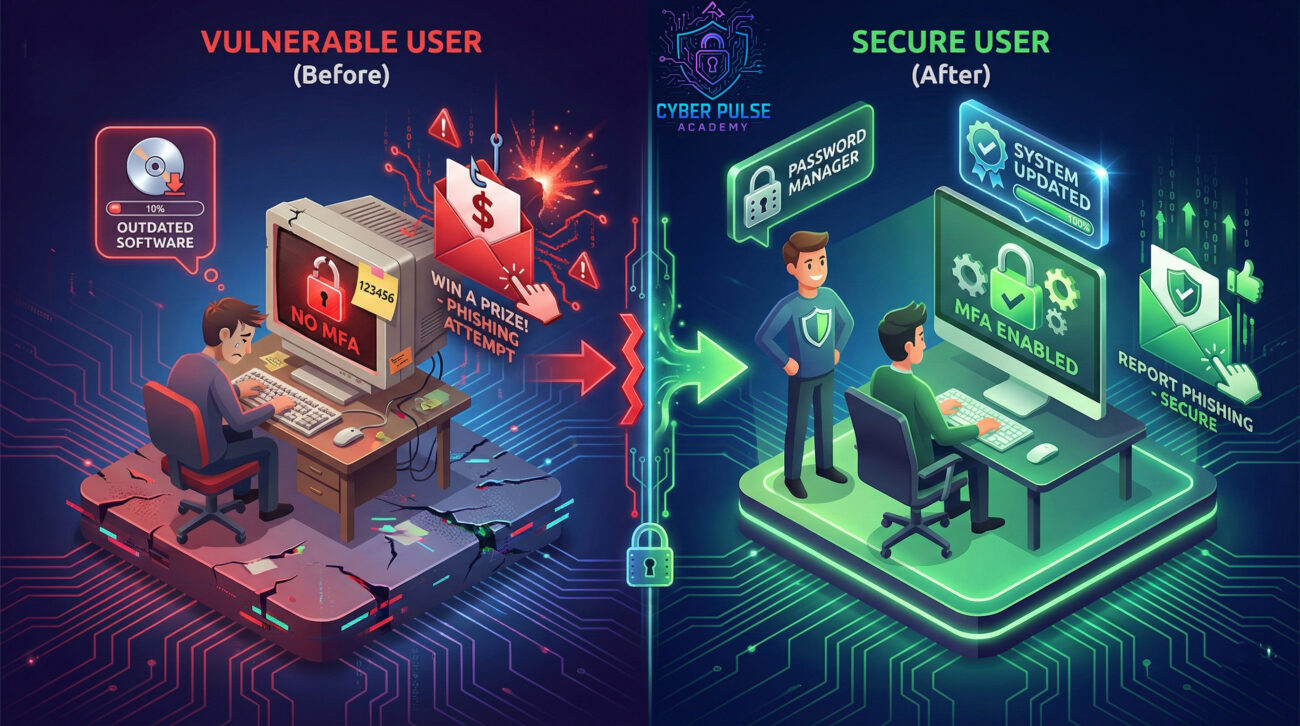
A password alone is like a lock that can be picked. Adding a second factor is like adding a deadbolt and an alarm.
- Enable Multi-Factor Authentication (MFA) everywhere: Especially on email, banking, and social media. Use an app like Google Authenticator or Microsoft Authenticator, not just SMS if possible. Learn more about MFA here.
- Use a Password Manager: This allows you to create long, unique, and complex passwords for every site without having to remember them. Our guide to password managers can help you get started.
Step 3: Keep Your Digital House Clean and Updated
Hackers exploit known vulnerabilities in software. Your job is to close those windows.
- Enable automatic updates: For your operating system (Windows, macOS), web browsers, and all applications. Updates often contain critical security patches.
- Use reputable antivirus/anti-malware software: And keep it updated. This provides a baseline of protection against known threats.
- Uninstall software you don't use: Every program is a potential entry point. Less software means a smaller attack surface.
Step 4: Practice Safe Browsing and Downloading
The internet is a city. Stick to the well-lit, reputable neighborhoods.
- Stick to HTTPS websites: Look for the padlock icon in your browser's address bar, especially when entering any personal information.
- Be extremely cautious with downloads: Only download software from official vendor websites or app stores. Avoid "cracked" software or suspicious freeware sites, which are common malware distributors.
- Use an ad-blocker: Malicious ads ("malvertising") can sometimes infect your computer just by displaying on a legitimate site.
Step 5: Cultivate a Security Mindset at Work
Your actions at work protect not just you, but your entire organization.
- Follow company security policies: They exist for a reason. This might include rules about using USB drives, accessing company data from home, or reporting suspicious emails.
- Participate in security training: If your company offers phishing simulation tests or security awareness courses, take them seriously. They're like fire drills for cyber incidents.
- Report anything suspicious immediately: If you get a weird email or notice strange computer behavior, tell your IT or security team right away. You're not bothering them; you're helping them.
Common Mistakes & Best Practices
❌ Mistakes to Avoid
- Reusing Passwords: Using the same password for your email, bank, and social media is like using the same key for your house, car, and office. If one is stolen, everything is compromised.
- Ignoring Software Updates: Clicking "Remind me later" on update notifications leaves known security holes wide open for exploitation.
- Oversharing on Social Media: Posting details like your pet's name, mother's maiden name, or workplace can give hackers answers to security questions or material for crafting targeted phishing emails.
- Connecting to Public Wi-Fi Without a VPN: Using free airport or coffee shop Wi-Fi to check your bank account is like shouting your login details across the room. The connection is often not encrypted.
✅ Best Practices
- Assume You Are a Target: Adopt a mindset that your data has value. This shifts you from passive to proactive.
- Verify Before You Trust: Got an email from your boss asking for a gift card? Call them on a known number to confirm. Received an invoice from a vendor? Contact them directly through official channels.
- Back Up Your Data Regularly: Follow the 3-2-1 rule: 3 copies of your data, on 2 different media (e.g., external drive and cloud), with 1 copy stored offsite. This makes you immune to ransomware and data destruction.
- Use a Secure and Private Communication Tool: For sensitive conversations, consider using apps with end-to-end encryption like Signal. NIST provides basic guidance on encryption here.
Threat Hunter's Eye: Thinking Like an Attacker & Defender
The Simple Attack Path
An attacker like the Lazarus Group doesn't start by trying to break through a company's strongest firewall. They start by looking for the weakest link, which is often a person. Their path might look like this: 1) They scour LinkedIn to find an employee in the finance department. 2) They craft a fake email pretending to be from the company's CFO, asking the employee to "urgently review an attached invoice." 3) The attachment contains hidden malware. If the employee is untrained and clicks, the attacker now has a beachhead inside the corporate network, all starting from a simple, believable trick.
The Defender's Counter-Move
A defender's goal is to break this chain at the earliest possible point. Their counter-move is layered defense. First, they use email filters to catch the obvious phishing emails. Second, they train employees (through simulations) to recognize and report sophisticated phishing attempts. Third, they implement application controls that prevent unknown software (like the malware in the attachment) from running in the first place. The defender's mindset isn't about building an impenetrable wall, but about creating multiple hurdles that make the attacker's job slow, costly, and likely to be detected.
Red Team vs Blue Team View
From the Attacker's (Red Team) Eyes
For the Lazarus Group, every person and system is a potential vulnerability to be exploited. They care about efficiency and stealth. Their primary goal is to achieve their objective, whether it's theft, destruction, or espionage, without being detected for as long as possible. They invest significant time in reconnaissance, crafting the perfect lure, and developing custom malware that antivirus won't catch. To them, a successful attack is a business operation; the cost (time, tools) must be justified by the payoff (money stolen, intelligence gathered, message sent).
From the Defender's (Blue Team) Eyes
For defenders, the goal is risk reduction and resilience. They assume a breach will happen eventually, so they focus on minimizing the damage and speeding up recovery. They care about visibility (seeing what's happening on their network), robust processes (like patch management), and empowering the human layer (security awareness). A defender's success is measured not by preventing 100% of attacks, but by quickly detecting an intrusion, containing it, and learning from it to improve defenses for next time.
Conclusion & Key Takeaways
Understanding the Lazarus Group isn't about fear; it's about empowerment. By demystifying one of the world's most advanced hacking teams, you've taken a huge step in your cybersecurity journey. You now see that even the most sophisticated threats often start with simple tricks that you can learn to spot.
Let's recap the essential lessons:
- The Lazarus Group is a state-sponsored APT, acting as a well-funded cyber army for North Korea, motivated by financial theft, espionage, and disruption.
- They commonly use spear-phishing and social engineering as their primary weapons to gain initial access to target networks.
- Your best protection lies in foundational habits: email vigilance, using MFA and a password manager, keeping software updated, and maintaining a healthy skepticism online.
- Security is a layered, continuous process, not a one-time setup. Adopting a defender's mindset makes you and your organization more resilient.
The digital world is full of both opportunity and risk. By applying what you've learned today, you significantly tilt the odds in your favor. You're no longer just a potential target; you're an informed user building your first line of defense.
Your Next Step
Did this guide help demystify the world of advanced cyber threats? What other cybersecurity topics would you like explained simply? Share your thoughts or questions in the comments below! Let's continue the conversation and build a more secure community together.