


















































Certification Courses
Hands-On Labs
Threat Intelligence
Latest Cyber News
MITRE ATT&CK Breakdown
All Cyber Keywords
Have you ever received an email that felt too personal? One that mentioned your job, a recent purchase, or a project you're working on? What if that perfectly crafted message was a trap designed just for you? Welcome to the world of spear-phishing – the digital con artist's most dangerous tool.
In this essential guide, you'll learn exactly what makes spear-phishing so effective, how to spot it before it's too late, and the simple steps to protect your digital life. No technical jargon, just clear explanations and actionable advice.
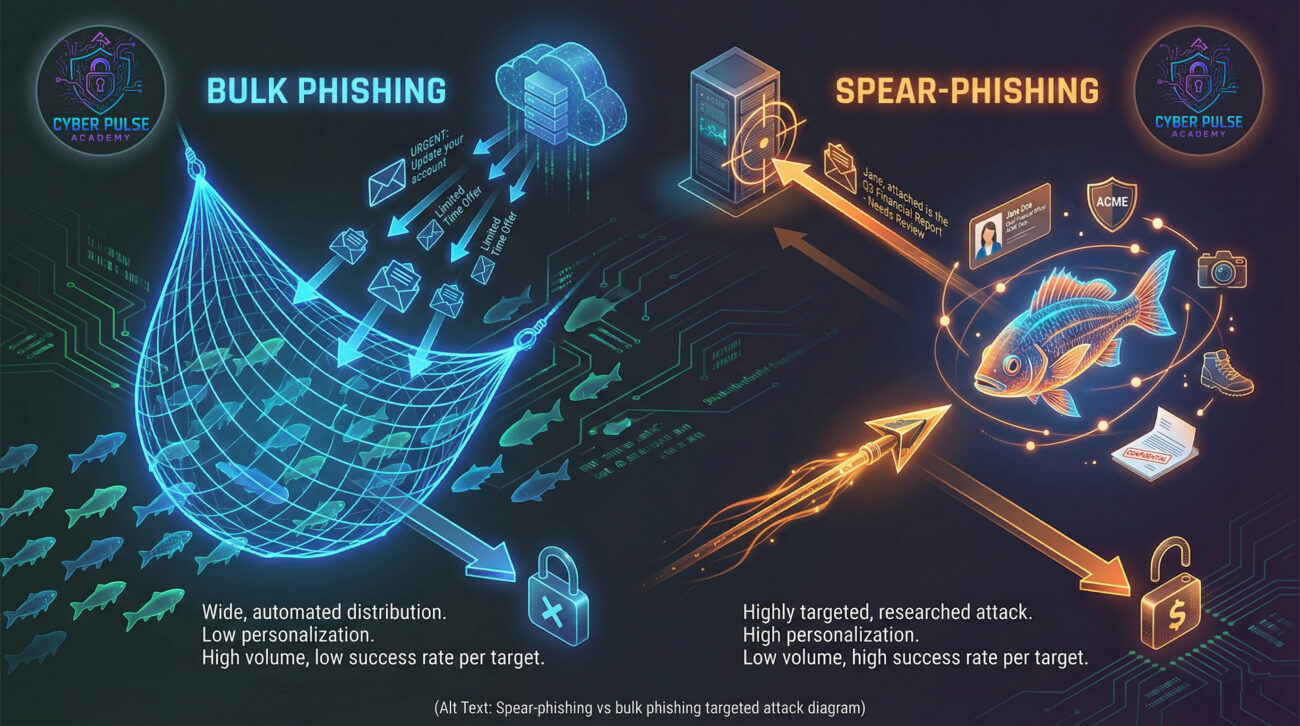
Imagine a thief who doesn't try every door on the street. Instead, they study you, learn your habits, and craft the perfect key for your door. That's spear-phishing. Unlike bulk spam, it's a highly targeted attack that uses personal information to trick you into giving away passwords, money, or access.
According to the Cybersecurity and Infrastructure Security Agency (CISA), phishing remains one of the top initial attack vectors, with tailored spear-phishing campaigns being particularly successful. A report by IBM Security found that the average cost of a data breach caused by phishing exceeds $4.9 million. This isn't just a corporate problem – with remote work, your personal email and devices can be the vulnerability that leads to a major breach.
In this guide, you'll learn:
Before we dive deeper, let's demystify the essential vocabulary. Understanding these terms is your first layer of protection.
| Term | Simple Definition | Everyday Analogy |
|---|---|---|
| Spear-Phishing | A highly targeted email attack designed to trick a specific person into revealing sensitive info or downloading malware. | A con artist who researches their victim and pretends to be their bank manager, using personal details to gain trust. |
| Social Engineering | The psychological manipulation of people into performing actions or divulging confidential information. | A stranger striking up a friendly conversation to learn your daily routine, then using that info to guess your security password. |
| Payload | The harmful part of the attack, like a malware file or a link to a fake login page. | The hidden blade inside a seemingly friendly gift box. |
| Multi-Factor Authentication (MFA) | A security method that requires two or more proofs of identity to grant access. | Needing both your key (password) and your fingerprint (code from your phone) to open a safe. |
| Credential Harvesting | The attackers' goal of stealing usernames and passwords. | A thief making a copy of your keys to enter your house later, unnoticed. |
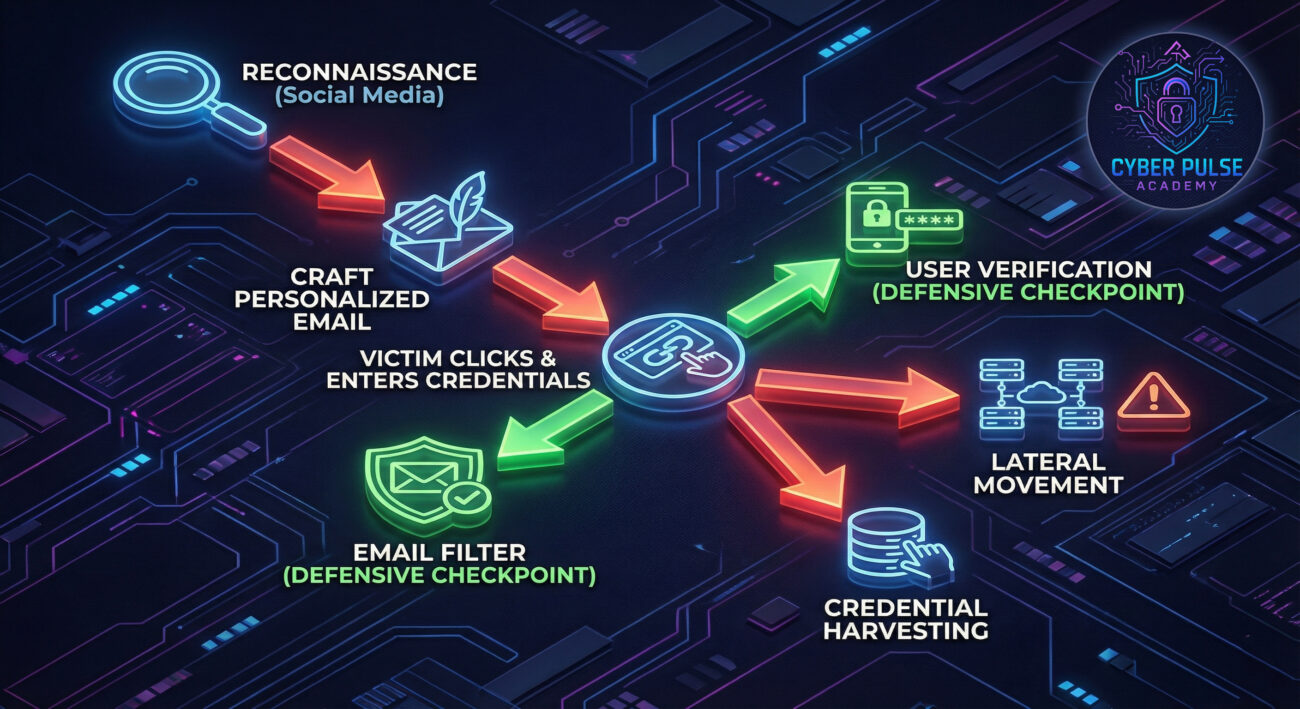
Let's follow Sarah, a project manager at a mid-sized tech firm. This is how a typical, sophisticated spear-phishing attack could unfold against her.
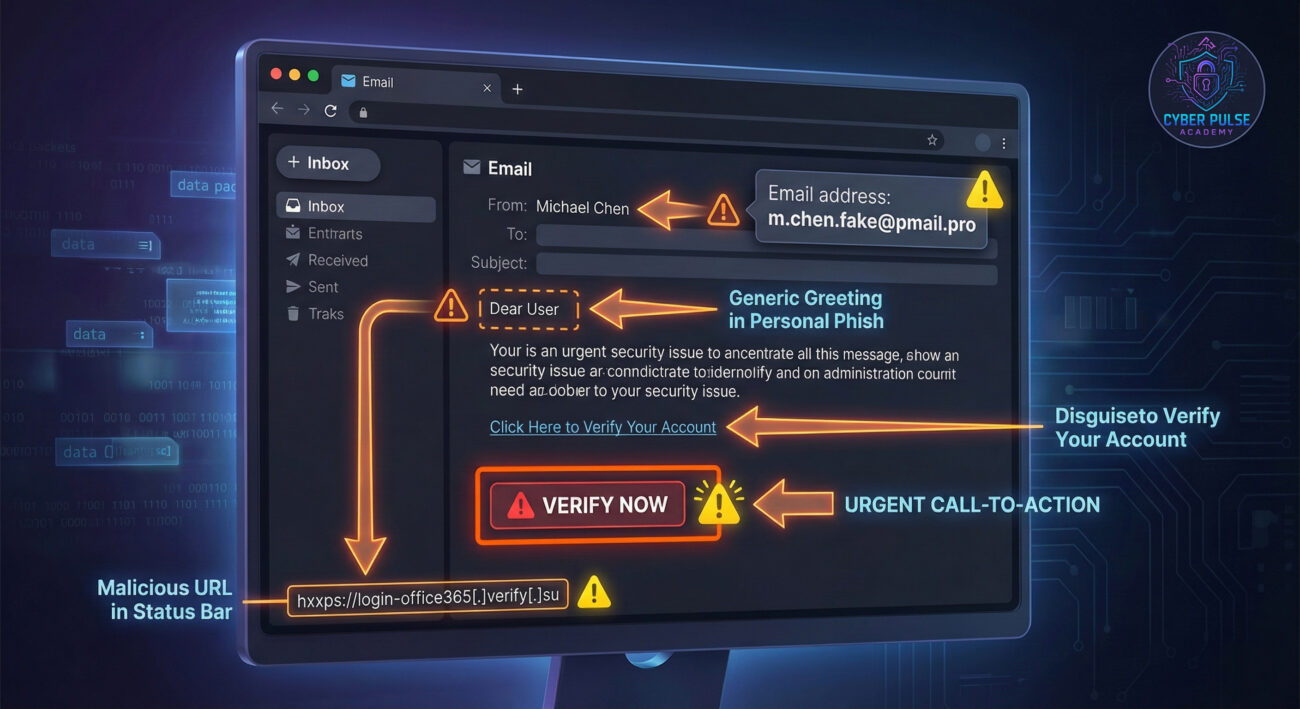
Sarah receives an email early on a Tuesday. The sender's name is "Michael Chen - Accounting Dept," and the subject is "Urgent: Q3 Vendor Invoice Approval - Project 'Aurora'." Michael is a real person at her company, and Project Aurora is the confidential project she's leading. The email is polite, references last week's budget meeting, and contains a link to a SharePoint document for review. Stressed and rushing, Sarah clicks.
| Time / Stage | What Happened | Impact |
|---|---|---|
| Week 1: Reconnaissance | The attacker scrapes LinkedIn, finds Sarah, her role, her project's public code name ("Aurora"), and identifies her colleague Michael in Accounting. | The attack is now personalized, increasing its credibility tenfold. |
| Day of Attack: The Hook | The fake email arrives. The link leads to a perfect replica of her company's Microsoft 365 login page, hosted on a lookalike domain (e.g., "mircosoft-online.com"). | Sarah enters her corporate credentials, believing she is accessing a real internal document. |
| Minutes Later: Credential Theft | The fake page sends her username and password to the hacker, then quietly redirects her to the real SharePoint to avoid suspicion. | The attacker now has the keys to her corporate account. A critical breach has occurred. |
| Hours Later: Escalation | Using Sarah's account, the attacker accesses internal files, sends phishing emails to other departments from a trusted source, and tries to initiate wire transfers. | The attack spreads laterally from a single point of vulnerability, magnifying the damage. |
The scary part? Sarah is careful. She doesn't click on obvious spam. But the attacker used time, research, and psychology to bypass her general caution. This is the power of spear-phishing.
Now for the good news: Spear-phishing is highly effective, but also highly preventable. You don't need to be a cybersecurity expert to implement these strong defenses.
Treat unexpected emails requesting action with polite skepticism.
Look beyond the sender's display name. It's easily forged.
Using the same password everywhere is a catastrophic vulnerability.
This is your single most effective shield.
Reduce the information a hacker can use against you.
Updates patch security holes that phishing emails try to exploit.
Become part of your organization's security network.
Let's step into the shoes of a defender thinking like an attacker.
The Attack Path: A hacker targeting a company might not go for the CEO first. Instead, they target a mid-level employee in HR or Finance who has access to sensitive systems but may be under less security scrutiny. They craft a fake "IT Security Training Update" email, spoofing the internal IT department. The link leads to a fake training portal that harvests credentials. Once in, they have a legitimate, low-privilege account inside the network, a perfect foothold to launch further, more privileged attacks.
The Defender’s Counter-Move: A savvy IT team employs security awareness training that includes regular, simulated spear-phishing tests for all employees. They also implement "assume breach" principles, using network segmentation to ensure that access from the HR department's system cannot easily reach the R&D servers. Monitoring for abnormal login times or locations from any account creates an early warning system.
For the attacker, spear-phishing is a precision investment. The goal is maximum return for minimum effort and risk. They care about: Reconnaissance Quality: The more accurate the personal details (name, project, colleague, recent event), the higher the click-through rate. Evasion: Crafting emails that bypass spam filters and endpoint protection. The Payload: Delivering a credential harvester or malware that evades detection long enough to call home. Their success hinges on exploiting human psychology, trust, urgency, and authority, rather than complex technical vulnerabilities.
For the defender, the focus is on layered defense and resilience. They assume some phishing emails will get through and build controls accordingly. They care about: User Education: Transforming the user from the weakest link into the first, most effective layer of protection. Technical Controls: Implementing strong email filtering, enforcing MFA, and using encrypted connections. Detection & Response: Monitoring for signs of compromised accounts (impossible travel logins, mass file downloads) to contain a breach quickly. Their goal is to shrink the attacker's window of opportunity to zero.
Spear-phishing is a powerful and prevalent threat, but it's not an unstoppable one. By understanding its personalized nature and adopting a proactive mindset, you move from being a potential target to an informed defender.
Let's recap the key takeaways:
You now have the knowledge to identify and stop a spear-phishing attack in its tracks. Start today by enabling MFA on your primary email account and reviewing your social media privacy settings. Your secure digital life begins with these simple actions.
Have questions about a suspicious email you received? Want to share your own experience or tip? Join the conversation below! Helping each other stay informed is one of the best defenses we have. What's the first step you'll take to protect yourself from spear-phishing?
Every contribution moves us closer to our goal: making world-class cybersecurity education accessible to ALL.
Choose the amount of donation by yourself.
2 Comments
Your article helped me a lot, is there any more related content? Thanks!
Thank you for your feedback.
In relation to Spear Phishing, this is the only post we have for the moment, but we are planning to create more content in the future, related to MITRE ATT&CK.
Otherwise, feel free to check the definition of any other Cyber Keywords from here : https://www.cyberpulseacademy.com/all-cybersecurity-keywords/