


















































Certification Courses
Hands-On Labs
Threat Intelligence
Latest Cyber News
MITRE ATT&CK Breakdown
All Cyber Keywords
In the shadowy corners of the internet, a new and formidable threat has emerged: the Rondodox botnet. This sophisticated malware is actively exploiting a critical vulnerability in popular TP-Link Archer routers, turning everyday home and office devices into weapons for large-scale attacks. For cybersecurity professionals, students, and beginners, understanding this botnet is not just academic, it’s a crucial step in defending the expanding frontier of the Internet of Things (IoT). This deep dive will dissect the Rondodox botnet, its mechanisms, and, most importantly, provide a clear framework for defense.
The Rondodox botnet represents a significant evolution in IoT-focused malware. It capitalizes on CVE-2023-1389, a command injection vulnerability in TP-Link Archer AX21 routers, which was patched by TP-Link in March 2023. However, the persistence of unpatched devices provides a fertile hunting ground for attackers. Once infected, a device becomes part of a distributed network (a botnet) that can be commanded to launch devastating Distributed Denial-of-Service (DDoS) attacks, steal data, and deploy further payloads. The Rondodox botnet is a stark reminder that perimeter devices like routers are high-value targets and often the weak link in organizational and personal security.
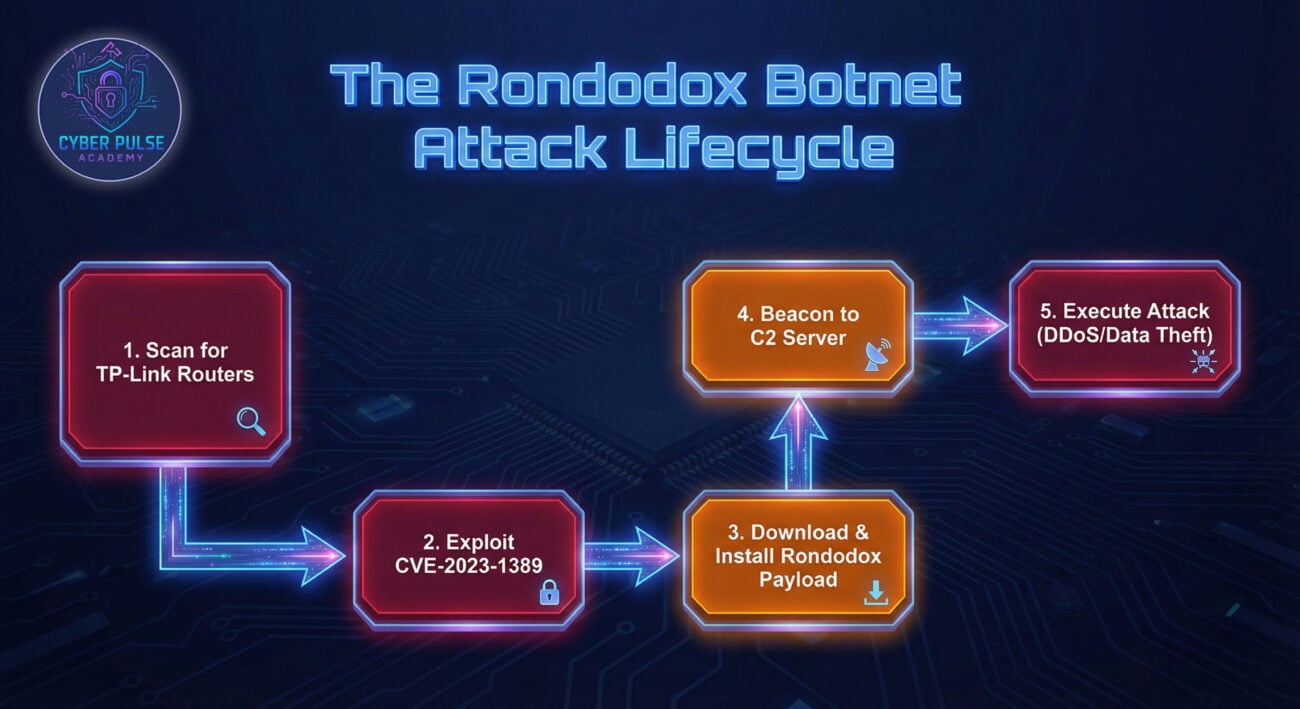
Understanding the technical steps of the attack demystifies the threat and illuminates critical defense points.
Hackers use automated scanners to scour the internet for TP-Link Archer routers, specifically probing port 80/443 (web management interface) and port 8443 (often used for remote management). The goal is to identify devices that are exposed to the internet and potentially unpatched.
Upon finding a target, the attacker sends a specially crafted HTTP POST request to the router's vulnerable endpoint. This request contains malicious commands within the "`country`" or "`cprintf`" parameters. Due to improper input validation, the router executes these commands with root privileges, giving the hacker complete control.
The executed command typically downloads the Rondodox binary payload from a command-and-control (C2) server. The malware is written to a persistent location (e.g., a writable filesystem partition) and a cron job or startup script is modified to ensure the botnet client reactivates after a reboot.
The infected device (now a "bot" or "zombie") calls home to the C2 server. It registers itself, receives updates, and waits for instructions. The C2 architecture is often decentralized, using peer-to-peer techniques or fast-flux DNS to evade takedown.
On command, the Rondodox botnet can unleash various attacks:
Imagine a small accounting firm, "SafeLedger Inc.," which uses a TP-Link Archer AX21 router for its office network. The IT manager, overwhelmed with work, missed the firmware update notification in early 2023.
An automated scanner identifies SafeLedger's router. The Rondodox botnet operator exploits CVE-2023-1389, silently installing the malware. The router becomes part of a 10,000-device botnet. Weeks later, a competitor hires a hacker to disrupt SafeLedger's online tax filing portal. The attacker rents the Rondodox botnet and directs it to attack SafeLedger's IP. The resulting traffic tsunami takes the portal offline for days, causing financial loss and reputational damage. Meanwhile, the malware also steals unencrypted client data passing through the compromised router, leading to a full-scale data breach.
Understanding both the offensive and defensive perspectives is key to comprehensive security.
Follow this actionable, step-by-step framework to secure your environment against threats like the Rondodox botnet.
Mapping the attack to the Cyber Kill Chain and MITRE ATT&CK framework helps align defensive actions.
| Kill Chain Stage | Rondodox Activity | MITRE ATT&CK Technique | Defensive Action (Control) |
|---|---|---|---|
| Reconnaissance | Scanning for TP-Link routers on the internet. | T1595: Active Scanning | Minimize external footprint. Use non-standard ports if possible. |
| Weaponization | Crafting the exploit using CVE-2023-1389. | T1588: Obtain Capabilities | Threat intelligence feeds to monitor for new exploits. |
| Delivery | Sending malicious HTTP POST request. | T1190: Exploit Public-Facing Application | Update firmware. Use a Web Application Firewall (WAF). |
| Exploitation | Command injection succeeds. | T1203: Exploitation for Client Execution | Input validation on devices. Least privilege principles. |
| Installation | Downloading and installing Rondodox binary. | T1543: Create or Modify System Process (cron) | File integrity monitoring. Behavioral analysis on embedded devices. |
| Command & Control (C2) | Bot calling home to C2 server. | T1071: Application Layer Protocol (HTTP) | Network traffic analysis. DNS filtering. Block known malicious IPs. |
| Actions on Objectives | Launching DDoS attack or stealing data. | T1498: Network Denial of Service | DDoS mitigation service. Egress filtering to detect data exfiltration. |

Q: I have a TP-Link router, but not an AX21 model. Am I safe?
A: Not necessarily. While this specific exploit targets the AX21, other TP-Link models (and routers from other brands) have had their own vulnerabilities. The core lesson is universal: update your firmware and secure your credentials, regardless of model.
Q: How can I tell if my router is part of a botnet?
A: Look for signs: significantly slower internet speed (unrelated to ISP), unusual outgoing network activity, device overheating, unfamiliar processes in router admin panel, or inability to access router settings. A factory reset and immediate firmware update is a good first response if you suspect compromise.
Q: Is disabling remote management enough to stop this attack?
A: It is a critical step that blocks the most common vector. However, if an attacker already has access to your internal network (e.g., via a phishing email), they could exploit the vulnerability from the inside. Patching is the only definitive fix.
Q: What resources can I use to stay updated on such threats?
A: Follow trusted sources:
Don't let your router become a footnote in the next major DDoS attack report. Take action today:
For further learning, explore the OWASP IoT Security Project and consider certifications like CompTIA Security+ to build a foundational knowledge of cybersecurity principles.
© 2026 Cyber Pulse Academy. This content is provided for educational purposes only.
Always consult with security professionals for organization-specific guidance.
Every contribution moves us closer to our goal: making world-class cybersecurity education accessible to ALL.
Choose the amount of donation by yourself.