In the ever-evolving landscape of cyber threats, a disturbing trend has gained prominence: hackers are increasingly abusing legitimate cloud services to launch sophisticated phishing campaigns. A prime target is Google Cloud email infrastructure, including Google Workspace and Gmail. This tactic, a form of Google Cloud email abuse, allows attackers to bypass traditional security filters that often trust emails from major providers like Google. By setting up seemingly legitimate Google domains or compromising existing accounts, cybercriminals craft emails that appear highly credible, dramatically increasing their success rate for stealing credentials, distributing malware, and orchestrating financial fraud.
This guide will deconstruct this attack vector. We'll move beyond the headlines to provide a beginner-friendly yet comprehensive analysis. You'll understand exactly how this Google Cloud email abuse works, examine a detailed real-world scenario, learn to think like both the attacker (Red Team) and the defender (Blue Team), and walk away with a practical, step-by-step framework to protect your organization. This isn't just about awareness; it's about actionable defense.

How The Attack Works: A Step-by-Step Breakdown
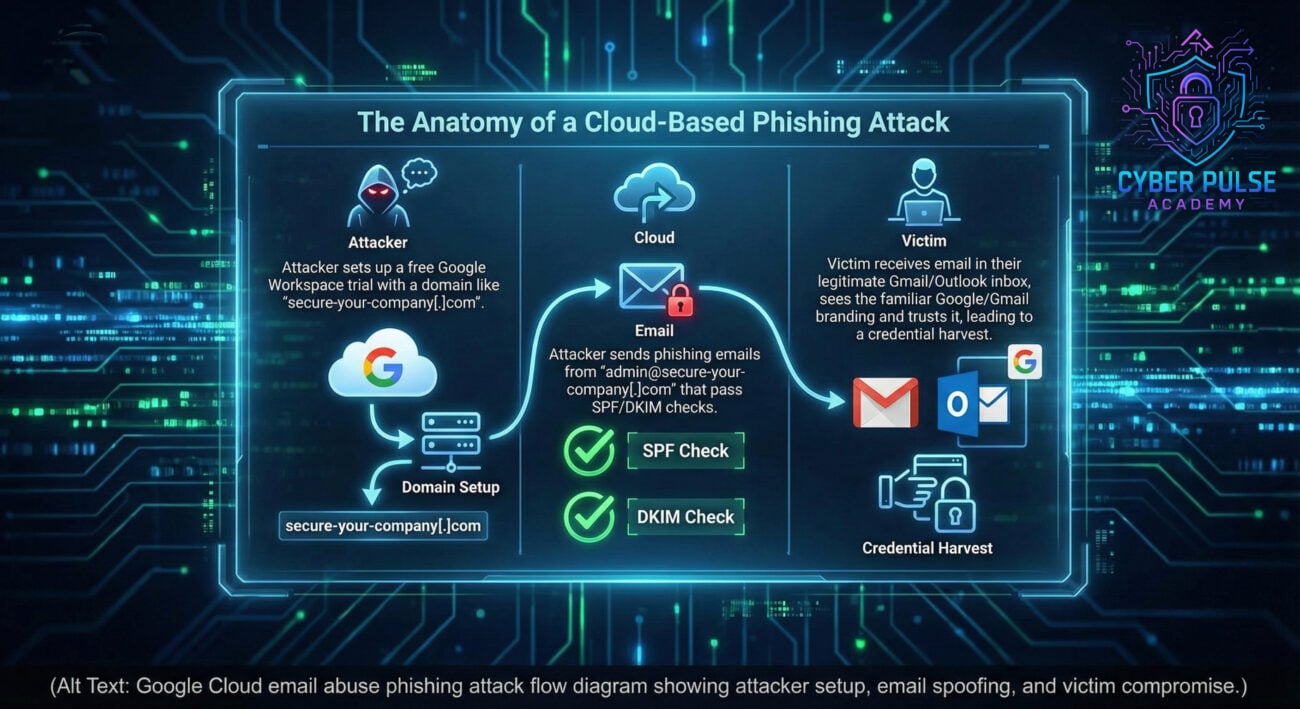
The power of this method lies in its exploitation of trust and infrastructure. Here’s how cybercriminals execute Google Cloud email abuse:
- Domain Acquisition & Setup: The attacker registers a new domain name that sounds trustworthy (e.g., "it-support-network[.]com") or uses an expired one. They then sign up for a Google Workspace free trial or a standard Google Cloud account, associating their new domain with it. This process is automated and low-cost.
- Legitimization via Email Authentication: Once the domain is verified with Google, the attacker configures the required DNS records (SPF, DKIM, and sometimes DMARC). Google automatically provides correct configurations, making the domain's emails fully authenticated. Emails sent from this domain now carry Google's seal of approval in the eyes of receiving mail servers.
- Crafting the Deceptive Payload: With a legitimate sending platform, the attacker crafts a phishing email. Themes often include fake security alerts ("Your account will be suspended"), invoice impersonations, or password expiration notices. The "From:" address looks authentic (e.g., "security@it-support-network[.]com"), and the email headers show it originated from Google's servers.
- The Bypass & Delivery: When this email is sent, the receiving email gateway checks its authentication. SPF and DKIM checks pass because the email genuinely came from Google's infrastructure for that domain. Many security filters have whitelists or high trust for emails from Google, Microsoft, etc., allowing the malicious email to land directly in the primary inbox, bypassing the spam or quarantine folder.
- Exploitation: The victim, seeing an email that appears to come from a Google-authenticated domain and lacks typical spam indicators, is more likely to click the malicious link (leading to a fake login page) or open the infected attachment, completing the attack.
Why This is So Effective
Traditional phishing relies on weak spoofing techniques that often fail SPF/DKIM checks. Google Cloud email abuse flips the script: the attack is technically legitimate from an email protocol standpoint. The breach of trust occurs at the human and semantic level, abusing the reputation of the cloud platform itself.
Real-World Attack Scenario: A CEO Fraud Case Study
Let's translate this into a concrete example to understand the impact.
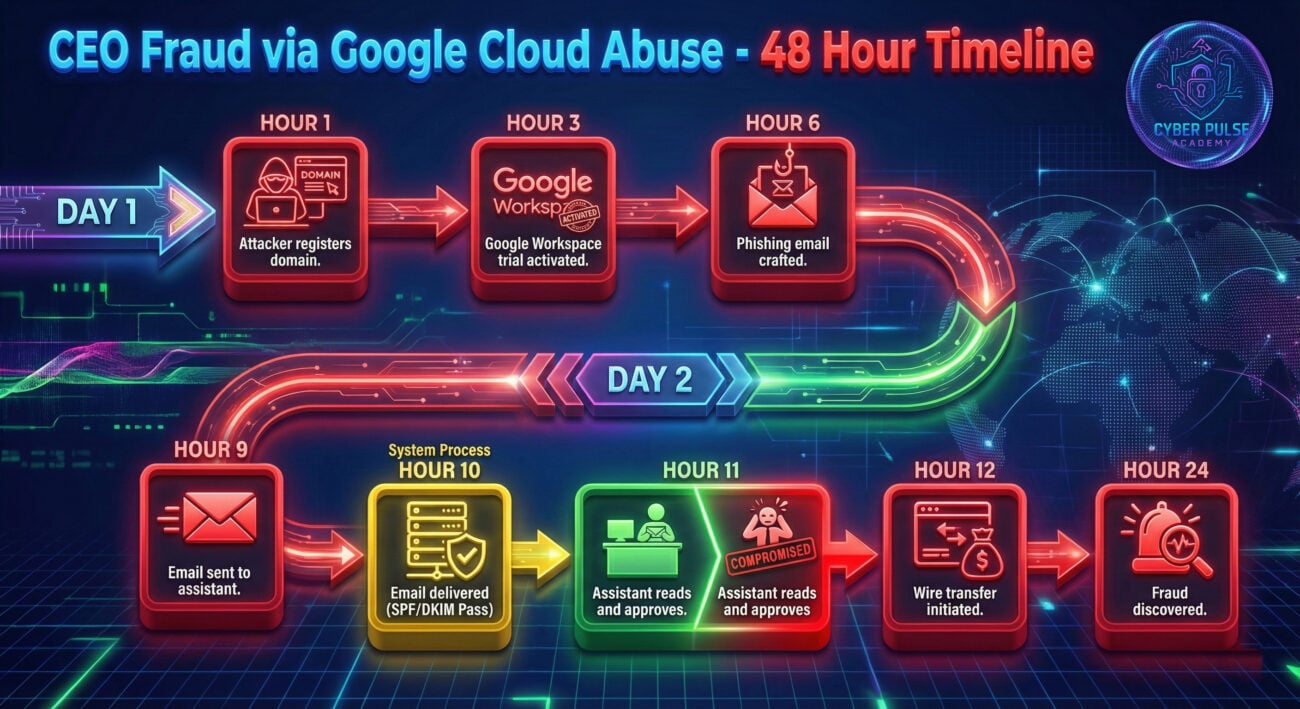
The Setup: Attackers target "ABC Manufacturing." They register the domain "abc-finance-update[.]com" and set up a Google Workspace account. They research the company's CFO, "Jane Doe," and her assistant, "Mark," using LinkedIn.
The Attack: Mark receives an email from "jane.doe@abc-finance-update[.]com" with the subject "Urgent: Confidential Wire Transfer Required." The email body is brief, mirrors Jane's writing style, and instructs Mark to process a payment to a new vendor ASAP, attaching a fake invoice. The email passes all technical checks and appears in Mark's inbox alongside other legitimate emails.
The Outcome: Believing it's a legitimate request from his CFO (and seeing no technical red flags), Mark complies. The company loses $47,000 before the fraud is detected.
Red Team vs. Blue Team: Attacker Mindset vs. Defender Response
Understanding this threat requires seeing both sides of the battlefield. Here’s the breakdown from the threat actor's perspective and the defender's counter-strategy.
🔴 Red Team View (The Attacker)
- Objective: Gain initial access or financial payoff via high-trust phishing.
- Advantages:
- Low Cost & High ROI: Free trials and cheap domains.
- Built-in Trust: Abuse the implicit trust in major cloud email providers.
- High Deliverability: Emails pass core email authentication protocols.
- Scalability: Easy to automate domain and account creation.
- Tactics:
- Domain Squatting: Registering domains similar to target companies.
- Content Theft: Copying logos, email signatures, and wording from real company communications.
- Timing Attacks: Sending emails during busy periods (month-end, Monday mornings).
- Weaknesses: The domain is newly created. The Google Workspace account is on a trial. These leave forensic traces (creation date, lack of historical traffic).
🔵 Blue Team View (The Defender)
- Objective: Detect and block Google Cloud email abuse before it causes a breach.
- Key Strategies:
- Multi-Layered Detection: Don't rely solely on email authentication (SPF/DKIM).
- Reputation Analysis: Check sender domain age, reputation, and associated IP ranges.
- Content Inspection: Use advanced AI/ML to analyze email intent, language patterns, and link destinations, regardless of sender.
- User Training: Train staff to hover over "From" addresses and be skeptical of urgent financial requests, even from "trusted" sources.
- Defensive Tools: Secure Email Gateways (SEGs) with advanced features, Domain-based Message Authentication, Reporting, and Conformance (DMARC) with strict policies, and User Entity Behavior Analytics (UEBA).
- Response: Have an incident response playbook ready for suspected Business Email Compromise (BEC).
Common Mistakes & Best Practices
Organizations often fall victim due to preventable gaps. Here’s what to avoid and what to implement immediately.
❌ Common Mistakes
- Over-relying on SPF/DKIM: Assuming a "PASS" means the email is safe.
- No DMARC Policy: Failing to implement a DMARC record with a policy (p=quarantine or p=reject) for your own domains, leaving you vulnerable to spoofing.
- Weak User Training: Generic annual phishing training that doesn't cover advanced tactics like cloud service abuse.
- Ignoring Domain Age: Not configuring tools to flag or quarantine emails from very newly registered domains.
- Lack of Financial Controls: No dual-authorization or verbal verification process for wire transfers.
✅ Best Practices
- Implement Strict DMARC: Enforce a DMARC policy of `p=quarantine` or `p=reject` for your domains to protect others from spoofing you.
- Deploy AI-Powered Email Security: Use a modern Secure Email Gateway that uses machine learning to analyze context, sentiment, and attack patterns beyond just signatures.
- Enable MFA (Multi-Factor Authentication) Everywhere: Especially for email accounts and financial systems. This is the single most effective defense against credential theft.
- Conduct Regular Red Team Exercises: Simulate these exact attacks to test your technical controls and employee awareness.
- Establish Clear Protocols: Create and communicate a simple process for verifying unusual requests, especially involving money or data: "Call the person on a known number."
7-Step Defense Implementation Framework
Here is a actionable, step-by-step framework to build resilience against Google Cloud email abuse and similar threats.
- Assessment & Visibility (Week 1-2):
- Audit your current email security posture. Check your DMARC, SPF, and DKIM configurations using tools like MXToolbox or dmarcian.
- Review logs from your email gateway for recent deliveries from Google Cloud IP ranges that scored highly on "new domain" or "suspicious content" metrics.
- Strengthen Technical Foundations (Week 3-4):
- Implement a strong DMARC policy (start with `p=quarantine`).
- Ensure MFA is enforced for all user email and cloud administrative accounts.
- Enhance Email Filtering (Week 5-6):
- Work with your security team or vendor to enable reputation scoring that penalizes new domains and sender domains with no prior good history.
- Configure rules to flag emails with urgent financial keywords ("wire," "invoice," "urgent payment") from external senders for additional scrutiny.
- Targeted User Awareness (Week 7):
- Roll out focused training on "Advanced Phishing: When Trusted Services Are Used Against You." Use the real-world example from this article.
- Teach users to hover over the sender's name to see the full email address and to be wary of slight domain misspellings.
- Implement Process Controls (Week 8):
- Formalize a financial authorization process requiring a secondary, out-of-band verification (e.g., a phone call) for any new payment instructions or changes to vendor details.
- Test & Simulate (Ongoing):
- Conduct a controlled phishing simulation that mimics the Google Cloud email abuse tactic. Measure click rates and use results for follow-up coaching.
- Monitor & Iterate (Ongoing):
- Continuously monitor threat intelligence feeds (AlienVault OTX, VirusTotal) for new attack patterns and adjust your defenses accordingly.
Frequently Asked Questions (FAQ)
Q1: Isn't Google responsible for stopping this on their platform?
A: Google has terms of service against abuse and employs detection systems, but the core service, allowing users to send authenticated email, is working as designed. The abuse is a misuse of a legitimate feature, similar to how a car can be used for a getaway. The primary defense responsibility lies with the receiving organization and user vigilance.
Q2: Can Microsoft 365 be abused in the same way?
A: Absolutely. Attackers similarly abuse Microsoft 365 trials and services. The principles in this guide apply directly to defending against abuse of any major cloud email provider. A robust defense strategy is platform-agnostic.
Q3: Will enabling DMARC on *my* domain stop others from spoofing it?
A: Yes, that's its primary purpose. A strict DMARC policy (`p=reject`) tells receiving mail servers to block emails that fail SPF/DKIM checks for your domain. This protects your brand from being impersonated. It does not, however, help you filter incoming malicious emails from other abused domains.
Q4: What's the single most important action I can take today?
A: If you do nothing else, enable and enforce Multi-Factor Authentication (MFA) on all critical accounts, especially email and financial systems. This creates a massive barrier even if credentials are stolen via a successful phishing attack from an abused cloud service.
Key Takeaways & Action Plan
The threat of Google Cloud email abuse is significant because it weaponizes trust in our everyday tools. To summarize and act:
| Takeaway | Immediate Action Item |
|---|
| Email Authentication (SPF/DKIM) is necessary but NOT sufficient for security. | Review and tighten your DMARC policy. Audit email security tool configurations. |
| Threat actors exploit the reputation of major platforms. | Train users to be skeptical of urgency and to verify sender addresses carefully, regardless of the service. |
| Newly registered domains are a major red flag. | Ensure your email security solution can score and filter based on domain age and reputation. |
| The ultimate goal is credential theft or financial fraud. | Enable MFA universally. Implement out-of-band verification for financial transactions. |
Ready to Fortify Your Defenses?
Understanding the threat is the first step. Implementation is what creates real security. Begin your defense today by scheduling a review of your organization's email authentication settings and user training programs. Share this guide with your IT and security teams to start the conversation.
Further Learning Resources:
- CISA: Secure Our World Campaign (General cybersecurity hygiene)
- Microsoft: Configure DKIM (Technical implementation)
© 2026 Cyber Pulse Academy. This content is provided for educational purposes only.
Always consult with security professionals for organization-specific guidance.