In the ever-evolving landscape of cyber threats, a new and particularly insidious malware named VVS Stealer has emerged, setting its sights on one of the world's most popular communication platforms: Discord. This isn't just another piece of nuisance software; it's a sophisticated information-hacker's tool designed to vacuum up your digital life, from passwords and authentication tokens to precious cryptocurrency wallets. For cybersecurity professionals, students, and beginners alike, understanding this threat is the first critical step in building an effective defense.
Executive Summary: The VVS Stealer Threat at a Glance
VVS Stealer is a commodity malware sold on underground forums, specializing in data exfiltration. Its primary target is users of Discord, but its capabilities extend far beyond. Once installed on a victim's machine, it acts as a silent digital burglar, hunting for:
- Discord Tokens: These are the golden keys. Stealing a session token allows an attacker to completely bypass passwords and two-factor authentication (2FA), taking full control of the Discord account.
- Saved Passwords & Browser Data: It scrapes passwords, cookies, and autofill data from major browsers like Chrome, Edge, and Firefox.
- Cryptocurrency Wallets: It specifically targets wallet files and seed phrases for Exodus, Atomic, MetaMask, and other popular crypto wallets, leading to direct financial theft.
- System Information & Files: It collects PC details and can search for specific document types, ready to be sent back to the attacker's command-and-control (C2) server.
The malware is typically distributed through phishing campaigns, fake game cracks, mods, or other "too-good-to-be-true" software downloads, exploiting human curiosity and trust.
Threat Deep Dive: How VVS Stealer Malware Works
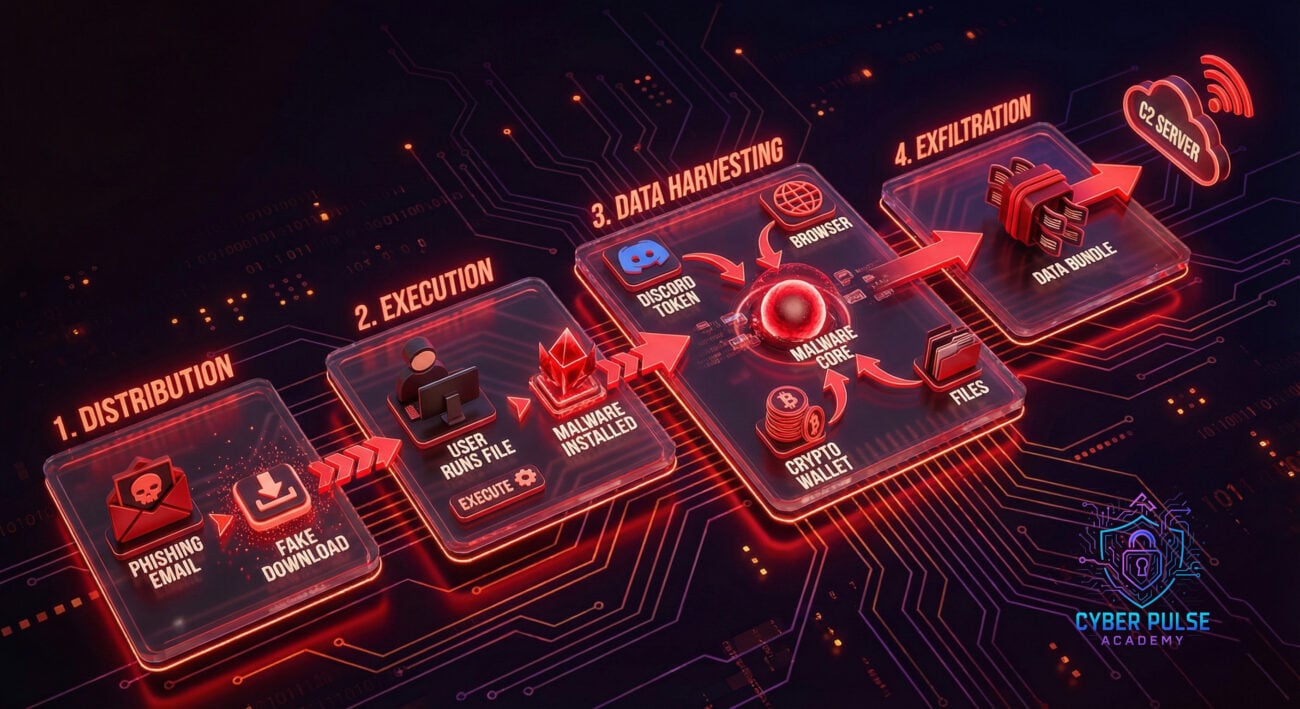
Let's break down the technical anatomy of this attack to understand its risk fully. VVS Stealer operates through a defined lifecycle:
1. Distribution & Infection Vector
The attack begins with social engineering. Victims are lured into downloading the payload. Common lures include:
- "Free" cracked versions of popular paid software or games.
- Fake Discord client updates or "nitro generator" tools.
- Compressed archives (ZIP/RAR) sent via direct message or posted in community servers.
- Malicious links disguised as game mods or cheat engines.
2. Execution & Persistence
Once executed, the stealer often employs techniques to avoid detection and maintain access:
- Obfuscation: The code is packed or encrypted to evade signature-based antivirus detection.
- Persistence Mechanisms: It may create scheduled tasks or registry run keys to relaunch itself after a system reboot.
- Disabling Security: Some variants attempt to disable Windows Defender or other security software temporarily.
3. Data Harvesting Phase
This is the core function. The malware systematically scans the infected system for targeted data paths:
- Discord Tokens: It locates Discord's local storage (LevelDB files) to extract session tokens.
- Browser Data: It accesses the `Login Data` and `Local State` files in browser profiles to decrypt and steal saved credentials.
- Wallet Files: It traverses directories like `%AppData%` looking for wallet.dat files and seed phrase backups.
- File Grabbing: It can be configured to search for and exfiltrate documents with extensions like .txt, .doc, .pdf.
4. Exfiltration & Attacker Access
All stolen data is bundled into a structured log file (often named with the victim's PC name) and sent via HTTP POST request to the attacker's C2 server. The attacker then accesses this data through a web panel, gaining immediate access to accounts and wallets.

Real-World Scenario: A Discord User's Worst Nightmare
Imagine "Alex," an avid gamer and Discord community moderator. A friend in a gaming server DMs Alex a link to an "exclusive game mod" for their favorite title. Trusting the friend (whose account may already be compromised), Alex downloads the `GameMod_Installer.zip` file.
After running the installer (which seems to do nothing), Alex continues their day. Unbeknownst to them, VVS Stealer has now:
- Stolen their Discord token. The attacker immediately uses it to log into Alex's account, bypassing their password and 2FA.
- Scraped the password for Alex's primary email from their browser.
- Found the seed phrase for a MetaMask wallet with some cryptocurrency.
- Uploaded all this data to a server.
Within hours, Alex is locked out of Discord, finds their wallet drained, and sees their compromised Discord account being used to phish other community members. This cascade of breaches started with a single click.
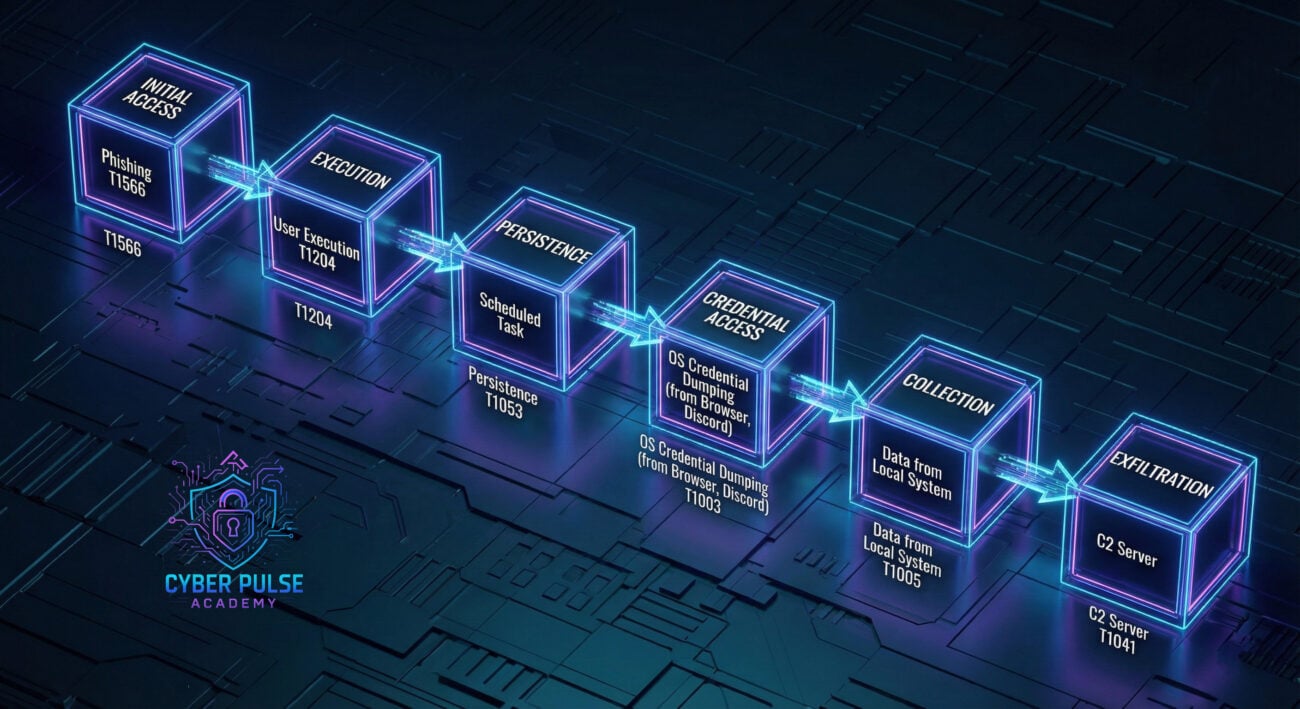
Visual Breakdown: The VVS Stealer Infection Chain
Red Team vs. Blue Team View: Attacker Tactics vs. Defender Strategies
Red Team View: The Attacker's Playbook
Objective: Gain unauthorized access to Discord accounts and sensitive financial data for profit or further intrusion.
Tactics, Techniques, and Procedures (TTPs):
- Weaponization: Bundle VVS Stealer into a legitimate-looking installer using simple packers or crypters.
- Delivery: Leverage compromised Discord accounts or servers to send malicious links. Use social engineering themes relevant to the community (gaming, crypto, tech).
- Exploitation: Rely solely on user execution. No software vulnerability is needed, the human is the weak link.
- Privilege Escalation: Often not required; the stealer runs with the user's own privileges, which is sufficient to access their data.
- Lateral Movement: Use stolen Discord tokens to infiltrate and compromise other accounts within the same servers or communities.
- Monetization: Sell Discord accounts, drain cryptocurrency wallets, or use access for credential stuffing attacks on other platforms.
Blue Team View: The Defender's Strategy
Objective: Prevent infection, detect malicious activity, and minimize damage from potential breaches.
Detection & Defense Strategies:
- User Awareness Training: The first and most critical defense. Train users to recognize phishing lures and avoid untrusted downloads.
- Endpoint Detection & Response (EDR): Deploy EDR tools that can detect suspicious behaviors like processes reading Discord LevelDB files or making outbound calls to known C2 IPs.
- Application Whitelisting: Restrict execution to approved software only, preventing unknown installers from running.
- Network Monitoring: Use firewalls and proxies to block traffic to known malicious IPs/domains associated with stealers.
- Least Privilege Principle: Ensure users do not have administrative rights for daily tasks, limiting the malware's potential impact.
- Incident Response Plan: Have a clear plan for when a token is stolen: force logout of sessions, reset passwords, and revoke authorized apps on Discord.
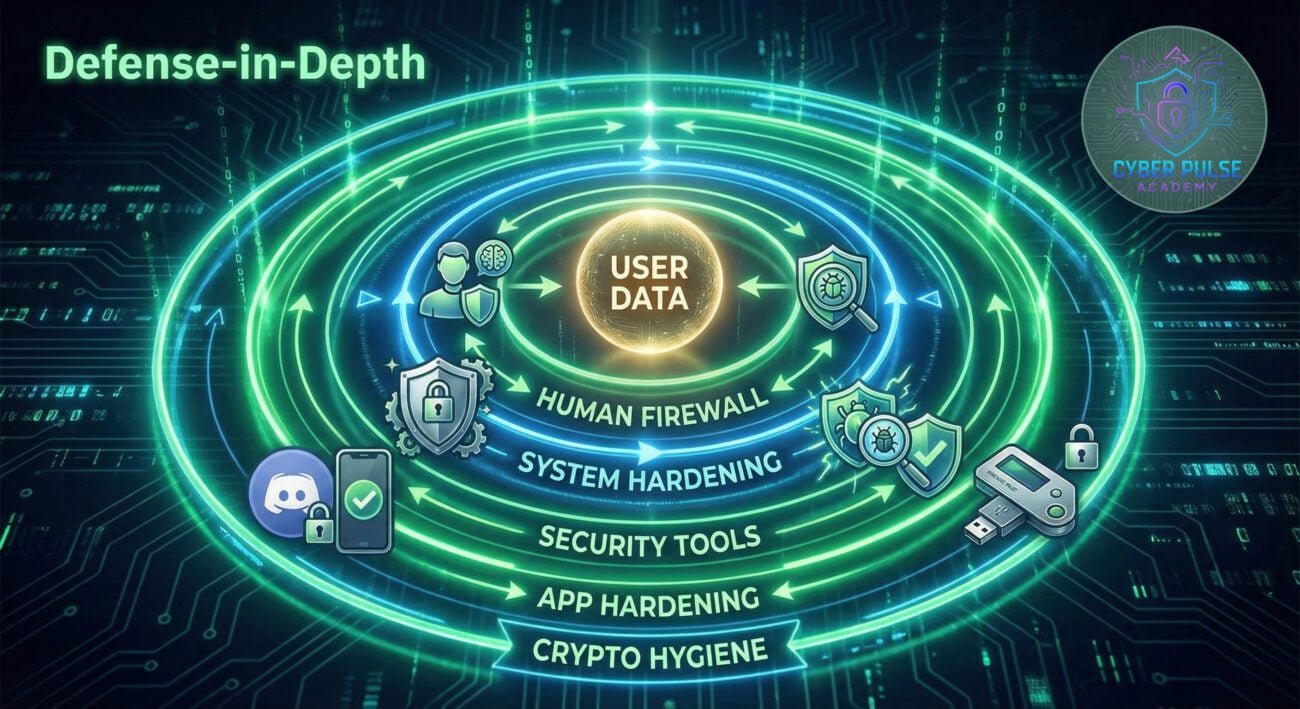
Implementation Framework: A 5-Layer Defense for Discord Users
Protecting yourself from malware like VVS Stealer requires a layered approach. Here is a practical framework you can implement today.
Layer 1: Human Firewall (The Most Important)
- Verify, Then Trust: Never run executables (.exe, .bat, .scr) from untrusted sources, even if sent by a friend. Contact them through another channel to verify.
- Scrutinize Downloads: Be extremely wary of cracks, mods, "free" software, and Discord token generators. They are primary vectors for malware.
- Check File Extensions: Enable "Show file extensions" in Windows. A file named "GameMod.pdf.exe" is an executable, not a PDF.
Layer 2: System Hardening
- Use a Standard User Account: Do your daily computing on an account without administrator privileges.
- Enable Controlled Folder Access (Windows): This Windows Defender feature can block unauthorized changes to sensitive folders like Documents and AppData.
- Keep Everything Updated: Regularly update your OS, browser, and all software to patch potential vulnerabilities.
Layer 3: Proactive Security Tools
- Use a Reputable Antivirus/EDR: Don't rely on Windows Defender alone. Consider a solution with behavioral detection. (See independent test results)
- Install an Ad/Payload Blocker: Browser extensions like uBlock Origin can block malicious ads and sites.
- Use a Password Manager: A password manager (like Bitwarden or 1Password) prevents browsers from storing passwords in a easily-scrapable way and allows you to use strong, unique passwords for every site.
Layer 4: Discord-Specific Protections
- Enable Two-Factor Authentication (2FA): This is non-negotiable. While a stolen token bypasses 2FA for that session, having it enabled makes account recovery possible and shows you take security seriously. (Discord's 2FA Guide)
- Regularly Check Active Sessions: Periodically review and disconnect unfamiliar sessions in your Discord settings (User Settings > Privacy & Safety).
- Be Cautious with Bots & Authorized Apps: Only authorize legitimate bots and apps. Review and revoke unused ones regularly.
Layer 5: Cryptocurrency Security
- Use a Hardware Wallet: For significant amounts, store crypto in a hardware wallet (like Ledger or Trezor). Seed phrases are never exposed to your computer.
- Never Store Seed Phrases Digitally: Never take a photo of your seed phrase or type it into a text file on your PC. Use physical, offline secure storage (metal plate, paper in a safe).
- Use a Dedicated Device: Consider using a separate, clean device for crypto transactions if possible.
Common Mistakes & Best Practices
❌ Common Mistakes
- Disabling antivirus to run a "crack": This is exactly what the attacker wants you to do.
- Reusing passwords: A password stolen from a gaming site can lead to your email, Discord, and bank being compromised.
- Assuming Discord DMs are safe: Compromised accounts make DMs a primary attack vector.
- Storing crypto seeds in cloud notes: Services like OneNote or Evernote are synced and can be harvested.
- Ignoring software updates: Updates often contain critical security patches.
✅ Best Practices
- Adopt a "Zero Trust" mindset for downloads: Verify the source and integrity of every file you run.
- Use a password manager + enable 2FA everywhere: This combination is the strongest general account protection available.
- Regularly audit your digital footprint: Check active sessions, authorized apps, and account activity logs.
- Backup important data offline: Use external drives for critical files. The 3-2-1 rule (3 copies, 2 media types, 1 offsite) applies.
- Educate your community: Share this knowledge with your Discord server members to create a collective defense.
Frequently Asked Questions (FAQ)
Q: If my Discord token is stolen, does changing my password help?
A: Yes, but you must do more. Changing your password invalidates old tokens. However, you must also go to User Settings > Privacy & Safety and use the "Remove All Connected Sessions" button to log out the attacker immediately. Then enable 2FA if you haven't.
Q: I think I downloaded a suspicious file but my antivirus didn't alert. Am I safe?
A: Not necessarily. Antivirus relies on signatures and heuristics, which new malware can evade. If you have a strong suspicion, assume you are compromised. Run a full scan with a second-opinion scanner like Malwarebytes, change critical passwords from a clean device, and monitor accounts for unusual activity.
Q: Can VVS Stealer infect macOS or Linux systems?
A: The specific variant discussed in the source article is a Windows PE (Portable Executable) file, targeting Windows systems. However, the threat model is the same. Information stealers exist for all major operating systems. The same principles of caution and secure practice apply regardless of your OS.
Key Takeaways & Call to Action
The emergence of VVS Stealer is a stark reminder that cybersecurity threats are personal, evolving, and often target our social and financial hubs. By understanding the attacker's methods, we empower ourselves to build robust defenses.
Key Takeaways:
- Discord tokens are prime targets: Protecting them is as important as protecting your password.
- Human error is the primary vector: Cultivate a skeptical and verification-oriented mindset online.
- Layered defense is the only effective defense: No single tool makes you immune. Combine awareness, system hardening, tools, and app-specific settings.
- The goal is damage limitation: Use unique passwords, 2FA, and hardware wallets to ensure a single breach doesn't become catastrophic.
Your Action Plan Starts Now
Don't let this be just another article you read. Take action in the next 10 minutes:
- Enable 2FA on Discord and your primary email right now if you haven't.
- Check your Discord active sessions and disconnect any you don't recognize.
- Audit your downloaded files. Delete any suspicious "cracks" or "mods" you've saved.
- Bookmark this page and share it with one friend or community server to spread awareness.
Cybersecurity is a shared responsibility. By leveling up your own knowledge and habits, you not only secure your digital life but also contribute to a safer online ecosystem for everyone.
© 2026 Cyber Pulse Academy. This content is provided for educational purposes only.
Always consult with security professionals for organization-specific guidance.