


















































Certification Courses
Hands-On Labs
Threat Intelligence
Latest Cyber News
MITRE ATT&CK Breakdown
All Cyber Keywords
In the ever-evolving landscape of cyber threats, a new, highly targeted phishing campaign has emerged, masquerading as legitimate hotel booking confirmations. This attack doesn't just try to steal your login credentials, it's a multi-stage breach designed to drain your wallet and compromise your identity. For cybersecurity beginners and professionals alike, understanding the mechanics of this hotel booking phishing scam is crucial for building effective defenses.
This guide will dissect the attack step-by-step, map it to the official MITRE ATT&CK framework, and provide actionable strategies from both red team (attacker) and blue team (defender) perspectives. By the end, you'll know exactly how to identify, analyze, and protect against this sophisticated scam.
The hotel booking phishing scam is a classic example of social engineering refined for the modern digital traveler. Threat actors send emails that appear to be from well-known hotel chains or booking platforms like Booking.com, Hilton, or Marriott. These emails contain a realistic-looking confirmation for a non-existent booking and a urgent call-to-action, such as "Review your booking details" or "Confirm your payment."
The core vulnerability exploited is human trust and the urgency associated with travel plans. Unlike broad, generic phishing attempts, this attack is timely and contextually relevant, making it far more convincing. The ultimate goal is a multi-theft operation: harvesting login credentials, capturing credit card details, and potentially installing malware.
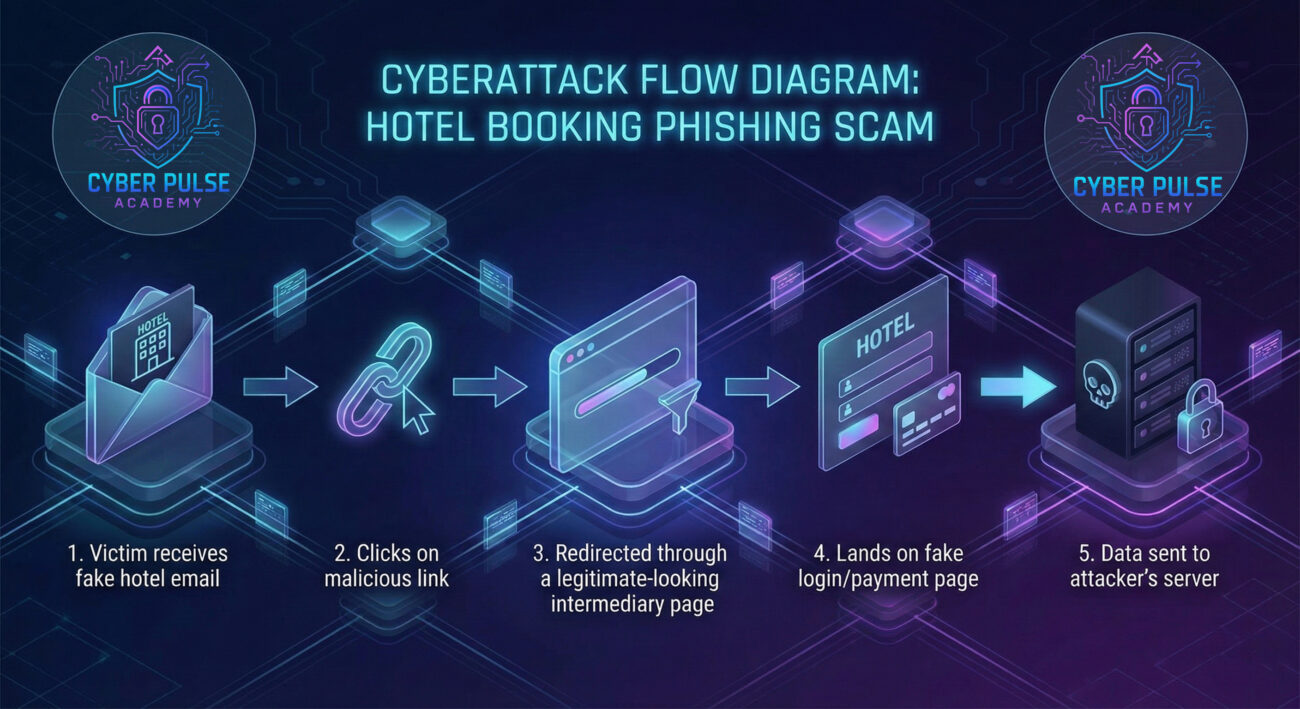
Let's walk through a hypothetical but technically accurate scenario of how a victim gets ensnared in this hotel booking phishing scam.
The target receives an email with a subject like "Your Booking Confirmation #ABX1234" or "Action Required: Confirm Your Upcoming Stay at [Fake Hotel Name]." The email body is meticulously crafted using stolen logos, professional formatting, and legitimate-sounding copy. It often includes fake details like a check-in date, room type, and a total charge to enhance credibility. The inclusion of a malicious link is disguised as a button labeled "View or Manage Booking," "Confirm Payment Method," or "Download Your Itinerary."
This is a critical technical nuance. The link in the email does not lead directly to the fake phishing page. Instead, it points to a compromised or abused legitimate website (like a poorly secured WordPress site or a free hosting page). This server acts as a redirector. It might perform a quick, invisible check (like verifying the user-agent) before forwarding the victim to the final phishing site. This technique helps attackers evade simple URL blocklists that only check the initial link.
The victim lands on a near-perfect replica of a hotel or travel platform's login page. The URL might be a clever lookalike (e.g., "booking-hotel[.]com" instead of "booking.com"). The page prompts the user to "log in to see your booking details." Any credentials entered here are immediately captured and sent to the attacker's command-and-control (C2) server.
After "logging in," the victim is often redirected again to a second fake page claiming there's a payment issue or an upgrade opportunity, asking for credit card details, CVV, and billing address. This multi-stage data harvesting maximizes the attack's financial yield.
The MITRE ATT&CK framework is a globally accessible knowledge base of adversary tactics and techniques. Mapping this hotel booking phishing scam to ATT&CK helps security teams speak a common language and implement targeted defenses.
| MITRE Tactic | MITRE Technique | How It's Used in This Scam |
|---|---|---|
| Reconnaissance | T1598: Phishing for Information | Attackers may send preliminary, less-targeted emails to gather a list of potential travelers before the main campaign. |
| Initial Access | T1566: Phishing Sub-technique: T1566.002: Spearphishing Link |
The primary method. A targeted email with a malicious link is sent to the victim to gain initial foothold (credentials). |
| Execution | T1204.002: User Execution - Malicious Link | Execution occurs when the victim clicks the link, initiating the redirect chain and loading the attacker-controlled page. |
| Collection | T1056.001: Input Capture - Keylogging (via Web Page) T1539: Steal Web Session Cookie |
The fake login page captures (collects) credentials and session data input by the victim. |
| Command and Control (C2) | T1102: Web Service T1071.001: Application Layer Protocol - Web Protocols |
Stolen data is exfiltrated to the attacker's server via standard HTTPS web requests, blending with normal traffic. |
Behind this scam often lies a "phishing kit" – a packaged set of files sold on dark web forums that allows even low-skilled criminals to launch such campaigns. Let's look at a simplified version of the redirect mechanism, a common feature in these kits.
The initial link in the email might point to a PHP file on a compromised server. This file performs checks and redirects:
<?php
// Simple PHP Redirector Script (Example Found in Kits)
$target_phishing_url = "https://malicious-phishing-site.tk/login.php";

// Optional: Check if the request is coming from a real browser (evades sandboxes)
if(isset($_SERVER['HTTP_USER_AGENT']) &&
   !preg_match('/bot|crawl|slurp|spider|curl|wget|libwww/i', $_SERVER['HTTP_USER_AGENT'])) {

    // Optional: Log the victim's IP for the attacker
    $logfile = 'visitors.txt';
    $ip = $_SERVER['REMOTE_ADDR'];
    file_put_contents($logfile, $ip . PHP_EOL, FILE_APPEND);

    // Perform the redirect
    header("Location: " . $target_phishing_url, true, 302);
    exit();
} else {
    // If it looks like a bot, maybe redirect to a legitimate site to avoid detection
    header("Location: https://www.google.com");
    exit();
}
?>
This code shows how attackers use simple server-side logic to filter out automated scanners and only redirect human visitors to the malicious site, increasing the attack's stealth.
Understanding both sides of the attack is key to building resilience. Here’s how each side approaches this hotel booking phishing scam.
Avoiding pitfalls is as important as implementing best practices. Here’s a quick comparison for individuals and organizations.
For businesses, especially in the travel and hospitality sector, a structured defense is essential.
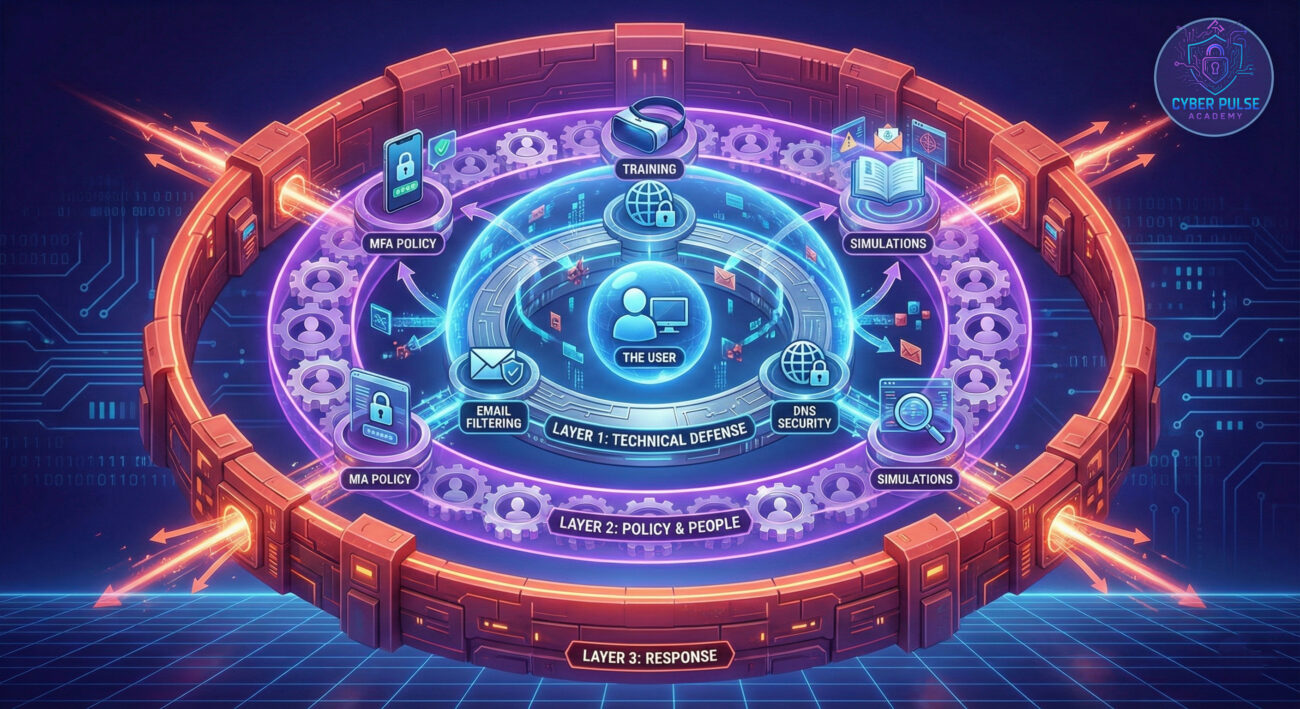
A: You are likely safe from credential theft, but there is a small risk. Some malicious sites can attempt "drive-by downloads" that exploit browser vulnerabilities just by visiting the page. Ensure your browser is fully updated, run a full antivirus scan, and monitor your accounts for unusual activity. In a corporate setting, report the click to your IT team immediately.
A: Look beyond the display name. Check the full email address header. Often, the domain will have subtle typos (e.g., "@bokking.com", "@marrott.com", or a subdomain like "@secure.booking.com.ua"). Legitimate companies rarely use free email domains (Gmail, Yahoo) for official communications, though this is not a guarantee.
A: Act immediately.
A: Yes. You can use free online tools like VirusTotal to scan a URL with multiple antivirus engines. Browser extensions from reputable security companies can also provide real-time link ratings. However, the safest method is always to navigate directly to the official site yourself.
Knowledge is your first line of defense. Now, take action:
Cybersecurity is a shared responsibility. By understanding threats like this hotel booking phishing scam, you move from being a potential target to an active defender of your own digital space.
© 2026 Cyber Pulse Academy. This content is provided for educational purposes only.
Always consult with security professionals for organization-specific guidance.
Every contribution moves us closer to our goal: making world-class cybersecurity education accessible to ALL.
Choose the amount of donation by yourself.