


















































Certification Courses
Hands-On Labs
Threat Intelligence
Latest Cyber News
MITRE ATT&CK Breakdown
All Cyber Keywords
Imagine receiving an email that appears to come from your own company's human resources department or CEO. The sender address looks perfect, the domain matches yours exactly, and the content seems legitimate. This is the dangerous reality of internal domain phishing, a sophisticated attack vector exploiting misconfigured email routing that Microsoft has recently warned is seeing a significant surge. This guide will dissect this evolving threat, explain exactly how attackers bypass security controls, and provide you with actionable steps to defend your organization.
Microsoft's Threat Intelligence team has issued a critical warning about a resurgence in internal domain phishing campaigns. Attackers are exploiting complex email routing scenarios, where a company's mail flow passes through an on-premises server or third-party service before reaching Microsoft 365, to send emails that spoof the organization's own domain. This bypasses typical spoofing protections, making emails appear as legitimate internal communications.
The phishing emails generated through this method are highly convincing, often themed around voicemail notifications, HR communications, password expirations, or shared documents. Microsoft reported blocking over 13 million such emails in a single month (October 2025), primarily linked to the "Tycoon 2FA" Phishing-as-a-Service (PhaaS) kit. The end goal is credential theft, leading to data exfiltration, financial fraud, or Business Email Compromise (BEC).
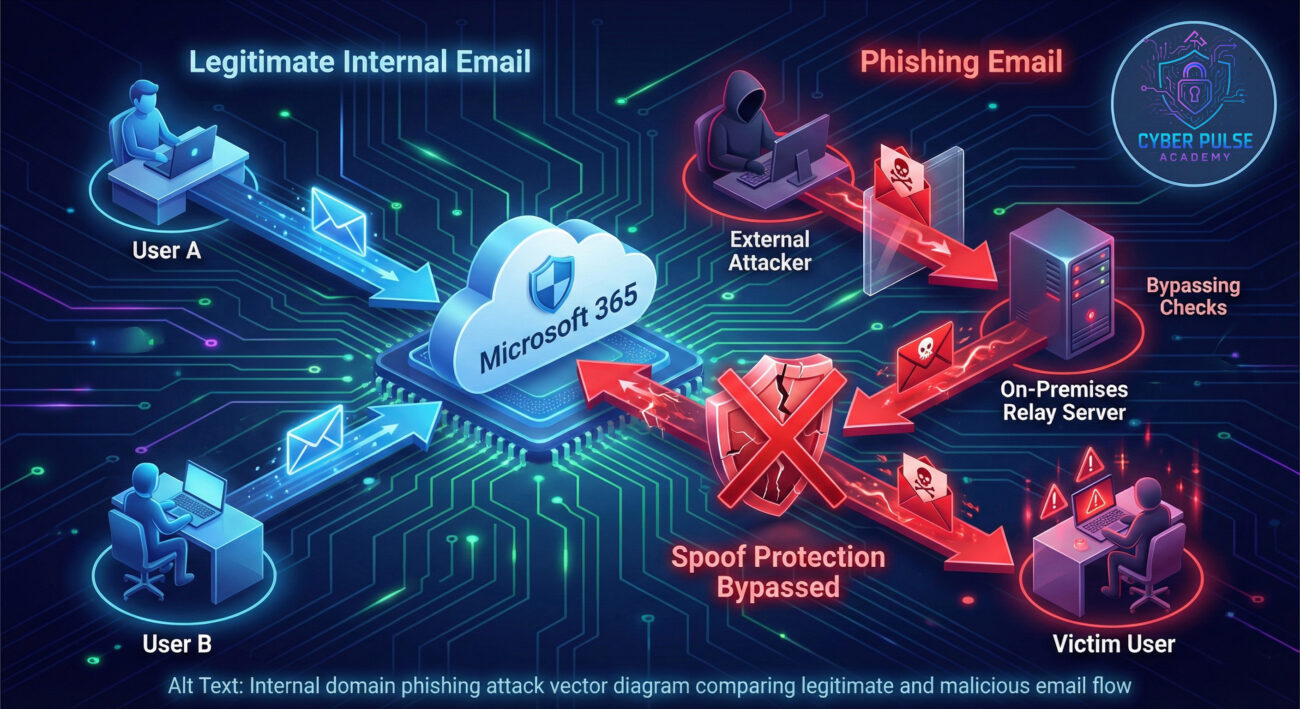
To understand this attack, you need to grasp two key concepts: MX Record routing and spoof protection enforcement points.
Many organizations, especially during cloud migration or when using hybrid setups, configure their Domain Name System (DNS) Mail Exchanger (MX) records to point first to an on-premises Microsoft Exchange server or a third-party security/archiving service. Only after this initial hop does mail get forwarded to Microsoft 365.
Herein lies the vulnerability. When mail is received by Microsoft 365 from a trusted on-premises server or a configured third-party connector, it often treats the mail as "internal" and may not apply the same rigorous anti-spoofing checks (like SPF/DKIM/DMARC) that it would apply to mail coming directly from the internet. An attacker who discovers this configuration can send emails directly to the on-premises relay, spoofing the 'From' address to be any user within the organization's domain. The relay forwards it to Office 365, which delivers it to the victim's inbox, appearing as a genuine internal email.
| Configuration Scenario | Vulnerability Status | Why? |
|---|---|---|
| MX record points directly to Microsoft 365 | NOT Vulnerable | All inbound mail is subject to Microsoft's full stack of anti-spoofing filters at the perimeter. |
| MX record points to on-premises Exchange, then to Microsoft 365 | POTENTIALLY Vulnerable | Mail from the on-prem server is often trusted. If the server is misconfigured to accept and relay external mail without validation, it becomes an open relay for spoofed internal mail. |
| MX record points to a third-party service (filter, archive), then to Microsoft 365 | POTENTIALLY Vulnerable | The connector between the service and Microsoft 365 must be tightly configured to only accept authenticated mail from the service's specific IPs. Misconfiguration here creates a gap. |
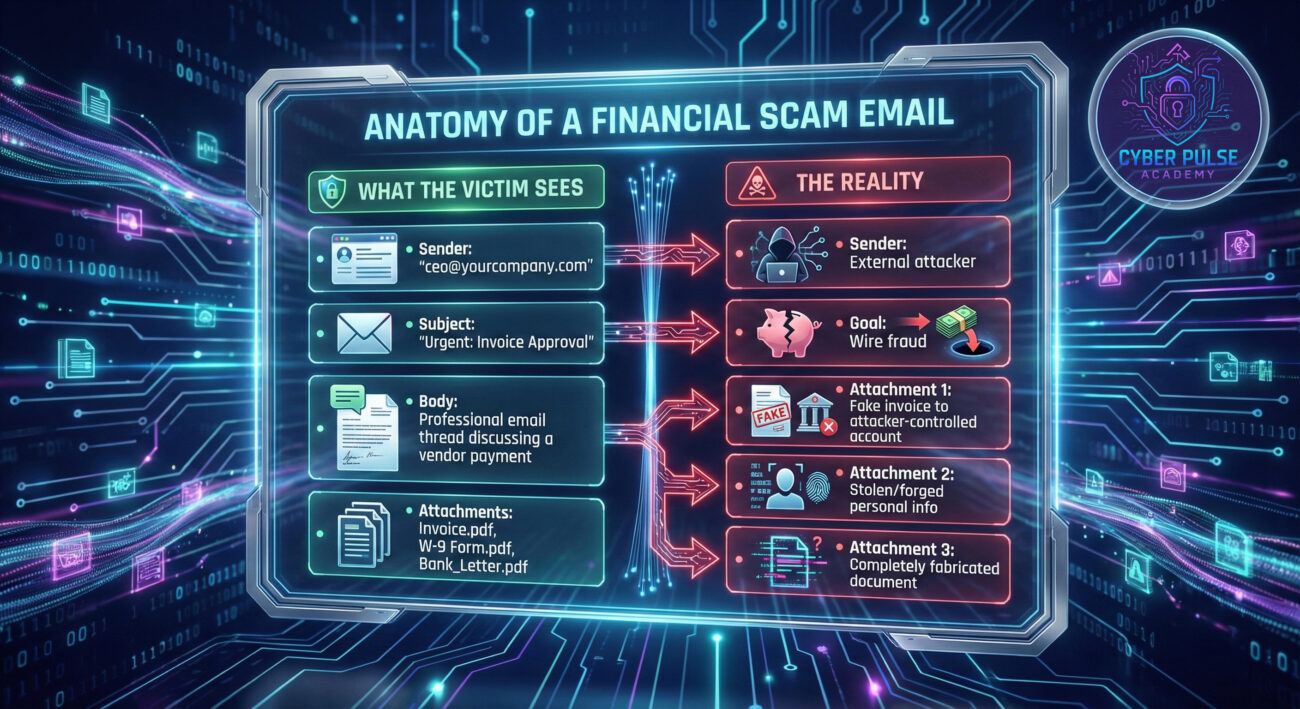
This isn't a theoretical risk. Attackers are actively using this vector for high-impact campaigns:
Mapping this attack to the MITRE ATT&CK framework helps security professionals understand its place in the broader threat landscape and design layered defenses.
| Tactic | Technique (ID) | How It's Used in This Attack |
|---|---|---|
| Initial Access | Phishing (T1566) | The primary technique. Spearphishing via internal domain spoofing (T1566.002) is the specific sub-technique. |
| Initial Access | Trusted Relationship (T1199) | Exploits the trusted relationship between the on-premises mail relay and Microsoft 365 cloud service. |
| Credential Access | Adversary-in-the-Middle (AiTM) (T1557) | Used by PhaaS kits like Tycoon 2FA to intercept MFA codes and session cookies during the phishing process. |
| Impact | Financial Theft (T1657) | The end goal of many BEC campaigns launched via this method. |
Check your public DNS MX records using tools like MXToolbox. Does it point directly to yourcompany-com.mail.protection.outlook.com (or similar) for Microsoft 365? Or does it point to your own mail server or a third-party service hostname? If it's the latter, you need to proceed to Step 2.
In your on-premises Exchange server, examine receive connectors. Ensure they are not configured to accept anonymous relay from the internet. In the Microsoft 365 Exchange Admin Center, review mail flow connectors. For connectors from your on-premises or third-party service, they must be scoped to only accept mail from specific, known IP addresses of your service/relay.
This is your primary defense.
p=reject. This instructs receiving servers (including Microsoft 365) to reject mail that fails alignment checks.-all (hard fail) mechanism at the end.
p=none (monitoring only), which provides no enforcement.p=quarantine if needed, but move to reject.For security leaders, here is a 30-60-90 day plan to address this risk:
| Timeline | Actions | Owner / Tools |
|---|---|---|
| First 30 Days (Assess) |
|
Email Admin, DNS Diagnostic Tools, Exchange Admin Centers |
| 60 Days (Remediate) |
|
Security & Email Team, PowerShell for automation |
| 90 Days (Optimize) |
|
Red/Blue Team, Phishing Simulation Platform |
A: You could be. The security depends on how the connector between that service and Microsoft 365 is configured. If the connector is set to trust mail from the filter's IPs without also validating the sender's authenticity (SPF/DKIM) for your own domain on messages coming from that source, then it's a potential gap. You must ensure your third-party service is configured to apply authentication checks and/or that the Microsoft 365 connector is scoped correctly.
A: Yes, if properly enforced at the right point. A strict DMARC p=reject policy tells receiving mail servers (like Microsoft 365) to reject messages that fail DMARC alignment. The key is ensuring Microsoft 365 is performing the DMARC check. In the vulnerable misconfigured flow, the mail might be treated as "internal" and the check might be skipped. Fixing the connector configuration ensures DMARC is evaluated, making the policy effective.
A: Check your MX record and test for open relay.
Don't wait for a breach to expose your configuration gaps. Begin your assessment today.
External Resources for Deeper Learning:
Microsoft Official Guide: Email Authentication in Microsoft 365 |
DMARC.org - Official Specification & Resources |
MITRE ATT&CK: Spearphishing via Service (T1566.002)
Share this guide with your security and IT teams to start a critical conversation about your organization's email defense posture.
© 2026 Cyber Pulse Academy. This content is provided for educational purposes only.
Always consult with security professionals for organization-specific guidance.
Every contribution moves us closer to our goal: making world-class cybersecurity education accessible to ALL.
Choose the amount of donation by yourself.