In a significant move highlighting urgent cyber threats, the U.S. Cybersecurity and Infrastructure Security Agency (CISA) has recently added two critical vulnerabilities to its Known Exploited Vulnerabilities (KEV) catalog. These vulnerabilities target ubiquitous enterprise software: Microsoft Office and HPE Aruba ClearPass Policy Manager. For cybersecurity professionals, students, and beginners, understanding why CISA KEV catalog Microsoft Office HPE vulnerabilities warrant immediate attention is crucial. This post breaks down the technical details, maps them to real-world attack techniques (including MITRE ATT&CK), and provides a clear defense framework.
Executive Summary: The Gravity of the KEV Catalog
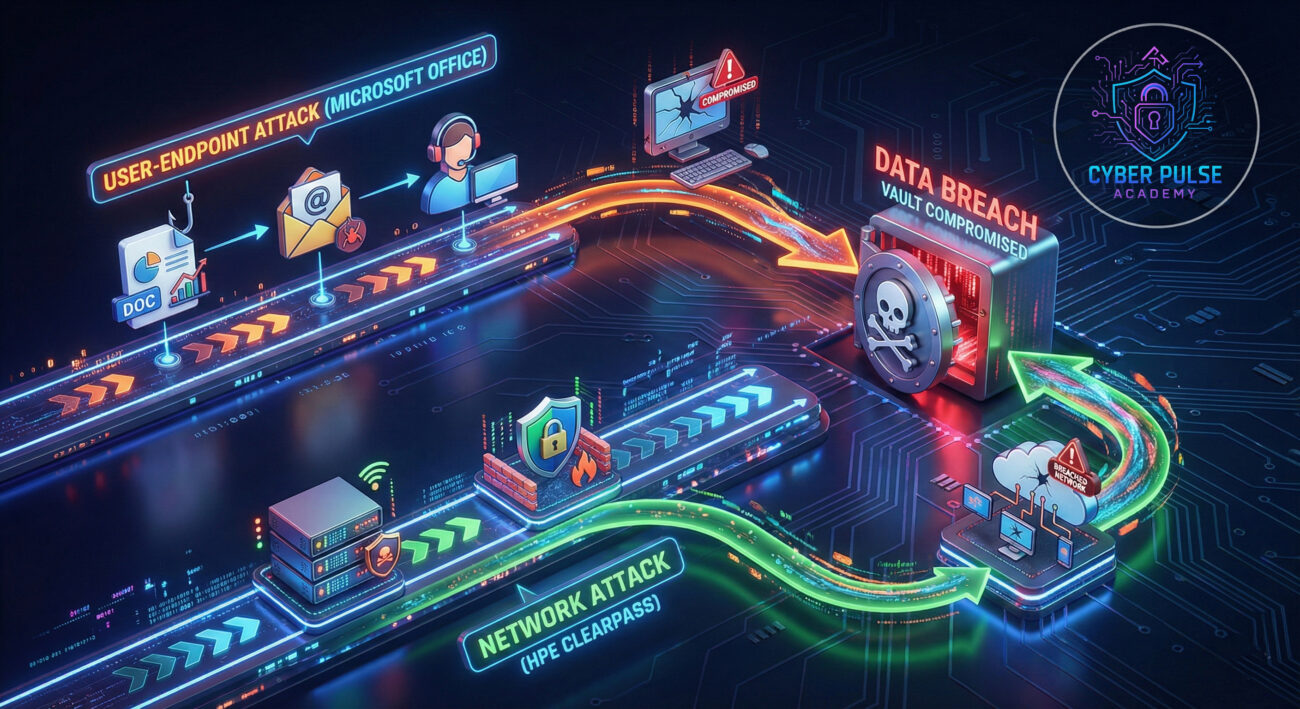
CISA's KEV catalog is not just a list, it's a high-priority warning system. When a vulnerability is added, it means CISA has confirmed evidence of active exploitation by threat actors in the wild. The two latest entries represent a dangerous combination: one exploits a common user entry point (Microsoft Office), and the other targets a critical network security infrastructure component (HPE Aruba ClearPass). Federal agencies are mandated to patch these by a set deadline, but all organizations should treat this with equal urgency. This situation perfectly illustrates the attacker strategy of chaining exploits for maximum impact.

Vulnerability Deep Dive: CVE-2023-36884 & CVE-2021-30116
Let's dissect the two CISA KEV catalog Microsoft Office HPE vulnerabilities to understand their nature and risk.
CVE-2023-36884: Microsoft Office Remote Code Execution
This is a critical vulnerability in multiple Microsoft Office products (Word, Excel, etc.) that allows an attacker to execute arbitrary code on a victim's system. How does it work? The flaw lies in how Office handles certain web-based content embedded in documents. An attacker can craft a malicious document (e.g., a .DOCX file) that, when opened, bypasses security prompts and fetches a malicious HTML payload from a remote server. This payload then exploits the flaw to run code.
Technical Mechanism (Simplified): The attack often uses a crafted "HTML smuggling" technique. The malicious Office file contains an object that points to an external HTML file. Due to the vulnerability, Office executes this HTML content with elevated privileges, allowing it to download and run a malware payload (like RomCom RAT) without the user's explicit consent beyond opening the document.
Attack Flow: CVE-2023-36884 Exploitation
- Weaponization: Attacker creates a malicious Office document exploiting the vulnerability.
- Delivery: Document is delivered via phishing email or compromised website.
- Exploitation: User opens the document. Office fetches and executes the malicious HTML from the attacker's server.
- Installation: The HTML payload downloads and installs the final malware payload (e.g., a Remote Access Trojan).
- Command & Control: The malware establishes a connection to the attacker's server, enabling full system control.
CVE-2021-30116: HPE Aruba ClearPass Policy Manager Remote Code Execution
This vulnerability, with a high CVSS score, exists in the web-based management interface of HPE's Aruba ClearPass Policy Manager, a crucial system for network access control and device authentication. It allows an unauthenticated remote attacker to execute arbitrary code with root privileges.
Technical Mechanism: The flaw is in a specific API endpoint that improperly validates user input. An attacker can send a specially crafted HTTP request containing malicious code (command injection) to this endpoint. Because the software doesn't correctly sanitize this input, the system executes the injected commands. Since ClearPass often holds a central role in network security, compromising it can grant an attacker keys to the entire network kingdom.
| CVE ID |
Product |
CVSS Score |
Exploit Status |
Core Issue |
| CVE-2023-36884 |
Microsoft Office |
7.8 (High) |
Actively Exploited |
RCE via crafted Office documents with malicious HTML. |
| CVE-2021-30116 |
HPE Aruba ClearPass |
9.8 (Critical) |
Actively Exploited |
Unauthenticated RCE via command injection in web API. |
Mapping to MITRE ATT&CK: The Hacker's Playbook
Understanding the CISA KEV catalog Microsoft Office HPE vulnerabilities through the MITRE ATT&CK framework provides a structured view of the attacker's tactics and techniques. This knowledge is vital for effective defense.
Microsoft Office Exploit (CVE-2023-36884) ATT&CK Mapping
- Tactic: Initial Access (TA0001)
- Technique T1566: Phishing. The primary delivery method for the malicious Office document.
- Sub-technique T1566.001: Spearphishing Attachment. The weaponized document is attached to a targeted email.
- Tactic: Execution (TA0002)
- Technique T1204: User Execution. Requires the user to open the malicious document.
- Technique T1204.002: Malicious File. The Office file is the malicious object that triggers execution.
- Tactic: Defense Evasion (TA0005)
- Technique T1218: Signed Binary Proxy Execution. Office is a trusted, signed application used to proxy the execution of malicious code.
- Technique T1553: Subvert Trust Controls. Exploiting the vulnerability subverts Office's built-in security controls and macro warnings.
HPE Aruba ClearPass Exploit (CVE-2021-30116) ATT&CK Mapping
- Tactic: Initial Access (TA0001)
- Technique T1190: Exploit Public-Facing Application. The attacker targets the ClearPass web management interface exposed to the network/internet.
- Tactic: Execution (TA0002)
- Technique T1059: Command and Scripting Interpreter. The vulnerability allows command injection, leading to execution of system commands.
- Sub-technique T1059.004: Unix Shell. Commands are executed in the underlying Linux shell of the ClearPass appliance.
- Tactic: Privilege Escalation (TA0004)
- The exploit grants root privileges immediately, achieving the highest level of system control (Technique T1068).
Real-World Attack Scenario: From Phishing to Full Compromise
Imagine a targeted attack against a mid-sized technology firm. Here’s how an adversary could chain these vulnerabilities for a devastating breach:
Phase 1: Initial Foothold via Office Exploit
An employee in the finance department receives a convincing phishing email disguised as an invoice from a known vendor. The email contains a Word document ("Invoice_Q1_2026.docx"). The user, expecting such communications, opens it. The document exploits CVE-2023-36884, silently downloading and executing the RomCom RAT malware. The attacker now has a backdoor on the user's workstation.
Phase 2: Lateral Movement & Discovery
From the compromised workstation, the attacker uses the RAT to move laterally. They use common tools like Mimikatz to steal credentials and scan the internal network. Their reconnaissance reveals the IP address of the internal HPE Aruba ClearPass Policy Manager server, a critical asset for managing network access policies for employees and devices.
Phase 3: Privilege Escalation & Network Dominance
The attacker finds the ClearPass server's web interface is accessible from the internal network. Using an automated exploit for CVE-2021-30116, they send a malicious HTTP POST request to the vulnerable API endpoint. This grants them immediate root shell access on the ClearPass server. With control over the network's primary access policy manager, they can:
- Create rogue administrator accounts.
- Modify policies to allow unrestricted access for their malicious devices.
- Intercept and manipulate network authentication traffic.
- Use the server as a launchpad for attacks on other critical systems (domain controllers, file servers).
The breach is now severe, with the attacker possessing deep, persistent control over the network's core security infrastructure.
Step-by-Step Defense Guide for IT Teams
Follow this actionable guide to secure your environment against these CISA KEV catalog Microsoft Office HPE vulnerabilities.
Step 1: Immediate Patching & Updates
This is non-negotiable. Apply the official vendor patches immediately.
Step 2: Implement Robust Application Control
Prevent the execution of unauthorized scripts and code. Use tools like:
- Microsoft Defender Application Control (WDAC) to allow only trusted applications.
- Policies to block Office from creating child processes (a common malware behavior), which can mitigate post-exploitation activity.
Step 3: Harden Network Security Posture
- Network Segmentation: Isolate critical infrastructure like ClearPass servers. Their management interfaces should not be directly accessible from the internet or general user VLANs.
- Web Application Firewall (WAF): Deploy a WAF in front of critical web applications (like ClearPass) to filter out malicious HTTP requests that exploit command injection patterns.
- Intrusion Detection/Prevention (IDS/IPS): Ensure your IDS/IPS signatures are updated to detect exploitation attempts for these specific CVEs.
Step 4: Enhance Endpoint Detection & Response (EDR)
Configure your EDR/XDR solutions to alert on suspicious behavior linked to these exploits:
- Microsoft Office spawning unusual child processes (e.g., PowerShell, cmd.exe, wscript).
- Network connections from workstations to unknown external IPs immediately after opening an Office document.
- Unusual process execution or network scanning originating from your ClearPass server.
Step 5: User Awareness & Phishing Simulations
Conduct regular, targeted training on identifying sophisticated phishing emails. Run simulated phishing campaigns that mimic the delivery method of these Office exploits. Teach users to verify sender addresses and avoid opening unexpected attachments, even from seemingly known contacts.
Red Team vs. Blue Team Perspective
Understanding both sides of the coin is key to building resilient defenses.
Red Team (Attacker) View
Objective: Gain initial access and elevate to domain/admin privileges.
- Opportunity: These are "low-hanging fruit" vulnerabilities with public exploits. They are reliable entry points.
- Tactics:
- Use CVE-2023-36884 for high-probability user compromise via spear-phishing.
- Scan for exposed ClearPass instances (port 443) and attempt CVE-2021-30116 for a quick, high-value win.
- Chain them: Use the Office exploit to get a foothold, then pivot to attack internally facing ClearPass servers.
- Challenges: Patching, network segmentation, and robust EDR can completely block these paths.
Blue Team (Defender) View
Objective: Prevent initial compromise, detect intrusion attempts, and limit impact.
- Primary Focus: Patch management is the #1 priority. A patched system is a closed door.
- Detection Strategies:
- Monitor for Office making outbound web requests (potential HTML smuggling).
- Alert on HTTP requests to ClearPass containing common command injection patterns (e.g., `;`, `&`, `|`, `$()` in parameters).
- Correlate alerts: A user opening a document followed by unusual process creation from Office.
- Mitigation Layers: Combine patching with application control, network micro-segmentation, and strong password policies for administrative accounts.
Common Mistakes & Best Practices
Common Mistakes (What to Avoid)
- Delaying Patches: Treating "critical" patches as a monthly task instead of an emergency.
- Exposing Management Interfaces: Having ClearPass or other critical system admin panels directly reachable from untrusted networks.
- Over-relying on User Vigilance: Assuming users will always spot sophisticated phishing attempts.
- Missing Asset Inventory: Not knowing you have an HPE ClearPass server or all versions of Office in your environment.
- Weak Endpoint Security: Not using EDR or having it misconfigured, missing key behavioral detections.
Best Practices (What to Implement)
- Prioritize KEV Catalog Patches: Integrate the CISA KEV catalog feed into your vulnerability management program for automatic high-priority ticketing.
- Implement a Zero-Trust Model: Enforce strict access controls and network segmentation. Assume breach and verify explicitly.
- Adopt Multi-Factor Authentication (MFA): Enforce MFA everywhere, especially on administrative accounts and VPN access, to mitigate stolen credentials.
- Conduct Regular Vulnerability Scans: Use tools to continuously scan for unpatched systems and misconfigurations.
- Develop an Incident Response Plan: Have a tested plan that specifically includes scenarios involving exploitation of commonly targeted software like Office and network appliances.
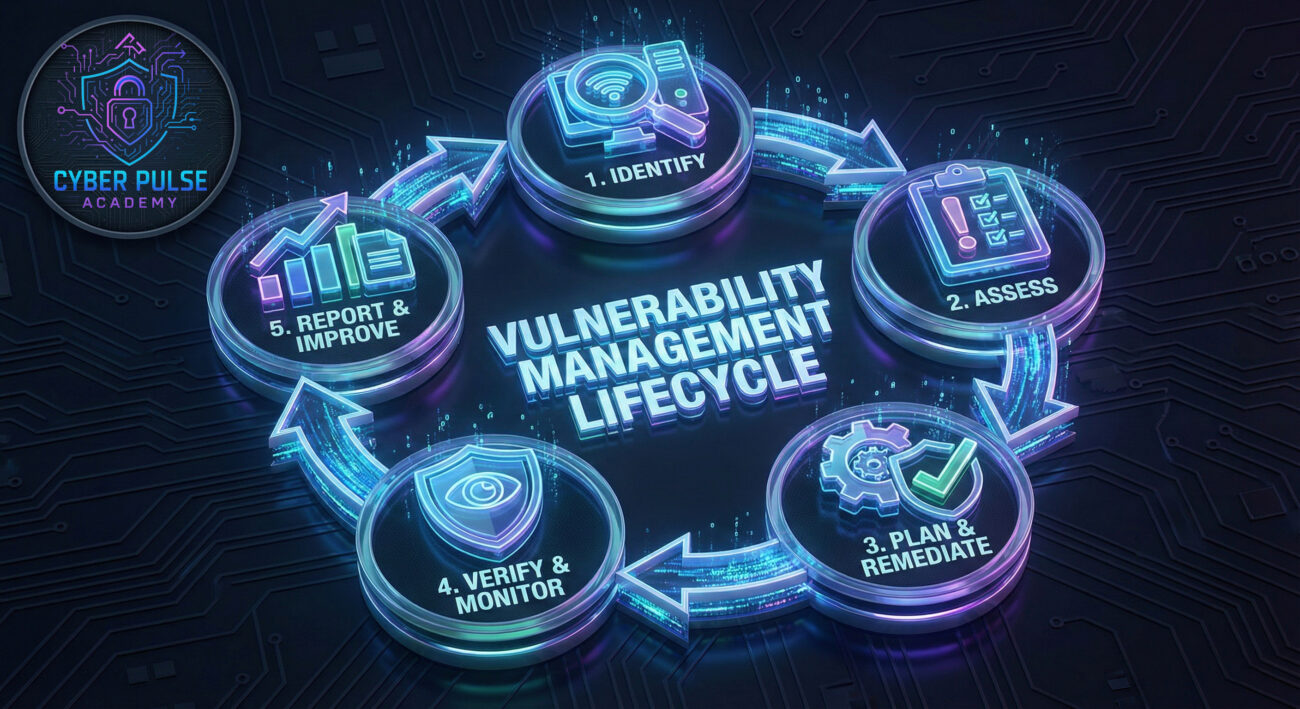
Implementation Framework for Vulnerability Management
Build a sustainable process to handle future CISA KEV catalog Microsoft Office HPE vulnerabilities and others.
- Identify & Inventory: Use asset discovery tools to maintain a real-time inventory of all software and hardware.
- Assess & Prioritize: Integrate threat intelligence feeds (like CISA KEV) into your vulnerability scanner. Prioritize based on exploit activity (in wild), CVSS score, and asset criticality.
- Plan & Remediate: For KEV-listed vulnerabilities, create an emergency change ticket. For others, follow a regular patch cycle. Test patches in a staging environment first.
- Verify & Monitor: After patching, rescan to confirm remediation. Monitor logs and EDR for any exploitation attempts that occurred before patching.
- Report & Improve: Document the process, time-to-patch metrics, and any obstacles. Use this data to improve your response time for the next critical vulnerability.
Frequently Asked Questions (FAQ)
Q: What does it mean when CISA adds a vulnerability to the KEV catalog?
A: It means CISA has confirmed that threat actors are actively using this vulnerability to attack organizations. It is considered a high-confidence, high-urgency threat requiring immediate action, especially for federal agencies who are bound by Binding Operational Directive (BOD) 22-01 to patch within set deadlines.
Q: I have Microsoft 365 Apps for Enterprise. Am I still vulnerable to CVE-2023-36884?
A: If your Microsoft 365 Apps are set to update automatically (the default), you should already be protected, as Microsoft rolls out security patches continuously. However, you must verify that updates have been applied. On-premises versions of Office (like Office 2019, 2021) require manual patching and are at higher risk if not updated.
Q: Why is the HPE ClearPass vulnerability (CVE-2021-30116) still a problem if it's from 2021?
A: Many organizations have complex upgrade processes for critical network appliances, leading to prolonged patch cycles. Furthermore, attackers actively scan the internet for outdated, vulnerable versions. The addition to the KEV catalog in 2026 indicates it is still being widely exploited, proving that unpatched systems remain a significant target years after disclosure.
Q: As a small business with limited IT staff, what's the single most important thing I should do?
A: Enable automatic updates for all software, especially Microsoft Office/Windows. For appliances like HPE ClearPass, schedule and prioritize their updates as soon as possible, even if it requires engaging a managed service provider (MSP). Combine this with enforcing MFA on all administrative accounts.
Q: How can I stay informed about new additions to the CISA KEV catalog?
A: Subscribe to CISA's KEV Catalog feed or RSS. Follow reputable cybersecurity news sources like The Hacker News, Krebs on Security, and Dark Reading. Many vulnerability management platforms also integrate this feed directly.
Key Takeaways
- CISA's KEV Catalog is a Critical Intelligence Feed: Treat any vulnerability added to it as a top-priority emergency requiring immediate patching.
- Dual-Threat Vector: The recent CISA KEV catalog Microsoft Office HPE vulnerabilities represent a classic combo, targeting both end-users and critical infrastructure, maximizing the attacker's chances of success.
- MITRE ATT&CK Provides Clarity: Mapping exploits to techniques like Phishing (T1566) and Exploit Public-Facing Application (T1190) helps build targeted defenses.
- Patching is Primary, But Layered Defense is Essential: Beyond patching, implement application control, network segmentation, EDR monitoring, and user training to create secure layers.
- Exploits Don't Expire: Vulnerabilities from years ago (like CVE-2021-30116) remain potent weapons in hacker arsenals as long as unpatched systems exist. Continuous vulnerability management is non-negotiable.
Call-to-Action: Your Next Steps
Don't let this be just another article you read. Take action today:
- Audit: Scan your network right now for Microsoft Office versions and HPE Aruba ClearPass instances. Check their patch levels.
- Patch: If unpatched, schedule and apply the updates for CVE-2023-36884 and CVE-2021-30116 as an emergency task.
- Validate Controls: Ensure your EDR, email security, and network segmentation controls are active and properly configured to detect related attacks.
- Educate: Send a brief, non-technical alert to your user base about being extra vigilant with email attachments.
- Subscribe: Bookmark and regularly check the CISA KEV Catalog. Make it part of your weekly security routine.
Stay vigilant, stay patched, and build your defenses layer by layer. The threat landscape evolves, but with proactive steps, you can significantly reduce your risk.
© 2026 Cyber Pulse Academy. This content is provided for educational purposes only.
Always consult with security professionals for organization-specific guidance.