


















































Certification Courses
Hands-On Labs
Threat Intelligence
Latest Cyber News
MITRE ATT&CK Breakdown
All Cyber Keywords
Imagine a burglar who doesn't need to pick locks. Instead, they have a master key that automatically tries every door in the neighborhood until one swings open. That’s essentially what an exploit kit does in the digital world. If you've ever wondered how ordinary people get infected with malware just by visiting a website, you're about to learn the secret.
An exploit kit is an automated cybercrime tool that secretly probes your software for weaknesses and delivers malware when it finds one. In this guide, you'll learn: what makes them so dangerous, how they work in simple terms, a real story of an attack, and most importantly, 5 actionable steps to shield yourself from them.
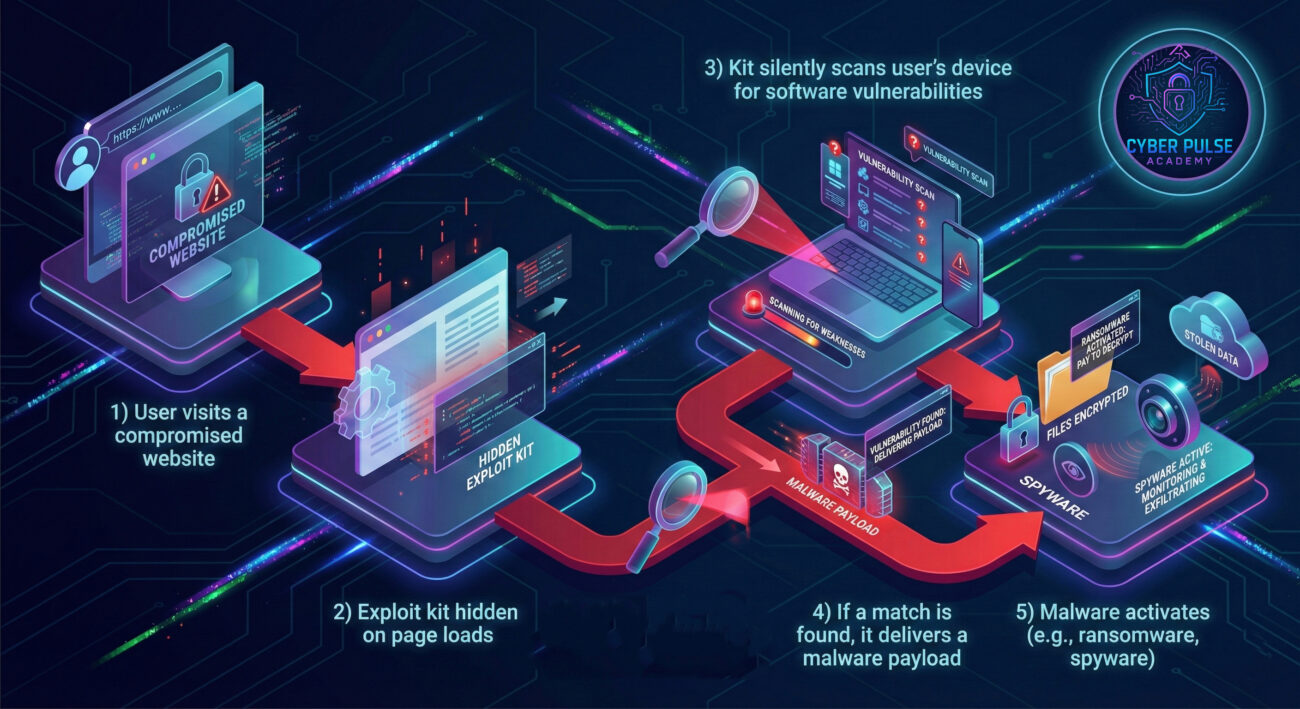
Have you ever clicked on a link from a search engine, fully trusting the website, only to have your antivirus scream a warning moments later? You might have just brushed against an exploit kit. Unlike a virus that comes in an email attachment, these kits work silently in the background of hacked but normal-looking websites.
In simple terms, an exploit kit is a hacker's automated toolbox. Its sole job is to find a tiny, unpatched crack in your software (like your browser, Flash, or Java) and push malware through it. Think of it like an automated drilling machine that tries every weak spot on a bank vault until it breaks through. You won't see the drill; you'll only notice when your digital valuables are gone.
By the end of this post, you'll understand the lifecycle of these kits, recognize the signs of a potential breach, and build a powerful defense using habits that cybersecurity pros swear by.
Exploit kits matter because they democratize cybercrime. In the past, launching a sophisticated attack required deep technical skill. Today, with exploit kits sold on the dark web, even low-skilled criminals can rent these "crimeware-as-a-service" platforms. A CISA report highlights that automated attacks are among the top vectors for initial network breaches.
The financial impact is staggering. These kits fuel ransomware attacks, data theft, and botnet creation. They often target outdated software on a user's device, making anyone who clicks "Remind me later" on update notifications a perfect victim. Your daily life is connected: reading news, online shopping, or watching videos, all are potential entry points if your defenses aren't secure.
The stealth of modern exploit kits is what makes them so dangerous. They use techniques like "filtering" to avoid security researchers and only deliver malware to specific, vulnerable targets. This means you could be infected without any pop-ups or obvious signs, a silent digital attack happening while you browse.
| Term | Simple Definition | Everyday Analogy |
|---|---|---|
| Exploit Kit | An automated software package that finds and exploits security vulnerabilities in other software to install malware. | A master key ring that automatically tries every key until it opens your front door. |
| Vulnerability | A weakness or bug in software code that can be used to compromise security. | A tiny, hidden crack in your car's windshield that can be tapped to shatter the whole glass. |
| Payload | The malicious software (ransomware, spyware) delivered after a successful exploit. | The burglar that slips through the opened door to steal your valuables. |
| Drive-by Download | An infection that happens just by visiting a webpage, with no click required. | Catching a flu just by walking into a room where someone sneezed. |
| Patch/Update | A software fix issued by developers to seal a vulnerability. | Repairing the crack in your windshield before it can be tapped. |
Sara, a freelance graphic designer, was researching design trends. She clicked on a link from a search result that led to a popular design blog. The site looked perfectly normal. Unknown to her, the blog had been hacked months prior, and a malicious script redirecting to an exploit kit was embedded in its footer.
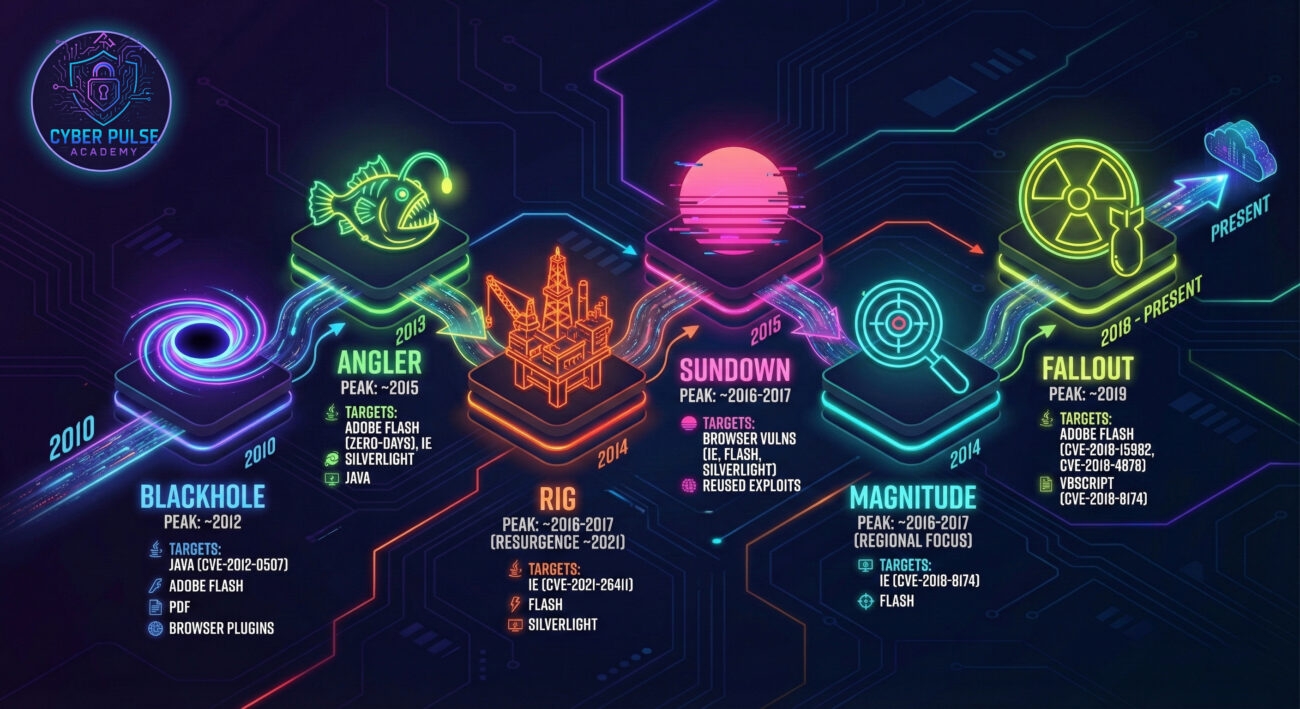
The kit, named "Rig" (a real, widespread kit), loaded silently. It checked Sara's browser and plugins. It found that her Adobe Flash Player was outdated, she had ignored the update notifications for weeks. The kit instantly used a known exploit for that Flash vulnerability to download and install a cryptojacking malware onto her computer. Her machine then started mining cryptocurrency for the hacker, slowing down her expensive design software to a crawl. It took her weeks and a costly tech support visit to discover and remove the infection.
| Time/Stage | What Happened | Impact |
|---|---|---|
| Day 0 | Sara ignores Flash Player update prompts. | Creates a known vulnerability on her system. |
| Day 15 | She visits the compromised design blog. | The exploit kit scans her system silently. |
| Day 15 (seconds later) | The kit finds the Flash vulnerability and executes the exploit. | Malware payload is downloaded and installed. |
| Day 16-44 | Cryptojacking malware runs, using 80% of her CPU. | Computer becomes slow and unresponsive, work deadlines are missed, increased electricity bill. |
| Day 45 | Sara seeks professional help, malware is removed, and all software is updated. | System performance restored. Lesson learned: automatic updates are enabled. |
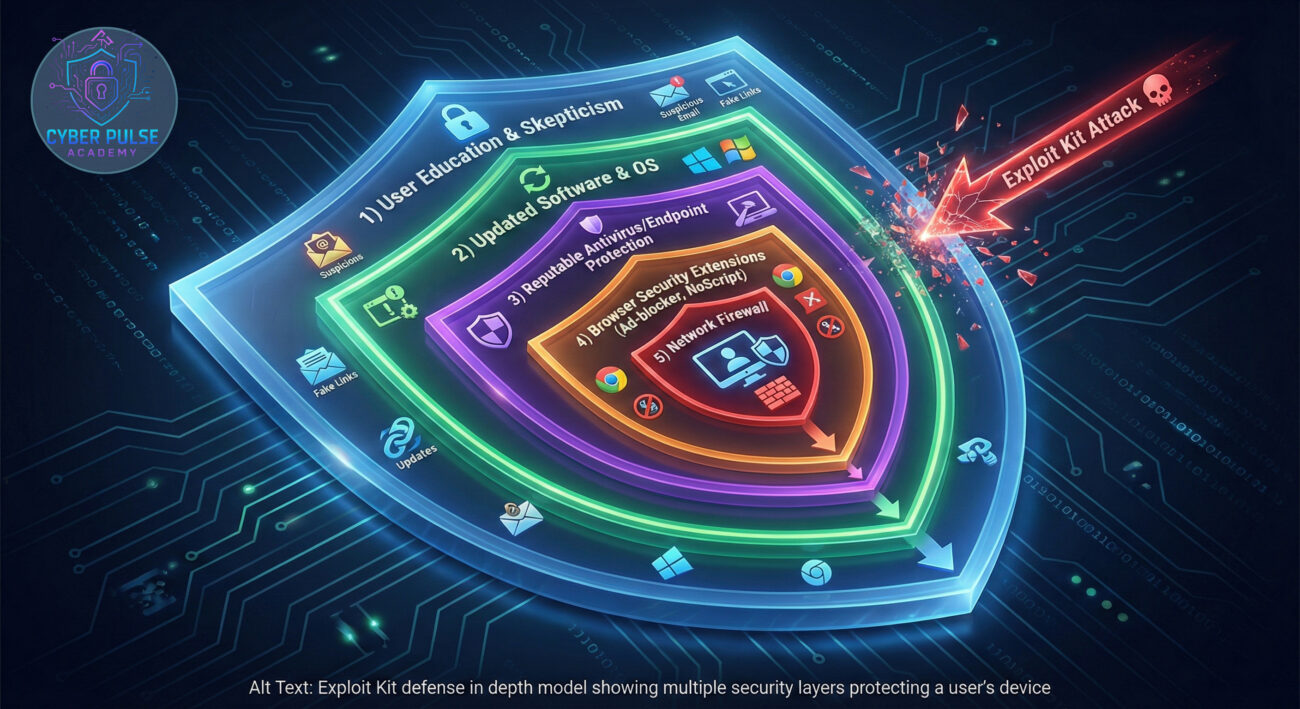
This is your single most effective shield. Exploit kits target known, patched vulnerabilities. By updating, you remove their targets.
A good security program acts like a vigilant guard, blocking known malicious scripts and sites.
The browser is the main gateway for exploit kits. Make it a fortress.
Your behavior is a critical layer of defense. Be skeptical and intentional online.
Add a protective barrier at your internet connection point.
A threat actor doesn't target you personally. They buy access to a hacked, high-traffic website (like a local news site) and inject a malicious script. This script acts as a "traffic director," sending visitors to their exploit kit server. The kit, hosted on a bulletproof server, does the heavy lifting: fingerprinting the visitor's software, matching against a database of exploits, and silently deploying the payload. The payload often establishes a backdoor, allowing the attacker to sell access to your computer or deploy ransomware later.
A defender focuses on breaking the chain. They use threat intelligence feeds to identify and block the domains and IP addresses of known exploit kit servers at the network firewall or DNS level. On endpoints, they enforce application whitelisting (only allowing approved programs to run) and use exploit mitigation technologies like Data Execution Prevention (DEP) and Address Space Layout Randomization (ASLR) that make it harder for exploits to work, even against unpatched vulnerabilities. The mindset is about increasing the attacker's cost and complexity until they give up.
An exploit kit is a force multiplier. Its a business investment. The red team (or criminal) cares about Return on Investment (ROI): the cost of the kit versus the number of successful infections. They want broad, reliable exploitation with low detection rates. They obsess over finding "fresh" unpatched vulnerabilities (zero-days) or, more commonly, relying on the "long tail" of users who are slow to patch. Their goal is stealthy, persistent access to as many systems as possible to monetize later.
The blue team sees exploit kits as a noisy but dangerous threat vector. They are a vulnerability scanner that works for the enemy. The defender's strategy is rooted in hygiene and resilience. By enforcing rigorous patch management, they shrink the "attack surface" the kit can target. They use network and endpoint telemetry to detect the tell-tale signs of kit activity, like unusual outbound connections to known-bad IPs, and contain it. Their primary goal is to make their environment a "hard target" that isn't worth the kit's effort.
Understanding exploit kits is your first step toward neutralizing their threat. These automated toolkits are powerful, but your defense can be more powerful by being proactive and layered.
Cybersecurity isn't about being perfectly secure, it's about being secure enough that attackers move on to easier targets. By implementing the steps in this guide, you move yourself out of the "low-hanging fruit" category and into the protected majority.
Did this guide help demystify exploit kits for you? What other cybersecurity topics would you like explained in simple terms? Share your thoughts, questions, or your own security tips in the comments below, let's build a safer digital world together.
Further Reading: Check out our deep dive on creating strong, memorable passwords and our guide to spotting sophisticated phishing emails.
© 2026 Cyber Pulse Academy. This content is provided for educational purposes only.
Always consult with security professionals for organization-specific guidance.
Every contribution moves us closer to our goal: making world-class cybersecurity education accessible to ALL.
Choose the amount of donation by yourself.