


















































Certification Courses
Hands-On Labs
Threat Intelligence
Latest Cyber News
MITRE ATT&CK Breakdown
All Cyber Keywords
Have you ever lost a key and tried every key on your keyring until one finally worked? That's essentially what a brute force attack is in the digital world. Imagine a hacker trying millions of password combinations to break into your accounts – that's the digital equivalent of trying every key until one unlocks the door.
In this beginner-friendly guide, you'll learn exactly what brute force attacks are, why they're still dangerously effective, and most importantly – how to protect yourself using simple, actionable strategies that anyone can implement.
A brute force attack is exactly what it sounds like – a cyberattack that uses raw computing power to break into systems by trying every possible combination of passwords or encryption keys until the correct one is found. Think of it as a digital battering ram against your accounts.
The term "attack" might sound intimidating, but understanding it is your first step toward better security. These attacks exploit one simple truth: many people use weak, predictable passwords that can be guessed with enough attempts.

You might think that in our advanced digital age, such simple attacks would be obsolete. Surprisingly, they remain one of the most common attack methods. According to the Verizon Data Breach Investigations Report, compromised passwords are involved in over 80% of hacking-related breaches.
Here's why brute force attacks are still effective:
The real danger of a brute force attack isn't just about one account. Once hackers access your email, they can reset passwords on all your connected accounts – banking, social media, cloud storage – creating a domino effect of breaches.
| Term | Simple Definition | Everyday Analogy |
|---|---|---|
| Brute Force Attack | Trying every possible password combination until the correct one is found | Like trying every key on a giant keyring until one opens the lock |
| Credential Stuffing | Using leaked username/password pairs from one site to access other sites | Using a key that works on your front door to try opening your car and safe |
| Multi-Factor Authentication (MFA) | Requiring two or more verification methods to log in | Needing both a key AND a fingerprint scan to enter a building |
| Dictionary Attack | A smarter brute force attack that tries common words and phrases first | Not trying random keys, but starting with the most commonly used keys |
| Password Manager | An application that generates and stores complex, unique passwords | A digital vault that creates and manages unbreakable locks for all your doors |
Meet Sarah, who runs a small online boutique. Like many entrepreneurs, she uses simple passwords she can remember: "Sarah2023!" for email, "Boutique123" for her website admin panel, and "SummerSale!" for her accounting software.
One day, her boutique's website starts acting strangely. Products disappear, prices change, and customers complain about weird pop-ups. Sarah has become a victim of a brute force attack.
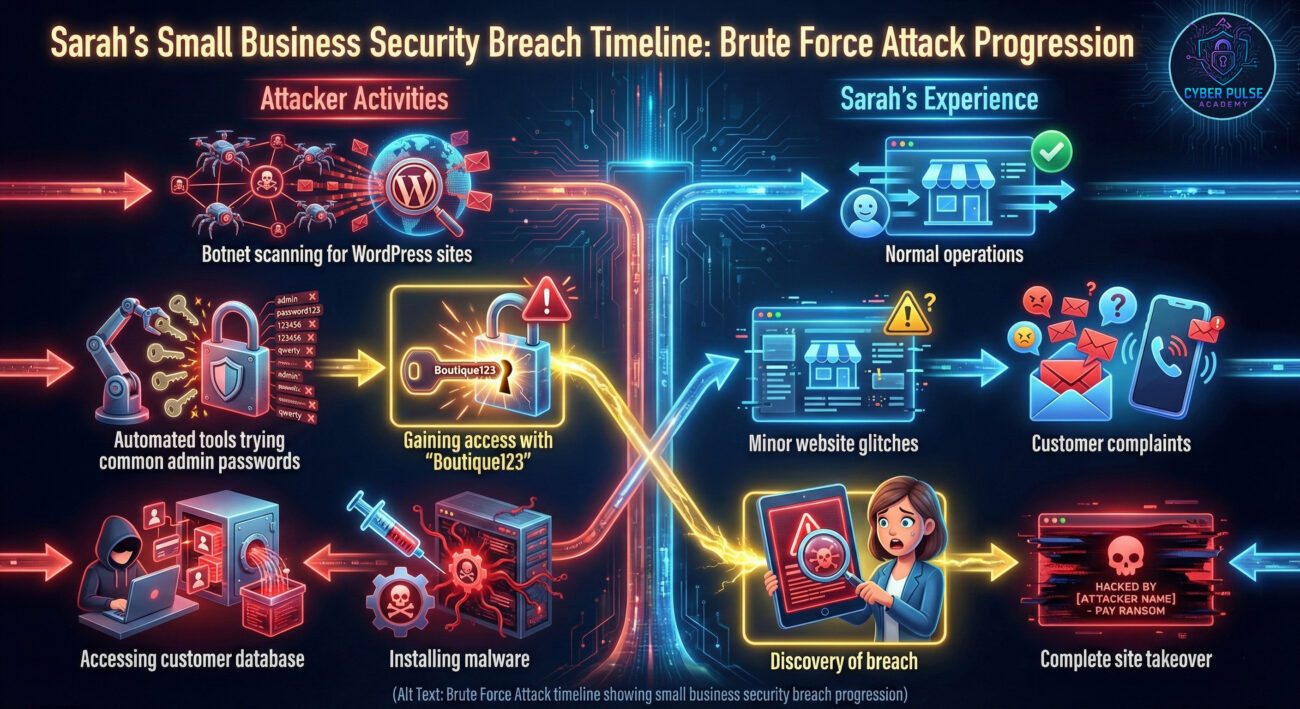
Here's how the attack unfolded:
| Time/Stage | What Happened | Impact |
|---|---|---|
| Day 1-3 | Automated bots scanned thousands of websites, including Sarah's WordPress site | No visible impact yet, but her site was now targeted |
| Day 4 | Attackers used a list of common admin passwords against her login page | Her weak "Boutique123" password was guessed within minutes |
| Day 5 | Hackers installed backdoor malware and accessed her customer database | 1,200 customer records compromised, including emails and addresses |
| Day 6 | Using the same email/password combination, attackers accessed her email account | Password reset requests sent to all her connected accounts |
| Day 7 | Sarah discovered the breach when customers reported fraudulent charges | Business temporarily shut down, legal liabilities, reputation damage |
This scenario happens daily to businesses and individuals worldwide. The good news? Sarah's story could have been prevented with simple protection measures.
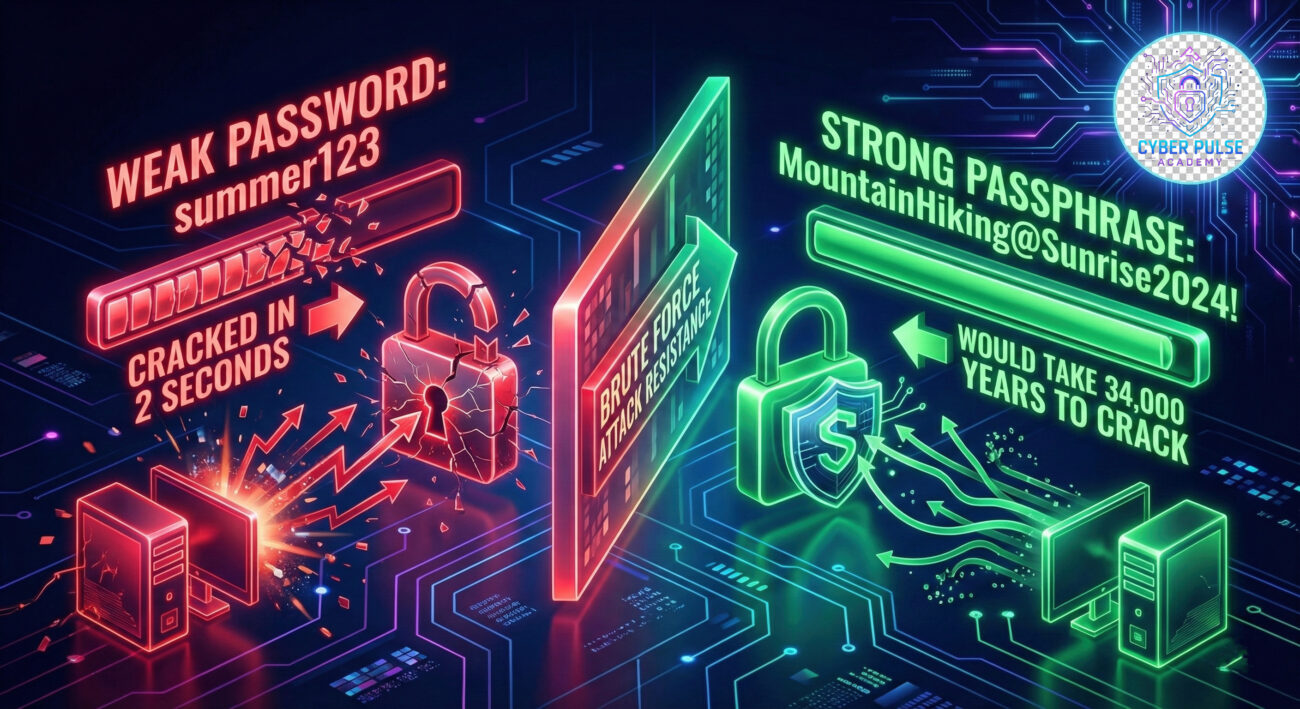
Your first line of defense against brute force attacks is password strength.
Remembering dozens of complex passwords is impossible. A password manager solves this.
MFA adds an extra layer that stops attackers even if they guess your password.
Know if your credentials have been leaked in past breaches.
Updates often fix security vulnerabilities that attackers exploit.
Understanding how attackers think helps you defend better. Here's a simple attack path a hacker might use:
Defender's Counter-Move: By using unique passwords for every account and enabling MFA, you break this chain at step 3. Even if the attacker guesses one password, they can't access other accounts, and MFA blocks them even with the correct password.
Attackers see brute force attacks as a numbers game. They're looking for low-hanging fruit – accounts with weak or common passwords. They automate everything, using botnets to try thousands of combinations per second across multiple targets simultaneously. They don't target you personally; they target any vulnerability they can find. Success is measured in compromised accounts per hour.
Their advantage? Human nature. People choose convenience over security, reuse passwords, and ignore security warnings until it's too late.
Defenders see brute force attacks as preventable incidents. They implement layers of defense: strong password policies, account lockouts after failed attempts, MFA everywhere, and continuous monitoring. They assume breaches will happen and focus on limiting damage through compartmentalization (different passwords for different accounts).
Their strategy? Make attacks economically unfeasible. If cracking your password would take 300 years instead of 3 seconds, attackers move to easier targets.
Brute force attacks might sound technical, but their prevention is surprisingly straightforward. Remember these key takeaways:
The most dangerous mindset is "It won't happen to me." Brute force attacks are automated and indiscriminate – they target everyone. By implementing the steps in this guide today, you move from being an easy target to a protected user.
Today: Enable MFA on your email account. This week: Start using a password manager. This month: Check HaveIBeenPwned.com and update any compromised passwords.
Cybersecurity isn't about being paranoid – it's about being prepared. You've now got the knowledge to protect yourself from brute force attacks. The next step is implementation.
Have questions or want to share your experience?
Leave a comment below or check out our related guides on phishing protection and secure browsing habits.
© 2026 Cyber Pulse Academy. This content is provided for educational purposes only.
Always consult with security professionals for organization-specific guidance.
Every contribution moves us closer to our goal: making world-class cybersecurity education accessible to ALL.
Choose the amount of donation by yourself.