


















































Certification Courses
Hands-On Labs
Threat Intelligence
Latest Cyber News
MITRE ATT&CK Breakdown
All Cyber Keywords
Have you ever wondered how a simple website form or search box could become a gateway for hackers to steal data, take over systems, or cause massive damage? What if I told you that a single line of text, typed into the wrong box, could compromise an entire organization? Welcome to the world of code injection, one of the most dangerous and pervasive threats in modern cybersecurity.
Code injection is a cyber attack where malicious code is inserted into a vulnerable application, tricking it into executing commands it wasn't supposed to. Think of it like convincing a security guard to follow the attacker's instructions instead of the building's rules. Once inside, the attacker can do almost anything.
In this guide, you'll learn exactly what code injection is through simple analogies, see how it works in real-world scenarios, and discover actionable steps to protect yourself and your applications. By the end, you'll not only understand this critical threat but also know how to defend against it.
Code injection isn't just a theoretical concept, it's a daily reality that costs businesses billions. According to the OWASP Top 10, injection flaws (primarily code and SQL injection) have consistently been among the top three most critical web application security risks for over a decade. A single successful attack can lead to data breaches, financial loss, and irreversible reputational damage.
Imagine your favorite online store. When you search for "blue sneakers," the website's code processes your request. Now, imagine if instead of "blue sneakers," a hacker types in special commands that trick the website into revealing every customer's credit card information. That's the power, and danger, of code injection. It exploits the trust between a user and an application.
Recent high-profile breaches, often reported by sources like CISA, have roots in injection flaws. For beginners, understanding this is your first step toward building secure digital habits, whether you're a developer, a business owner, or just a conscientious web user.
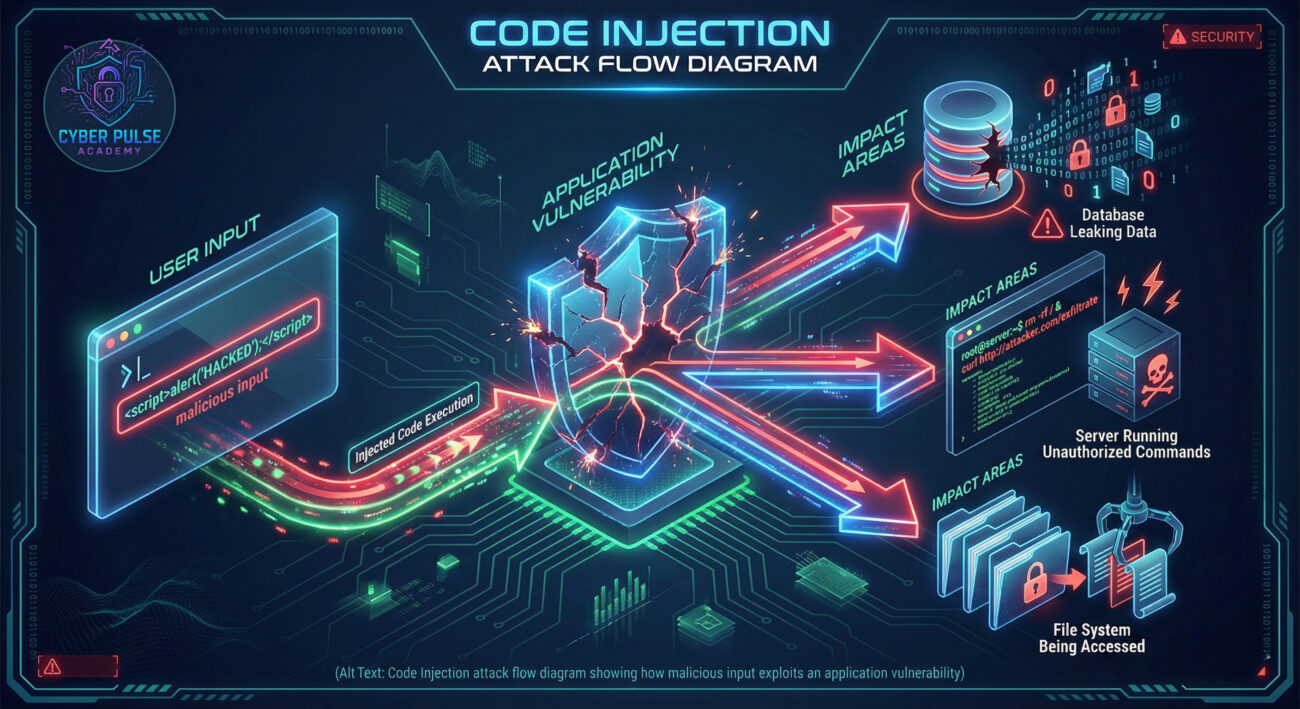
Let's break down the jargon. Here are the essential terms you need to understand code injection without a technical background.
| Term | Simple Definition | Everyday Analogy |
|---|---|---|
| Code Injection | The act of inserting and executing malicious code within a vulnerable software application. | Like slipping your own rules into a referee's playbook during a game, causing them to make calls in your favor. |
| Vulnerability | A weakness or flaw in the application's design or code that can be exploited. | An unlocked window in a supposedly secure house. |
| Input Validation | The process of checking and sanitizing any data entered by a user before the application uses it. | A bouncer checking IDs and refusing entry to anyone who doesn't meet the criteria. |
| SQL Injection (SQLi) | A specific type of code injection that targets databases using malicious SQL queries. | Forging a query to the library's catalog system so it gives you every borrower's private records instead of just book titles. |
| Parameterized Queries | A secure coding technique that separates data (user input) from code (SQL commands). | Using a pre-printed form where you just fill in the blanks, preventing you from changing the questions themselves. |
Meet Alex, who runs a popular hobbyist blog using a common content management system. The blog has a search feature that lets users find articles. Alex is busy and hasn't updated the blog software in months, leaving a known vulnerability unpatched.
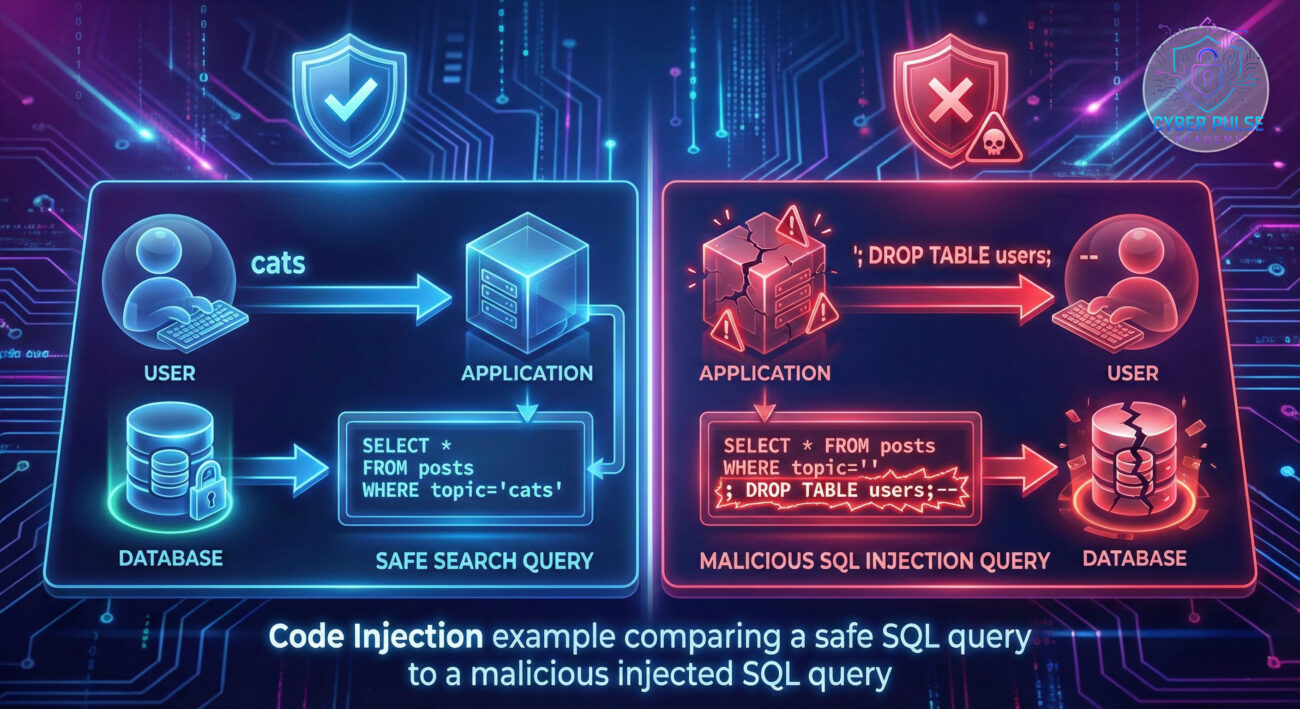
A malicious actor, scanning the web for this specific flaw, finds Alex's blog. They don't type a normal search term. Instead, they input a crafted string of code into the search box: '; DROP TABLE users; --. This input isn't treated as plain text. Because of the vulnerability, the application mistakes it for part of its own database instructions.
The result? The command executes. The "users" table, containing all subscriber emails and hashed passwords, is deleted from the database. The blog crashes, and Alex loses years of community data. Let's trace the timeline:
| Time / Stage | What Happened | Impact |
|---|---|---|
| Day 1: Vulnerability Exists | Alex's blog software has an unpatched SQL injection flaw in its search function. | Attack surface is openly available. |
| Day 15: Reconnaissance | An attacker uses an automated tool to scan thousands of sites for this exact flaw. | Alex's blog is identified as an easy target. |
| Day 16: Injection Attack | The attacker submits the malicious code via the public search box. | The database interprets the input as a command, not data. |
| Day 16: Immediate Aftermath | The 'users' table is deleted. The blog displays a database error and goes offline. | Data destruction, service disruption, loss of user trust. |
| Week 2: Recovery | Alex must restore from a backup (if one exists), patch the software, and inform users. | Significant time, cost, and potential legal implications from the breach. |
Protecting against code injection is about building good habits and using the right techniques. Whether you're a developer or managing a website, these steps are your foundation.
Treat all input from users as untrustworthy until proven otherwise.
This is the single most effective defense against SQL injection.
When displaying user input back on a page (like in a comment section), ensure it's encoded so it's treated as text, not code.
Software updates often contain fixes for known security vulnerabilities.
A WAF acts as a protective shield between your application and the internet, filtering out malicious traffic.
"SELECT * FROM users WHERE name='" + userName + "'" is an invitation for disaster.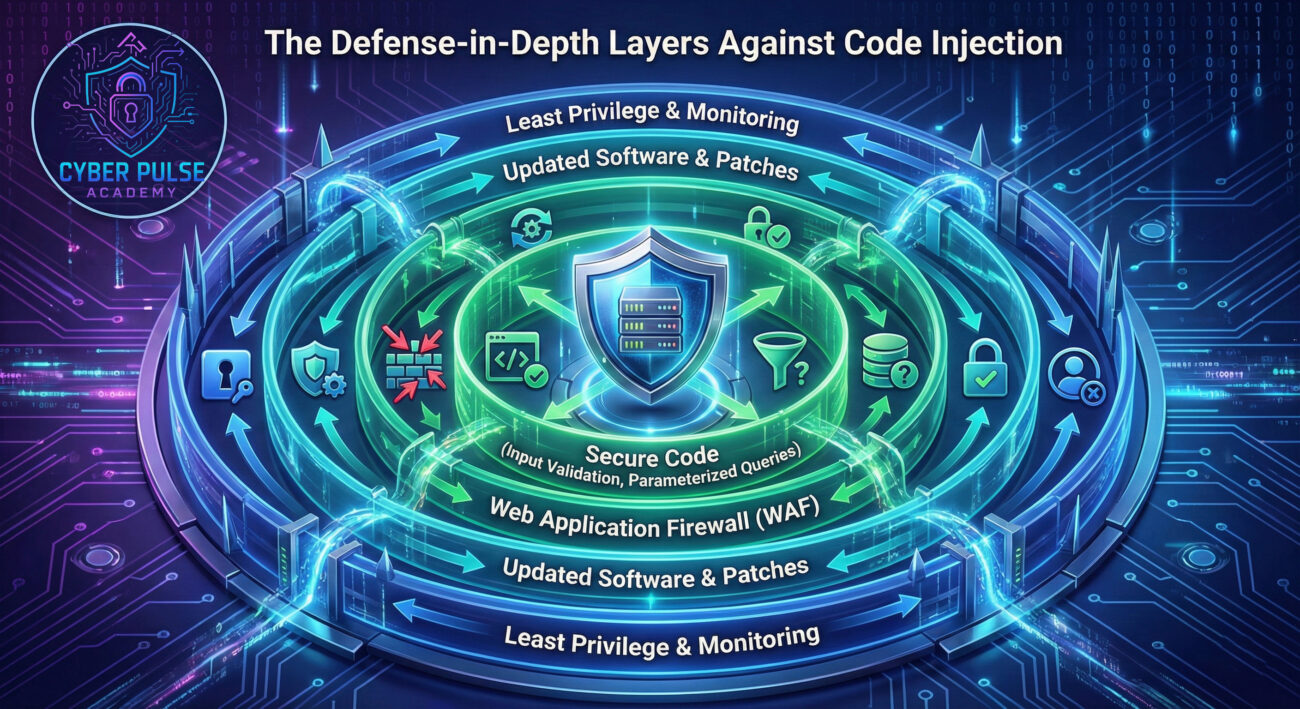
Let's think like a defender by understanding a simple attacker's playbook for code injection.
The Attack Path: An attacker doesn't start by writing complex code. They begin with reconnaissance, looking for any input field, search boxes, login forms, contact forms, URL parameters. They then send payloads, like a single quote ('), and observe the application's response. If an error message reveals a database syntax error, they've hit the jackpot, a SQL injection vulnerability. Next, they use automated tools (like sqlmap) to probe the extent of the flaw, potentially extracting table names, column data, and finally, the sensitive information itself.
The Defender's Counter-Move: The defender's mindset is to eliminate the signals the attacker relies on. Implement generic error messages that don't reveal system details. Use input validation and parameterized queries to make the application ignore malicious payloads entirely. Furthermore, set up monitoring to detect repeated failed attempts with strange inputs (like multiple quote marks or SQL keywords) from a single IP address, and have an automatic lockdown or alerting system in place.
A hacker sees an input field as a potential "conversation" with the application's backend. Their goal is to break the expected conversation pattern by injecting their own commands. They care about efficiency: finding the weakest, most automated point of entry to maximize gain with minimal effort. A successful code injection is a "golden key" because it often provides direct access to the crown jewels, the data. They are constantly probing for that one unvalidated input that everyone else overlooked.
A defender sees every user input as a potential threat vector. Their goal is to build layers of protection that make injection impossible or, at least, detectable. They care about resilience: ensuring that even if one layer fails, others remain. They focus on secure coding standards, continuous patching, and active monitoring. For them, preventing code injection is about rigorous process and constant vigilance, treating security not as a feature but as a fundamental property of the application.
Code injection is a critical cybersecurity concept, but it's understandable and preventable. Let's recap what you've learned:
By implementing the steps and best practices outlined here, you significantly reduce the attack surface of your applications. Cybersecurity isn't about being perfect; it's about making it incredibly hard for attackers to succeed. Start with validating that first input field.
Now it's your turn! Have you ever encountered a suspicious form or error message online? What part of code injection surprised you the most? Share your thoughts or questions in the comments below. For further learning, explore our related guides on password security and two-factor authentication (MFA) to build a comprehensive security foundation.
Stay curious, stay secure.
Your Cybersecurity Educator.
© 2026 Cyber Pulse Academy. This content is provided for educational purposes only.
Always consult with security professionals for organization-specific guidance.
Every contribution moves us closer to our goal: making world-class cybersecurity education accessible to ALL.
Choose the amount of donation by yourself.