


















































Certification Courses
Hands-On Labs
Threat Intelligence
Latest Cyber News
MITRE ATT&CK Breakdown
All Cyber Keywords
Have you ever typed a comment on a website, only to wonder where that text actually goes and who can see it? What if someone could turn your innocent comment into a secret weapon to attack other visitors? Welcome to the hidden world of Cross-Site Scripting.
Cross-Site Scripting (XSS) is a type of cybersecurity vulnerability that allows attackers to inject malicious scripts into trusted websites. Think of it like someone slipping a forged note into a library book, the next reader trusts the library, but the message inside is dangerous.
In this guide, you'll learn: what XSS really is (without the jargon), how a simple attack unfolds through a real story, and most importantly, 7 practical steps you can take to protect yourself and your website. Let's dive in.
Imagine you're browsing your favorite online forum, reading user reviews for a new gadget. One review looks normal but contains hidden, malicious code. Without you clicking anything, this code secretly steals the login cookie from your browser and sends it to a hacker. That's Cross-Site Scripting in action, an attack that turns trusted websites into unwitting accomplices.
XSS is consistently among the top web security risks, according to the OWASP Top Ten. It's not a flaw in your browser or computer; it's a vulnerability in the website itself that fails to properly validate or sanitize user input. Whether you're a website owner, developer, or just a curious netizen, understanding XSS is your first step towards a more secure web experience.
Cross-Site Scripting isn't just a theoretical concern, it's a daily threat. The Cybersecurity and Infrastructure Security Agency (CISA) regularly issues alerts about active exploitation of XSS and other web vulnerabilities. A single, successful XSS attack can lead to data theft, session hijacking, defacement of websites, or even distribution of malware to thousands of visitors.
For the everyday user, this could mean your social media account gets taken over, your private messages are read, or your computer gets infected. For businesses, the stakes are higher: financial loss, reputational damage, and legal liabilities. By learning about Cross-Site Scripting, you're not just gaining technical knowledge, you're building a defensive mindset that helps you question and verify the digital content you interact with.
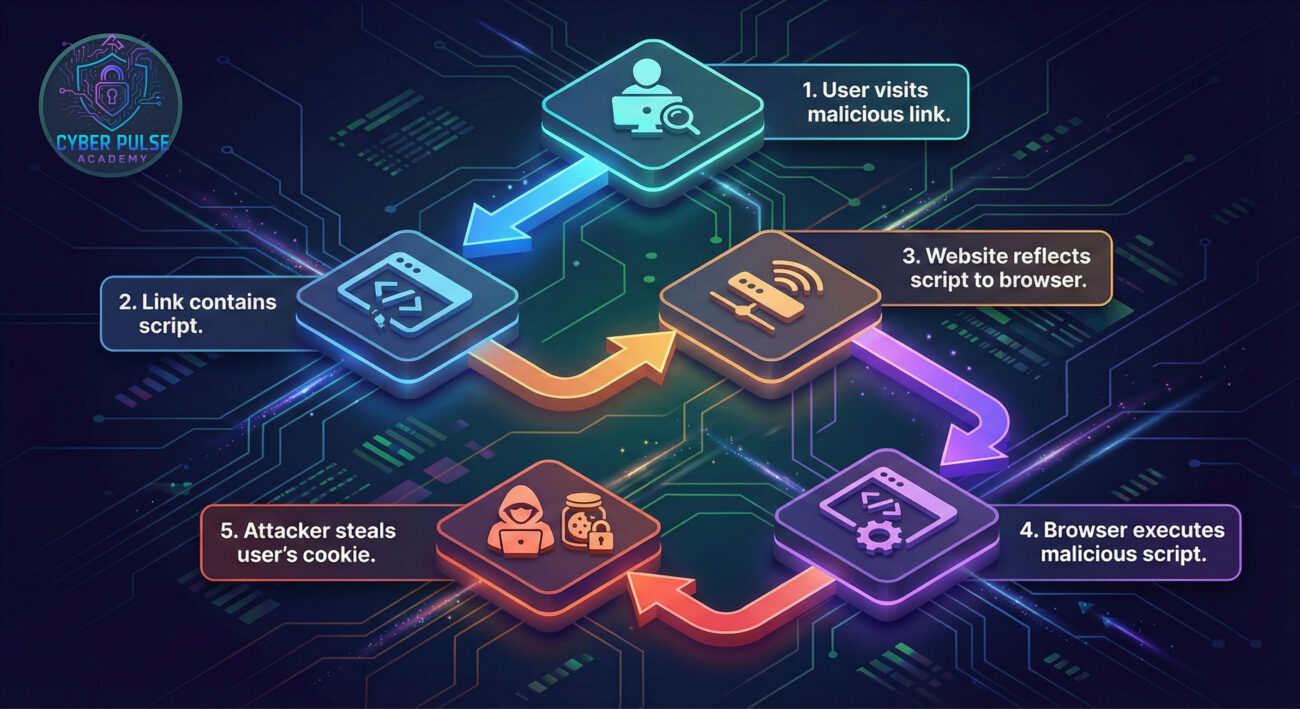
Don't let the terminology intimidate you. Here’s a breakdown of the essential terms you need to know, explained in plain English.
| Term | Simple Definition | Everyday Analogy |
|---|---|---|
| Client-Side | Anything that happens in your web browser (like Chrome or Firefox), not on the website's server. | Like the chef preparing your food in the kitchen (server) vs. you eating it at your table (client). XSS attacks happen at your "table." |
| Script | A set of instructions (code) that tells the browser what to do. JavaScript is the most common. | A recipe for the browser to follow. Malicious scripts are like recipes that secretly tell the cook to poison the food. |
| Input Validation | The process of checking if the data a user submits (like a comment) is safe and expected. | A bouncer at a club checking IDs. Weak validation lets the wrong people in. |
| Output Encoding | Converting potentially dangerous characters into a safe format before displaying them on a webpage. | Putting a dangerous item in a locked display case. It can be seen but cannot interact with or harm visitors. |
| DOM (Document Object Model) | The browser's internal representation of a webpage. XSS can manipulate this to change what you see. | The blueprint of a building. A hacker altering the DOM is like secretly changing the blueprint to add a trapdoor. |
Let's follow Sarah, who runs "Bean There," a popular coffee shop with a website that lets customers post reviews. The site has a vulnerability: it takes user reviews and displays them directly without any safety checks.
A malicious actor, Alex, writes a "review" that isn't about coffee at all. Instead, it contains hidden JavaScript code: <script>alert('Hacked!');</script>. When Sarah's website displays this review, it doesn't show text, it executes the script, popping up an alert for every visitor.
But Alex goes further. He crafts a more dangerous script that silently steals the session cookies of anyone viewing the review page. With these cookies, he can log in as those users, including Sarah, the admin.
| Time/Stage | What Happened | Impact |
|---|---|---|
| Day 1 | Alex discovers the review form doesn't filter script tags. | Initial vulnerability identified. |
| Day 2 | He posts a malicious review containing cookie-stealing JavaScript. | The website is now booby-trapped. |
| Day 3 | Sarah logs into her admin panel to check reviews. | Her admin session cookie is stolen without her knowledge. |
| Day 4 | Alex uses Sarah's stolen cookie to access the admin panel. | Full site compromise: He defaces the homepage and steals customer data. |
This scenario highlights how a simple oversight, not sanitizing user input, can lead to a total breach.
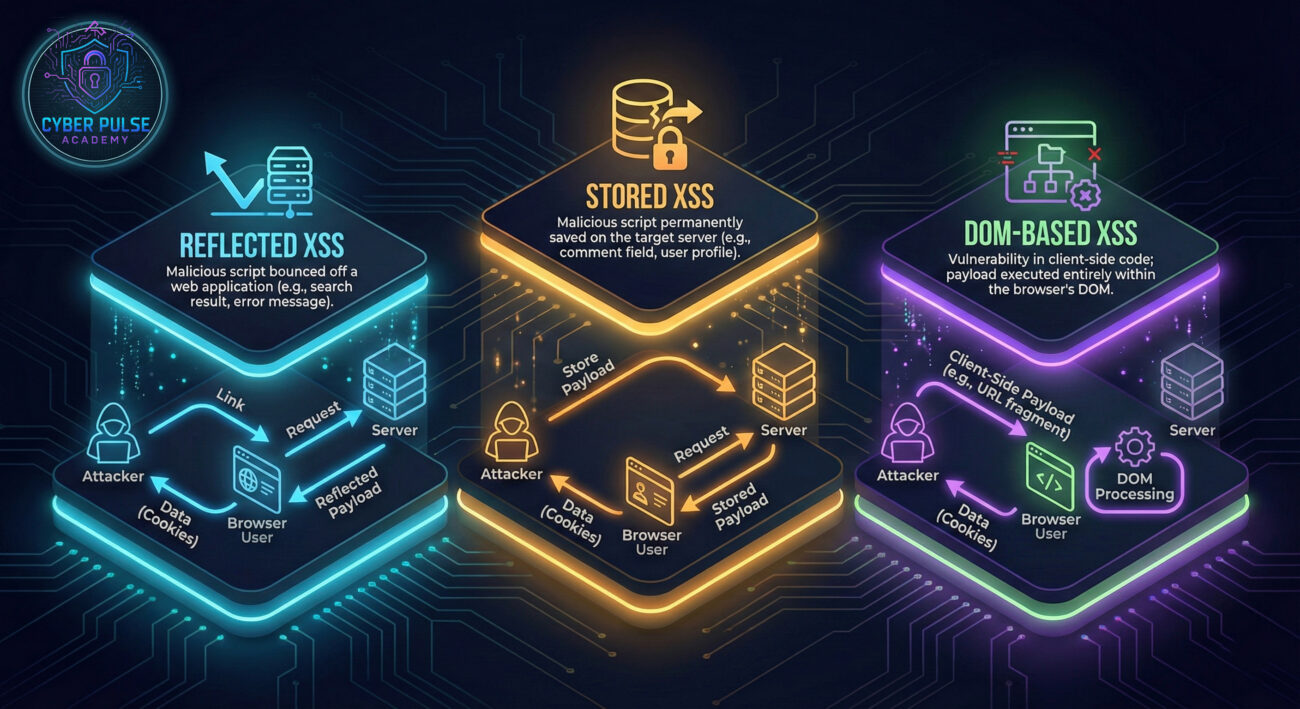
Whether you're a developer building a site or a user browsing the web, here are actionable steps to mitigate XSS risks.
Treat every piece of data from a user as potentially hostile. Define strict rules for what is acceptable.
Before displaying any user-supplied data on your webpage, encode it so the browser treats it as plain text, not executable code.
htmlspecialchars). Encoding for HTML is different than encoding for JavaScript.CSP is a powerful browser feature that acts as an allow-list for resources (scripts, styles, images).
script-src 'self' which only allows scripts from your own domain. Learn more from MDN Web Docs.Modern web frameworks have built-in XSS protections.
This protects user session cookies, a prime target of XSS attacks.
HTTPOnly flag prevents JavaScript from accessing the cookie, so stolen code can't read it.Secure flag ensures cookies are only sent over encrypted HTTPS connections.Awareness is a critical layer of security.
Proactively find and fix vulnerabilities before attackers do.
innerHTML with unsanitized data is a direct invitation for XSS. Use textContent instead when possible.<script> tag or an HTML attribute. Context matters.X-XSS-Protection and X-Content-Type-Options for an extra layer of browser-side protection.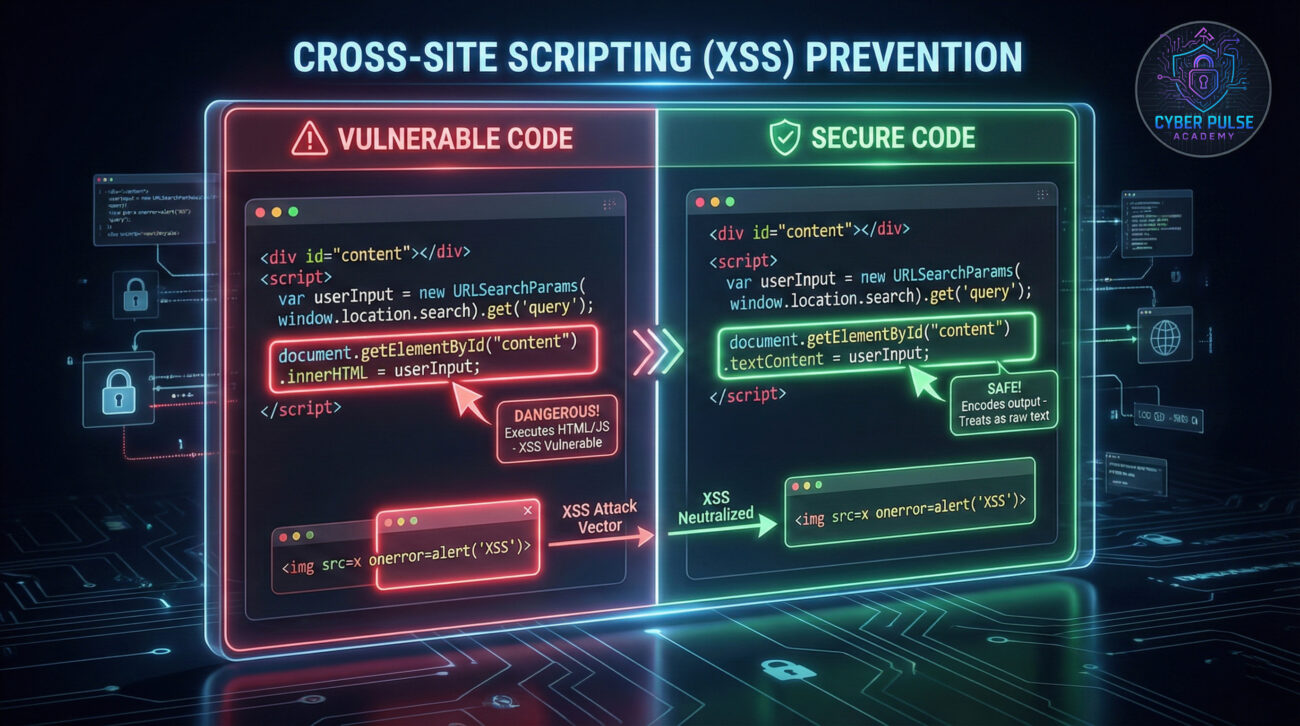
To defend against a threat, you must think like the threat. Let's walk through a high-level attack path a malicious actor might take, and the defender's counter-move.
The Attack Path (Simplified): The attacker's goal is to execute their script in a victim's browser. They first probe a website, looking for any input that is reflected back in the page's response without being encoded (e.g., search results, error messages). They craft a special URL containing a simple test script (like <script>alert(1)</script>). If the alert pops up, they know the site is vulnerable. Next, they replace the test script with a sophisticated payload designed to steal session cookies and send them to a server they control.
The Defender's Counter-Move: A vigilant defender employs input validation at the server to reject any input containing script tags in the first place. More crucially, they implement contextual output encoding so that even if the malicious input is accepted, it's displayed as harmless text on the page, not executed as code. They also deploy a strict CSP that blocks any connections to the attacker's server, thwarting the data exfiltration attempt completely.
For an attacker, XSS is a golden opportunity. It's often easy to find using automated scanners or manual fuzzing. The focus is on evasion, crafting payloads that bypass weak filters (using encoding tricks or alternative syntax). The goal is impact: stealing cookies is great, but redirecting users to phishing sites or performing actions on their behalf (like making a purchase) is even better. The attacker sees the web application as a puzzle; finding an input that isn't properly sanitized is the key to unlocking control over other users' browsers.
For a defender, XSS represents a persistent risk that must be managed at multiple layers. The focus is on defense-in-depth. The first layer is secure development practices (validation, encoding). The second is protective technologies (CSP, secure headers). The third is monitoring and response (log analysis for suspicious activity, rapid patching). The defender sees the application as a fortress; every user input point is a potential gate that needs a strong lock, a guard, and an alarm.
Cross-Site Scripting (XSS) is a prevalent and dangerous web vulnerability, but it's not an unsolvable mystery. By understanding its mechanics, you've taken a huge step towards web safety.
Cybersecurity is a continuous journey. Start by applying the 7 steps outlined here, stay curious, and keep learning. The web becomes safer when each of us understands and implements these fundamental protective measures.
Do you have questions about Cross-Site Scripting, or a personal experience with web security you'd like to share? Drop a comment below! Let's build a community of security-aware individuals. For your next learning step, check out our guide on SQL Injection Basics.
Stay vigilant, stay secure.
© 2026 Cyber Pulse Academy. This content is provided for educational purposes only.
Always consult with security professionals for organization-specific guidance.
Every contribution moves us closer to our goal: making world-class cybersecurity education accessible to ALL.
Choose the amount of donation by yourself.