


















































Certification Courses
Hands-On Labs
Threat Intelligence
Latest Cyber News
MITRE ATT&CK Breakdown
All Cyber Keywords
Imagine opening your computer one morning to find every single file, your family photos, work documents, and financial records, locked with a digital padlock. A message flashes on your screen demanding hundreds of dollars to get them back. This isn't a scene from a movie; it's the terrifying reality of a Cryptolocker attack.
In this essential guide, you'll learn exactly what Cryptolocker is, how it sneaks onto your devices, and most importantly, 7 practical steps you can take today to build an impenetrable digital fortress around your precious data.
Before we dive deeper, let's break down the jargon. Understanding these few terms is your first shield against cyber threats.
| Term | Simple Definition | Everyday Analogy |
|---|---|---|
| Ransomware | Malicious software that encrypts your files and holds them hostage for payment. | A digital kidnapper who locks your photo album in a safe and demands money for the combination. |
| Encryption | The process of scrambling data so it becomes unreadable without a special key. | Turning a clear message into a secret code that only someone with the decoder ring can read. |
| Phishing Email | A fraudulent message designed to trick you into clicking a malicious link or opening a dangerous attachment. | A con artist dressed as your bank teller, asking you to "verify" your account details. |
| Backup (3-2-1 Rule) | A copy of your data stored separately. The 3-2-1 rule: 3 copies, on 2 different media, with 1 offsite. | Making photocopies of your house deed and storing them in a safety deposit box and a trusted friend's house. |
| Multi-Factor Authentication (MFA) | An extra layer of security requiring two or more proofs of identity to log in. | Needing both a key and a fingerprint scan to enter a building, not just the key alone. |
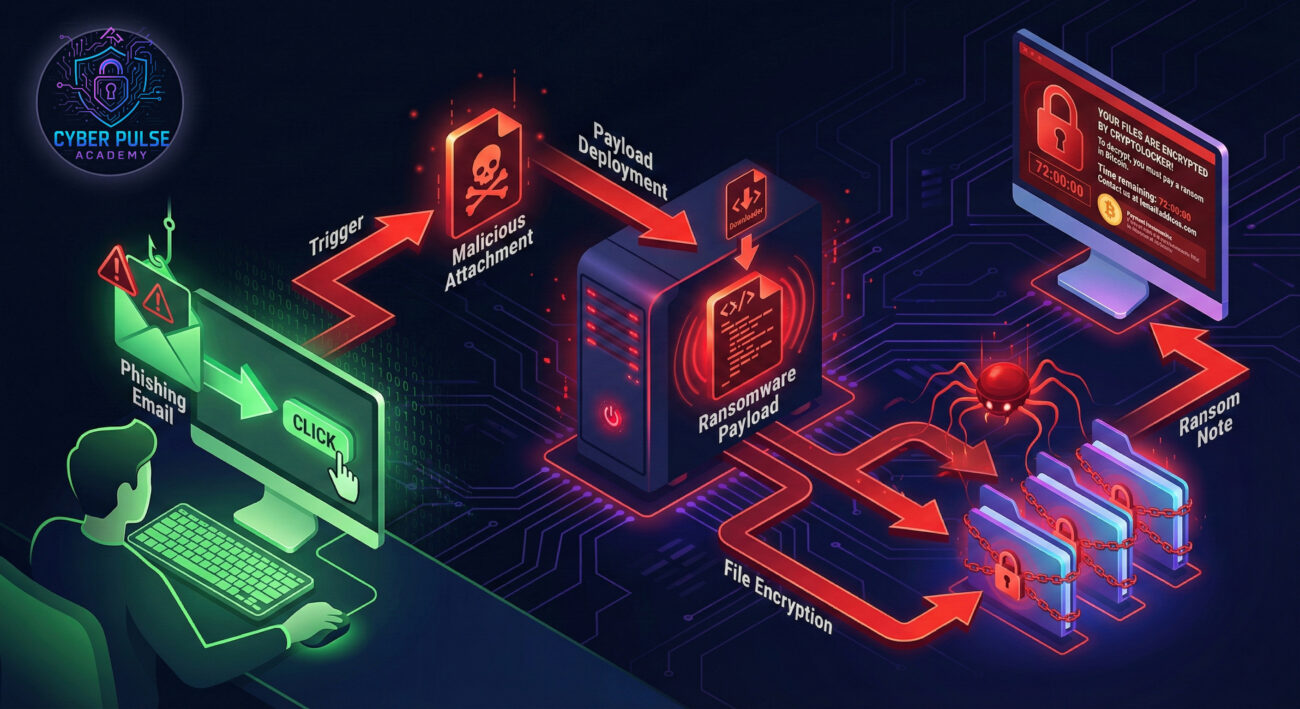
Cryptolocker isn't just old news, it's the blueprint for modern ransomware. Since its first major attack in 2013, it has evolved and inspired countless copycats, causing billions in damages. According to the Cybersecurity and Infrastructure Security Agency (CISA), ransomware remains a top threat, targeting everyone from individuals to hospitals and schools.
Why should you care? Because today's attacks are automated and indiscriminate. You don't need to be a high-profile target; your home computer or small business is just as vulnerable if it has weak defenses. The average ransom demand has skyrocketed, and paying doesn't guarantee you'll get your files back. In fact, it often marks you as a willing target for future attacks.
The good news? Understanding Cryptolocker's mechanics is 90% of the battle. By recognizing the threat vectors and implementing proven protection strategies, you move from being a potential victim to a secured user.
Sarah, a freelance graphic designer, was finishing a client's logo. An email arrived that appeared to be from a shipping company about a "pending delivery." Stressed and expecting a package, she clicked the attached "invoice." Nothing seemed to happen, so she went back to work.
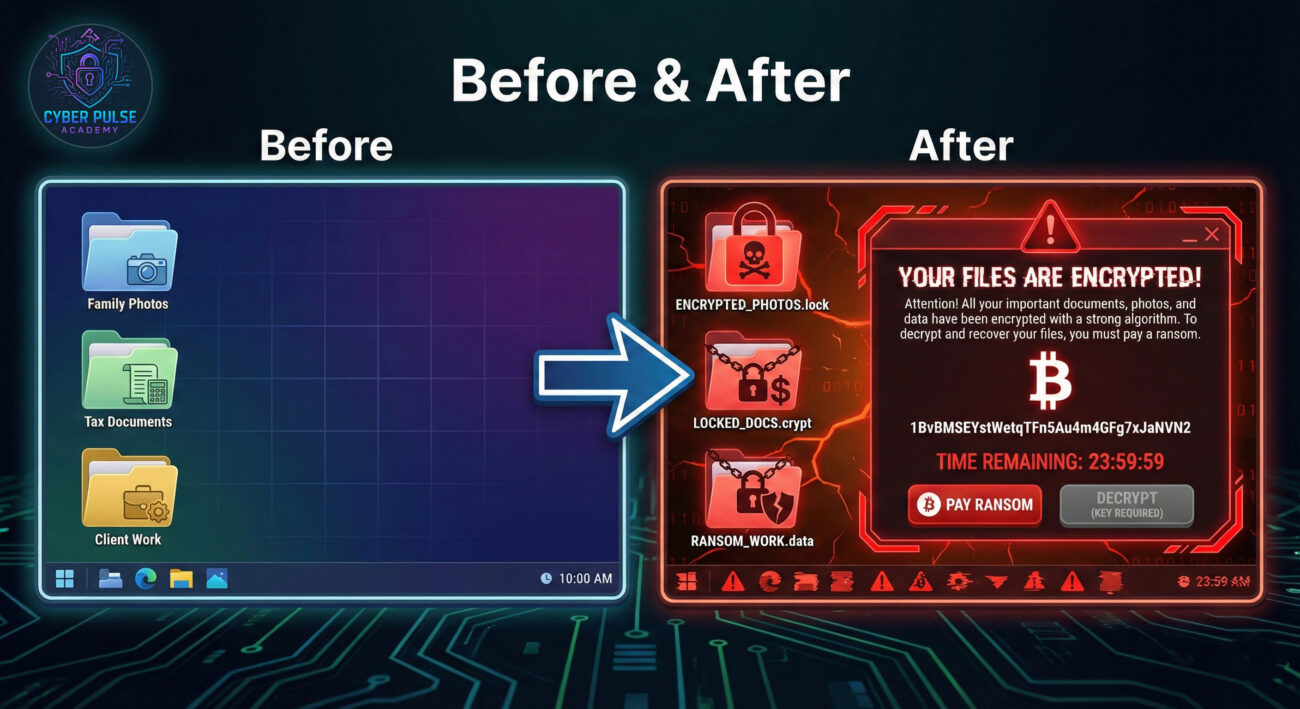
Two hours later, every file on her computer, her portfolio, active projects, and personal photos, had a strange new extension ".cryptolocked." A text file named "READ_ME_NOW.txt" contained the ransom demand: $500 in Bitcoin within 72 hours, or the decryption key would be destroyed.
| Time / Stage | What Happened | Impact |
|---|---|---|
| Day 1, 10:00 AM | Phishing email arrives disguised as a shipping invoice. | Initial vulnerability is created. |
| Day 1, 10:02 AM | Sarah clicks the malicious attachment, executing the ransomware dropper. | Malware is silently installed. |
| Day 1, 12:15 PM | Ransomware completes scanning and encrypting files (documents, images, databases). | All personal and work data is encrypted and held hostage. |
| Day 1, 12:20 PM | Ransom note appears. The malware contacts its command server. | Extortion begins. Sarah faces financial loss and data breach risk. |
Sarah didn't have a recent backup. She faced an impossible choice: lose years of irreplaceable work or pay criminals with no guarantee. This scenario plays out daily for thousands.
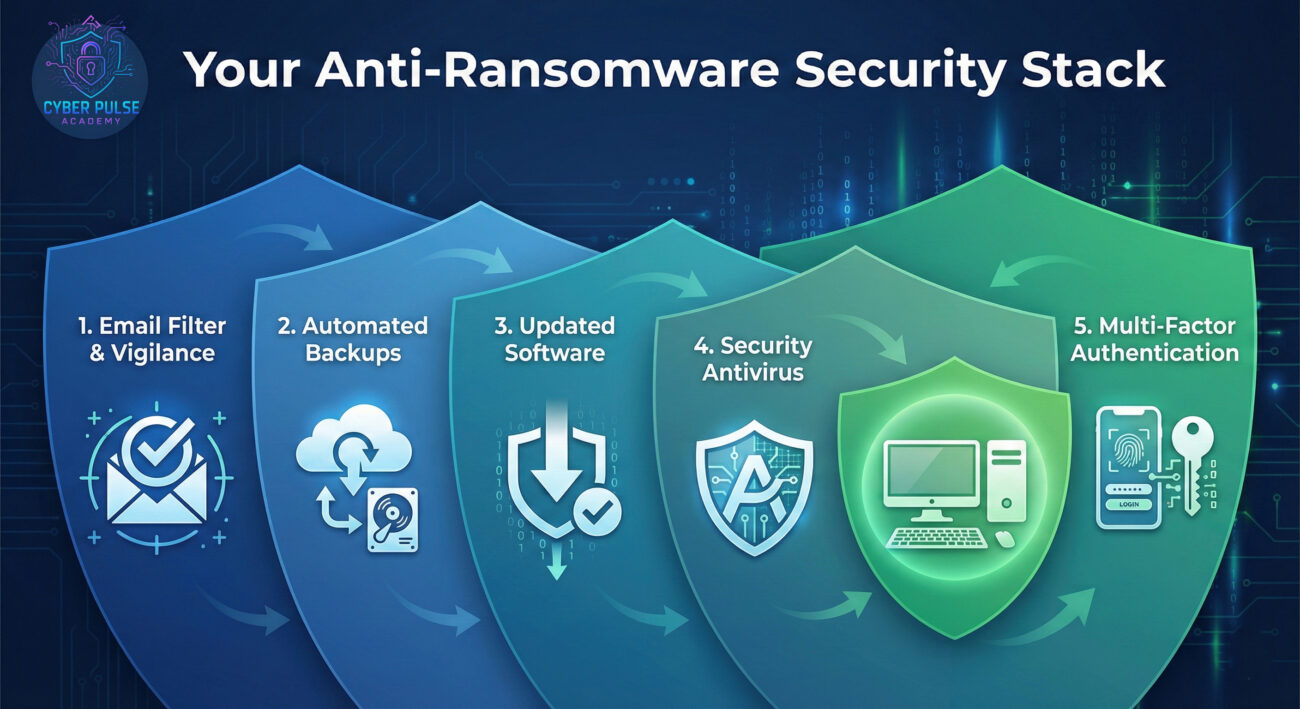
Follow this actionable guide to build your defenses. Think of these not as chores, but as essential digital habits, like locking your front door.
This is your single most important defense. If you have a secure, recent backup, ransomware loses its power.
Since phishing is the #1 delivery method, your inbox is the frontline.
Hope for the best, prepare for the worst. Knowing what to DO if infected is critical.
Let's briefly walk in the shoes of both attacker and defender to understand the mindset.
A Simple Attack Path: A threat actor doesn't hack in; they walk in through the front door. They purchase a cheap, pre-made Cryptolocker variant from a dark web marketplace (a service called "Ransomware-as-a-Service" or RaaS). They craft a convincing phishing email campaign targeting small businesses, exploiting the common vulnerability of human trust. Their goal is volume: if they send 10,000 emails and even 0.5% click, that's 50 potential paydays with minimal effort.
A Defender's Counter-Move: A security-conscious individual or organization uses layered defense. Their email filter catches 95% of phishing attempts. The user is trained to spot and report the remaining 5%. The system is patched, closing exploits. Even if malware executes, it runs in a limited user context and can't spread to critical network shares. Automated, air-gapped backups ensure that recovery is a minor inconvenience, not a catastrophe. The defender's mindset is about resilience, not just prevention.
Cryptolocker is a perfect weapon: high impact, low effort, and monetizable. The attacker cares about return on investment. They look for the easiest entry point, often the human element via phishing. They value stealth during initial deployment and reliability in the encryption process. Their success metric is the percentage of victims who pay. They are opportunistic, not personal; you're just a wallet with a weakness.
Cryptolocker is a destructive force that disrupts operations and destroys trust. The defender cares about business continuity and data integrity. They focus on breaking the attack chain at every stage: blocking malicious emails, preventing execution, containing spread, and ensuring recovery. Their success metric is Mean Time to Recover (MTTR) and the absence of data loss. They build secure systems knowing that some attacks will get through, so recovery is non-negotiable.
Cryptolocker and its ransomware cousins are a pervasive threat, but they prey on inertia and lack of awareness. You are not powerless. By understanding the threat and taking systematic action, you can dramatically reduce your risk.
Cybersecurity isn't about being paranoid; it's about being prepared. Start with Step 1 from our guide and build your defenses one layer at a time. The peace of mind that comes from knowing your digital life is protected is priceless.
Cybersecurity is a community effort. Did you find a creative way to secure your backups? Have a question about a suspicious email? Share your thoughts and questions in the comments below! Let's help each other build a more secure digital world.
© 2026 Cyber Pulse Academy. This content is provided for educational purposes only.
Always consult with security professionals for organization-specific guidance.
Every contribution moves us closer to our goal: making world-class cybersecurity education accessible to ALL.
Choose the amount of donation by yourself.