


















































Certification Courses
Hands-On Labs
Threat Intelligence
Latest Cyber News
MITRE ATT&CK Breakdown
All Cyber Keywords
Learn what access management is and why it's critical for cybersecurity. Our beginner's guide covers key concepts, implementation steps, and best practices to protect your digital resources.
Imagine handing out keys to your home to every person who walks by, without keeping track of who has them, which rooms they can enter, or when they should return them. Sounds terrifying, right?
Access management is the systematic process of controlling who can view, use, or modify resources in your digital environment, ensuring the right people have the right access to the right systems at the right time.
Think of it as being the security guard, locksmith, and record keeper for your digital castle all at once. Just as a building needs controlled entry points, visitor logs, and different clearance levels for different areas, your organization's digital assets need the same thoughtful protection.
In this guide, you'll learn: what access management really means, why it's your first line of defense against breaches, how to implement it step-by-step, and the common mistakes that leave organizations vulnerable.
Access management is the cybersecurity practice of defining, tracking, and enforcing policies that determine which users and systems can access specific resources, data, and applications within your organization.
It's important because every data breach, ransomware attack, and insider threat begins with someone, or something—gaining access they shouldn't have. By implementing strong access controls, you create multiple layers of protection that make it exponentially harder for attackers to succeed.
In your daily digital life, you're already using access management every time you log into your email, unlock your phone with a fingerprint, or when your company's HR system prevents you from viewing salary data for other departments. These are all examples of access management in action.
| Term | Meaning | Analogy |
|---|---|---|
| Authentication | Verifying someone is who they claim to be | "Like a bouncer checking your ID at a club, proving you're you before entry" |
| Authorization | Determining what an authenticated user is allowed to do | "Think of it as your hotel room key that opens your room but not others" |
| Principle of Least Privilege | Giving users only the minimum access they need to do their job | "It's similar to giving a delivery driver access to your lobby, not your bedroom" |
| Role-Based Access Control (RBAC) | Granting access based on job roles rather than individuals | "Imagine theater seating, backstage crew, performers, and audience each have different access zones" |
| Multi-Factor Authentication (MFA) | Requiring two or more verification methods to prove identity | "Like needing both a key card AND a PIN to enter a secure facility" |
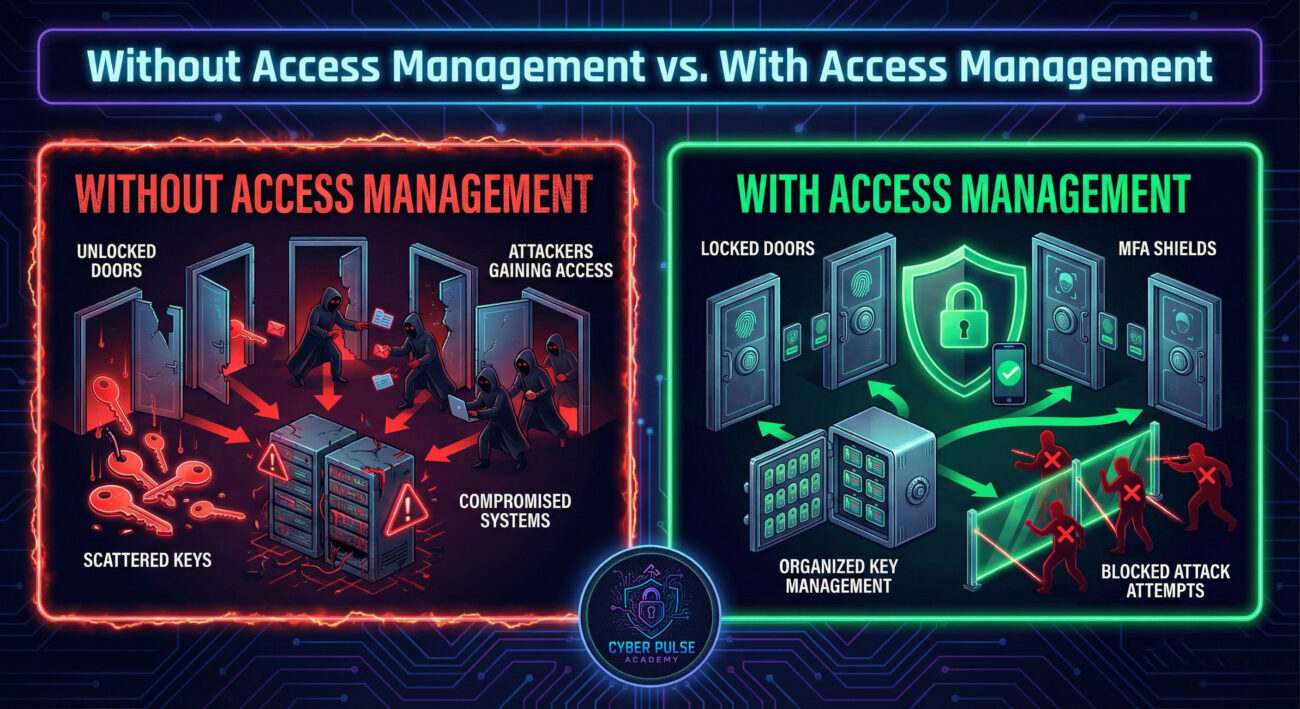
According to the 2023 Verizon Data Breach Investigations Report, stolen credentials were involved in nearly 50% of all breaches. When access management fails, the consequences are devastating and immediate.
Consider these real-world implications:
Understanding access management isn't just for IT professionals, it's essential knowledge for anyone who uses digital systems at work or home. Whether you're a small business owner, remote employee, or managing your family's digital life, these principles apply to you.
💡 Pro Tip: The 2023 Identity Defined Security Alliance (IDSA) survey found that 84% of organizations experienced an identity-related breach, yet only 30% had implemented comprehensive access management controls. Being in the minority that takes this seriously gives you a massive security advantage.
Meet Sarah, a marketing manager at a growing tech startup. When she joined TechCo two years ago, the company had 20 employees and a relaxed approach to system access. Everyone had admin rights to almost everything "to move fast and avoid bottlenecks."
Fast forward to today: TechCo now has 150 employees. Last Tuesday, Sarah received an urgent Slack message from their CEO asking her to reset her password immediately via a link. The message looked legitimate, it had the CEO's profile picture, writing style, and even referenced a recent company meeting.
Fortunately, Sarah had recently completed access management training. She remembered the key principle: never click password reset links from messages. Instead, she navigated directly to the company portal and discovered something alarming, the real CEO hadn't sent anything.
What Sarah didn't know yet was that a phishing attack had compromised a former contractor's account, someone who still had active credentials six months after their contract ended. The attackers used that account to send convincing messages to employees with elevated privileges, hoping to capture admin credentials.
Because TechCo had recently implemented proper access management, several protections kicked in: the contractor's account had been automatically disabled after 90 days, MFA prevented the attackers from fully accessing internal systems, and Sarah's limited access meant even if she had been tricked, the damage would have been contained.
The security team traced the breach attempt, revoked the compromised account, and sent company-wide awareness training, all within two hours. Had TechCo still been using their "everyone is admin" approach from two years ago, this story would have ended very differently, likely with ransomware encrypting their entire customer database.
| ❌ Without Access Management | ✅ With Access Management |
|---|---|
| All employees have admin rights to critical systems | Access granted based on role and necessity only |
| Former contractors retain active credentials indefinitely | Automated de-provisioning after 90 days or contract end |
| Attackers gain full system access with one compromised account | MFA and segmentation limit breach scope |
| No audit trail of who accessed what and when | Complete logging and monitoring for compliance and forensics |
| Phishing success leads to company-wide compromise | Contained incident with minimal impact and rapid response |
This scenario demonstrates why access management is essential for everyday digital safety. It's not about creating obstacles, it's about creating intelligent barriers that stop threats while enabling legitimate users to work efficiently.
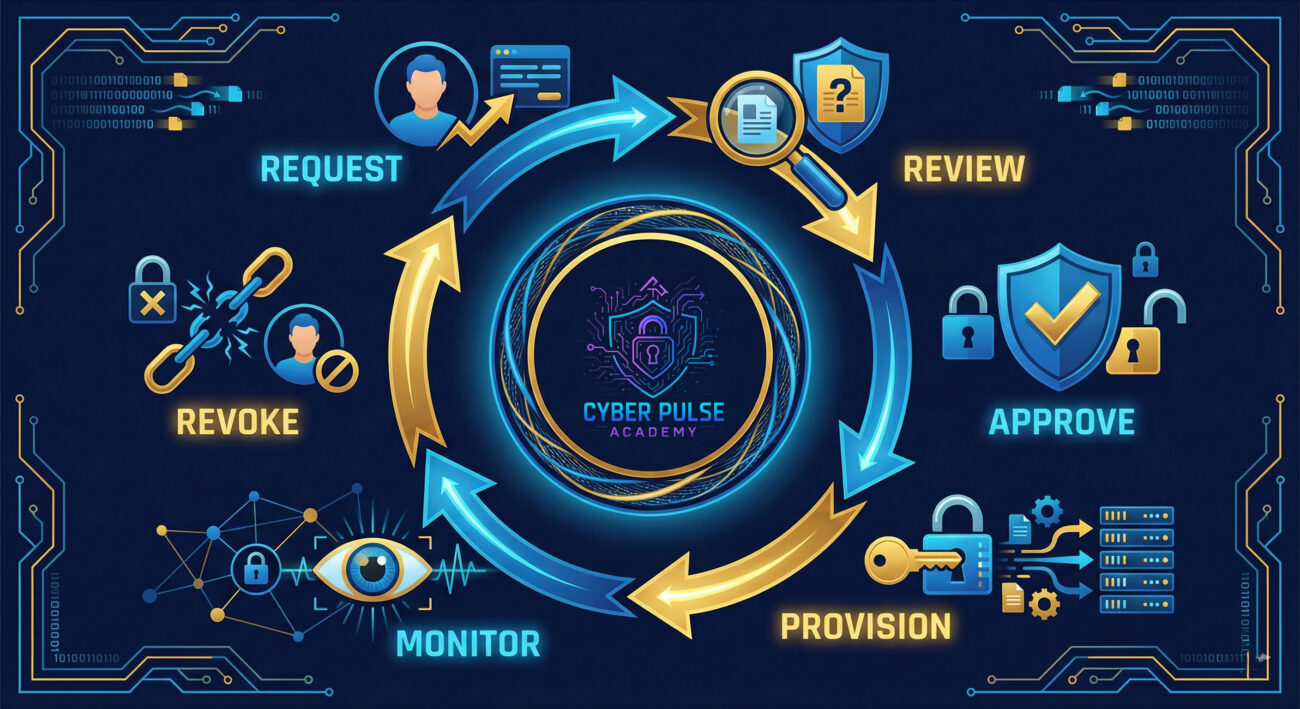
Follow these 7 essential steps to establish strong access management in your organization:
Create a comprehensive list of all systems, applications, databases, and resources that require access control. Simultaneously, document every user account, employees, contractors, service accounts, and third-party vendors. You can't protect what you don't know exists.
Key Point: Discovery tools can automate this process for large organizations, but even a simple spreadsheet works for smaller teams. Update this inventory quarterly at minimum.
Map out job functions and create roles based on actual responsibilities, not seniority or preferences. Each role should clearly specify what resources are accessible and what actions can be performed.
Start with zero access and grant only what's necessary. This means new employees begin with minimal permissions that expand as their role requires, not the reverse of starting with everything and removing access later.
Key Point: Administrative accounts should be separate from daily-use accounts. Even IT staff should use standard accounts for routine tasks and elevate privileges only when needed.
Enable MFA on every system that supports it, prioritizing critical resources like email, VPNs, financial systems, and administrative consoles. Passwords alone are no longer sufficient protection against modern attacks.
💡 Pro Tip: Microsoft reports that MFA blocks 99.9% of automated attack attempts. This single control dramatically reduces your risk profile for minimal cost and complexity.
Create formal workflows for requesting, approving, and provisioning access. Every access grant should be documented with business justification, approver identity, and expiration date if temporary.
Key Point: Implement quarterly access reviews where managers certify that their team members still need their current permissions. Revoke anything that can't be justified.
Manual access management doesn't scale and creates dangerous gaps. Use Identity and Access Management (IAM) systems to automatically provision access when employees join and immediately revoke it when they leave or change roles.
Implement continuous monitoring of access activities, failed login attempts, privilege escalations, unusual access patterns, and after-hours activity. Configure alerts for suspicious behavior and maintain detailed audit logs for compliance and incident investigation.
Key Point: Access logs are useless if nobody reviews them. Assign responsibility for daily monitoring and establish clear response procedures for anomalies.

⚠️ Critical Warning: The most dangerous mistake in access management is assuming your current controls are adequate without testing them. Conduct regular access control audits and penetration tests to identify gaps before attackers do. Organizations often discover they have hundreds of orphaned accounts, excessive privileges, and unmonitored access paths only after a breach has occurred.
Want to deepen your knowledge? Check out these trusted resources:
These resources provide deeper technical documentation, policy templates, and practical examples for mastering access management at any organizational scale.
Access management isn't just another cybersecurity buzzword, it's the fundamental discipline that determines whether your organization's digital assets remain secure or become the next breach headline.
Remember the three core principles: verify every identity rigorously, grant minimum necessary access, and continuously monitor for anomalies. Whether you're implementing these controls for a Fortune 500 enterprise or securing your family's home network, these principles scale to your context.
The investment in proper access management pays dividends immediately, not just by preventing breaches, but by creating operational clarity, regulatory compliance, and organizational confidence that your digital environment is under control. In an era where attackers are increasingly sophisticated and credentials remain the most targeted asset, there's simply no alternative to getting access control right.
Every contribution moves us closer to our goal: making world-class cybersecurity education accessible to ALL.
Choose the amount of donation by yourself.