


















































Certification Courses
Hands-On Labs
Threat Intelligence
Latest Cyber News
MITRE ATT&CK Breakdown
All Cyber Keywords
Learn what account lockout is and why it protects your accounts from hackers. Our beginner's guide explains lockout policies, how they work, and best practices to stay secure.
You've probably experienced it: typing your password wrong a few times, and suddenly you're locked out of your own account. Frustrating? Yes. But that temporary inconvenience is actually protecting you from something far worse.
Account lockout is a security feature that temporarily or permanently blocks access to an account after multiple failed login attempts. It's one of the simplest yet most effective defenses against unauthorized access.
Think of account lockout like a bouncer at an exclusive club. If someone keeps showing the wrong ID, the bouncer doesn't let them keep trying indefinitely, they get turned away. Your account lockout policy works the same way, stopping hackers from endlessly guessing your credentials.
In this guide, you'll learn: what account lockout is and how it works, why it's critical for your digital security, and how to configure it properly to balance protection with usability.
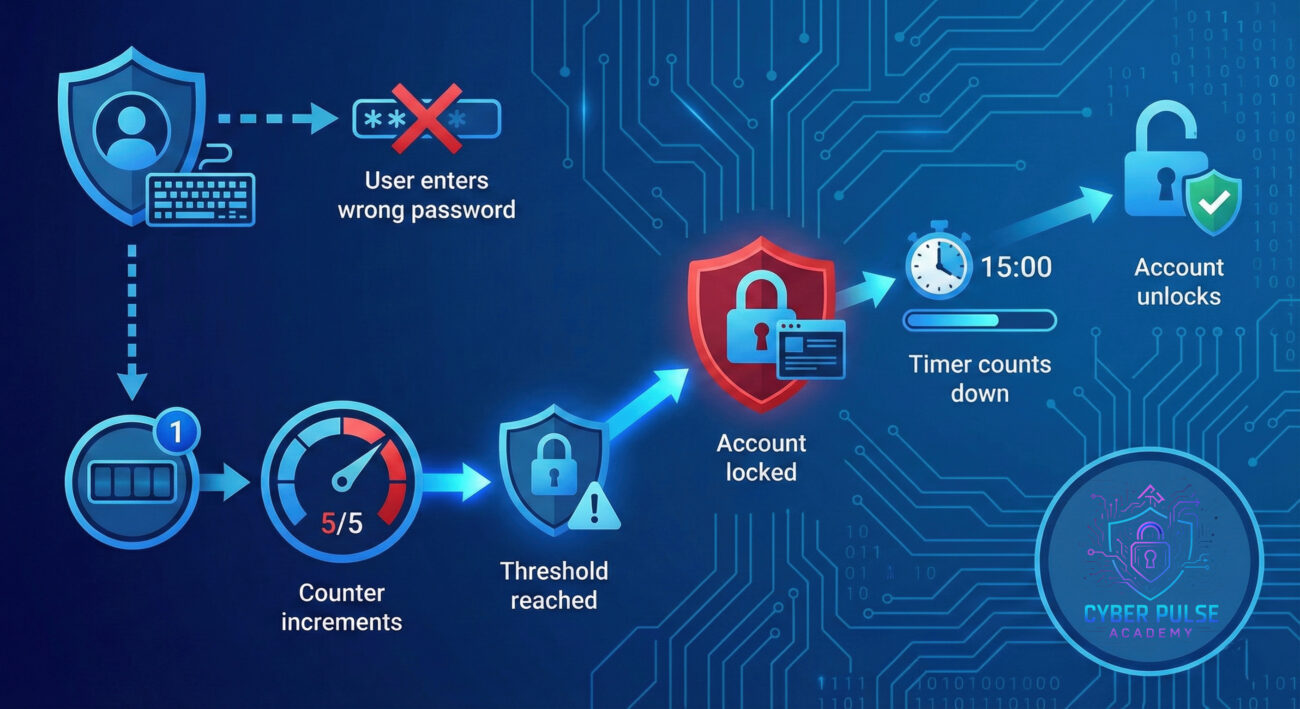
Account lockout is an automated security mechanism that disables an account after a specified number of unsuccessful login attempts. This feature prevents brute force attacks where attackers systematically try thousands of password combinations to gain access.
When account lockout is triggered, the account becomes temporarily inaccessible, even to the legitimate owner. This might seem like an overreaction, but it's a critical defense layer. Without it, a determined hacker could run automated programs that test millions of password combinations in minutes.
Every time you log into your email, bank account, or social media, account lockout policies are working silently in the background to keep your information secure.
| Term | Meaning | Analogy |
|---|---|---|
| Lockout Threshold | The number of failed attempts before lockout triggers | "Like strikes in baseball, three strikes and you're out" |
| Lockout Duration | How long the account stays locked | "Think of it as a timeout, a cooling off period" |
| Brute Force Attack | Automated attempts to guess credentials | "It's like trying every key on a keyring until one works" |
| Reset Counter | Time after which failed attempt count resets | "Imagine a scoreboard that clears after halftime" |
| Progressive Lockout | Increasing lockout duration with each violation | "Like escalating penalties, first warning, then suspension" |
Understanding account lockout isn't just for IT professionals, it's essential knowledge for anyone who uses online accounts. Here's why:
Hackers use sophisticated tools that can attempt thousands of password combinations per second. Without account lockout, your simple eight-character password could be cracked in hours. The 2023 Verizon Data Breach Investigations Report found that stolen credentials remain one of the top methods attackers use to gain unauthorized access.
Account lockout policies dramatically slow down these attacks. If an account locks after five failed attempts, an attacker would need years instead of hours to crack even a moderately strong password.
The challenge with account lockout is finding the right balance. Too strict, and legitimate users get frustrated. Too lenient, and hackers have room to work. Understanding how these policies function helps you:
Meet Sarah, a small business owner who runs an online boutique. One Monday morning, she received an alert: her admin account had been locked due to multiple failed login attempts. At first, she was annoyed, she hadn't tried logging in at all.
Then it clicked. Someone else was trying to access her account. Checking her email logs, Sarah discovered that over 200 login attempts had been made from IP addresses in three different countries, all within 15 minutes. An automated brute force attack was targeting her business.
Because her e-commerce platform had account lockout enabled with a five-attempt threshold, the attacker never got close to her actual password. The lockout kicked in after the fifth failed attempt, and the system's MFA requirement provided an additional safety net.
Sarah took this as a wake-up call. She enabled two-factor authentication, updated her password to a longer passphrase, and reviewed her account lockout settings to ensure they were appropriately configured. What could have been a devastating breach, with access to customer payment information, became a minor inconvenience and a learning opportunity.
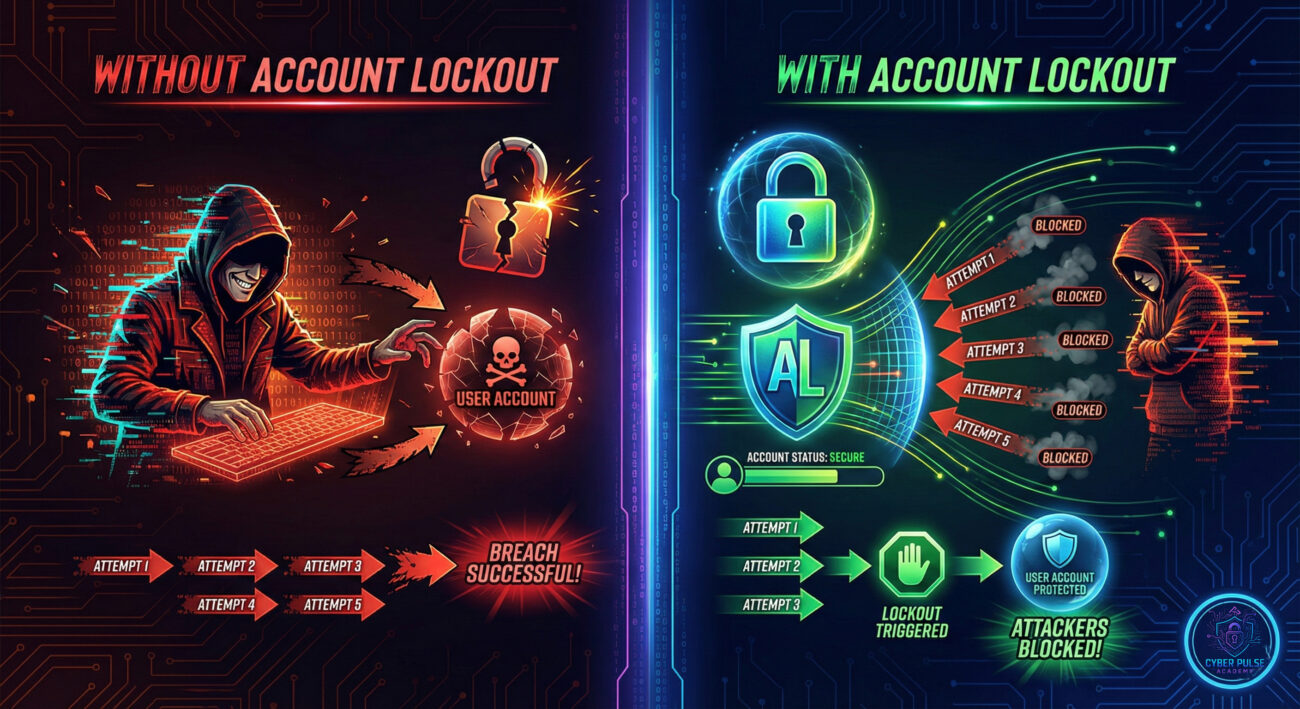
| ❌ Without Account Lockout | ✅ With Account Lockout |
|---|---|
| Hackers can attempt unlimited password guesses | Protected after just a few wrong attempts |
| Brute force attacks succeed within hours | Attacks become impractical and time-prohibitive |
| No alert that an attack is occurring | Lockout notifications warn you of suspicious activity |
| Weak passwords are easily compromised | Even moderate passwords gain additional protection |
This scenario demonstrates why account lockout is essential for everyday digital safety. It's not just a corporate IT concern, it protects everyone from individual users to enterprise organizations.
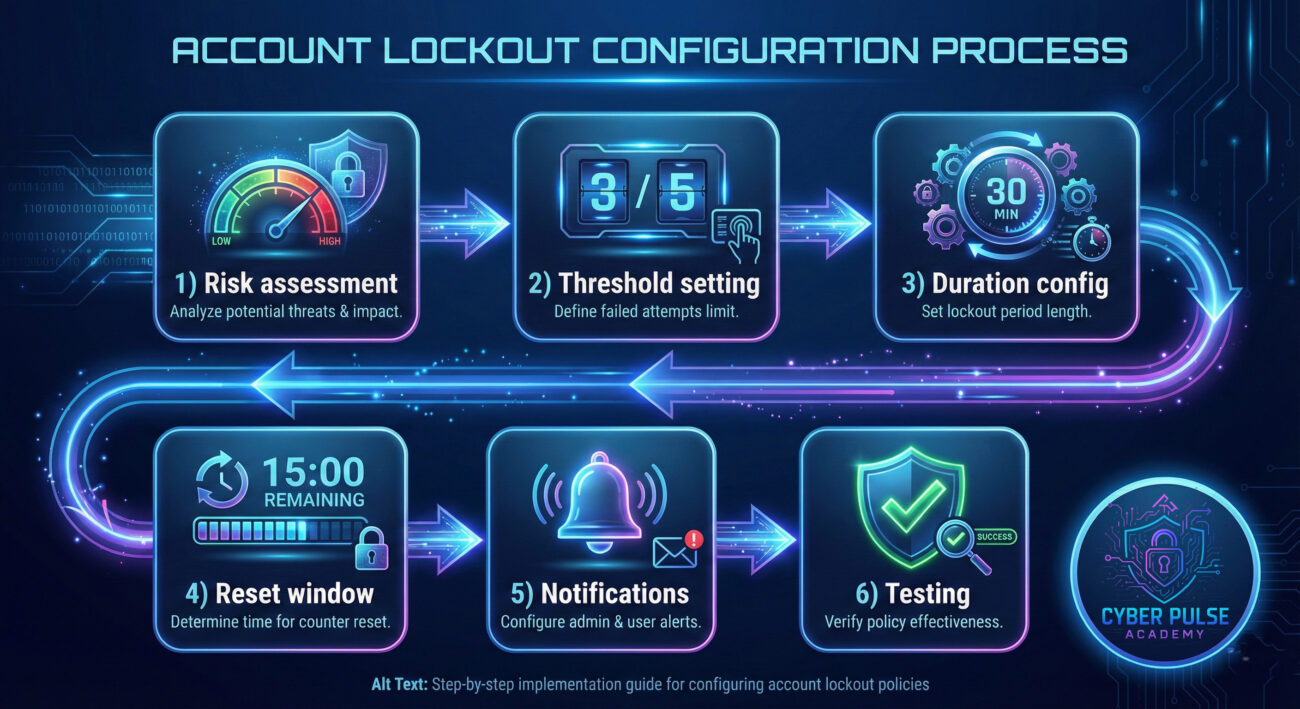
Follow these six steps to understand and configure effective account lockout settings:
Before configuring account lockout, evaluate what you're protecting. A personal social media account has different requirements than a banking portal or corporate system. Higher-value targets need stricter lockout policies.
Key Point: Financial accounts and systems with sensitive data should have lower thresholds (3-5 attempts) while general accounts can be slightly more lenient (5-10 attempts).
The lockout threshold determines how many failed attempts trigger a lockout. Industry standards recommend:
Decide how long accounts should remain locked. Options include:
This determines when the failed attempt counter resets. If set to 30 minutes, five failed attempts spread over an hour won't trigger lockout, but five attempts in 20 minutes will.
Key Point: Match this window to your lockout duration for consistent protection.
Configure alerts to notify users and administrators when lockouts occur. This provides visibility into potential attacks and helps legitimate users understand why they're locked out.
After configuration, test the settings by intentionally triggering a lockout. Document your policies so users know what to expect and how to regain access.
💡 Pro Tip: Combine account lockout with MFA (Multi-Factor Authentication) for layered defense. Even if an attacker somehow guesses your password, they'll still need your second factor to gain access.
⚠️ Critical Warning: Never disable account lockout completely on accounts that access sensitive information. Some organizations disable it to reduce help desk calls, this creates serious vulnerabilities that attackers actively exploit.
Want to deepen your knowledge? Check out these trusted resources:
These resources provide deeper technical documentation and practical examples for mastering account lockout implementation.
Account lockout is one of cybersecurity's unsung heroes. It works quietly in the background, stopping brute force attacks before they can succeed and alerting you when someone tries to breach your accounts.
Here's what to remember:
Account lockout isn't optional, it's a fundamental part of protecting yourself online. By understanding and implementing what you've learned today, you're taking a significant step toward digital security. Whether you're protecting personal accounts or managing enterprise systems, proper lockout configuration makes the difference between being secure and being vulnerable.
Every contribution moves us closer to our goal: making world-class cybersecurity education accessible to ALL.
Choose the amount of donation by yourself.