


















































Certification Courses
Hands-On Labs
Threat Intelligence
Latest Cyber News
MITRE ATT&CK Breakdown
All Cyber Keywords
Imagine walking into an office building where anyone can access any room, computer, or file without permission. That's what a network without Active Directory is like – chaotic, insecure, and impossible to manage.
Active Directory is Microsoft's directory service that acts as the digital security guard for business networks. In simple terms, it's the system that manages who can access what on a company's computers and servers.
Think of it like this: If your company's network is a city, Active Directory is the government, police, and post office combined. It creates user identities (citizens), controls access to resources (buildings), and delivers policies (laws) to every computer in the network.
In this guide, you'll learn:
• What Active Directory actually is (in plain English)
• Why it's the #1 target for hackers
• How to understand its key components
• Best practices to keep it secure
• Common mistakes to avoid
Have you ever wondered how large companies manage thousands of employees accessing hundreds of systems without complete chaos? Or why you only need one password to access email, file servers, and business applications?
The answer is Active Directory – Microsoft's directory service that organizes, manages, and secures network resources. It's the invisible framework that makes modern business networks possible.
Imagine trying to manage a school with 5,000 students without class schedules, ID cards, or security guards. That's what managing a network without Active Directory feels like. Every computer would be an island, every user would need separate passwords for everything, and security would be nearly impossible.
By the end of this guide, you'll understand why Active Directory is called the "keys to the kingdom" by cybersecurity professionals, how it works at a fundamental level, and what you can do to protect it whether you're an IT admin or just starting your cybersecurity journey.
Active Directory isn't just convenient – it's critical infrastructure. According to recent data, approximately 90% of Fortune 1000 companies use Active Directory as their primary directory service. When it's compromised, the entire business can fall like dominos.
Consider these alarming statistics:
• 95% of ransomware attacks target Active Directory environments
• The average data breach involving compromised AD costs $4.35 million
• It takes attackers an average of just 3 days to move from initial access to domain admin privileges
Recent major breaches at companies like SolarWinds and Colonial Pipeline all involved Active Directory compromise as a key attack vector. As noted by CISA, "Attackers frequently target Active Directory due to its central role in authentication and authorization."
What makes Active Directory so attractive to hackers? It's the master key system. Once an attacker controls Active Directory, they control every user account, every computer, every server, and every permission in the network. They can create new admin accounts, disable security software, and access any data they want.
This is why understanding Active Directory isn't just for system administrators anymore. Every cybersecurity professional, from analysts to managers, needs to grasp how it works and how to protect it. As networks become more complex and attacks become more sophisticated, Active Directory security has moved from IT concern to business survival requirement.
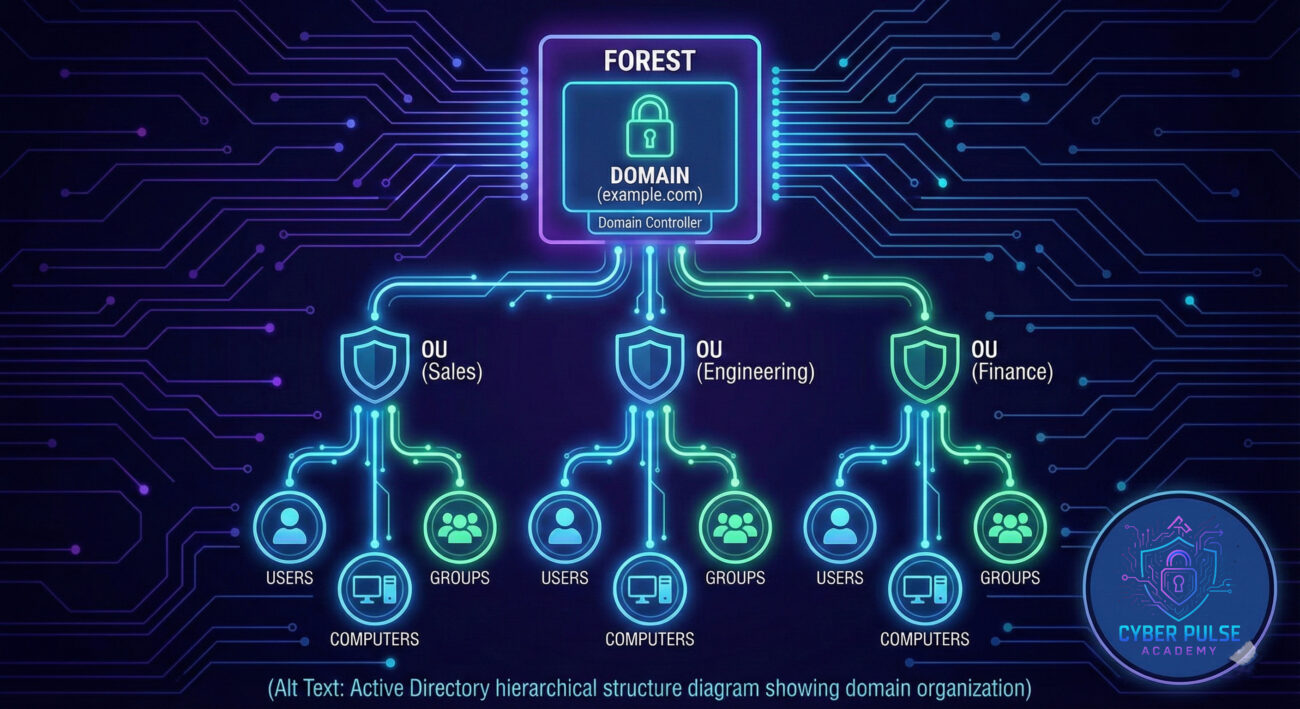
| Term | Simple Definition | Everyday Analogy |
|---|---|---|
| Domain | A group of users, computers, and devices that share the same security database and rules | A gated community with its own security guards and rules |
| Domain Controller | The server that stores the Active Directory database and handles authentication requests | The community's security office that checks IDs and controls gate access |
| Forest | A collection of one or more domains that trust each other | Multiple gated communities that recognize each other's residents |
| Organizational Unit (OU) | A container for organizing users, computers, and groups within a domain | Different neighborhoods within the gated community |
| Group Policy | Rules and settings applied to users and computers in Active Directory | Community rules like "no parking on grass" or "trash day is Tuesday" |
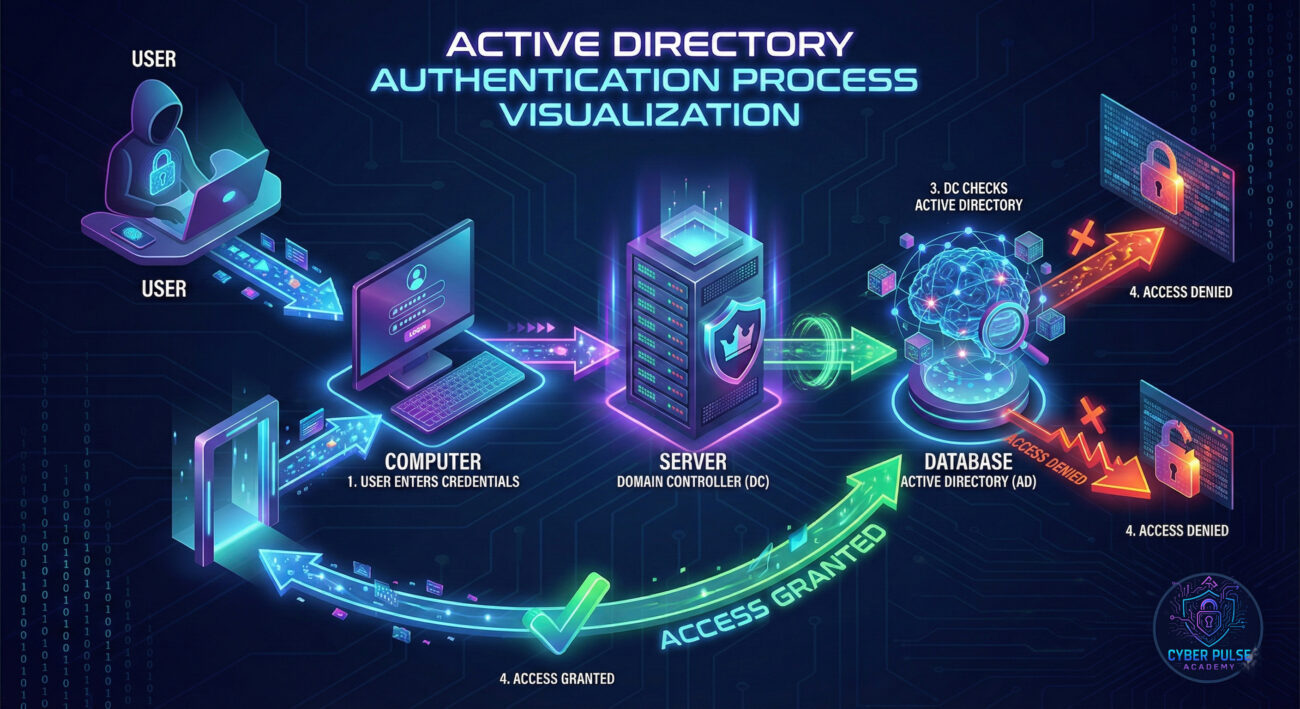
Meet Sarah, a system administrator at TechCorp, a mid-sized software company with 300 employees. Like many companies, TechCorp relied on Active Directory to manage all user accounts and permissions. Sarah thought their network was secure – until Tuesday morning changed everything.
The Attack Timeline:
| Time/Stage | What Happened | Impact |
|---|---|---|
| Day 1: Initial Access | A junior accountant fell for a phishing email and entered his AD credentials on a fake login page | Attackers gained a legitimate user account with basic network access |
| Day 2: Reconnaissance | Attackers used the stolen account to map the AD structure and identify vulnerabilities | They discovered several service accounts with excessive permissions |
| Day 3: Privilege Escalation | Using a known AD weakness, attackers gained Domain Admin privileges | Complete control over all 300 user accounts and 500 computers |
| Day 4: Lateral Movement | Attackers created backdoor admin accounts and disabled security monitoring | They could now access financial systems and customer databases |
| Day 5: Data Exfiltration | 250GB of sensitive data was copied to external servers before ransomware was deployed | Company operations completely halted for 2 weeks |
Sarah discovered the breach when employees couldn't log in and every file had been encrypted with a ransom note. The attackers had used their Active Directory control to disable antivirus software, create hidden admin accounts, and move undetected through the network.
The aftermath was devastating: $500,000 in ransom paid, $2 million in recovery costs, 15% of customers lost, and a 9-month legal battle about data protection failures. All because of weak Active Directory security.
Key Lesson: Active Directory is attacked not because it's weak, but because it's powerful. When secured properly, it's your best defense. When neglected, it becomes your biggest vulnerability.
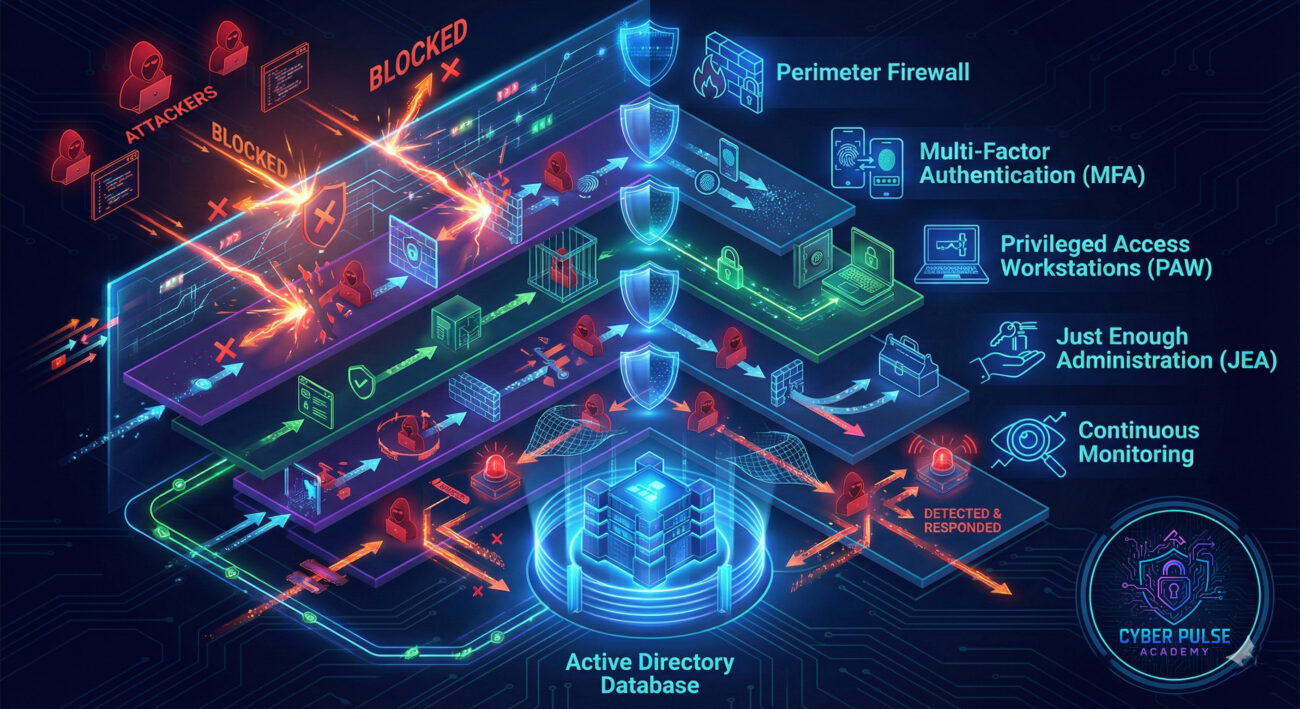
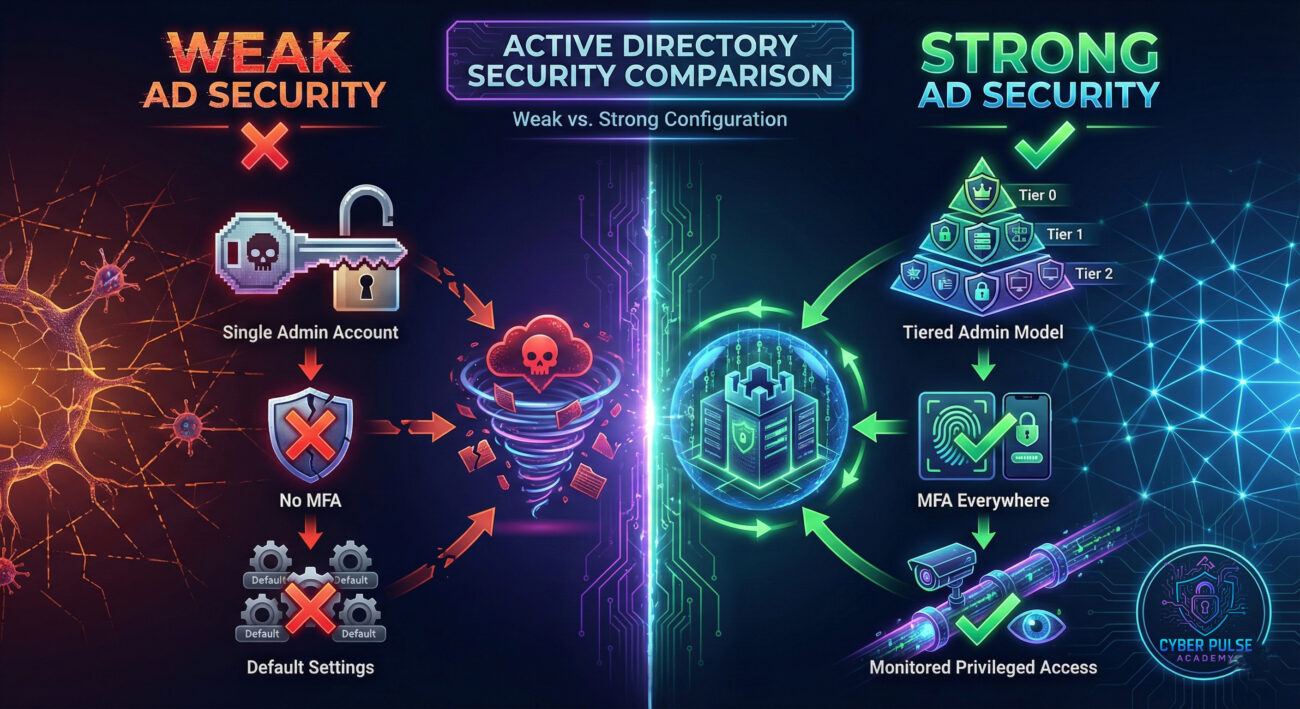
Pro Tip: According to Microsoft's Privileged Access documentation, implementing tiered administration can reduce the attack surface by up to 85%. Start by identifying your most critical assets and building protection outward from there.
Understanding AD is no longer optional in today's threat landscape. As we've seen, it's both the backbone of modern networks and the prime target for sophisticated attacks. But with proper knowledge and implementation, you can transform it from a vulnerability into a strength.
Key Takeaways:
Remember that AD security is a journey, not a destination. Start with the fundamentals: identify your critical assets, implement basic protections, and gradually build more advanced controls. Every improvement, no matter how small, makes your network more resilient against attacks.
As you continue your cybersecurity education, consider diving deeper into specific areas like NIST frameworks for identity management or exploring Azure Active Directory for hybrid environments. The world of directory services is evolving, but the principles of secure design and vigilant maintenance remain constant.
Have questions about AD security? Not sure where to start with implementing these controls in your environment? Share your thoughts and questions in the comments below!
👉 What's your biggest challenge with AD security? Let's discuss practical solutions and share experiences to build more secure networks together.
References & Further Reading:
• CISA: AD Security Best Practices
• Microsoft: Protecting AD
• SANS: Securing AD
• NIST SP 800-53: Security and Privacy Controls
Every contribution moves us closer to our goal: making world-class cybersecurity education accessible to ALL.
Choose the amount of donation by yourself.