


















































Certification Courses
Hands-On Labs
Threat Intelligence
Latest Cyber News
MITRE ATT&CK Breakdown
All Cyber Keywords
Have you ever downloaded a "free" program only to find your browser flooded with strange pop-ups and your computer slowing to a crawl? You're not alone, this is the frustrating world of adware, one of the most common yet misunderstood cyber threats today.
Adware (advertising-supported software) is a type of program that displays unwanted advertisements on your device. Think of it like a digital billboard truck that follows you everywhere online, except it's parked inside your computer, hijacking your browser and tracking your every move.
In this guide, you'll learn: exactly what adware is and how it works, how to spot it before it causes damage, simple steps to remove and prevent it, and why protecting yourself matters more than ever in our connected world.
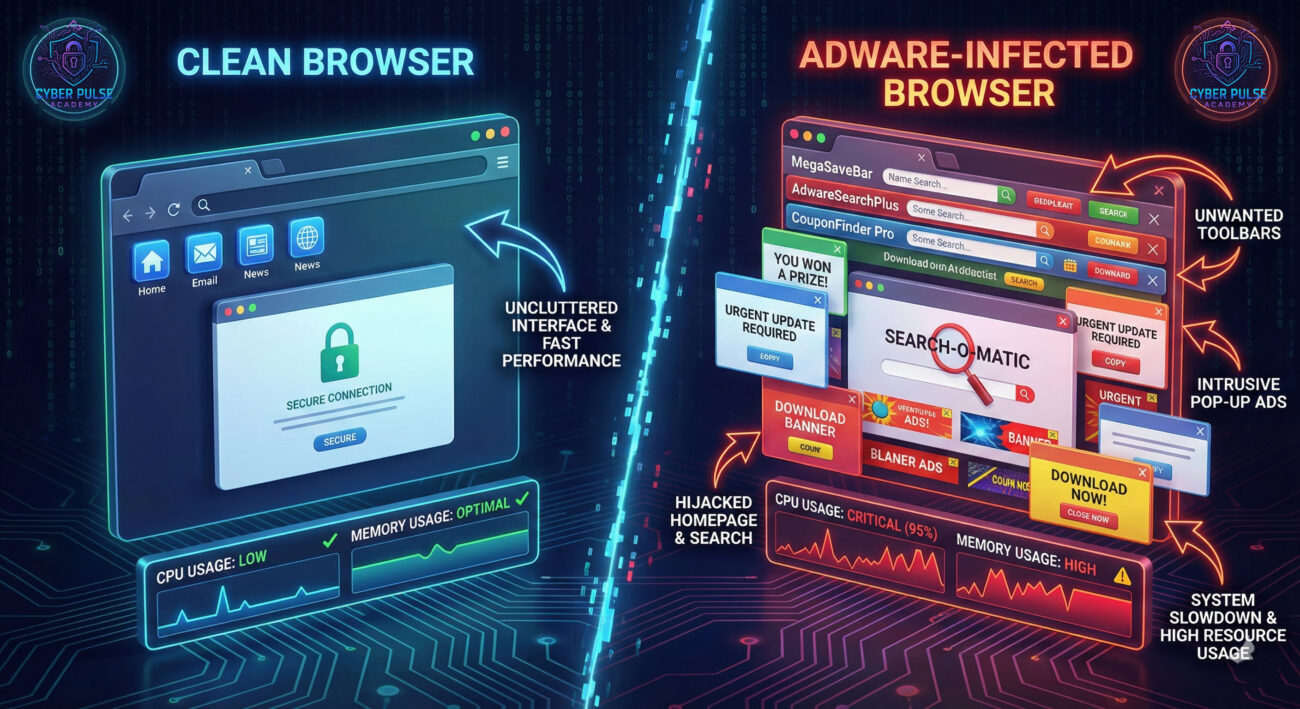
Imagine this: You download a free photo editing app you found online. It works great at first, but within days, your browser looks like Times Square on New Year's Eve, flashing ads, unexpected pop-ups, and banners for questionable products appear everywhere. Your computer runs slower, strange toolbars clutter your screen, and you start seeing ads for things you only searched for privately. Welcome to the world of adware.
Adware is software designed to display advertisements on your computer, often without your consent. While some adware is relatively harmless, much of it crosses into malicious territory by hijacking browsers, tracking your activity, and opening doors to more dangerous threats. It's the digital equivalent of someone putting stickers all over your car, not only annoying but potentially damaging and invasive.
By the end of this guide, you'll understand exactly how adware works, how to spot it, and most importantly, how to keep it off your devices for good. Let's dive in.
Adware might seem like a minor inconvenience, but it represents serious risks to your privacy, security, and device performance. According to the Cybersecurity and Infrastructure Security Agency (CISA), malware (including adware) continues to be a primary attack vector for cybercriminals.
Modern adware does more than just show ads. It often includes tracking components that monitor your browsing habits, search history, and even keystrokes. This data gets sold to third parties or used to deliver targeted ads. In some cases, adware serves as a gateway for more severe malware like spyware or ransomware. A report by CSO Online notes that adware infections can lead to identity theft, financial loss, and significant system damage.
Beyond security risks, adware impacts your daily life. It slows down computers, consumes bandwidth, and creates frustrating user experiences. For businesses, it can lead to lost productivity and compromised network security. Understanding adware is your first line of defense in today's digital landscape where "free" software often comes with hidden costs.

Let's break down the essential terminology you need to understand adware. These concepts will help you recognize and discuss threats with confidence.
| Term | Simple Definition | Everyday Analogy |
|---|---|---|
| Adware | Software that displays unwanted advertisements, often bundled with free programs. | A street promoter who sticks flyers on your car windshield every day without permission. |
| PUP (Potentially Unwanted Program) | Software that may not be malicious but is installed without clear consent and often delivers ads. | A magazine subscription you didn't order that keeps arriving and charging your account. |
| Browser Hijacker | A type of adware that changes your browser settings without permission. | Someone changing your TV's default channel to their preferred shopping network. |
| Tracking Cookie | Small files that websites place on your device to monitor your browsing activity. | A retail store clerk who follows you around noting everything you look at. |
| Malware | Malicious software designed to harm or exploit devices, networks, or users. | A digital vandal who breaks into your home to steal, damage, or spy. |
Sarah, a college student, needed to edit a PDF for a class project. Short on time and money, she searched for "free PDF editor" and downloaded the first result that promised "100% free, no watermarks." The installation process seemed normal, though she did quickly click through several screens without reading them.
Within hours, her Chrome browser had a new search engine, three unfamiliar toolbars, and pop-ups for weight loss supplements appeared constantly. Her laptop slowed dramatically, and the fan ran loudly even during simple tasks. Sarah noticed ads for textbooks she had searched for earlier that day, a clear sign her browsing was being tracked.
Here's how the situation unfolded:
| Time/Stage | What Happened | Impact |
|---|---|---|
| Day 1: Download | Downloaded "FreePDFEditor.exe" from an unverified source | Adware bundled with legitimate software entered her system |
| Day 1: Installation | Skipped reading the "custom installation" options | Unknowingly agreed to install 3 additional PUP programs |
| Day 1-2: Execution | Browser settings changed, pop-ups began appearing | Productivity dropped, privacy compromised, system slowed |
| Day 3: Escalation | Strange processes in Task Manager, antivirus alerts | Potential gateway for more serious malware established |
| Day 4: Resolution | Ran malware removal tools and reset browser | System cleaned, but lost time and data anxiety remained |
Sarah's experience is common. The financial incentive for adware creators is significant, they earn money through pay-per-click schemes and selling user data. What begins as an annoyance can escalate into serious privacy violations or system compromise.
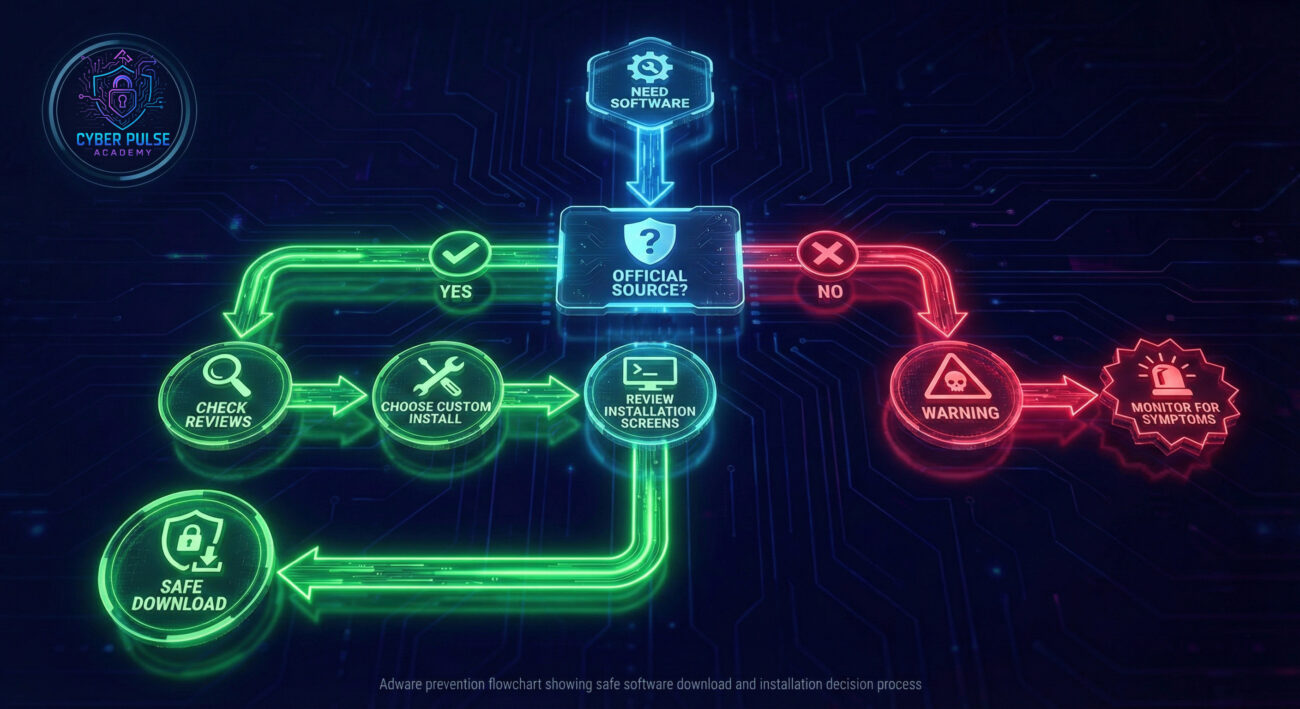
Follow these practical steps to prevent, detect, and remove adware from your devices. These measures will significantly reduce your risk of infection.
Most adware enters systems through bundled software downloads. Be cautious about what and where you download.
Always choose "Custom" or "Advanced" installation to see what you're actually agreeing to install.
Modern antivirus programs detect and block many adware variants before they can install.
Browsers are the primary target for adware. Proper configuration provides strong protection.
Software updates often include security patches that close vulnerabilities adware might exploit.
Early detection limits damage and makes removal easier. Know what to look for.
If you suspect adware, take immediate action to clean your system.
Understanding how attackers think helps you defend better. Let's examine adware from a threat hunter's perspective.
Attack Path: An attacker bundles adware with popular free software like media players or PDF readers. They purchase ads that appear at the top of search results for "free [software name]." When users click, they're taken to a site that looks legitimate but hosts the bundled installer. The installation uses dark patterns, pre-checked boxes, confusing wording, and "decline" buttons that are hard to find. Once installed, the adware generates revenue through pay-per-click schemes and by selling aggregated user data to third parties. Sophisticated variants may download additional payloads if they detect weak security.
Defender's Counter-Move: Security professionals use "sinkholing", redirecting traffic from known adware domains to controlled servers to monitor infection rates and disrupt the attackers' revenue. They also analyze installation packages to identify bundling patterns and work with software vendors to clean their distribution channels. On your end, using a DNS filtering service can block connections to known adware domains before ads even load.
Adware is a low-risk, high-volume revenue stream. The goal isn't to destroy systems but to monetize access. We look for software with high download counts but poor security practices around distribution. We exploit users' desire for free software and their tendency to rush through installations. Success is measured in installations per day and revenue per thousand impressions (RPM). We constantly evolve our bundling techniques to bypass security software detection, using polymorphism and legitimate code signing certificates when possible. The weakest link is nearly always the human, their impatience and trust in search results.
Adware represents both a nuisance and a serious threat indicator. While often less dangerous than other malware, its presence suggests poor security hygiene that could lead to worse infections. We focus on prevention through education and technical controls. We monitor for unusual network traffic to ad networks, changes in browser settings, and unexpected processes. Our tools include application whitelisting, reputation-based filtering, and robust endpoint protection. We educate users about safe download practices and the importance of reading installation screens. Every adware infection we prevent is one less potential entry point for ransomware or data theft.
Adware may seem like a minor annoyance, but it represents significant risks to your privacy, security, and system performance. By understanding what it is and how it operates, you're already better protected than most users.
Let's recap the essential points:
Remember that cybersecurity is an ongoing practice, not a one-time setup. The adware landscape constantly evolves, but the fundamental principles of caution, education, and good digital hygiene remain your strongest defenses. By implementing even a few of the steps outlined in this guide, you'll significantly reduce your risk and enjoy a cleaner, faster, and more secure computing experience.
Have you encountered adware before? What removal methods worked for you? Share your experiences and questions in the comments below, your story might help someone else avoid the same frustration. For more beginner-friendly cybersecurity guides, check out our articles on phishing protection and password security.
Stay curious, stay cautious, and stay secure.
© 2026 Cyber Pulse Academy. This content is provided for educational purposes only.
Always consult with security professionals for organization-specific guidance.
Every contribution moves us closer to our goal: making world-class cybersecurity education accessible to ALL.
Choose the amount of donation by yourself.