


















































Certification Courses
Hands-On Labs
Threat Intelligence
Latest Cyber News
MITRE ATT&CK Breakdown
All Cyber Keywords
In the ever-evolving landscape of cyber threats, few actors are as persistent and regionally focused as Transparent Tribe (APT36). Their latest campaign unveils a sophisticated new Android Remote Access Trojan (RAT), marking a significant escalation in mobile-targeted espionage. This guide breaks down this complex attack into understandable concepts, providing a clear roadmap for beginners in cybersecurity to comprehend, detect, and defend against such malware.
The newly identified Android RAT, part of Transparent Tribe's arsenal, is a stark reminder that mobile devices are prime targets. Dubbed "Crimson," this malware is distributed through deceptive social engineering campaigns, often impersonating popular apps like YouTube. Once installed, it grants the attacker near-total control over the victim's device, enabling data theft, surveillance, and further network intrusion. This attack underscores the critical need for vigilant security practices on mobile platforms.
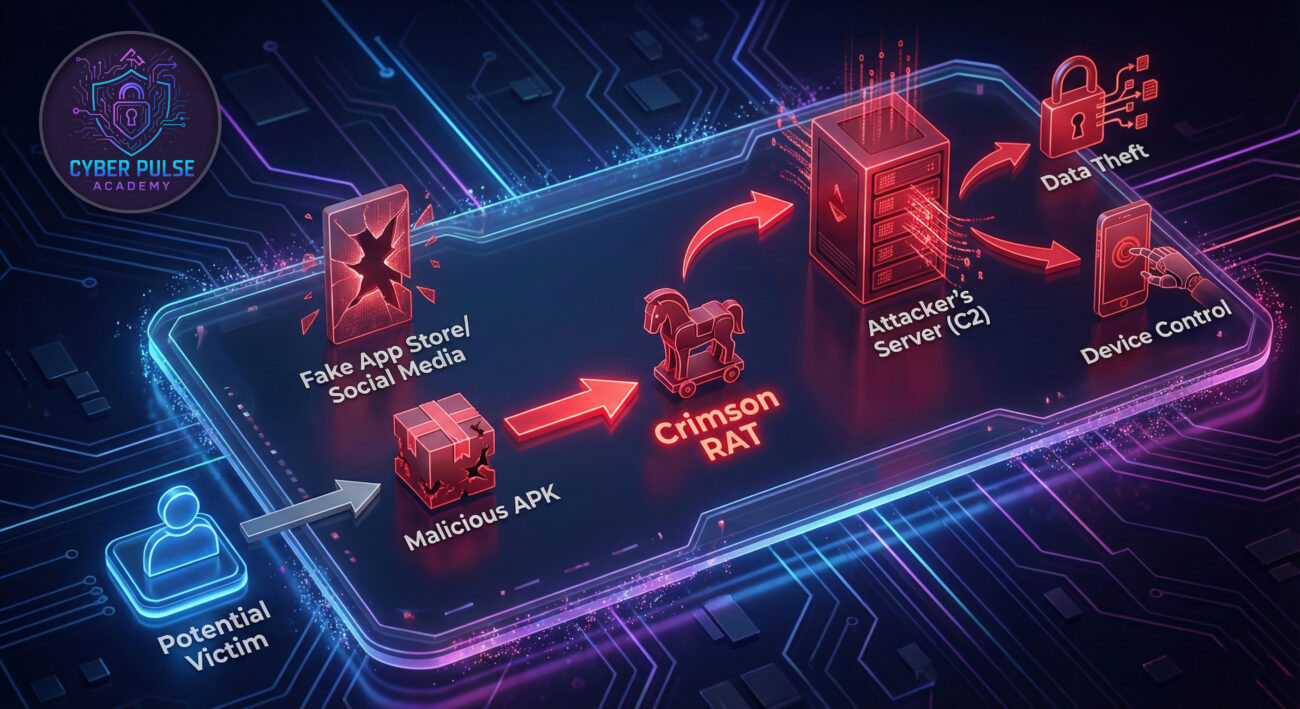
Understanding the attack step-by-step is crucial for building effective defenses. The Crimson RAT campaign follows a multi-stage infection chain designed to bypass casual scrutiny.
Attackers create convincing lures. These are often fake promotional pages or messages on social media platforms like Instagram, offering modified versions of legitimate apps (e.g., "YouTube Premium APK"). The trust associated with the impersonated brand lowers the victim's guard.
The victim is tricked into downloading an APK (Android Package Kit) file from a third-party, unsecured website. To install it, the victim must knowingly enable "Install from Unknown Sources" in Android settings, a critical security bypass. The app often requests extensive permissions immediately upon installation.
Once installed, the RAT establishes a connection to a attacker-controlled server (C2). It uses techniques to hide its icon and maintain persistence, ensuring it survives device reboots. The C2 server then sends commands to the infected device, turning it into a remote spy tool.
This malware is a Swiss Army knife for espionage. Its capabilities illustrate the severe risk of a mobile device compromise:
Let's examine this threat from both adversarial and defensive perspectives. This dual-view is essential for building robust security.
Objective: Deploy a persistent RAT for intelligence gathering on specific targets.
Objective: Prevent infection, detect compromise, and mitigate damage.
For beginners, here’s a simplified framework to approach potential RAT detection, whether for your own device or in a learning lab.
Go to Settings > Apps > [App Name] > Permissions. Be extremely wary of any app that requests permissions irrelevant to its function (e.g., a flashlight app asking for SMS or microphone access).
Use tools like NetGuard (for non-rooted devices) to see which apps are making network connections. Connections to obscure domains or IP addresses on non-standard ports are a major warning sign.
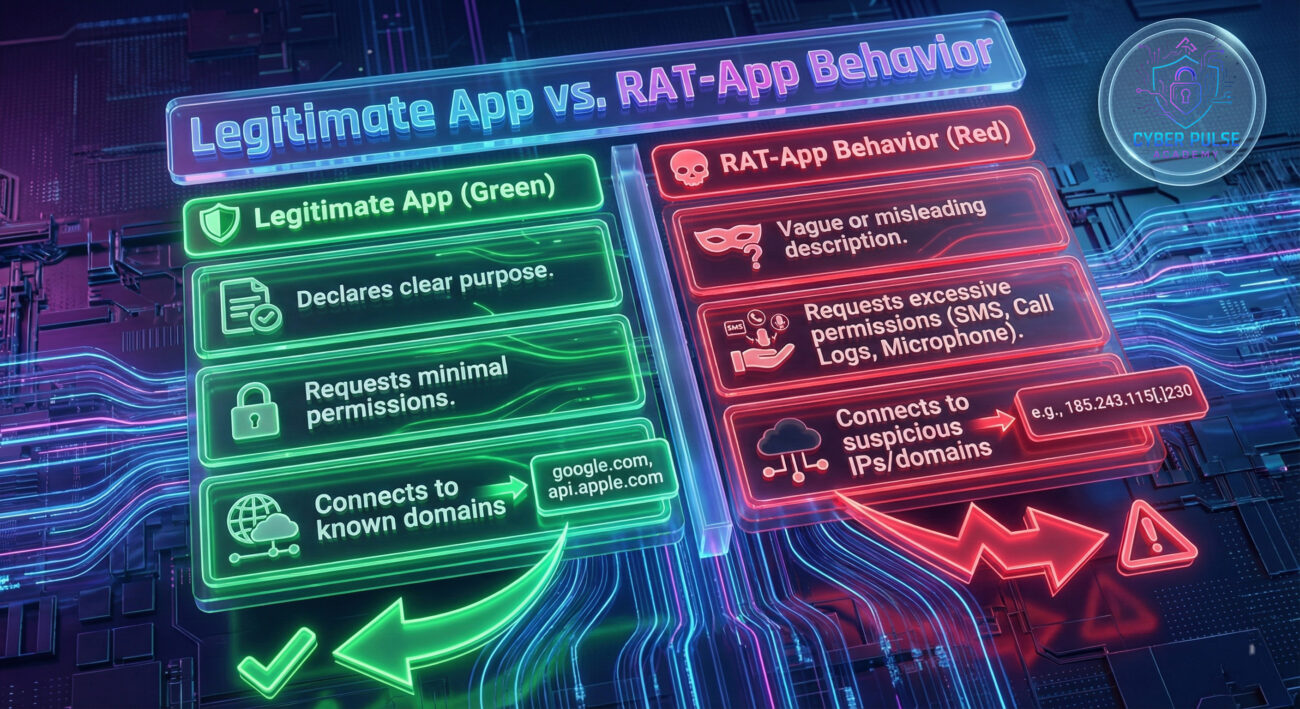
Security is often broken by simple oversights. Here’s a breakdown of pitfalls and the secure habits to replace them.
A: First, go to Settings > Apps and uninstall the suspicious app immediately. Then, run a scan with a reputable mobile security app (like Malwarebytes for Mobile). Change all your important passwords (email, social media, banking) from a trusted, clean device, as the RAT may have stolen them. Consider backing up your personal data and performing a factory reset on the device for complete assurance.
A: No. This specific malware is built for the Android operating system. However, iOS is not immune to targeted espionage. iOS threats typically require more sophisticated exploits (like zero-days) or abuse of enterprise/apple developer certificates. The core defense principle remains: only install apps from the official App Store.
A: Start in a safe, controlled environment. Set up a virtual machine (using VirtualBox or VMware) with a security-focused OS like REMnux. Use repositories like theZoo to access live malware samples for analysis in isolation. Follow tutorials on static analysis (examining code without running it) with tools like APKTool and JADX.
The Transparent Tribe's Crimson RAT campaign is a masterclass in social engineering, proving that the human element is often the weakest link. This Android RAT attack demonstrates that attackers don't always need complex code exploits; they just need a convincing story and a moment of user oversight.
Don't let the complexity intimidate you. Begin by implementing one best practice today: audit the permissions on your most-used apps, disable "Unknown Sources," or set up a password manager.
To continue learning, explore these excellent free resources:
© 2026 Cyber Pulse Academy. This content is provided for educational purposes only.
Always consult with security professionals for organization-specific guidance.
Every contribution moves us closer to our goal: making world-class cybersecurity education accessible to ALL.
Choose the amount of donation by yourself.