


















































Certification Courses
Hands-On Labs
Threat Intelligence
Latest Cyber News
MITRE ATT&CK Breakdown
All Cyber Keywords
Have you ever shown your ID to enter a club, or used a special key card to access your office floor? In the digital world, authorization is that exact same process, it's the security guard that checks your credentials after you've logged in to decide what you're actually allowed to do. Think of it as the rulebook that says, "Okay, we know who you are (that's authentication), but here's exactly what you can touch, see, or change."
Without proper authorization, a regular employee could accidentally (or maliciously) access the CEO's salary data, or a user on a shared computer could delete someone else's files. In this guide, you'll learn: what authorization really is through simple analogies, why it's the silent hero of cybersecurity, the key terms you need to know, a real-world story of what happens when it fails, and a step-by-step guide to implementing strong authorization in your own digital life.
In 2023, over 60% of data breaches involved the misuse of authorized access, according to Verizon's Data Breach Investigations Report. This means the hackers didn't always break down the front door; often, they used legitimate user credentials but then roamed freely where they shouldn't have been allowed. This is a failure of authorization.
Authorization matters because it's the final, critical layer of defense. Imagine your username and password (authentication) get you into the company building. Authorization is what prevents you, a new intern, from walking into the CFO's office, opening the safe, and reading confidential merger documents. It enforces the principle of least privilege, giving users only the access they absolutely need to perform their job, nothing more. In our personal lives, it's what stops an app that has access to your photos from also reading your text messages unless you explicitly grant it permission.
With the rise of cloud services, remote work, and complex software, managing who can do what has never been more critical. A single misconfigured setting in a cloud storage bucket (an authorization error) can accidentally expose millions of customer records to the public internet, as has happened to major corporations. By understanding and implementing strong authorization controls, you protect not just data, but privacy, finances, and reputation.
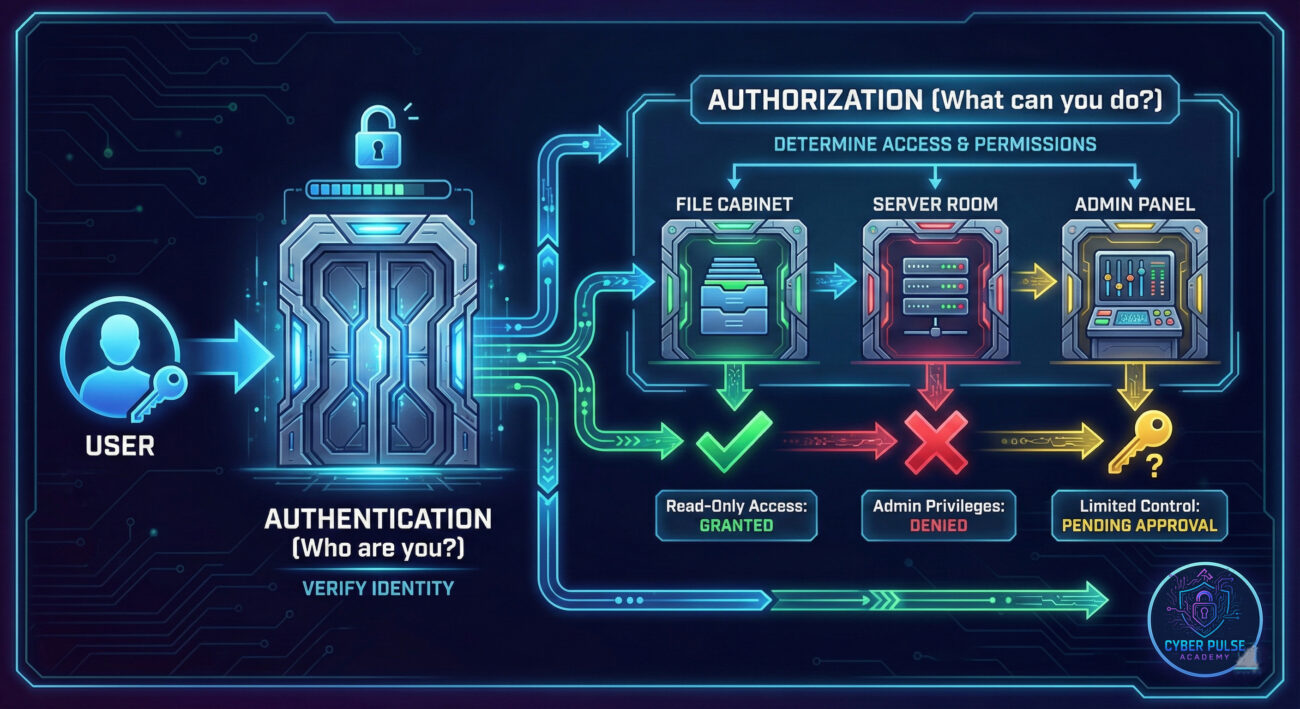
Let's break down the jargon into plain English. These are the core authorization concepts you'll encounter.
| Term | Simple Definition | Everyday Analogy |
|---|---|---|
| Principle of Least Privilege (PoLP) | The security practice of giving a user only the minimum levels of access – or permissions – needed to perform their task. | A bank teller has a key to their cash drawer, but not to the main vault or the security system's master controls. |
| Role-Based Access Control (RBAC) | A method where access permissions are assigned to roles (like "Manager," "Editor," "Viewer"), and users are assigned to those roles. | In a hospital: "Nurse" role can view patient charts and administer meds. "Janitor" role can enter rooms to clean but cannot view charts. |
| Permissions | The specific rules, attached to a user or role, that define allowed actions on a resource (e.g., Read, Write, Delete, Execute). | Your Netflix profile has permission to "Play" movies, but not permission to "Add New User" or "Change Billing Plan". |
| Access Control List (ACL) | A list attached to a resource (like a file or folder) that specifies which users or roles have what permissions to it. | A shared Google Doc. The ACL is the "Share" settings panel showing that "Alice can edit," "Bob can comment," and "Charlie can view." |
| Privilege Escalation | When a user or attacker gains access to permissions higher than they are supposed to have. A major security vulnerability. | A hotel guest figures out a way to modify the electronic lock system, granting themselves master keycard access to every room. |
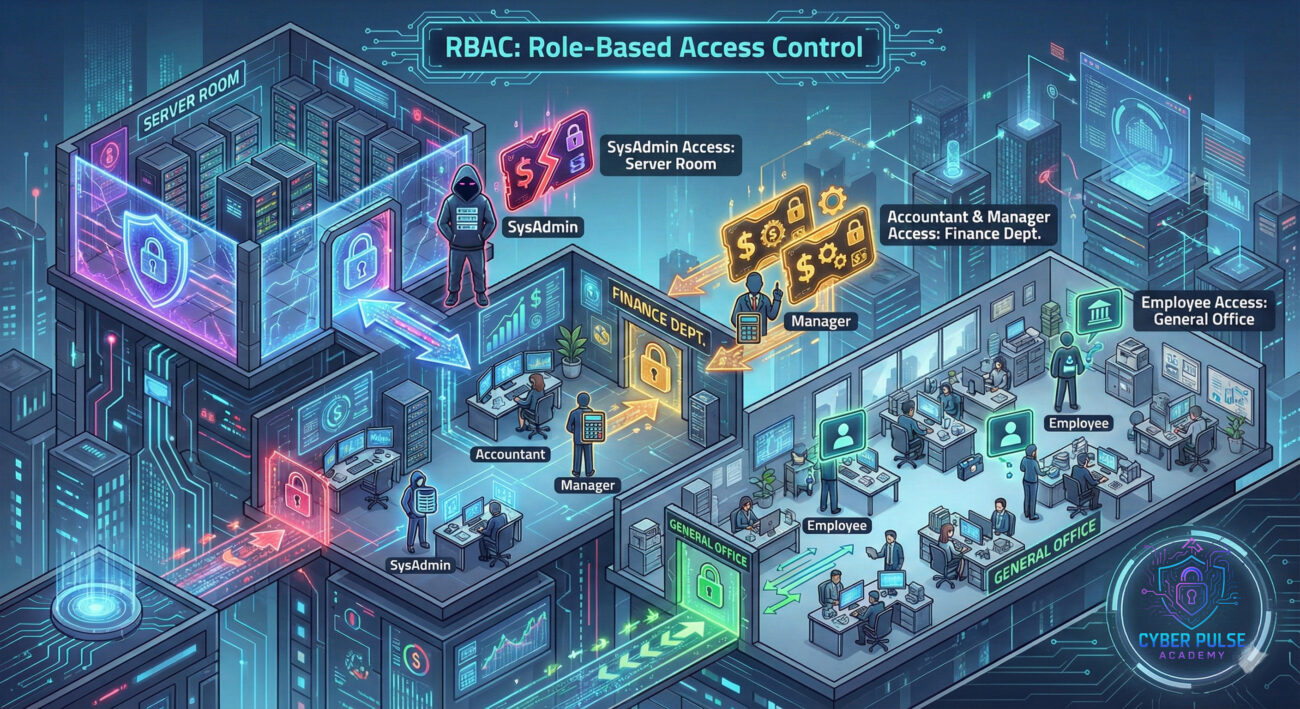
Meet Sarah, a marketing associate at "TechGrow Inc." She uses a company project management tool to coordinate campaigns. One Tuesday, she needs a graphic from last quarter's project. Browsing the tool, she notices she can not only see her current projects but also a folder called "Executive - M&A Strategy." Curiosity gets the better of her. She clicks, and to her surprise, she can open it. Inside are confidential documents about the company's plan to acquire a competitor, information that could move stock prices if leaked.
This isn't a hacking attack in the classic sense. Sarah didn't steal a password. The system correctly authenticated her as "Sarah." The catastrophic failure was in authorization. Her user role, "Marketing Associate," was incorrectly granted "View" permissions on an executive-level folder due to a configuration error when the software was updated. This is a privilege escalation via misconfiguration.
Sarah, being ethical, immediately reports the issue to IT. But let's timeline what could have happened if someone with malicious intent found this opening.
| Time / Stage | What Happened | Impact |
|---|---|---|
| Day 1: Misconfiguration | A system update resets folder permissions. The "Executive" folder's ACL mistakenly includes the "All Employees" group. | Vulnerability created. Hundreds now have unauthorized access. |
| Day 5: Discovery (Malicious) | A different employee, planning to leave for a competitor, discovers the access. They download all M&A documents. | Confidential intellectual property is stolen. Competitive advantage is lost. |
| Day 10: Data Sale & Breach | The employee sells the data. The acquiring company finds out, calls off the deal. News leaks to the press. | Financial loss (millions), stock price drop, massive reputational damage, and regulatory fines. |
| Day 30: Aftermath | Forensic audit traces the breach to the authorization misconfiguration. New access controls and audit processes are implemented. | Long-term trust is eroded. The cost of recovery far exceeds the cost of proper authorization setup. |
Whether you're managing a team, setting up your home network, or just configuring your own apps, these steps will help you build a strong authorization mindset.
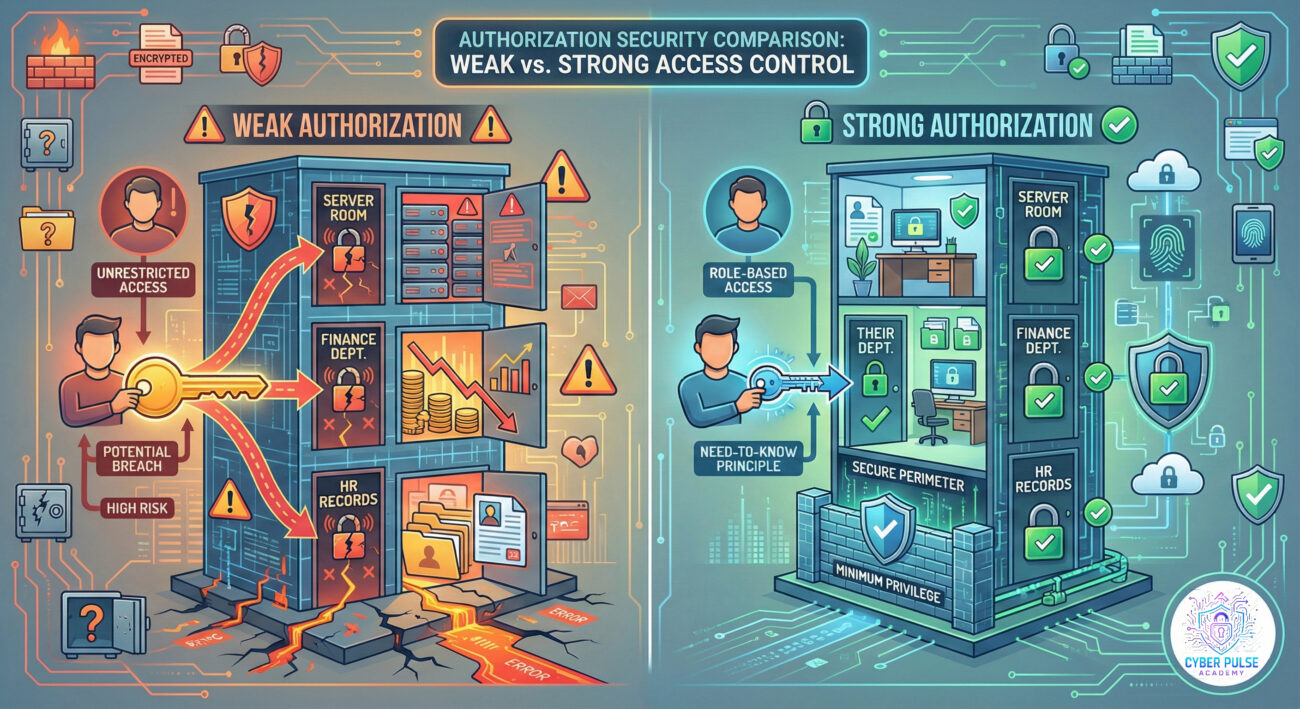
An attacker doesn't always try to break the strongest lock. Instead, they look for the easiest way in. After stealing a low-level employee's credentials (perhaps through a phishing email), their first move isn't to attack the main server. They explore.
They log into the company's project management tool (using the stolen credentials) and start clicking around. They're not looking for specific data yet, they're mapping the permissions. Can they access the shared drive? Can they see the HR folder? Can they modify user roles? They're hunting for any misconfiguration, a folder accidentally set to "Everyone can edit," a user account with unnecessary admin rights, or a legacy system with default passwords still enabled.
The defender's mindset is different. They operate on the principle of "assume breach." They assume an attacker already has some valid credentials. Therefore, their entire authorization strategy is designed to limit what that attacker can do next.
Their key move is network segmentation and micro-permissions. Even if an attacker gets into the marketing department's system, they hit a wall. The authorization rules prevent that marketing system from talking directly to the finance database. The attacker's movement is contained. The defender then relies on monitoring to detect unusual access patterns, like a marketing account suddenly trying to read thousands of financial records, and shuts down the attack before real damage occurs.
Authorization is the puzzle to solve after getting past the front gate. The Red Team (ethical hackers simulating real attackers) sees authorization as a system of internal doors. Their goal is to find the one door left unlocked, the guard not paying attention, or the master key carelessly copied.
They care about weak configurations, over-privileged service accounts, inheritance flaws in permission structures, and forgotten legacy access. They think in chains: "If I have access to System A, and System A can talk to System B with high privileges, can I jump to System B?" Their success is measured by how deep they can go and how high they can climb the privilege ladder from a starting point of very basic access.
Authorization is the internal zoning map that limits damage. The Blue Team (defenders) sees authorization as the primary tool for containment. They assume authentication will fail at some point, so they build layers of internal walls.
They care about clean, audit-ready role definitions, strict adherence to least privilege, automated de-provisioning of access when employees leave, and clear logs of every "who accessed what." Their success is measured by minimizing the "blast radius", ensuring that even if an attacker gets in, they can only touch a tiny, non-critical part of the network before being detected and stopped.
Authorization is not an IT afterthought; it's the essential rulebook that governs actions inside our digital spaces. By mastering it, you move from being a passive user to an active defender of your own data and privacy.
Remember, in cybersecurity, a locked front door (authentication) means little if the intruder, once inside, can freely open every cabinet and safe. Build strong walls inside with intelligent authorization.
Did this guide help demystify authorization for you? What part of access control do you find most challenging? Share your thoughts, questions, or your own tips in the comments below. Let's build a more secure digital world together.
Every contribution moves us closer to our goal: making world-class cybersecurity education accessible to ALL.
Choose the amount of donation by yourself.