


















































Certification Courses
Hands-On Labs
Threat Intelligence
Latest Cyber News
MITRE ATT&CK Breakdown
All Cyber Keywords
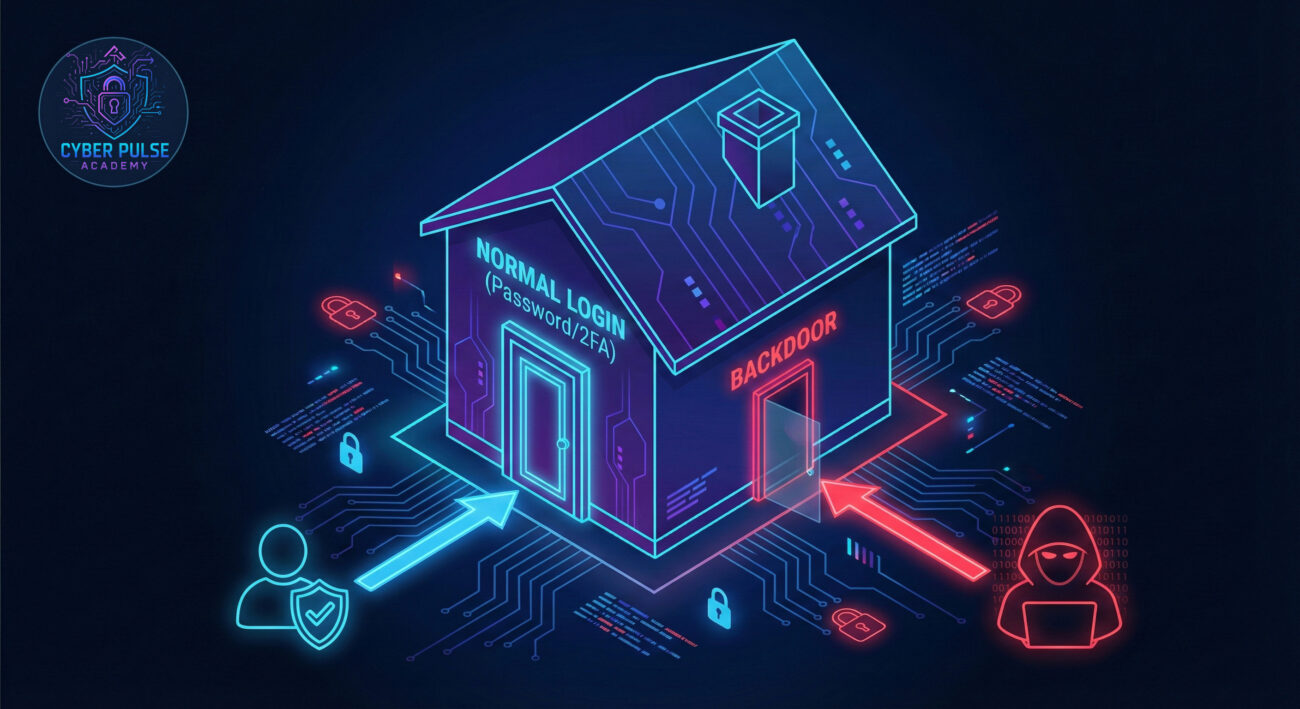
Imagine leaving your house locked and secure, but unknowingly leaving a spare key under the mat. A backdoor is the digital version of that hidden key – a secret way into a system that bypasses normal security. Whether you're protecting your personal laptop or a company network, understanding backdoors is your first line of defense.
In this guide, you'll learn: exactly what a backdoor is in simple terms, how hackers use them in real-world attacks, the 7-step protection plan anyone can follow, and the mindset that separates security pros from victims. Let's unlock this critical concept together.
Have you ever updated an app, used a default password, or downloaded a "free" software crack? Each of these common actions could potentially install a backdoor – a hidden, unauthorized method for someone to access your device or accounts without your knowledge.
A backdoor is a piece of code, a configuration setting, or a hardware feature that bypasses normal authentication or encryption. Think of it not as breaking down your front door, but as using a secret passage the builder left in the blueprints. They can be intentionally created by developers for legitimate maintenance ("lawful access") or maliciously inserted by hackers through malware or phishing attacks.
This guide will walk you through how backdoors work, show you a realistic attack scenario, and give you a clear, actionable plan to ensure your digital doors have no hidden keys.
The danger of a backdoor lies in its stealth. Unlike a ransomware attack that locks your screen with a demand, a backdoor operates in the shadows. An attacker can lurk in your system for months, stealing data, watching your activities, or using your device to launch attacks on others.
According to a CISA advisory, advanced persistent threat (APT) groups frequently use backdoors for long-term espionage. The 2020 SolarWinds breach, which affected numerous government agencies and Fortune 500 companies, began with a backdoor inserted into a software update. This isn't just about big corporations – individual users are targeted for identity theft, financial fraud, and to become part of botnets.
Understanding backdoors matters because they undermine the very foundation of digital trust. If you can't be sure your front door is the only entrance, you can never truly be secure.
Let's break down the jargon into plain English. Here are the essential terms you need to know:
| Term | Simple Definition | Everyday Analogy |
|---|---|---|
| Backdoor | A hidden method to bypass normal security controls and gain access to a system. | A secret tunnel into a fortress that bypasses the guarded main gate. |
| Malware | Malicious software designed to harm, exploit, or perform unauthorized actions. | A digital parasite that infects your device to steal or cause damage. |
| Authentication | The process of verifying someone's identity (like with a password or fingerprint). | The bouncer checking your ID before letting you into the club. |
| Exploit | A piece of code or technique that takes advantage of a vulnerability. | A specialized tool a burglar uses to pick a specific type of lock. |
| Zero Trust | A security model that assumes no user or device is trustworthy by default. | Checking everyone's ID at every door inside the building, not just the entrance. |
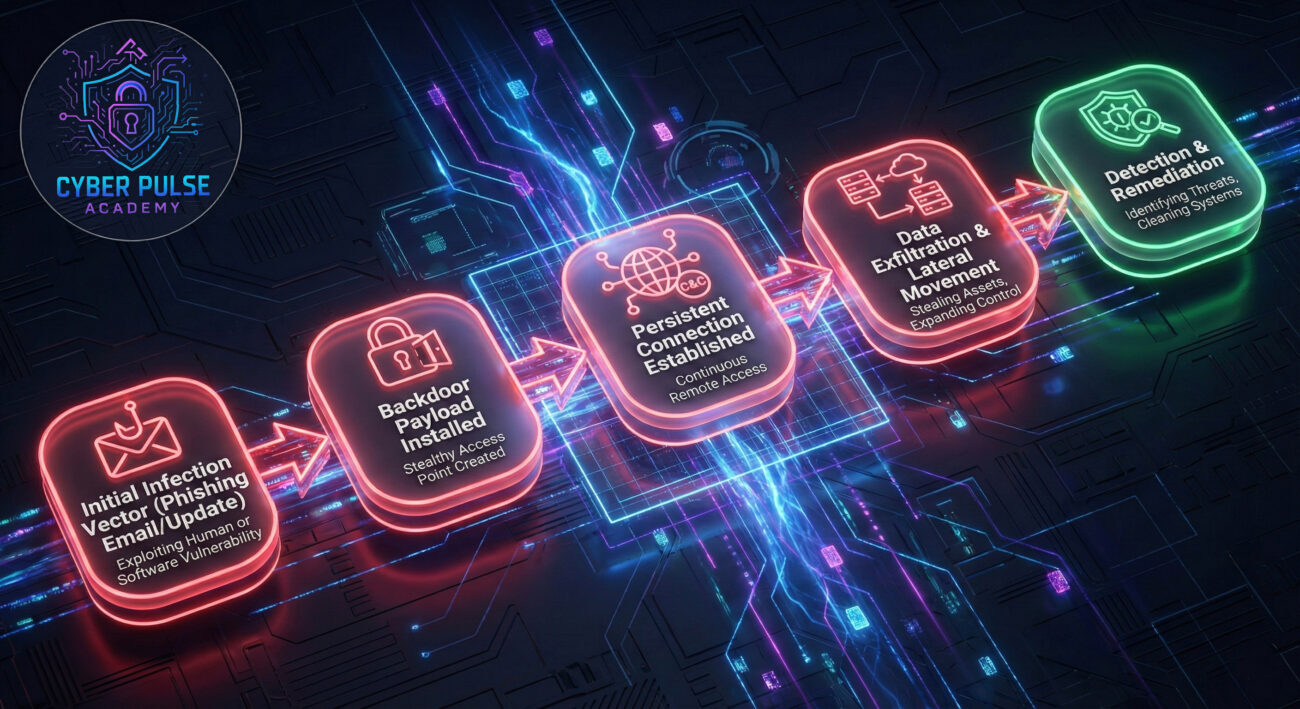
Meet Alex, a freelance graphic designer. Alex loves working from "Bean There Cafe," using their free Wi-Fi. One day, Alex receives an email notification about a required update for a popular design tool they use. The email looks legitimate, with the correct logo, but the download link is slightly off. Pressed for time, Alex clicks and installs.
Unbeknownst to Alex, the update was a phishing lure. It installed a backdoor payload. For weeks, nothing seemed wrong. Then, strange things happened: password reset emails for other accounts, sluggish computer performance, and unexplained files. A client later called, furious that a draft design had been leaked online.
Alex had become a victim. The backdoor gave the attacker persistent access. They stole Alex's files, used Alex's computer to store illegal content, and even used it as a relay point to attack Alex's clients.
| Time/Stage | What Happened | Impact |
|---|---|---|
| Day 0 (Initial Compromise) |
Alex clicks the fake update link and installs malware containing a backdoor. | The backdoor is installed silently. Alex's device is now compromised. |
| Day 1-7 (Establishment) |
The backdoor "phones home" to the attacker's server, establishing a persistent connection. It hides its activity from basic task managers. | Attacker has remote control. Begins scouting files and network connections. |
| Day 8-21 (Theft & Expansion) |
Attacker exfiltrates design files, steals saved browser passwords, and uses Alex's weak home router password to access other devices on the network. | Data breach, privacy violation, and expansion of the attack surface. |
| Day 22+ (Discovery & Fallout) |
A client finds their design online. Alex runs a malware scan, which detects the backdoor. The incident is contained. | Financial loss, reputational damage, and hours spent on recovery. A hard lesson learned. |
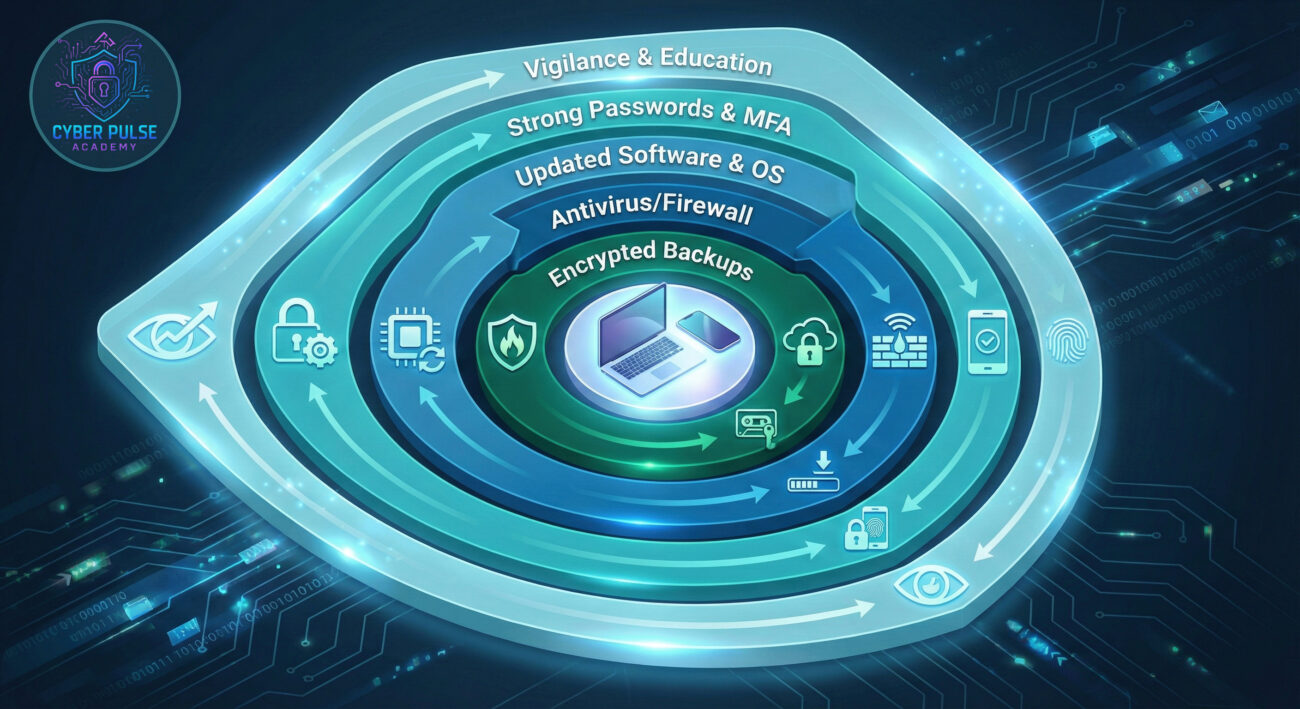
Protecting yourself from backdoors doesn't require a computer science degree. It requires consistent, smart habits. Follow this actionable plan.
Assume every download link and email attachment is guilty until proven innocent.
Weak or reused passwords are a common backdoor installation path.
Unpatched software is a welcome mat for exploits that install backdoors.
Public Wi-Fi and even home networks can be hostile territory.
You can't protect what you can't see. Basic monitoring goes a long way.
If a backdoor leads to ransomware or destruction, your backups are your salvation.
Cybersecurity is not a one-time setup; it's an ongoing practice.
To defend effectively, you must understand the attacker's goal and method.
One Simple Attack Path: An attacker doesn't need to be a genius. They might search for a company's employees on LinkedIn, find someone in finance, and guess their corporate email ([email protected]). They then send a phishing email disguised as an IT alert about "mandatory VPN client updates," with a link to a fake login page that looks identical to the real one. If the employee enters their credentials, the attacker now has a valid login. If that employee hasn't enabled MFA, the attacker is in. From there, they explore the network, looking for a server with outdated software to exploit and plant a persistent backdoor.
One Defender's Counter-Move: The defender's mindset is "trust but verify." Before clicking any link in an email, the defender independently navigates to the official company IT portal by typing the known URL or using a bookmarked link, not the link in the email. They check the official portal for the same announcement. This simple act of verification completely neutralizes the phishing attempt. This is the essence of defense: breaking the attacker's chain at its weakest, earliest link.
A backdoor is the ultimate prize. It represents persistence, stealth, and control. The Red Team's goal is to find or create that hidden access by any means: exploiting a vulnerability, tricking a user with phishing, or leveraging a stolen password. Once inside, their first objective is often to install a backdoor to ensure they can get back in even if the initial entry point is discovered and closed. They value backdoors that are hard to detect, communicate subtly, and survive reboots. For them, it's about maintaining a foothold in the target environment indefinitely.
A backdoor is the ultimate failure of perimeter security and a critical threat to eradicate. The Blue Team's mission is to prevent its installation and rapidly detect its presence. They focus on strong authentication, patch management, user training, and network segmentation to block installation paths. They deploy tools to monitor for unusual network connections, unexpected processes, and changes to system files, the telltale signs of a backdoor. For them, it's about maintaining integrity, ensuring that every access point is known, authorized, and monitored.
Understanding the backdoor threat transforms you from a passive user into an active defender. Remember these key takeaways:
You don't need to be a cybersecurity expert to be secure. You just need to start applying the consistent, smart habits outlined in this guide. Begin today by enabling MFA on your primary email account and checking for pending software updates. Your digital house will be significantly more secure for it.
Did this guide help demystify backdoors? What's your biggest cybersecurity concern as a beginner?
Share your thoughts, questions, or your own security tips in the comments below!
Ready for the next step? Explore our beginner's guide to Firewalls or learn about Spotting Phishing Emails.
© 2026 Cyber Pulse Academy. This content is provided for educational purposes only.
Always consult with security professionals for organization-specific guidance.
Every contribution moves us closer to our goal: making world-class cybersecurity education accessible to ALL.
Choose the amount of donation by yourself.