


















































Certification Courses
Hands-On Labs
Threat Intelligence
Latest Cyber News
MITRE ATT&CK Breakdown
All Cyber Keywords
Imagine a spy planted inside a secure facility, not stealing anything immediately, but just checking in with their handler every day at exactly 5:03 PM. To the untrained eye, it's just another person making a routine call. But to a security expert, that predictable, hidden pattern is a glaring red flag. This is exactly what beaconing is in the digital world.
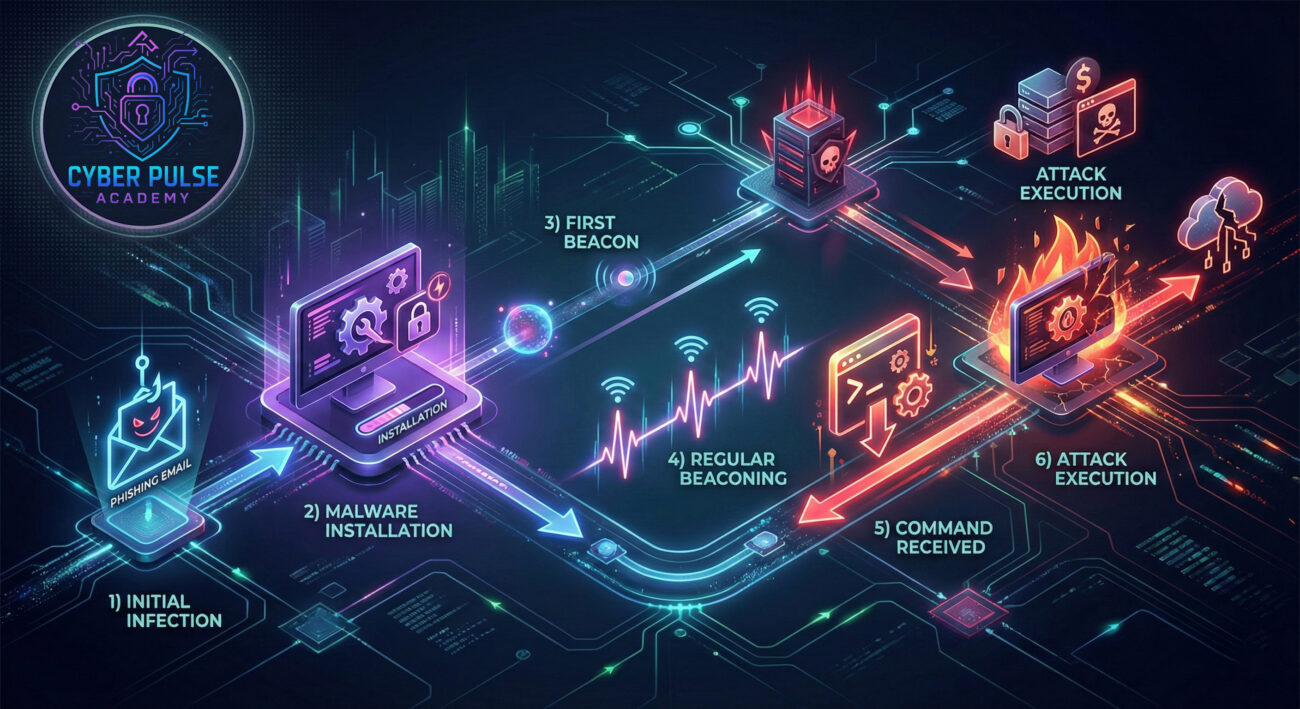
Beaconing is the secret, automated "check-in" communication between a hacker's malware on your device and their remote command server. It's how a breached system says, "I'm here, what should I do next?" without raising alarms.
In this guide, you'll learn: what beaconing is in plain English, why it's the lifeblood of modern cyber attacks, how to spot its digital footprints, and the 7 actionable steps you can take to protect yourself and your organization from this hidden threat.
Has your computer or network ever felt slow for no reason, even with a strong internet connection? Before you blame your internet provider, consider this: it might be secretly sending signals to a hacker right under your nose. This is the world of beaconing.
At its core, beaconing is the heartbeat of a malware infection. Think of it like a digital sleeper agent. Once a piece of malware slips past your defenses (often through a phishing email or a malicious download), it doesn't always cause chaos immediately. Instead, it goes quiet and starts sending small, regular messages, "beacons", back to its controller to receive further instructions or to exfiltrate stolen data.
These signals are designed to be stealthy, blending in with normal web traffic. By the end of this guide, you'll understand this hidden language of cyber threats and, more importantly, know how to silence it for good.
Beaconing matters because it represents the "patient zero" of a major security breach. It's not the flashy ransomware lock screen; it's the quiet infection that happened weeks or months before. According to a 2023 IBM Security report, the average time to identify a breach is 204 days. Beaconing is a primary reason why, it allows attackers to maintain a long-term, undetected presence.
For a beginner, this connects directly to your daily life. That seemingly harmless "Adobe Flash Update" pop-up you clicked, or the free game you downloaded from an unofficial site, could have planted a beaconing malware. Once active, it could be stealing your passwords, logging your keystrokes, or waiting to lock your files for ransom. Understanding beaconing is your first line of defense in recognizing that not all threats are loud; the most dangerous ones whisper.
Furthermore, with the rise of remote work, our personal devices and home networks have become extensions of corporate attack surfaces. A single compromised laptop using beaconing can be the gateway a hacker uses to pivot into an entire company's database.
| Term | Simple Definition | Everyday Analogy |
|---|---|---|
| Beacon (Signal) | A small, often encrypted packet of data sent from infected malware to the attacker's server. | A spy sending a coded postcard saying "I'm alive and in position." |
| Command & Control (C2) | The hacker's remote server that receives beacons and sends back commands. | The villain's secret lair that receives the spy's postcards and mails back mission instructions. |
| Dwell Time | The amount of time an attacker remains undetected in a network. | How long a burglar can hide in your house before you notice things are missing. |
| Lateral Movement | When malware moves from the initially infected device to other devices on the same network. | The burglar, once inside your house, finding the keys to your car and your office. |
| Network Traffic Analysis | The process of monitoring network data to identify unusual patterns, like beaconing. | A security guard reviewing all building entry/exit logs to find someone who leaves at exactly 3:07 AM every night. |
Meet Sarah, a project manager at a small marketing firm. One Tuesday, she used the free Wi-Fi at her favorite coffee shop to quickly check her work email on her laptop. A pop-up appeared, urging her to update a "critical PDF viewer plugin" to read an attachment. She clicked "Update."
Unknown to Sarah, this was a malicious download. The next day, back at the office, her laptop seemed fine. But in the background, a stealthy malware called a "backdoor" was now installed. It began its silent work.
| Time/Stage | What Happened | Impact |
|---|---|---|
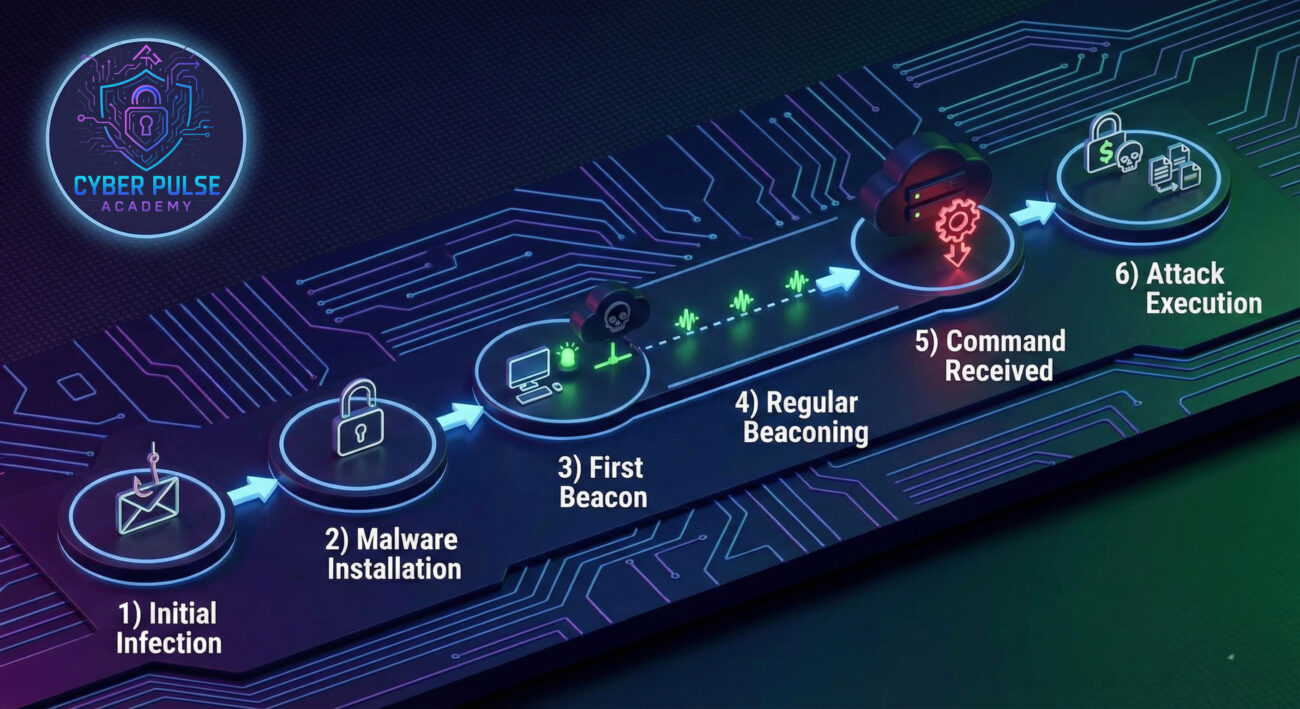
| Day 1: Infection | Sarah's laptop gets infected at the coffee shop. | The attack surface is created. A digital backdoor is installed. |
| Day 2-30: Beaconing | Every 5 minutes, the malware sends a tiny, encrypted signal to a hacker-controlled server in another country, waiting for commands. | The hacker establishes persistence. Network vulnerability is exploited silently. |
| Day 31: Attack Order | The C2 server finally sends a command: "Start keylogging and find financial files." | The malware activates its primary attack function. |
| Day 45: Discovery | The company's IT admin notices unusual, regular outbound traffic from Sarah's laptop to an unknown IP address during a routine check. | The beaconing pattern is detected! The secure monitoring process works. |
| Day 46: Containment | IT isolates Sarah's laptop, removes the malware, and forces a company-wide password reset with MFA enabled. | The protected environment is restored. A major data breach is narrowly avoided. |
You don't need to be a seasoned IT professional to significantly reduce the risk of beaconing. Follow these 7 steps to build your digital immunity.
Prevent the malware that does the beaconing from getting in.
Outdated software has known holes that malware uses to sneak in.
Use tools designed to spot malicious behavior, including beaconing.
Learn what normal looks like so you can spot the abnormal.
Limit the damage if one device gets infected.
The human element is the most common weakness exploited.
Know what to do if you suspect an infection, so you can stop beaconing quickly.
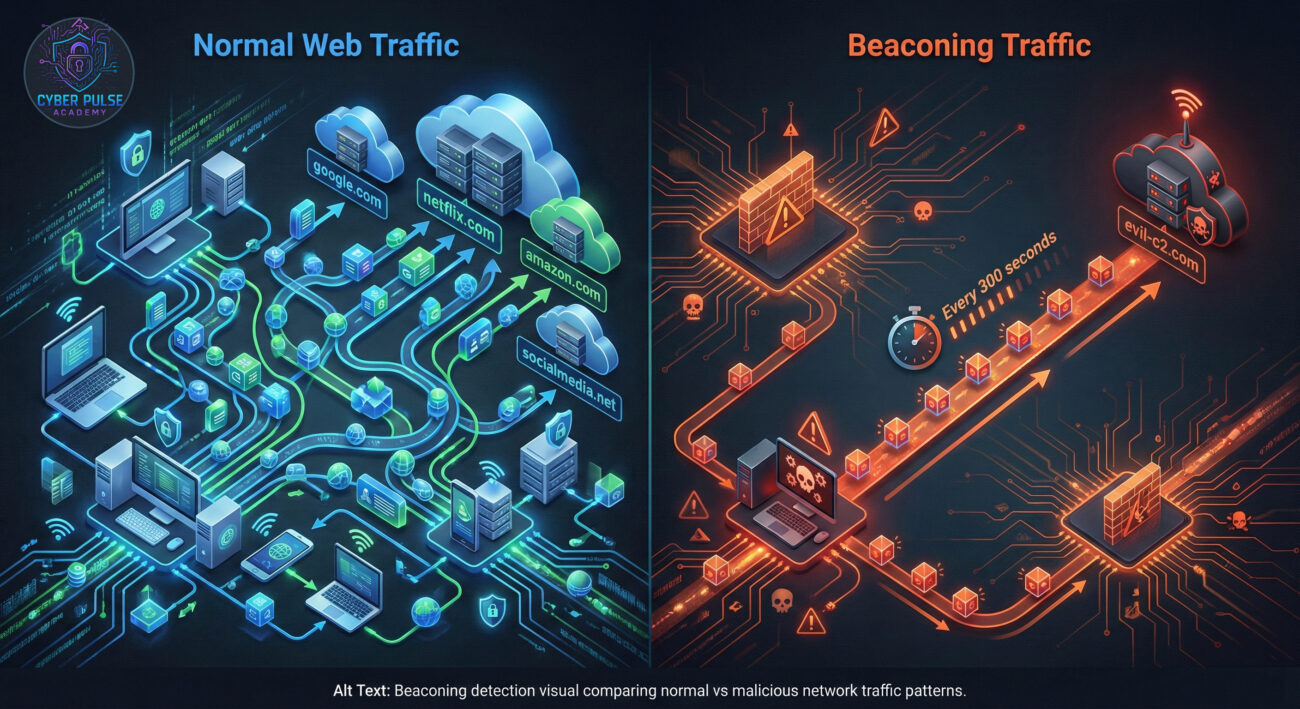
An attacker's goal is to maintain access. They don't want their malware beaconing to be found. A simple path is to use common ports like HTTPS (port 443) for their beaconing traffic. Why? Because encrypted web traffic to common ports looks normal and is rarely blocked. They'll also try to make the beaconing interval random (e.g., between 4 and 10 minutes) instead of perfectly timed, to evade simple detection tools that look for clockwork patterns.
A defender knows attackers hide in noise. So, instead of just looking for perfect timing, they use behavioral analysis. They ask: "Does this device usually talk to this obscure server in a foreign country at 2 AM?" They establish a baseline of "normal" for each device, what sites it visits, when it's active, how much data it sends. Any significant deviation from this baseline, even if the traffic is encrypted and on a common port, triggers an alert for deeper investigation. The mindset shift is from "Is this packet bad?" to "Is this behavior normal for this user/device?"
"Beaconing is my lifeline. It's my remote control connection to the compromised asset. My primary concerns are stealth and reliability. I need the beacon to get through firewalls (so I'll mimic normal web traffic) and I need it to be persistent enough that if one call fails, it will try again later. My success is measured in long dwell time. The longer my beacon goes unnoticed, the more data I can steal, the more systems I can move to, and the more damage I can ultimately cause."
"Beaconing is a critical indicator of compromise (IoC). It's a sign that a breach has already occurred. My job is to detect it as fast as possible and contain it. I care about network visibility, log analysis, and establishing behavioral baselines. I use tools to look for patterns, consistent calls to unknown domains, data exfiltration at odd hours, or systems communicating with IP addresses on threat intelligence blocklists. My goal is to shrink the attacker's dwell time from months to minutes."
Understanding beaconing moves you from a passive user to an active defender of your digital space. It's not about fearing every data packet but about developing a keen awareness of what's normal and what's not.
Cybersecurity is a continuous journey, not a one-time setup. By mastering concepts like beaconing, you build a stronger, more resilient digital life.
Did you find this guide helpful? Do you have questions about a specific network behavior you've noticed? Share your thoughts or questions in the comments below! Let's build a more secure community together. If you want to dive deeper, explore our guides on Network Monitoring for Beginners and Building a Simple Incident Response Plan.
© 2026 Cyber Pulse Academy. This content is provided for educational purposes only.
Always consult with security professionals for organization-specific guidance.
Every contribution moves us closer to our goal: making world-class cybersecurity education accessible to ALL.
Choose the amount of donation by yourself.