


















































Certification Courses
Hands-On Labs
Threat Intelligence
Latest Cyber News
MITRE ATT&CK Breakdown
All Cyber Keywords
Have you ever unlocked your phone with your face or used your fingerprint to log into your bank app? That’s biometric authentication in action. In a world where remembering dozens of complex passwords feels like a full-time job, your unique biological traits offer a key that can’t be forgotten. Biometric authentication is the process of using your physical or behavioral characteristics, like your face, fingerprint, or voice, to verify your identity and grant you access to devices, apps, or buildings.
Think of it as the world’s most personal key. A password is something you know (and can forget or have stolen). A biometric trait is something you are. This guide will transform you from a curious beginner to someone who confidently understands how this technology works, where it’s used, and most importantly, how to use it safely.
In this guide, you'll learn:
What if the key to your most important accounts wasn't a jumble of letters and numbers, but your own smile, the swirl of your fingertip, or the sound of your voice? This is the promise of biometric authentication, a technology that turns your unique biological traits into a seamless digital key.
For beginners, it can sound like science fiction, but it's already part of daily life. It solves a huge modern problem: password fatigue. You no longer have to remember if you used an exclamation mark or a number '1' in your password. Instead, a quick glance at your phone or a touch of a sensor does the trick. It's not just about convenience; when implemented correctly, it can be a strong layer of protection. In this post, we'll break down this fascinating technology into bite-sized, easy-to-understand pieces, so you can use it with confidence and security.
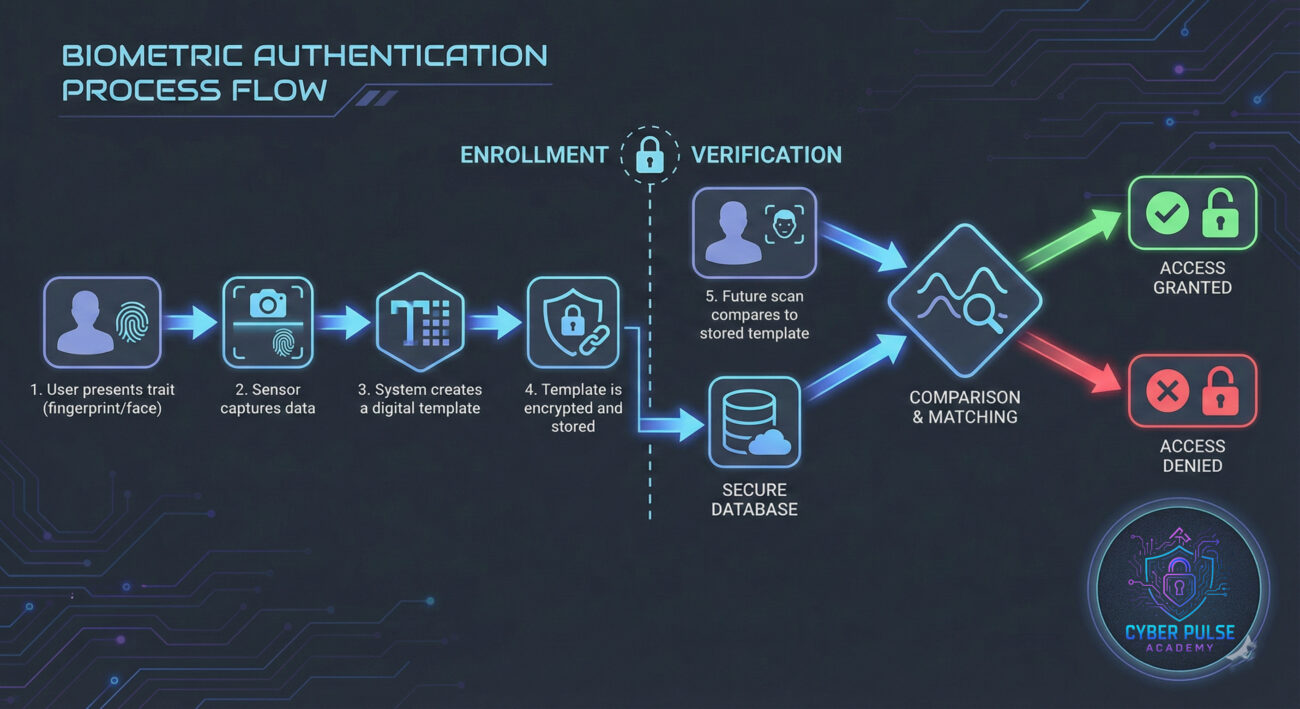
The shift to biometric authentication is not just a trend; it's a response to a failing system. Passwords are notoriously weak. People reuse them, choose simple ones, and fall victim to phishing attacks. According to a Verizon Data Breach Report, over 80% of breaches involve stolen or weak credentials. Biometrics offer a compelling alternative because they are intrinsically tied to the individual.
From unlocking your smartphone to boarding an international flight with your face, biometric authentication is becoming the default for both convenience and heightened security. Organizations like the National Institute of Standards and Technology (NIST) now recognize certain biometrics as a valid factor in multi-factor authentication. This matters to you because it means the apps and services you use daily are increasingly relying on this tech to protect your data.
Imagine paying at a store with just your fingerprint or accessing your medical records with an iris scan. This technology bridges the physical and digital worlds, making interactions faster and, when done right, more secure.
Let's demystify the jargon. Here are the essential terms you need to know about biometric authentication.
| Term | Simple Definition | Everyday Analogy |
|---|---|---|
| Biometric Template | A secure, mathematical representation of your biometric data (not the actual image). | Like a unique recipe for your fingerprint, but not the fingerprint itself. The system stores the recipe, not the ingredient. |
| Liveness Detection | A technology that checks if the biometric source is from a live person, not a photo or mask. | A bouncer checking for a pulse or asking you to blink to make sure you're not a mannequin. |
| False Acceptance Rate (FAR) | The chance a system incorrectly grants access to an unauthorized person. A high FAR is a major vulnerability. | The hotel key card accidentally opening the wrong room door. |
| False Rejection Rate (FRR) | The chance a system incorrectly denies access to the authorized person. A high FRR is frustrating. | Your own front-door lock refusing your key, even though it's the right one. |
| Multi-Factor Authentication (MFA) | Using two or more different factors (like a fingerprint + a PIN) to verify identity. Biometrics is often one factor. | Needing both your ID card and a secret handshake to enter a club. |
Meet Alex, a freelance graphic designer. Alex used the same password for her email, cloud storage, and social media, a major risk. One day, a phishing attack tricked her into giving up that password. The attacker accessed her email and tried to reset passwords for her financial accounts. However, Alex's bank used biometric authentication. To add a new payee or make a large transfer, the app required a fingerprint scan in addition to her password.
The attacker, thousands of miles away, had the password but could not replicate Alex's fingerprint. The attack was stopped in its tracks. Alex received an alert for the suspicious login attempt, changed all her passwords, and enabled biometrics everywhere she could. Here’s how the event unfolded:
| Time / Stage | What Happened | Impact |
|---|---|---|
| Day 1: The Trap | Alex clicks a fake "security alert" email and enters her main password on a hacker-controlled site. | Credentials are breached. The attacker now has the key to her email. |
| Day 1: Initial Access | Attacker logs into Alex's email, looks for financial info, and finds her bank. | Privacy is violated. The attacker can see sensitive communications. |
| Day 1: The Barrier | Attacker tries to log into Alex's bank. They get past the password but are blocked by the fingerprint requirement. | Biometric authentication acts as a critical barrier, preventing account takeover. |
| Day 1: Defense Alert | Alex gets a push notification: "New login attempt from unrecognized device." She immediately initiates a secure password reset. | Alex regains control, enables MFA everywhere, and avoids financial loss. |
This story shows that while passwords can fail, a layered defense that includes biometric authentication can save the day.
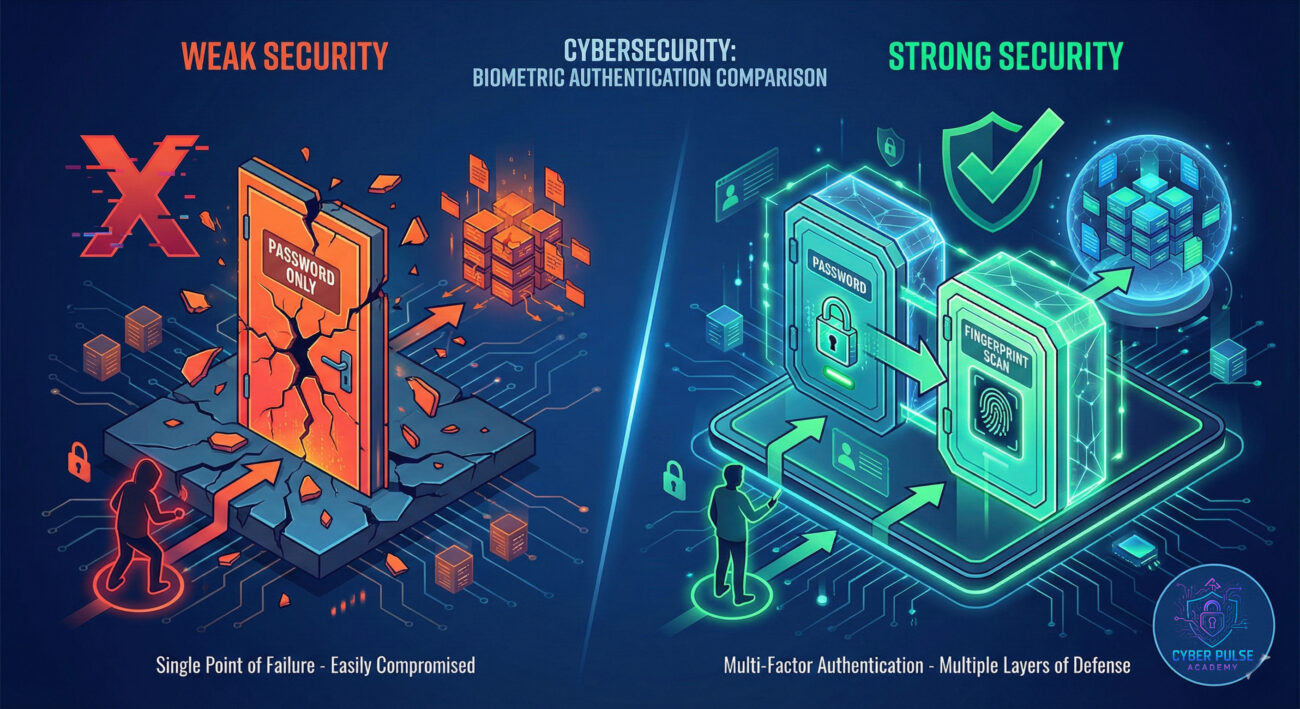
Ready to use your biology as a key? Follow this simple 7-step guide to implement biometric authentication securely.
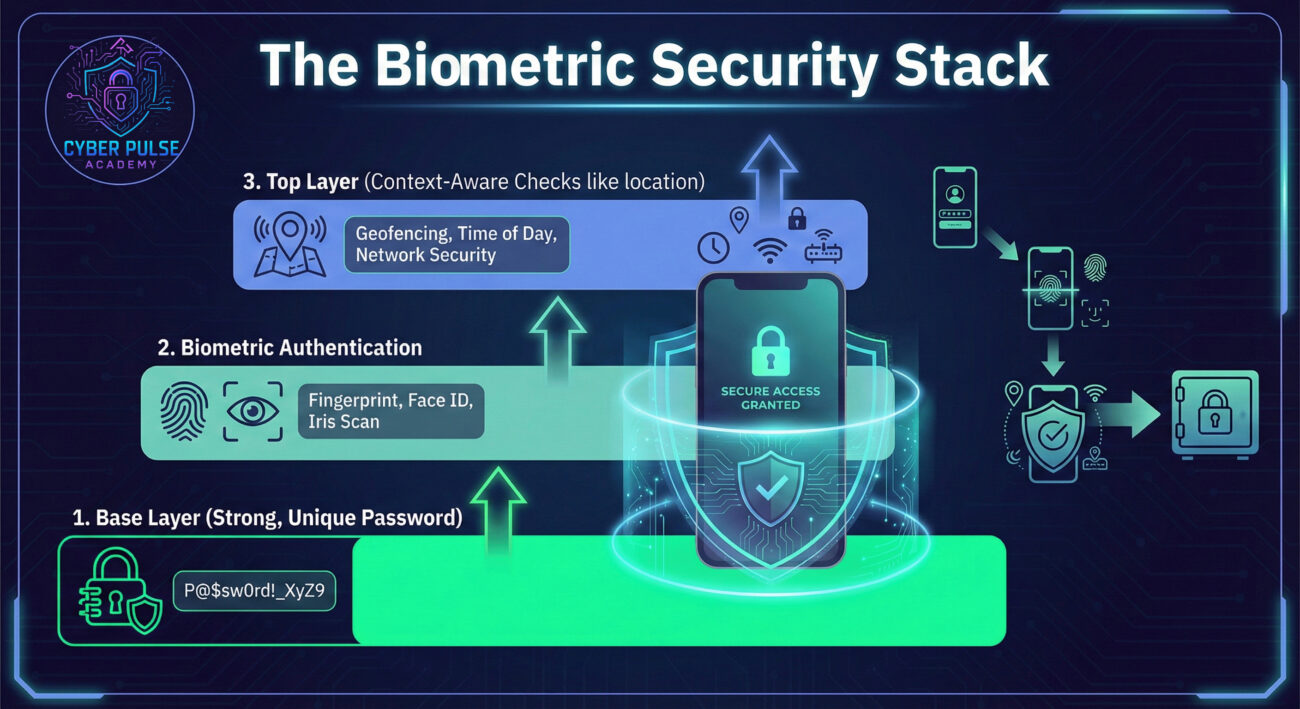
A threat hunter thinks like an attacker to find weaknesses. For biometric authentication, one simple attack path is spoofing. An attacker finds a high-resolution photo of you from social media. They print it out or display it on another screen. If your device's facial recognition lacks proper liveness detection, it might be tricked into unlocking with the photo. This is why "require attention" (which checks if your eyes are looking at the sensor) is so crucial.
The defender's counter-move is all about layering and behavioral context. A defender ensures liveness detection is mandatory. But they also look for anomalies: Is this login attempt coming from a new country two minutes after a successful login from your home? Even with a valid fingerprint, that's suspicious. The defender's mindset is "trust, but verify continuously," adding invisible layers of analysis beyond the initial scan.
The red team sees biometric authentication as a challenging but potentially exploitable lock. They care about finding the weakest implementation. Is the sensor cheap and easy to fool with a gelatin fingerprint mold? Is the template stored locally on the device in a way they can extract? Is there no fallback rate limit, allowing them to try endless spoofs? Their goal is to bypass the "something you are" factor by replicating it, finding flaws in the software, or forcing the system to fall back to a weaker method they can crack.
The blue team sees biometrics as a valuable component in a verified and protected identity ecosystem. They care about the integrity of the entire process: secure enrollment, encrypted template storage, robust liveness detection, and seamless integration with other security signals (like device health and location). Their goal is to implement biometrics in a privacy-preserving way that enhances user experience without creating a single point of failure. For them, a biometric failure should gracefully and securely revert to another strong authentication method.
Biometric authentication is a transformative technology that makes our digital lives more convenient and can add a powerful layer of security. It turns your unique physical traits into a key that's hard to steal or forget. Let's recap the most important lessons:
By understanding how it works, you can move from simply using it to using it wisely, making you a more secure and savvy digital citizen.
Have a question about setting up Face ID or fingerprint scanning on a specific app? Are you curious about the privacy implications of biometrics? Share your thoughts and questions in the comments below! Let's build a community of security-aware beginners together.
Every contribution moves us closer to our goal: making world-class cybersecurity education accessible to ALL.
Choose the amount of donation by yourself.