


















































Certification Courses
Hands-On Labs
Threat Intelligence
Latest Cyber News
MITRE ATT&CK Breakdown
All Cyber Keywords
Have you ever wondered how companies protect thousands of employee accounts from hackers? Or how your bank knows it's really you when you log in? The answer lies in a powerful cybersecurity system called Identity and Access Management (IAM). If you've ever used a fingerprint to unlock your phone or entered a code sent to your email, you've already interacted with IAM systems.
Identity and Access Management (IAM) is the framework of policies and technologies that ensures the right individuals have appropriate access to technology resources. Think of it as a digital bouncer who checks IDs, verifies invitations, and decides who gets into which areas of the digital nightclub. Without proper IAM, your sensitive data becomes vulnerable to hackers, data breaches, and unauthorized access.
In this beginner-friendly guide, you'll learn:
Imagine your entire digital life, bank accounts, social media, work emails, medical records, protected by a single password. If that password gets stolen, everything collapses. This is why Identity and Access Management (IAM) has become essential. According to recent reports from CISA, identity-related attacks account for over 80% of data breaches. Proper IAM could prevent most of these incidents.
When cybercriminals target organizations, they often start by stealing employee credentials through phishing attacks. Without proper IAM controls, one stolen password can give attackers access to sensitive customer data, financial systems, and proprietary information. Companies that implement strong IAM practices reduce their risk of data breaches by up to 99%, according to security researchers.
For individuals, understanding Identity and Access Management (IAM) principles helps you protect your personal accounts. Every time you enable two-factor authentication, use a password manager, or review app permissions on your phone, you're practicing good IAM hygiene. These simple actions create multiple layers of protection against identity theft and account takeover.
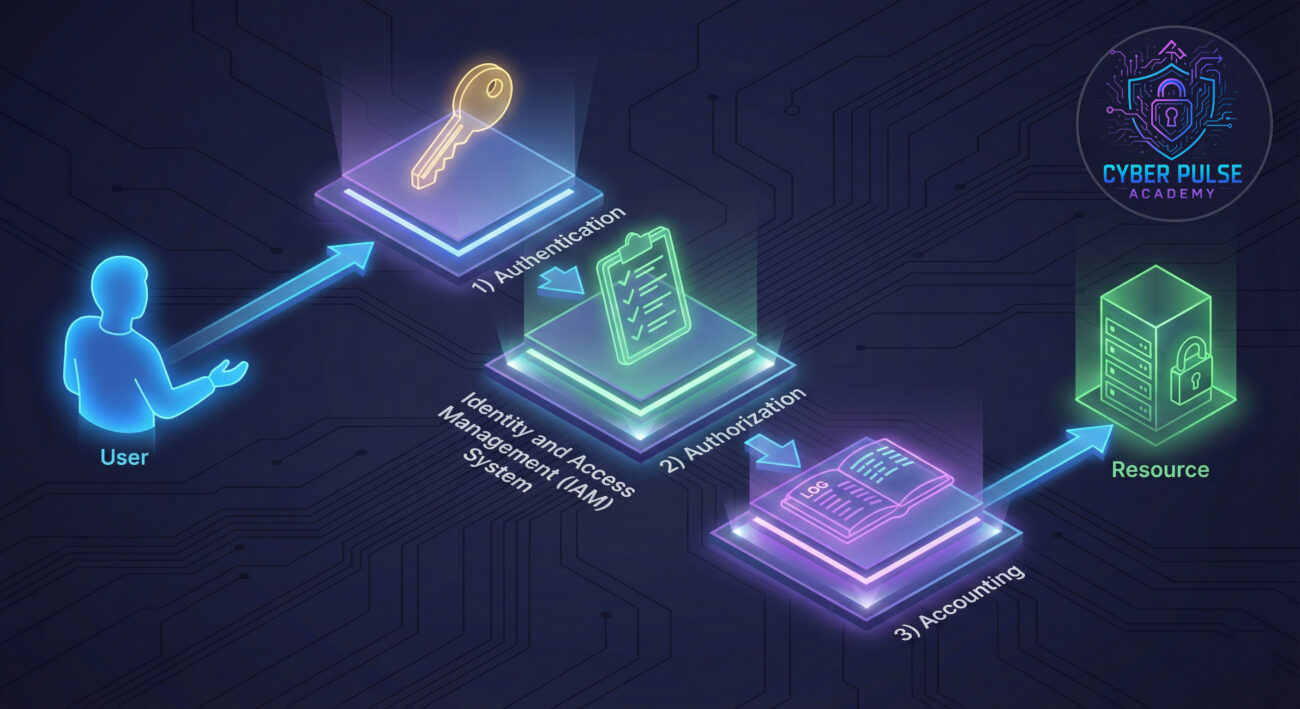
Before we dive deeper, let's clarify some essential terms. Don't worry, we'll use everyday analogies to make everything crystal clear.
| Term | Simple Definition | Everyday Analogy |
|---|---|---|
| Authentication | Proving you are who you claim to be | Showing your ID at the airport security checkpoint |
| Authorization | Determining what you're allowed to access | Having a key that opens your office but not the CEO's office |
| Multi-Factor Authentication (MFA) | Using two or more proofs of identity | Needing both a bank card AND a PIN to withdraw money |
| Privilege Escalation | Gaining unauthorized higher-level access | A hotel guest finding a master key that opens all rooms |
| Least Privilege Principle | Giving only the minimum access needed | A restaurant employee can access the kitchen but not the safe |
Sarah runs a growing online boutique with three employees. For years, everyone shared one password for their inventory system, accounting software, and email. One day, her part-time employee Mark clicked on a phishing email pretending to be from their shipping provider. The hackers captured their shared password and accessed everything.
The attackers changed prices on their website, sent fraudulent invoices to customers, and downloaded their entire customer database. Sarah didn't discover the breach for three days. The damage: $15,000 in lost revenue, 200 unhappy customers, and a damaged reputation.
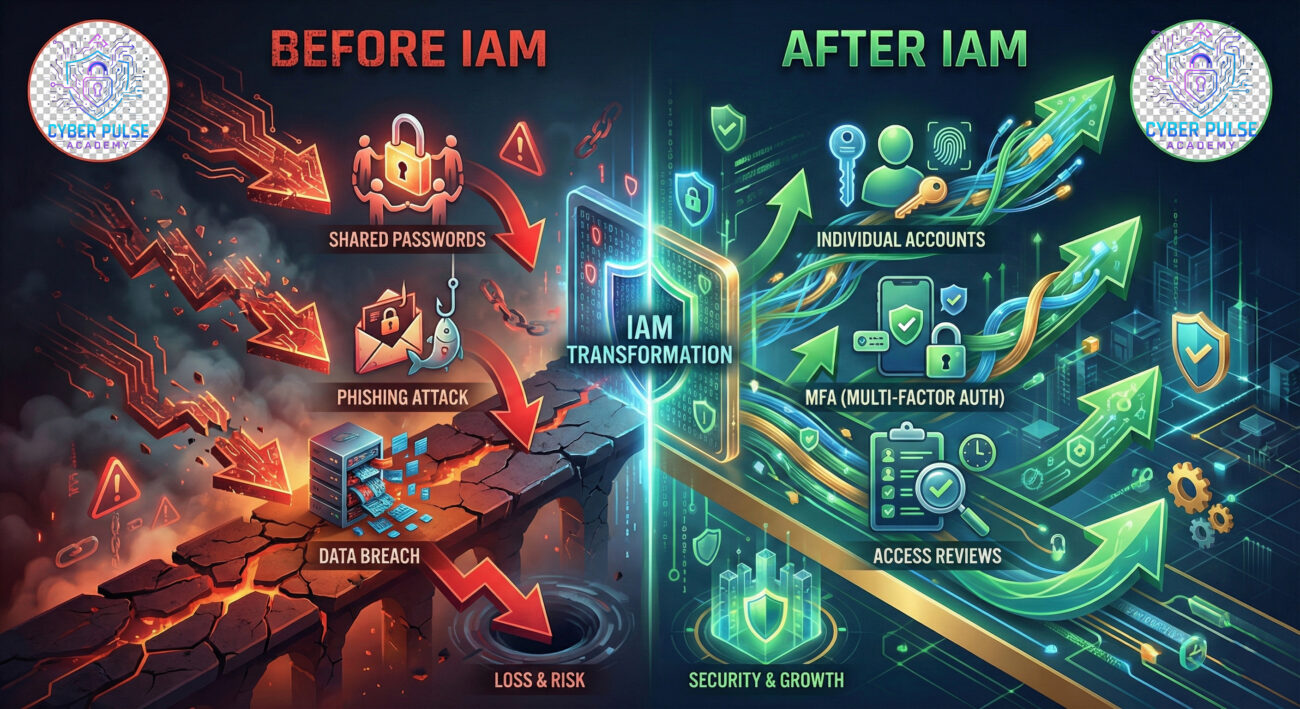
After consulting with a cybersecurity expert, Sarah implemented basic Identity and Access Management (IAM) practices:
| Time/Stage | What Happened | Impact |
|---|---|---|
| Week 1 | Created individual accounts for each employee | No more shared passwords; activity tracking possible |
| Week 2 | Enabled Multi-Factor Authentication on all systems | Even stolen passwords became useless without second factor |
| Week 3 | Implemented role-based access (inventory staff only see inventory) | Limited potential damage from any single compromised account |
| Month 2 | Set up quarterly access reviews | Removed access for former contractor automatically |
| Month 3 | Employee clicked another phishing link | MFA blocked the attack; zero damage occurred |
Six months later, Sarah's business is more secure than ever. Her employees appreciate the clear access rules, and customers trust her with their data. The initial time investment in Identity and Access Management (IAM) saved her business from potential collapse.
List all systems, applications, and data that need protection. For individuals, this includes email, banking, social media, and cloud storage. For businesses, include customer databases, financial systems, and employee records.
Turn on MFA wherever possible. This adds a second layer of protection beyond just passwords.
Give people only the access they absolutely need to perform their tasks. Regular employees don't need admin rights; family members don't need full access to all accounts.
Each account should have a different, complex password. Never reuse passwords across multiple services.
Set aside time each quarter to review who has access to what. Remove access for people who no longer need it.

Understanding how attackers think helps you defend better. Here's a simple attack path and corresponding defense:
Attack Path: An attacker starts by researching employees on LinkedIn, then sends tailored phishing emails pretending to be IT support. When one employee enters their credentials, the attacker now has initial access. They look for shared drives, check for saved passwords in browsers, and search for documents containing "password" or "admin." Within hours, they've found credentials for a higher-privilege account.
Defender's Counter-Move: Implement MFA so stolen passwords alone are useless. Use email filtering to catch phishing attempts. Regularly audit privileged accounts and monitor for unusual access patterns. Educate employees about phishing through simulated exercises. Segment networks so initial access doesn't grant wide-ranging control.
Attackers love weak IAM. They look for shared passwords, absent MFA, and excessive permissions. Their goal is to steal valid credentials, escalate privileges, and move laterally through systems. They know most people reuse passwords, so compromising one account often gives access to many. They monitor for new employee accounts (often with default passwords) and look for service accounts with excessive rights that are rarely monitored.
Defenders focus on verification, limitation, and monitoring. We assume breaches will happen, so we design systems where stolen credentials have limited value. We implement layers of verification, grant minimal necessary access, and watch for anomalies. We care about reducing the attack surface, containing potential damage, and maintaining clear audit trails. Regular access reviews and employee training are our proactive shields.
Let's recap what you've learned about Identity and Access Management (IAM):
Identity and Access Management (IAM) isn't just for large corporations, it's essential for everyone who uses digital services. Whether you're protecting personal email or business data, applying these principles dramatically reduces your risk. Start today by enabling MFA on your most important accounts and reviewing who has access to your sensitive information.
The digital world will only become more connected. Taking control of your digital identity through proper Identity and Access Management (IAM) practices is one of the most impactful security steps you can take right now.
Ready to take action? Start with these three tasks today:
Have questions about implementing IAM in your specific situation? Share your thoughts in the comments below! What's been your biggest challenge with managing digital identities? Our cybersecurity community would love to help you find solutions.
Stay secure, stay verified, and remember: Your digital identity is worth protecting.
External Resources: NIST IAM Guidelines | CSO Online IAM Overview | CISA Security Tips
Every contribution moves us closer to our goal: making world-class cybersecurity education accessible to ALL.
Choose the amount of donation by yourself.