


















































Certification Courses
Hands-On Labs
Threat Intelligence
Latest Cyber News
MITRE ATT&CK Breakdown
All Cyber Keywords
Have you ever wondered why your computer sometimes runs painfully slow for no reason? Or how a single hacker can take down massive websites like Twitter or Netflix? The answer often lies in the shadowy world of a botnet operator. This isn't just tech jargon, it's a real threat that could be affecting your devices right now.
In simple terms, a botnet operator is a cybercriminal who controls an army of hijacked computers and devices (called a "botnet") to launch large-scale attacks. Think of them as a puppet master, secretly pulling strings on thousands of devices without their owners' knowledge.
In this beginner-friendly guide, you'll learn exactly how botnet operators work, why they're so dangerous to everyday internet users like you, and, most importantly, how to ensure your devices never become part of their zombie army.
In our connected world, a botnet operator isn't just a niche threat, they're a multi-billion dollar criminal enterprise. According to a CISA report, botnets are responsible for over 30% of all cyber attacks globally. These attacks aren't just about stealing data; they can shut down hospitals, disrupt elections, and hold entire cities' infrastructure for ransom.
The danger has grown with the Internet of Things (IoT). Your smart fridge, security camera, or even baby monitor could be silently recruited into a botnet. A single vulnerability in one device can lead to millions being compromised. Recent news from CSO Online shows that modern botnets can consist of over 10 million devices, generating enough traffic to paralyze national internet infrastructure.
For you, this means slower internet, higher electricity bills (from devices working overtime), increased risk of identity theft, and potentially becoming an unwitting accomplice to crimes. Understanding the botnet operator's methods is your first line of defense in today's digital landscape.
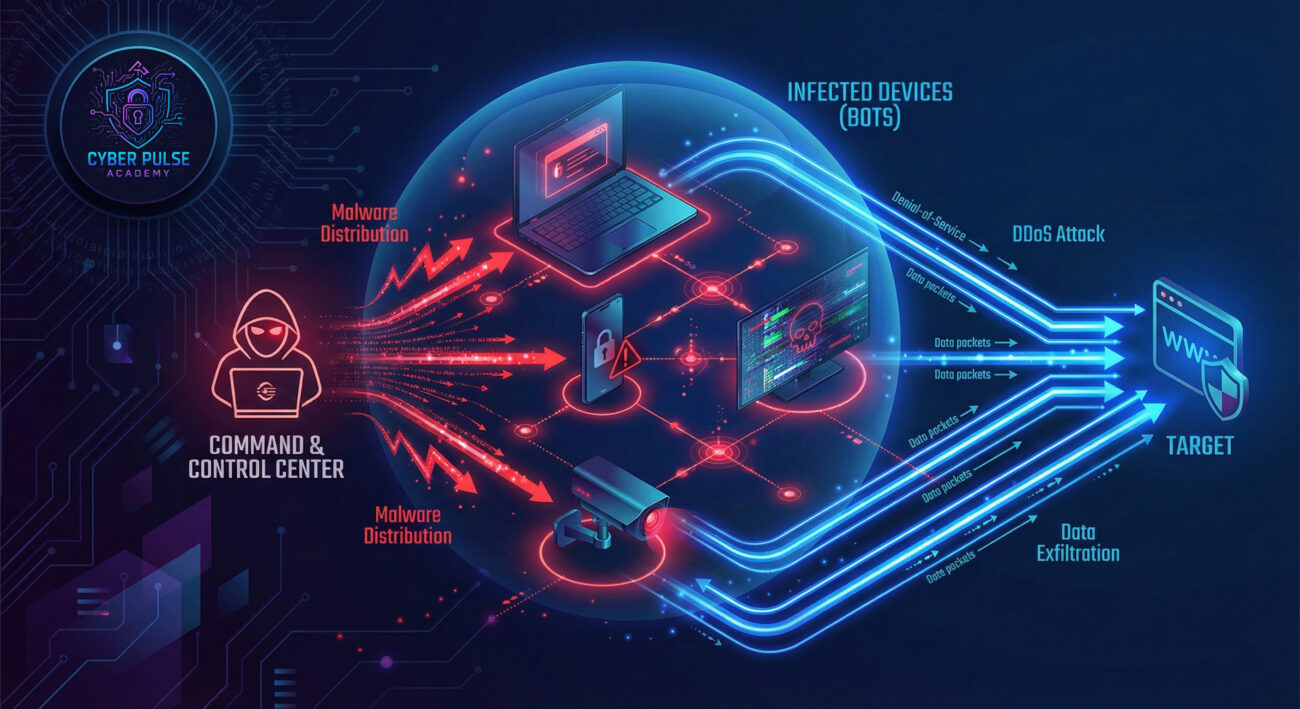
Don't worry about the technical jargon. Here are the essential terms broken down into simple language and everyday analogies:
| Term | Simple Definition | Everyday Analogy |
|---|---|---|
| Botnet Operator | The criminal who controls the network of infected devices. | Like a general commanding an army of remote-controlled robots. |
| Botnet | A network of compromised devices ("bots" or "zombies") under one control. | A fleet of driverless cars all following one hacker's GPS commands. |
| Command & Control (C&C) | The secret server that sends instructions to the infected devices. | A hidden radio tower broadcasting orders to sleeper agents. |
| DDoS Attack | Flooding a target with traffic from the botnet to crash it. | Hiring 10,000 people to crowd a store entrance so real customers can't enter. |
| Infection Vector | The method used to infect a device (email, website, etc.). | The disguised door a burglar uses to sneak into your house. |
Let's follow Sarah, who runs a popular local coffee shop with free customer Wi-Fi. Sarah's story shows how a botnet operator can impact a small business.
Sarah noticed her Wi-Fi was unbearably slow. Customers complained. Then, her payment system crashed during the morning rush. Unknown to her, a botnet operator had infected an old security camera Sarah had plugged into her network years ago. The camera had a default password (weak password) that was never changed. This single vulnerability became the entry point.
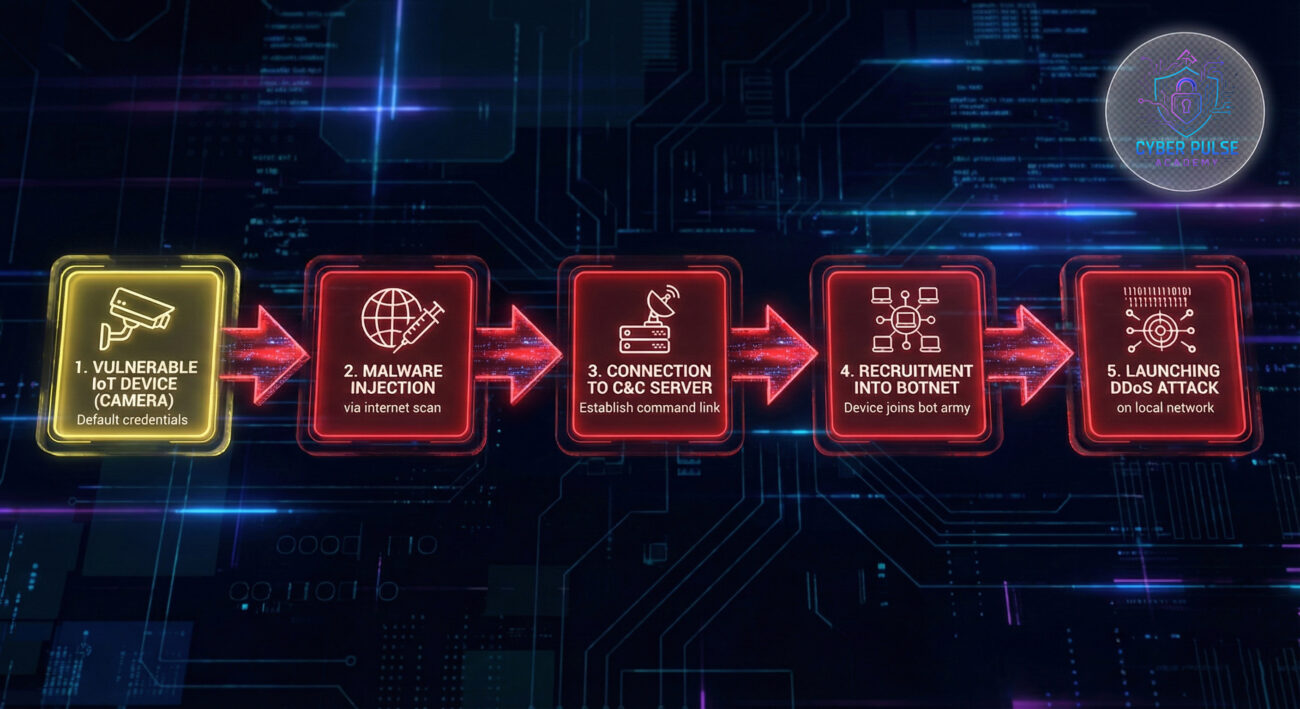
The botnet operator used Sarah's camera as a foothold to spread malware to the payment tablet and even customers' phones connected to the Wi-Fi. The operator then rented out this "botnet" to another criminal who launched a DDoS attack on a gaming website. Sarah's network was the unwitting traffic source.
| Time/Stage | What Happened | Impact on Sarah |
|---|---|---|
| Week 1 | Botnet operator scans internet for devices with default passwords. | No visible impact yet. The breach is silent. |
| Week 2 | Malware installed on the security camera. It connects to Command & Control server. | Camera occasionally glitches. Internet speed drops slightly. |
| Week 3 | Botnet operator uses camera to spread to other devices on the network. | Payment tablet runs slow. Personal laptop shows odd behavior. |
| Week 4 | DDoS attack launched through Sarah's network infrastructure. | Wi-Fi crashes completely. Payment system down. Business halts. |
| Aftermath | ISP detects malicious traffic and suspends Sarah's service. | Days of downtime, lost revenue, and costly repairs to network. |
Protecting yourself from a botnet operator doesn't require a degree in cybersecurity. It's about consistent, smart habits.
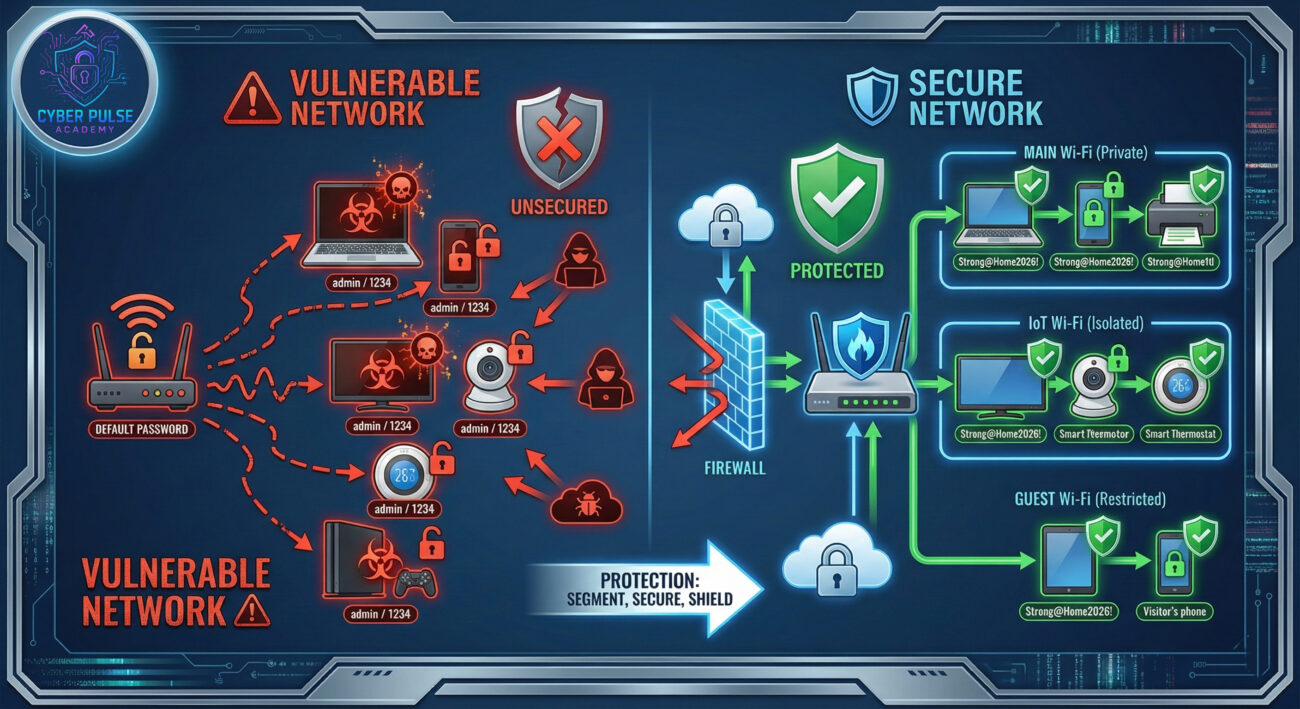
Let's look at one simple way a botnet operator thinks, and how a defender counters, without getting technical.
The Attack Path (Operator's View): "I need more bots. I won't target sophisticated companies; I'll target everyday people. I'll write a simple program that scans the entire internet for old home routers that still use the default admin password like 'admin/admin'. When it finds one, it automatically installs a small malware payload. Now I have a steady stream of new, poorly secured devices to add to my botnet for DDoS rentals."
The Defender's Counter-Move (Your View): The defender knows this is a numbers game. They can't stop all scans, but they can make their device a "hard target." By simply changing the router's default password and disabling remote management, their device no longer matches the operator's easy criteria. The automated script moves on to the next target. This is why basic hygiene blocks the vast majority of automated attacks.
To a botnet operator, your devices are resources, not personal property. They care about quantity, stealth, and persistence. Their goal is to maintain control over as many devices as possible, for as long as possible, without alerting the owner. They see default settings, outdated software, and user negligence as low-hanging fruit. Efficiency is key; they'd rather infect 1000 easy targets than spend time on 10 well-secured ones.
The defender's goal is resilience and hygiene. They view every device as a potential entry point that must be protected. The focus is on reducing the "attack surface", eliminating those easy entry points like default passwords. They assume breaches will be attempted constantly and focus on detection (noticing strange device behavior) and containment (segmenting networks so a breach in one device doesn't spread). Their mantra is "make it uneconomical for the attacker."
Understanding the botnet operator is your first step toward digital safety. Let's recap what matters most:
The world of a botnet operator thrives on ignorance and inaction. By choosing knowledge and simple security habits, you not only protect yourself but also help make the internet safer for everyone by denying criminals the resources they need.
Ready to act? Start with Step 1 tonight: Log into your home router (usually by typing 192.168.1.1 in your browser) and change the default admin password. It's the single most effective step to block a botnet operator from taking over your entire network.
Have questions about router settings or spotted something strange on your network? Share your thoughts or questions in the comments below! Let's build a more secure community together.
Further Reading: Learn how to create uncrackable passwords and why Two-Factor Authentication (2FA) is your account's best friend.
Every contribution moves us closer to our goal: making world-class cybersecurity education accessible to ALL.
Choose the amount of donation by yourself.