


















































Certification Courses
Hands-On Labs
Threat Intelligence
Latest Cyber News
MITRE ATT&CK Breakdown
All Cyber Keywords
Have you ever worried about your passwords being stolen in a data breach? You're not alone. In today's digital world, traditional passwords are like flimsy locks that hackers can easily pick. But what if there was a more secure way to prove your identity online? Enter certificate-based authentication – a powerful method that uses digital certificates instead of passwords to verify who you are.
Think of it like a digital passport: just as a passport proves your identity at border control, a digital certificate proves your identity when accessing sensitive systems. It's issued by a trusted authority, contains encrypted information, and is nearly impossible to forge. In this guide, you'll learn: what certificate-based authentication is, why it's crucial for security, how it works in simple terms, common mistakes to avoid, and practical steps to implement it.
Imagine logging into your bank account without ever typing a password. Sounds futuristic? With certificate-based authentication, it's a reality today. This method replaces weak passwords with strong digital certificates, drastically reducing the risk of attacks like phishing or credential theft. According to recent reports, over 80% of data breaches involve compromised credentials, making stronger authentication methods critical. CISA emphasizes the importance of moving beyond passwords to protect sensitive data.
In daily life, certificate-based authentication secures everything from corporate networks to online transactions. It's used by businesses to protect employee access, by governments for secure communications, and even in IoT devices. By understanding this technology, you can advocate for better security in your organization or personal use. Certificate-based authentication isn't just for tech experts; it's a fundamental tool for anyone serious about cybersecurity.
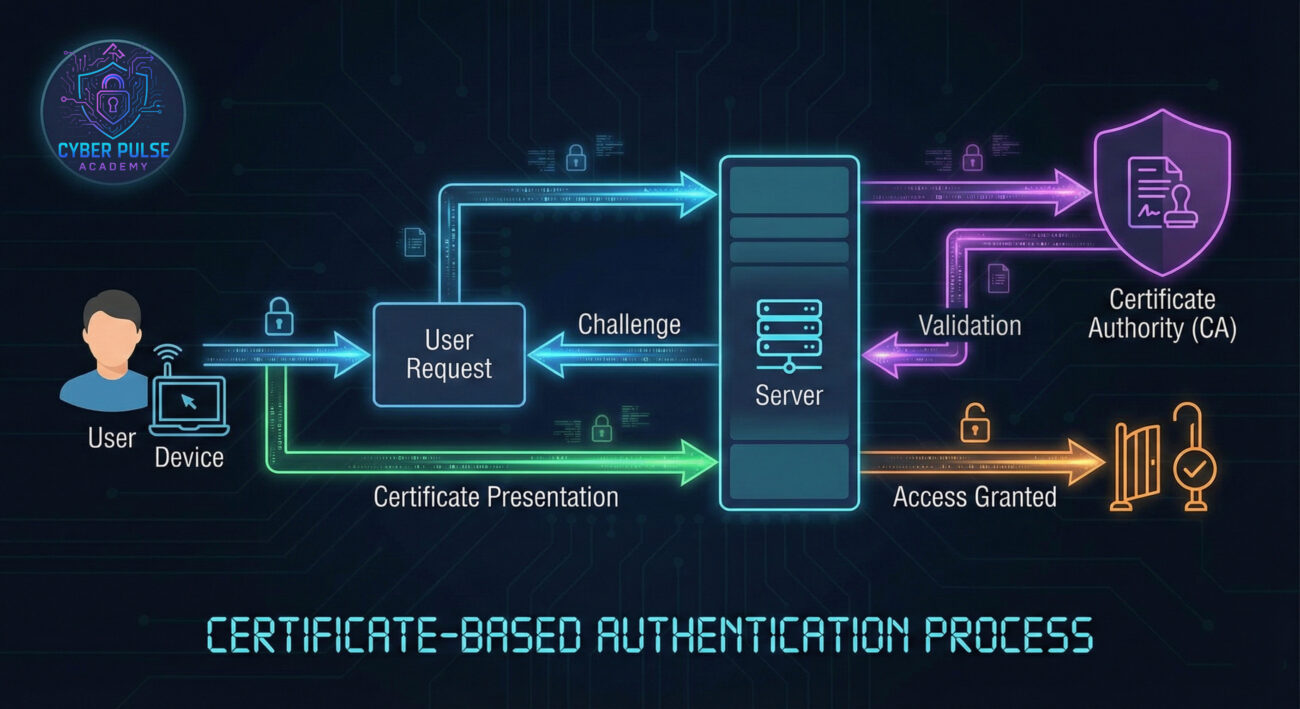
Don't let technical jargon scare you! Here are the essential terms explained with simple analogies.
| Term | Simple Definition | Everyday Analogy |
|---|---|---|
| Digital Certificate | An electronic document that proves identity, like a digital ID card. It contains public key information and is issued by a trusted authority. | Your driver's license – it's issued by the government (trusted authority) and proves who you are when you need to drive or buy age-restricted items. |
| Certificate Authority (CA) | A trusted organization that issues and verifies digital certificates, ensuring they are genuine. | A passport office – it issues passports after verifying your identity, and border control trusts passports from recognized offices. |
| Public Key Infrastructure (PKI) | The system that manages digital certificates and public-key encryption, including CAs, registration, and revocation. | The entire postal system – it includes mail carriers, sorting centers, and rules to ensure packages are delivered securely and authentically. |
| Private Key | A secret key held by the user to decrypt data or sign messages, paired with a public key. | Your safe's combination – only you know it, and it's used to unlock the safe (decrypt data) that others can send to you via the public key. |
| Certificate Revocation | The process of invalidating a compromised or expired certificate to prevent misuse. | Canceling a lost credit card – if it's stolen, you report it, and the bank blocks it to stop fraudulent transactions. |
Meet Sarah, a finance manager at a mid-sized company. For years, she used passwords to access the company's accounting system, but after a phishing attack nearly led to a data breach, her IT department implemented certificate-based authentication. Here's how it transformed her security.
Before: Sarah had to remember complex passwords, often reusing them across systems. She once clicked a malicious link in an email, exposing her credentials. The company faced a risk of financial loss and reputational damage.
After: Now, Sarah uses a digital certificate stored on a secure USB token. To log in, she inserts the token, and the system automatically verifies her identity without a password. It's faster, more secure, and eliminates password-related vulnerabilities.
| Time/Stage | What Happened | Impact |
|---|---|---|
| Week 1 | IT team assessed current security and identified password weaknesses. They decided to adopt certificate-based authentication. | Increased awareness of threats like credential theft. |
| Week 2-3 | Certificates were issued by a trusted CA and deployed to employee devices. Training sessions were held. | Employees learned how to use certificates, reducing user error. |
| Week 4 | Full rollout: Employees started using certificates for login. Password-based access was disabled. | Login times improved, and security alerts dropped by 70%. |
| Ongoing | Regular certificate renewals and monitoring for suspicious activity. | Sustained protected environment with no breaches in 6 months. |
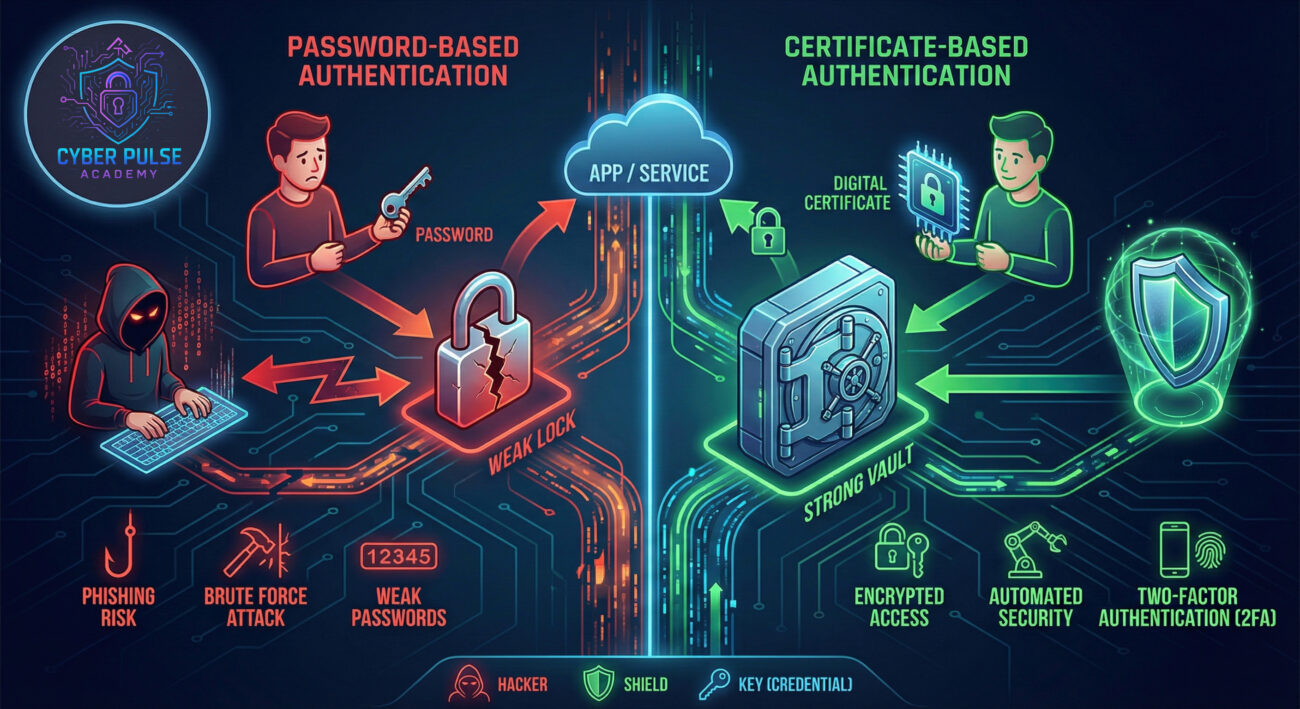
Ready to enhance your security? Follow this beginner-friendly guide to adopt certificate-based authentication. For more tips, check our posts on password security and two-factor authentication.
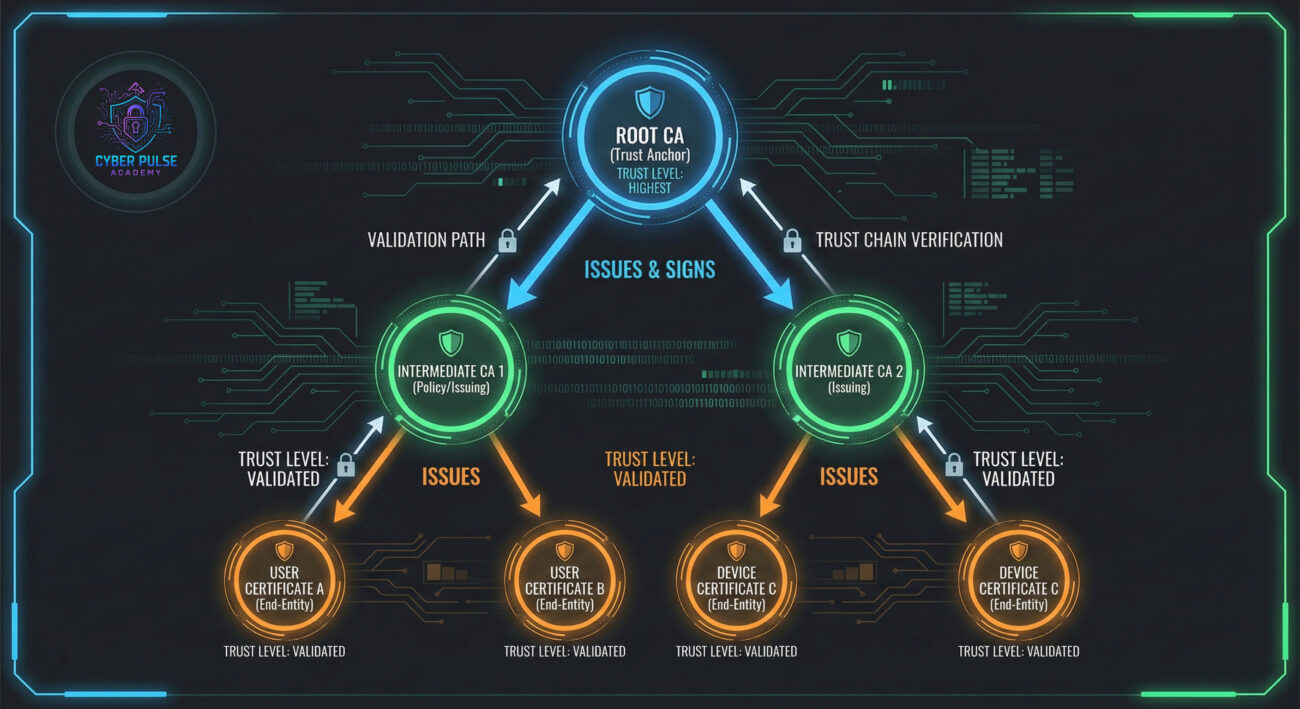
Understanding both sides of the coin helps you stay ahead. Here’s a high-level look at how attackers might target certificate-based systems and how defenders counter them.
Attack Path: An attacker might try to steal a private key from a poorly secured device or trick a CA into issuing a fraudulent certificate. For example, they could use social engineering to gain access to an employee's token or exploit a vulnerability in the CA's software. Once they have a valid certificate, they can impersonate a legitimate user and access sensitive data without raising alarms.
Defender’s Counter-Move: Defenders focus on hardening the entire PKI. This includes using strong encryption for private keys, implementing strict CA validation processes, and monitoring for unusual certificate requests. By regularly auditing certificates and using secure issuance protocols, they can detect and block malware or unauthorized access attempts early.
Attackers see certificate-based authentication as a challenging but rewarding target. They look for weak links: poorly managed certificates, outdated CAs, or users who neglect security. Their goal is to bypass authentication by stealing private keys or compromising the trust chain. They might use phishing to install keyloggers or exploit CA breaches to issue fake certificates. Success means gaining undetected access to critical systems.
Defenders view certificate-based authentication as a robust layer in a defense-in-depth strategy. They prioritize maintaining the integrity of the PKI, ensuring certificates are issued only to verified entities, and revoking compromised ones quickly. Their focus is on continuous monitoring, automated alerts for suspicious activities, and educating users. By keeping certificates encrypted and up-to-date, they build a resilient barrier against attacks.
Certificate-based authentication is a game-changer in cybersecurity, offering a more secure alternative to passwords. By now, you should understand its basics and why it's essential. Let's recap the main points:
Embrace this technology to enhance your security posture. Whether for personal use or in an organization, certificate-based authentication provides a strong foundation for trust in digital interactions.
Have questions about certificate-based authentication? Share your thoughts in the comments below or reach out on social media.
Every contribution moves us closer to our goal: making world-class cybersecurity education accessible to ALL.
Choose the amount of donation by yourself.