


















































Certification Courses
Hands-On Labs
Threat Intelligence
Latest Cyber News
MITRE ATT&CK Breakdown
All Cyber Keywords
In January 2026, cybersecurity researchers uncovered a coordinated supply chain attack leveraging five malicious Google Chrome extensions. These extensions posed as legitimate productivity tools for major enterprise platforms like Workday, NetSuite, and SuccessFactors, collectively amassing over 2,300 installs from the official Chrome Web Store before their removal.
This attack represents a significant evolution in browser-based threats, moving beyond simple adware to a multi-faceted campaign designed for persistent credential theft, defensive evasion, and complete account takeover. The operators employed a chillingly effective strategy: compromise the user at the browser level, the gateway to their most sensitive SaaS applications.
Unlike traditional malware, these extensions operated with the permissions granted by the user, making them difficult for standard antivirus software to flag. Their primary goal was to steal authentication cookies and session tokens, enabling hackers to bypass multi-factor authentication (MFA) and seamlessly hijack user sessions on critical business platforms. This breach vector is particularly dangerous because it targets the weak link in cloud security: the endpoint's browser.
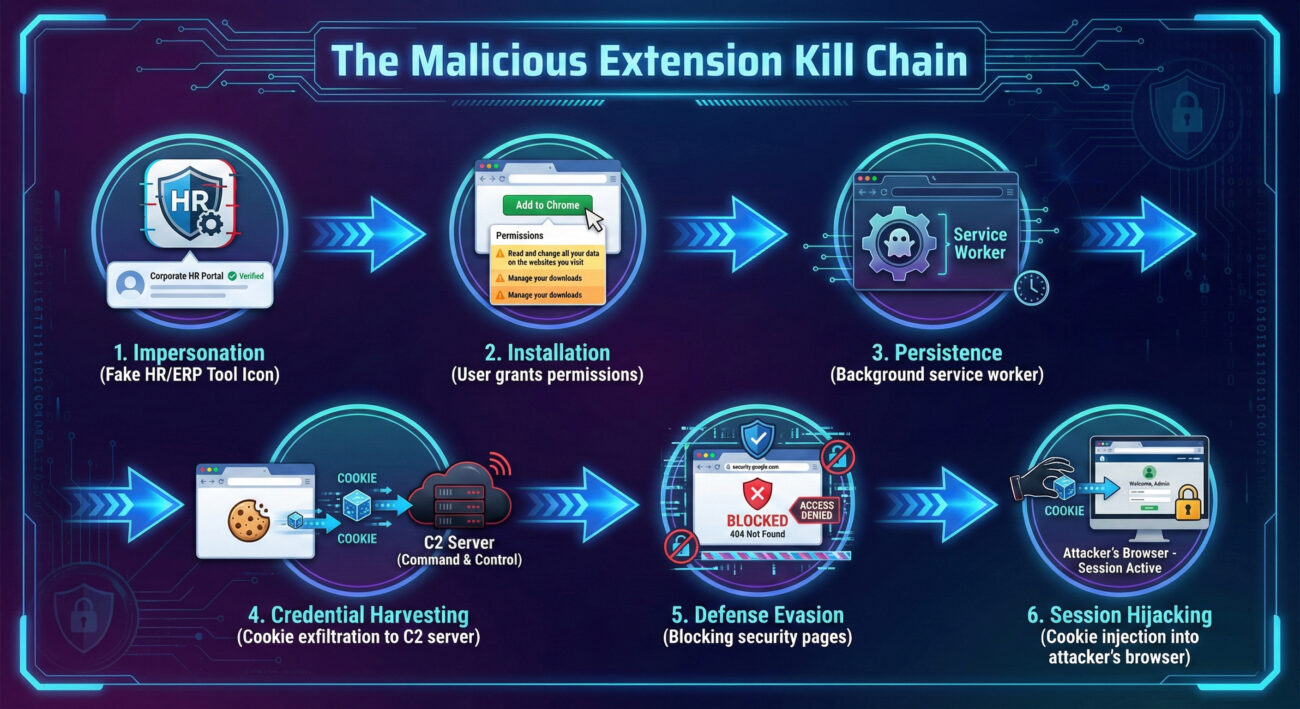
Let's dissect exactly how this Chrome extension supply chain attack unfolded. The threat actors executed a multi-phase operation with surgical precision, exploiting the inherent trust users place in the browser extension ecosystem.
The attack began with social engineering. The malicious extensions, published under publisher names like "databycloud1104," were advertised as helpful tools for accessing premium features on Workday, NetSuite, and SuccessFactors, platforms used daily by millions for HR, finance, and ERP tasks.
cookies, management, scripting, and access to data on specific enterprise domains. This is a critical red flag often overlooked by users.Once installed, the extensions activated two primary, intertwined malicious functions: credential theft and defensive sabotage.
The core malicious function was executed by the DataByCloud Access extension. It used the chrome.cookies API to collect authentication cookies for predefined enterprise domains. A background script ran every 60 seconds, sending stolen cookies to the command-and-control (C2) server at api.databycloud[.]com.
Technical Insight: Authentication cookies, especially session tokens, are gold for attackers. They often contain all the necessary information for a server to recognize a user as "logged in," potentially bypassing passwords and even some forms of MFA if the session is still active.
To prevent the victim from detecting or remediating the breach, extensions like Tool Access 11 implemented a cunning defense evasion technique. They maintained a blocklist of 44+ specific administrative page titles within Workday (e.g., "/security/authentication," "/proxy/configuration").
When a user navigated to one of these pages, the extension used JavaScript to manipulate the Document Object Model (DOM), either clearing the page content or redirecting to a malformed URL. This blocked access to security settings, password change interfaces, 2FA management, and audit logs, effectively crippling the victim's ability to respond.
The most advanced capability was found in the Software Access extension. It didn't just steal cookies; it could also receive stolen cookies from its C2 server and inject them directly into the browser's cookie store using chrome.cookies.set().
This function allowed the threat actor to perform a live session hijacking. They could take a stolen session token from a victim, inject it into their own controlled browser, and instantly gain access to the victim's account without needing a username, password, or 2FA code.
The Chrome extension supply chain attack is a textbook example of how threat actors combine multiple techniques into a powerful sequence. The MITRE ATT&CK framework helps us deconstruct their methodology.
The following table maps the observed malicious activities to specific MITRE ATT&CK Techniques and Tactics, providing a common language for defenders to understand and counter the threat.
| MITRE ATT&CK Tactic | Technique ID & Name | How It Was Used in This Attack |
|---|---|---|
| Initial Access | T1475: Deliver Malicious App via Authorized Repository | The malicious extensions were uploaded to the official Chrome Web Store, exploiting user trust in the platform. |
| Persistence | T1176: Browser Extensions | The extensions established persistence by installing themselves as legitimate-looking Chrome add-ons with background service workers. |
| Credential Access | T1539: Steal Web Session Cookie | The primary attack vector. Used the chrome.cookies API to exfiltrate authentication cookies every 60 seconds. |
| Defense Evasion | T1562.001: Disable or Modify Tools (Block Security Pages) | Actively monitored and manipulated the DOM to block access to security administration pages within Workday/NetSuite. |
| Defense Evasion | T1622: Debugger Evasion (Disable DevTools) | Some extensions used the DisableDevtool library to obstruct analysis via browser developer tools. |
| Collection | T1119: Automated Collection | Scripted, automated collection of cookies from specified domains on a scheduled basis. |
| Command and Control | T1071.001: Application Layer Protocol (Web Protocols) | Communicated with C2 servers (api.databycloud[.]com) over HTTPS, blending in with normal web traffic. |
Understanding this mapping is crucial for Security Operations Centers (SOCs). It allows them to craft detection rules (e.g., for unusual cookie access patterns by extensions or DOM manipulation on security pages) and align their incident response playbooks to a known adversary framework.
This Chrome extension supply chain attack offers valuable lessons from both offensive (Red Team) and defensive (Blue Team) viewpoints. Let's break down the strategies and counter-strategies.
Objective: Gain persistent, undetected access to corporate SaaS accounts to steal data, conduct espionage, or enable financial fraud.
Why This Vector is Effective:
Exploited Weaknesses: User propensity to install "helpful" tools without reviewing permissions; lack of enterprise-level browser extension management; the difficulty of monitoring extension behavior at scale.
Objective: Detect, prevent, and respond to browser extension-based threats to protect organizational data and user accounts.
Key Challenges & Solutions:
Core Strategy: Shift from mere detection to resilience. Assume some extensions will be malicious and limit the damage they can do via strict permission controls and session timeouts.
Defending against sophisticated Chrome extension supply chain attacks requires a layered approach, combining technology, policy, and user education. Here is a actionable framework for individuals and enterprises.
chrome://extensions/. Remove any you don't recognize or use. Check permission lists, does a "color picker" need to "read and change all your data on all websites"?Enterprise defense requires centralized control and visibility. Google Chrome provides powerful enterprise policies through the Chrome Browser Cloud Management console or Group Policy.
ExtensionInstallAllowlist policy.ExtensionInstallBlock policy to block high-risk permissions (e.g., declarativeNetRequest, broad host permissions like 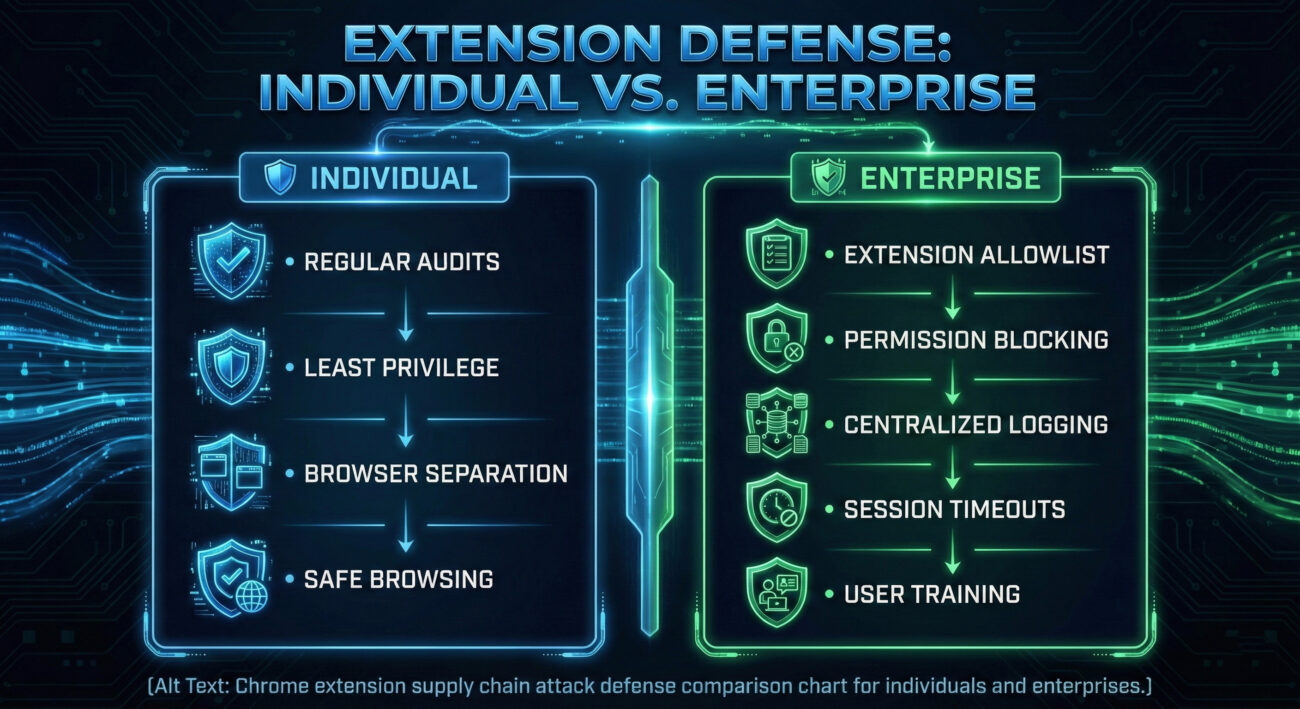
Immediate Action Plan: 1) Go to chrome://extensions/ and remove any suspicious extensions. 2) For any potentially compromised accounts (Workday, NetSuite, etc.), immediately log out of all sessions (if the interface is accessible) and change your password. 3) Enable or re-configure Multi-Factor Authentication (MFA) on those accounts. 4) Monitor account activity logs for any access from unfamiliar locations or devices.
This is a critical point. Many MFA methods, like Time-based One-Time Passwords (TOTP), only protect the initial login. Once a user is authenticated, the server creates a session cookie. If a malware extension steals that cookie, the attacker presents it to the server, which sees it as a valid, already-logged-in session. This is why phishing-resistant MFA (like WebAuthn/FIDO2 security keys) and shorter session timeouts are important for high-value accounts.
Yes, the threat model is similar across all major browsers that support extensions. Each has its own extension store and permission model. The core risk, users installing malicious code that runs with high privileges in their browser, is universal. The defense principles (allowlisting, least privilege, monitoring) apply equally. Microsoft Edge, for example, also supports comprehensive enterprise management via its policies.
Here are excellent, up-to-date external resources:
1. The Browser is the New Battleground: As core business functions move to SaaS, the browser holding the session keys becomes the primary target. Supply chain attacks via extensions are a potent, stealthy method to compromise it.
2. Cookie Theft = Account Takeover: Stolen session cookies often provide attackers with more power than stolen passwords, as they can negate MFA. Protecting these tokens is paramount.
3. Defense Requires a New Mindset: You cannot rely on the extension store's curation alone. Enterprises must adopt a "zero-trust" approach to extensions: verify explicitly, allowlist strictly, and monitor constantly.
4. Response Must Be Multi-Channel: When an attacker can block security pages, your incident response plan must include out-of-band actions, such as using MDM tools or alternate admin consoles to revoke access.
The discovery of these five malicious extensions is a stark reminder that our digital toolkits can be turned against us. By understanding the technical attack vectors, mapping them to established frameworks like MITRE ATT&CK, and implementing a layered defense strategy, both individuals and organizations can significantly harden their browsers against these evolving threats. Stay vigilant, audit your extensions, and prioritize security over convenience.
Start your defense today. Audit your personal browser extensions right now, and if you're responsible for an organization, review your Chrome management policies.
Share this knowledge with your colleagues to help build a more secure community.
© 2026 Cyber Pulse Academy. This content is provided for educational purposes only.
Always consult with security professionals for organization-specific guidance.
Every contribution moves us closer to our goal: making world-class cybersecurity education accessible to ALL.
Choose the amount of donation by yourself.