


















































Certification Courses
Hands-On Labs
Threat Intelligence
Latest Cyber News
MITRE ATT&CK Breakdown
All Cyber Keywords
In the relentless cat-and-mouse game of cybersecurity, threat actors continually refine their tools to slip past our defenses. The latest evolution of the notorious GootLoader malware presents a masterclass in evasion, employing a deceptively simple yet highly effective technique: concatenated ZIP archives. By stitching together 500 to 1,000 malformed archive files, this loader creates a unique, hash-busting payload that confounds automated analysis and rides on a victim's own system to execute. This deep dive will unpack exactly how this attack works, map its tactics to the MITRE ATT&CK framework, and provide a clear, actionable guide for defenders.
GootLoader is a persistent JavaScript-based malware loader first spotted in 2020, known for distributing ransomware and other secondary payloads via SEO poisoning. Its newest trick turns a common file format, the ZIP archive, into a formidable weapon for evasion. Instead of one malicious ZIP, the threat actors now create a single file that is actually 500 to 1,000 ZIP archives concatenated (joined) together in sequence.
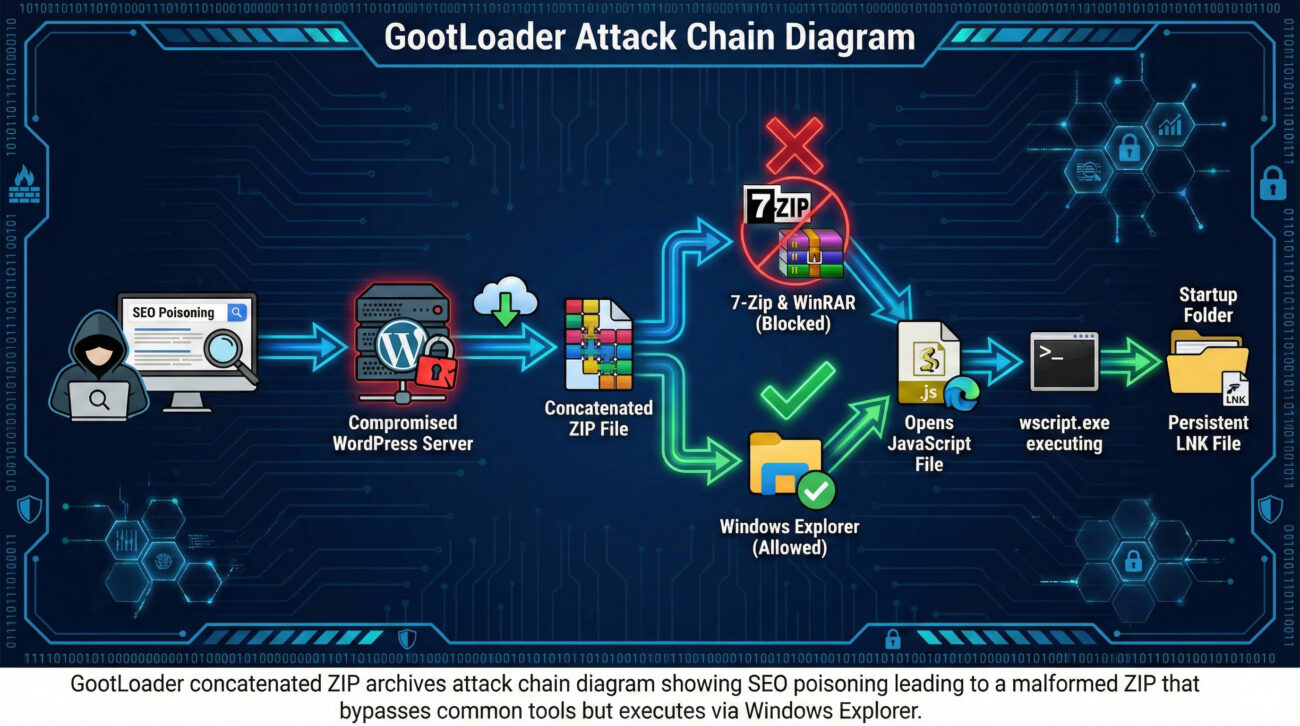
This isn't just about quantity; it's about clever corruption. The archive is intentionally malformed: its End of Central Directory (EOCD) record, the crucial footer that tells software where the file list begins, is truncated by two bytes. Most third-party tools like 7-Zip or WinRAR fail to parse this, halting automated security scans. However, the default Windows Explorer unarchiver is more forgiving and proceeds to extract the contents, leading the victim directly to the JavaScript payload.
Every downloaded file is unique due to randomized data in non-critical fields, a technique called "hashbusting." This makes traditional signature-based detection using file hashes (MD5, SHA-256) completely futile. For defenders, understanding this technique is critical, as it highlights a shift towards attacks that exploit inconsistencies in how different software handles complex file structures.
To appreciate the ingenuity of this attack, we need to look under the hood of a ZIP file and understand the specific vulnerability in parsing logic that GootLoader exploits.
Every valid ZIP file ends with a structure called the End of Central Directory record. It's like the table of contents at the end of a book, telling the extraction tool vital information: how many files are inside, where the central directory starts, and comments. The standard structure is precise.
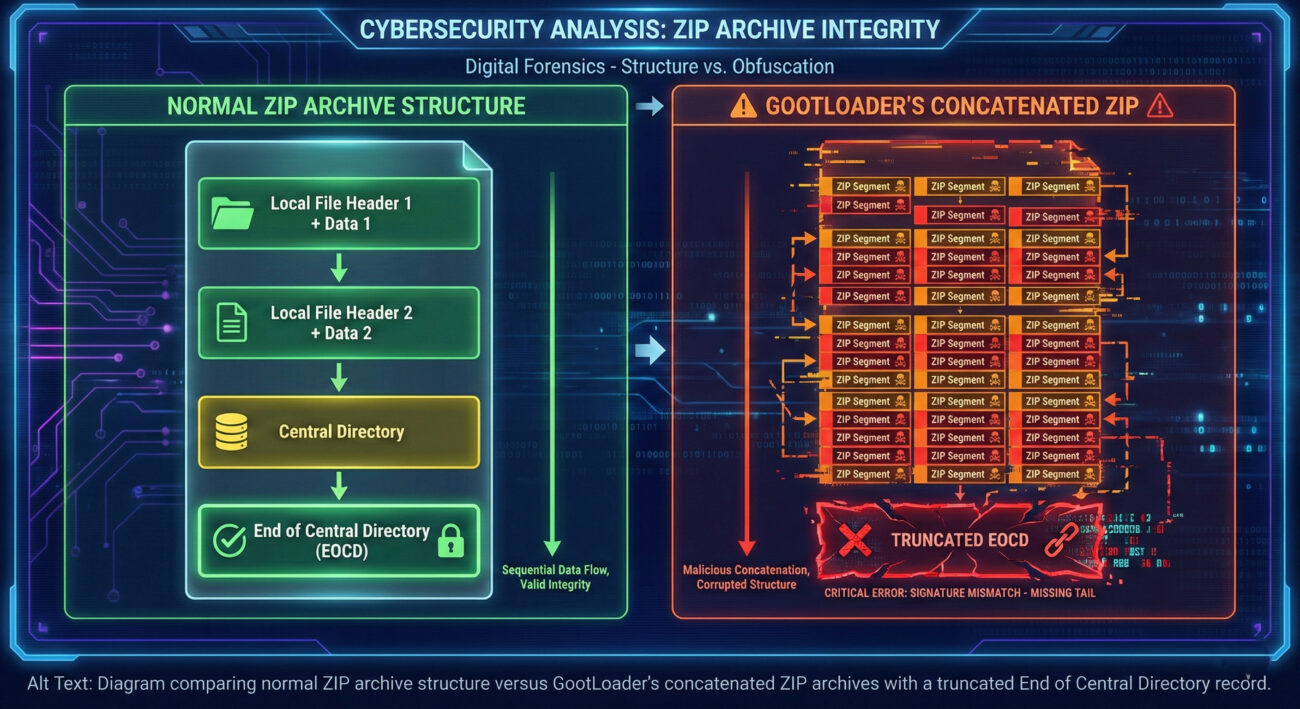
GootLoader's malware creators truncate the last two bytes of this EOCD record. For many robust, standards-compliant unarchivers, this malformation triggers a parsing error, and they refuse to process the file, declaring it corrupt. This is the intended effect, to stop analysis tools.
Beyond the truncation, the attackers randomize values in specific fields within the ZIP structure that are non-critical for extraction but are part of the file's digital fingerprint.
| ZIP Field Randomized | Typical Purpose | GootLoader's Manipulation | Evasion Impact |
|---|---|---|---|
| Disk Number | For multi-disk (spanned) archives. | Set to a random value. | Alters the file's binary signature, creating a unique hash for each sample. |
| Number of Disks | Indicates total disks in a set. | Set to a random value. | Further contributes to hash uniqueness (hashbusting). |
| Number of Archives Concatenated | Not a standard field; implied by structure. | Between 500 and 1000 archives. | Creates enormous file size variance, hindering size-based detection and causing tool failures. |
The result is a "ZIP bomb" of a different kind: one that doesn't crash systems with decompressed size but blinds security tools with complexity and uniqueness. The only tool that consistently navigates this mess is the built-in Windows unarchiver, which prioritizes user functionality over strict validation, thereby becoming the unwitting attack vector.
Let's walk through the complete infection lifecycle, from the initial search to persistent foothold, to understand where defenders can intervene.
The threat actor uses SEO poisoning (aka malvertising) to compromise legitimate WordPress sites. They create pages that rank highly for searches like "free business contract template." When a victim clicks the download link, the server doesn't send a ZIP file directly. Instead, it sends an XOR-encoded blob of data. The victim's browser JavaScript decodes this blob and repeatedly appends it to itself client-side until it reaches the multi-megabyte size of the final concatenated ZIP. This bypasses network security controls looking for a transferred `.zip` file.
The victim now has a file like "Agreement.zip." Double-clicking it opens it in Windows File Explorer (the default handler). Explorer's unarchiver successfully reads past the malformed EOCD and displays the contents, typically a single, obfuscated JavaScript file (e.g., `agreement.js`). The victim, expecting a document, clicks the JS file. Windows executes it with wscript.exe because the file is run from within the ZIP archive without being explicitly extracted to disk, a feature that aids the malware in remaining stealthy.
The initial JavaScript payload (GootLoader) performs several actions. It creates a Windows Shortcut (LNK) file in the user's Startup folder (`%APPDATA%\Microsoft\Windows\Start Menu\Programs\Startup\`), pointing to a second JavaScript file. This ensures the infection survives reboot. It then uses `cscript.exe` to run more code, which typically launches PowerShell. The PowerShell script performs reconnaissance (system info) and reaches out to a C2 (Command & Control) server to fetch the final payload, such as ransomware (e.g., Cobalt Strike, SocGholish).
Framing the attack within the MITRE ATT&CK matrix helps standardize our understanding and defense planning. Below are the key techniques used in this GootLoader campaign.
| MITRE ATT&CK Tactic | Technique ID & Name | How GootLoader Implements It |
|---|---|---|
| Initial Access | T1583.008 (Acquire Infrastructure: Compromise Websites) T1566.002 (Phishing: Spearphishing Link) |
Uses SEO poisoning to compromise legitimate WordPress sites, turning them into malicious download portals. |
| Defense Evasion | T1027 (Obfuscated Files or Information) T1027.009 (Embedded Payloads) T1006 (Fileless Execution via wscript) |
Creates uniquely hashed, concatenated ZIP archives. Executes JavaScript directly from the mounted ZIP without dropping to disk. |
| Execution | T1059.005 (Command and Scripting Interpreter: Visual Basic/JScript) T1204.002 (User Execution: Malicious File) |
Relies on victim double-clicking the JS file, triggering execution via wscript.exe and later cscript.exe. |
| Persistence | T1547.001 (Boot or Logon Autostart Execution: Registry Run Keys / Startup Folder) | Drops a malicious LNK file in the Windows Startup folder to reignite the infection on system boot. |
| Discovery & C2 | T1057 (Process Discovery) T1071.001 (Application Layer Protocol: Web Protocols) |
PowerShell scripts gather system info and beacon out to C2 servers over HTTP/HTTPS for further instructions. |
Understanding these mappings is crucial for developing detection rules and hunting hypotheses. For instance, detecting anomalous use of wscript.exe to run scripts from Temp or downloaded paths (T1059.005) becomes a high-value alert.
Objective: Deliver a persistent loader to the target environment undetected.
wscript, cscript, PowerShell, Startup folder) to avoid dropping custom binaries that trigger EDR alerts.Objective: Detect and prevent the loader from establishing a foothold.
Explorer.exe -> wscript.exe executing a file from a temporary or downloaded location, especially if that file was just accessed from a `.zip`.wscript.exe and cscript.exe from user-writeable directories like Downloads or Temp.Many organizations are vulnerable to this type of attack due to common oversights. Here’s what to avoid and what to implement.
wscript/cscript from running scripts in user directories.wscript.exe in suspicious contexts.wscript.exe and cscript.exe from executing files in user profile, download, and temp directories. This is the single most effective technical control.Q: Why don't tools like 7-Zip open the concatenated ZIP, but Windows Explorer does?
A: It's a matter of parsing strictness. Tools like 7-Zip and WinRAR follow the ZIP file specification rigorously. When they encounter a critical structure like a truncated End of Central Directory (EOCD) record, they flag the file as corrupt and abort. Windows Explorer's built-in extractor is designed for maximum user compatibility and will often attempt to salvage and extract what it can from a damaged archive, which in this case plays directly into the attacker's hands.
Q: Can't I just block .ZIP files at the email or network gateway?
A: Blocking all ZIPs is often impractical for business. A more nuanced approach is to use advanced threat protection gateways that can sanitize or "re-package" archives. These tools can unpack a ZIP, inspect its contents in a sandbox, and then repack it into a clean, standards-compliant archive before delivery. This process would normalize GootLoader's malformed concatenated ZIP, potentially breaking its execution path and allowing detection of the malicious script inside.
Q: Is the initial ZIP file itself malicious, or just the JavaScript inside?
A: The ZIP file is a delivery mechanism and evasion wrapper. Its sole purpose is to bypass security controls and deliver the malicious JavaScript payload to the point of execution. The JavaScript file (GootLoader) is the first-stage malware that establishes persistence and fetches the final, more damaging payload (e.g., ransomware).
Q: Where can I find more technical details and Indicators of Compromise (IOCs)?
A: For the most current IOCs (domains, URLs, file patterns), refer to threat intelligence reports from security vendors. You can also search the MITRE ATT&CK website for GootLoader (S0577) to see detailed technique profiles. Here are valuable external resources:
The evolution of GootLoader to use concatenated ZIP archives is a stark reminder that threat actors are astute observers of security tooling and user behavior. They invest time in finding the "cracks" between different software implementations. This attack is not about a zero-day vulnerability in the classic sense, but about exploiting a logic gap in defensive parsing.
Don't just read about this threat, act on it. This week, take these three concrete steps:
By understanding the mechanics of threats like GootLoader's concatenated ZIP archives attack, you transform from a passive target into an informed defender. Share this knowledge with your team, implement the practical controls, and always remember: in cybersecurity, the best defense is a proactive one.
© 2026 Cyber Pulse Academy. This content is provided for educational purposes only.
Always consult with security professionals for organization-specific guidance.
Every contribution moves us closer to our goal: making world-class cybersecurity education accessible to ALL.
Choose the amount of donation by yourself.