


















































Certification Courses
Hands-On Labs
Threat Intelligence
Latest Cyber News
MITRE ATT&CK Breakdown
All Cyber Keywords
A Deep Dive into the Security Risks of the Popular Self-Hosting Platform and How to Defend Your Infrastructure.
In January 2026, the cybersecurity community was alerted to 11 critical vulnerabilities within Coolify, an immensely popular open-source alternative to Heroku for self-hosting applications. These flaws, if left unpatched, could grant attackers complete control over the hosting platform, leading to data breaches, service disruption, and further lateral movement into connected networks and applications. This analysis is crucial for DevOps engineers, system administrators, and security professionals using or considering Coolify. Understanding these Coolify vulnerabilities is the first step in transforming your infrastructure from a target into a fortress.
The disclosed Coolify vulnerabilities ranged from authentication bypasses and path traversal issues to insecure default configurations and privilege escalation vectors. This incident serves as a stark reminder that even well-regarded, community-driven tools require rigorous security scrutiny and proactive maintenance. This guide will not only explain the technical nature of these flaws but will provide actionable, step-by-step instructions for remediation and hardening.
Coolify is an open-source, self-hostable platform-as-a-service (PaaS) that allows developers to deploy, manage, and scale applications (like Node.js, Python, PHP), databases, and other services with remarkable ease. It abstracts away much of the complexity of Docker, Docker Compose, and reverse proxy configuration.
Its growing popularity is precisely what makes it a lucrative target for threat actors. A successful compromise of a single Coolify instance can yield access to all hosted applications, their source code, environment variables (often containing API keys and secrets), and databases. This creates a high-impact attack surface. For hackers, it's a "one-to-many" attack vector: breach the orchestrator, control everything it orchestrates.
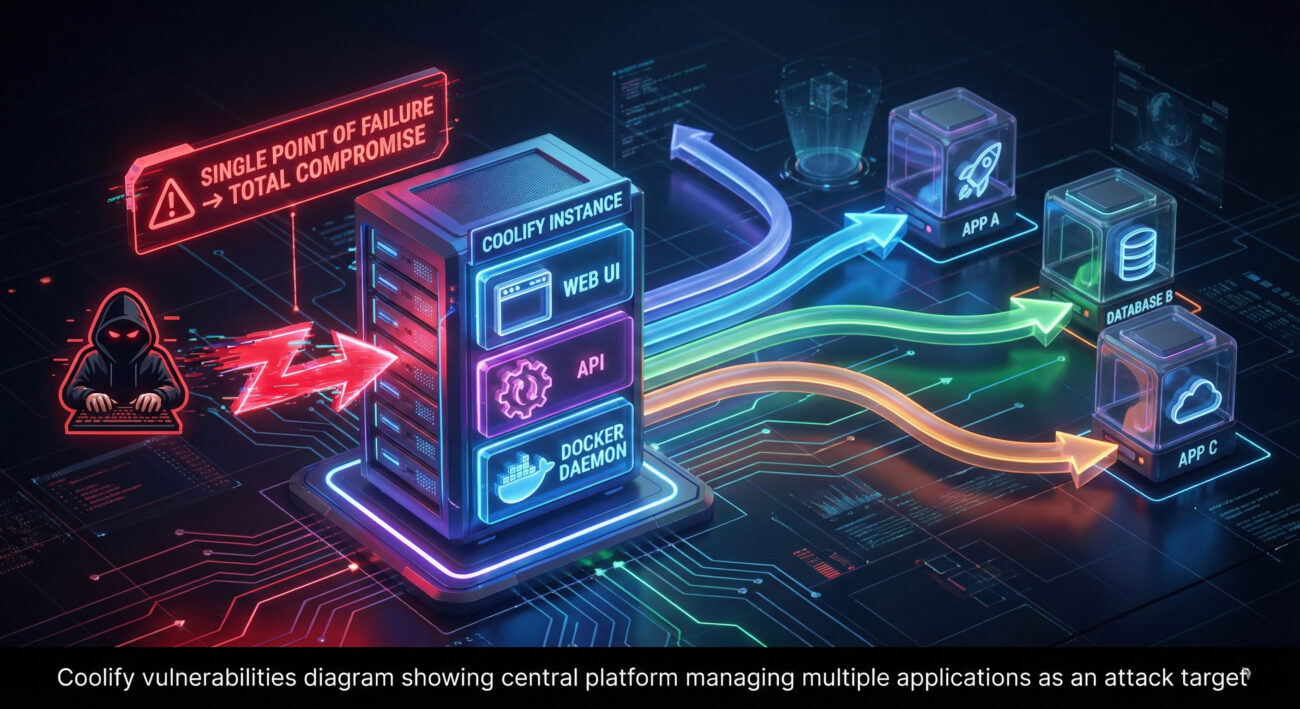
Let's delve into the nature of these critical Coolify vulnerabilities. Understanding the "how" is essential for effective defense.
Some API endpoints and web UI functions lacked proper authorization checks. A low-privileged user or, in some cases, an unauthenticated request, could trigger actions reserved for administrators, such as creating new servers, deploying applications, or accessing other users' project data.
Technical Insight: This often stems from missing or incorrectly implemented middleware that verifies a user's role or permissions before processing a request. For example, an endpoint /api/admin/create-server might only check if a user is logged in, not if they have the "admin" role.
Functions responsible for reading, writing, or deleting application files did not properly sanitize user-supplied input (like file paths). An attacker could use sequences like ../../../../ to escape the intended application directory and access or overwrite critical system files, such as Coolify's own configuration or SSH keys.
// Vulnerable pseudo-code example
const userFilePath = userInput; // e.g., "../../../etc/passwd"
fs.readFileSync(`/app/data/${userFilePath}`); // Reads system file!
Default installations had overly permissive settings. Additionally, sensitive data like Docker socket access, database passwords, and API keys were sometimes stored or logged in plaintext, making them vulnerable if file access was compromised via another vulnerability.
This table summarizes the key Coolify vulnerabilities and their immediate impact:
| Vulnerability Category | Primary Risk | Potential Attacker Gain |
|---|---|---|
| Authentication Bypass | Unauthorized Admin Access | Full platform control, deploy malicious containers |
| Path Traversal | System File Read/Write | Steal secrets, modify configuration, plant backdoors |
| Insecure Defaults | Low-Hanging Fruit Exploit | Easy initial access without complex exploitation |
| SSRF (Server-Side Request Forgery) | Internal Network Probe | Attack internal services, access metadata APIs (e.g., AWS IMDS) |
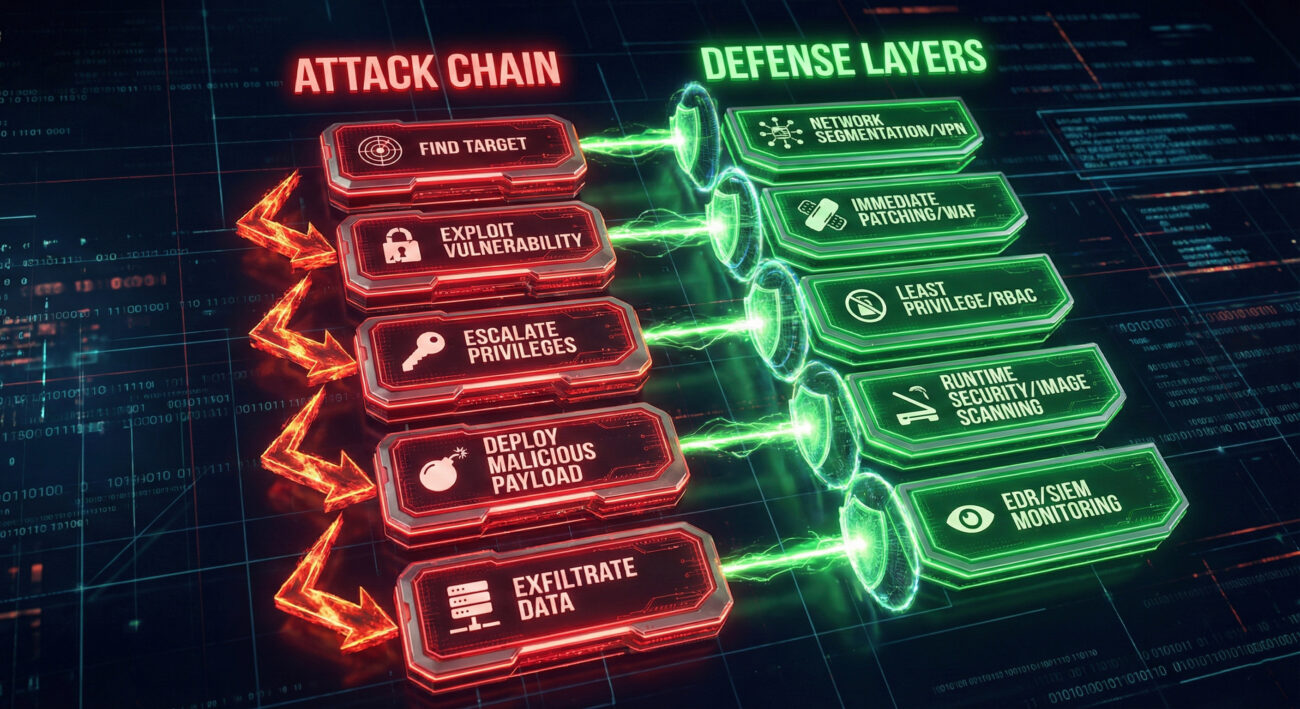
Framing these Coolify vulnerabilities within the MITRE ATT&CK® framework helps defenders understand the broader attack lifecycle and implement appropriate controls.
Imagine a small SaaS company using Coolify to host its customer dashboard and internal tools. Here’s how an attack could unfold:
An attacker uses a shodan.io search to find internet-facing Coolify instances running a vulnerable version.
They exploit a path traversal vulnerability (/api/file/read?path=../../.env) to download Coolify's environment file, leaking the admin panel's secret keys and database credentials.
Using stolen or default credentials, they log in. They then call an unprotected API endpoint to grant their user account full administrative privileges.
As an admin, they deploy a new "application" – which is actually a malicious Docker container running a crypto-miner and a reverse shell. They now have persistent access, can steal data from all hosted apps, and incur massive cloud compute costs for the victim.
Immediate action is required. Follow this guide to patch and harden your deployment.
Update Coolify immediately to the latest patched version. This is the single most important step. The maintainers have released fixes for all disclosed vulnerabilities. Check the official Coolify GitHub repository for release notes and update instructions.
# Typical update command via Coolify's own interface or CLI
# Always backup your data and configuration first.
coolify update
1. Change all default passwords and API keys.
2. Review user roles and permissions. Ensure the principle of least privilege is applied.
3. Audit environment variables in all projects. Remove any hardcoded secrets and use Coolify's secret management or an external vault.
1. Do not expose the Coolify admin panel directly to the internet. Place it behind a VPN (like WireGuard or Tailscale) or a secure authentication proxy (e.g., Cloudflare Access, Authelia).
2. Configure firewall rules to restrict inbound access to only necessary ports.
3. Isolate the Coolify host network from other sensitive parts of your infrastructure where possible.
"Coolify is a goldmine. It's often exposed, poorly updated, and holds the keys to the kingdom. Our playbook is straightforward:
X-Powered-By: Coolify headers or default paths."Our strategy is layered defense and aggressive monitoring:
Move beyond reactive patching. Implement this framework for ongoing security:
Q: I'm running an older version of Coolify. Am I definitely vulnerable?
A: If you are running a version prior to the patched releases in January 2026, you are extremely likely vulnerable. You must update immediately. Assume compromise and conduct an audit.
Q: Is it safe to use Coolify after these patches?
A> Yes, once updated to the latest patched version and with the secure hardening practices outlined (especially network isolation), Coolify can be used securely. No software is perfectly secure, but responsible patching and configuration dramatically reduce risk.
Q: What should I look for in my logs to see if I've been attacked?
A> Look for: 1) Multiple failed login attempts followed by a success from a new IP. 2) API calls to administrative endpoints from non-admin users. 3) Log entries containing path traversal patterns (../). 4) Unexpected deployment of new applications/containers.
Q: Where can I get official updates on Coolify security?
A> Monitor the official GitHub Security Advisories page for Coolify and their announcement channels (like Discord or Twitter). Consider using a CVE monitoring service.
Don't be the next case study. The exploits for these Coolify vulnerabilities are now public knowledge.
Your action plan is clear:
Share this guide with your team to raise awareness. For continued learning on cloud and container security, explore resources from the OWASP Foundation and the CIS Docker Benchmarks.
Stay vigilant, patch promptly, and build your defenses layer by layer.
© 2026 Cyber Pulse Academy. This content is provided for educational purposes only.
Always consult with security professionals for organization-specific guidance.
Every contribution moves us closer to our goal: making world-class cybersecurity education accessible to ALL.
Choose the amount of donation by yourself.